This blog post explains how faceted navigation filters on Shopify stores, while beneficial for user experience, create SEO problems by generating thousands of duplicate URLs that waste Google's crawl budget and hurt search rankings. The post covers the technical issues caused by filter combinations and provides solutions to prevent these problems from damaging organic search performance.
Your Filters Are Helping Shoppers and Hurting Google.
Faceted navigation — the filters on your collection pages that let shoppers narrow results by size, color, price, brand, and material — is one of the most useful UX features a Shopify store can have. It reduces friction, speeds up product discovery, and consistently outperforms stores that force shoppers to scroll through unfiltered catalogs.
The same system that helps your shoppers is quietly creating a faceted navigation SEO problem most merchants never discover until rankings start dropping without a clear cause. One collection page with six filter types can generate hundreds of thousands of crawlable URLs. Most will never rank. Most will never receive a single visit. But Google still has to wade through every one of them — and that costs you.
That’s exactly what this blog covers: what faceted navigation SEO actually means for Shopify stores, why duplicate URLs are the central problem, and the practical, layer-by-layer fixes that stop your filters from quietly cannibalizing your own rankings.
What Faceted Navigation Actually Is — and Why Shopify Stores Have a Specific Problem With It?
Faceted navigation — sometimes called faceted search — lets shoppers narrow collection pages by attributes. Each attribute is a facet (brand, size, color, material, price range, rating). Each value within it is a filter. The UX benefit is real and well-documented: fewer clicks to the right product, less scrolling, lower bounce rates, and higher conversion rates for stores that implement it well.
Website conversion rates drop by an average of 4.42% with each additional second of load time — and faceted navigation, when uncontrolled, is a key driver of the technical bloat that causes slowdowns. — Illustrate Digital Global Page Speed Report 2024
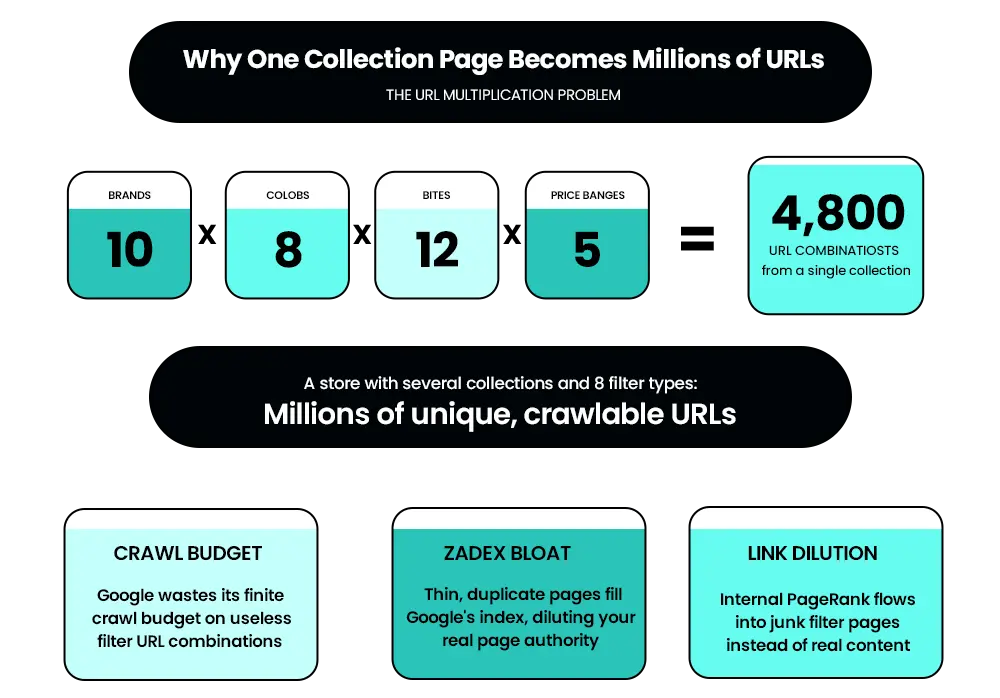
The SEO problem is what happens to the URL when a filter is applied. On Shopify, applying a filter generates a new URL — either a query parameter like? filter.p.m.product_type=jeans or a path-based URL variant. Because filters combine freely, the number of URLs isn’t additive. It’s multiplicative.
Ten brands × eight colors × twelve sizes × five price ranges = 4,800 URL combinations from a single collection page. A store with several collection pages and eight filter types can generate millions of unique, crawlable URLs before you’ve changed a single piece of content.
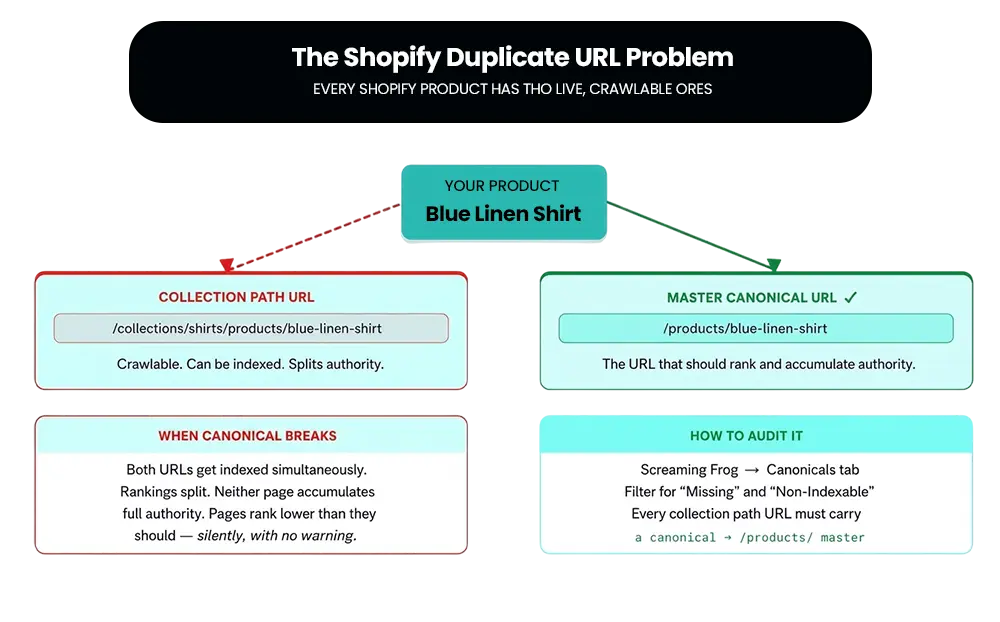
Shopify also creates a second duplicate URL issue that exists independently of faceted navigation: every product has two accessible URLs — /products/product-name and /collections/collection-name/products/product-name. Both are crawlable. Both can be indexed. Neither accumulates full authority when both are live. Both problems have the same underlying effect: they split Google’s attention across pages that should never exist in the index.
Related read: Technical SEO Audit Checklist for Shopify: 15 Issues That Kill Rankings — the collection path duplicate URL issue covered in this guide is one of 15 issues in this full technical SEO checklist. If you’re auditing faceted navigation, it’s worth running through the complete checklist at the same time.
The Four Ways Uncontrolled Faceted Navigation Damages Shopify Rankings
3.1 Crawl Budget Waste
Google’s crawl budget is finite. Every URL Googlebot fetches spends a portion of that budget. When filter URLs are crawlable and unchecked, Googlebot follows them — each fetch consumes budget that could have gone toward your actual product and collection pages.
Google officially published documentation in December 2024 confirming that faceted navigation URLs cause “overcrawling” because crawlers cannot determine whether filter URLs will be useful without fetching them first — meaning Googlebot accesses a very large number of faceted navigation URLs before determining they’re useless. — Google Search Central Blog, December 2024
The visible symptom: new product pages take days or weeks to appear in search results. Existing pages are slow to reflect content updates. Google Search Console shows a high volume of parameter URLs in your Crawl Stats. That is the fingerprint of crawl budget waste.
How to check: Google Search Console → Settings → Crawl Stats. If parameter-based URLs account for a disproportionate share of Googlebot’s requests, filter URLs are the cause.
3.2 Index Bloat
Filter URLs that get indexed, fill Google’s index with thin, near-duplicate pages. A store with 2,000 products can generate hundreds of thousands of indexed URLs from filter combinations alone.
The ratio of strong pages to weak ones influences Google’s site-level quality assessment. A store where the majority of indexed pages are low-value filter combinations signals a poorly maintained site — and that signal affects how Google evaluates every other page on the domain.
How to check: Google Search Console → Pages → count your total indexed URLs. If the number is far larger than your actual product + collection + page count, filter URLs are the likely cause.
3.3 Duplicate and Near-Duplicate Content
A filtered collection view typically shows the same products, descriptions, and on-page content as a dozen other filter combinations. Google sees a cluster of competing pages, none clearly canonical, and ranking signals split across all of them. This is keyword cannibalization at scale — the same problem that affects individual pages, multiplied by thousands.
Each facet page that addresses the same category keyword cannibalizes the ranking potential of the real collection page you actually want indexed. Every filter combination that duplicates content is a vote cast against your own best pages.
How to check: Screaming Frog → filter for near-duplicate page titles and meta descriptions. Large clusters with similar titles and identical template structure are the signal.
3.4 Link Equity Dilution
Internal links are how authority flows through a site. When a collection page links to hundreds of filter URL combinations via its filter UI, a meaningful portion of that page’s internal PageRank flows into pages that will never rank. The store is effectively voting its own authority into junk pages instead of concentrating it on products and collections that matter.
How to check: Screaming Frog or Ahrefs → Internal Link report → look for which pages are receiving the most internal links. If filter URLs dominate that list, that’s where authority is going.
The Shopify-Specific Duplicate URL Problem — Collection Paths vs. Product Paths
Independent of faceted navigation, every Shopify product has two live, crawlable URLs. The master URL — yourstore.com/products/product-name — and the collection path URL — yourstore.com/collections/collection-name/products/product-name. Both are accessible. Both can be indexed.
Shopify’s default behavior is to generate a canonical tag on the collection-path URL pointing back to the /products/ master URL. This is the correct behavior. The problem: theme customizations, app installations, and developer changes regularly break these canonical tags without any visible warning in your Shopify dashboard.
When canonical tags break, both URLs can be indexed simultaneously. Neither accumulates full ranking authority. Rankings split. This is a silent issue. Pages just rank lower than they should, and the cause is invisible until you crawl the site.
How to audit it: Screaming Frog → Canonicals tab → filter for “Missing” and “Non-indexable.” Check that every product accessible via a collection path URL carries a canonical pointing to the /products/ version.
The collection path duplicate issue affects every Shopify store regardless of filter complexity. The faceted navigation issue scales with catalog and filter depth. Both need to be checked. Both are frequently found together in the same store.
Related read: How to Optimize Your Shopify Store for AI Overviews in Google Search — canonical tag hygiene and clean URL structure also affect how AI search engines discover and cite your store’s pages. If you’re cleaning up faceted navigation, it’s worth understanding what AI Overviews look for at the same time.
Finding SEO Issues but Not Sure What's Causing Them?
Duplicate URLs, faceted navigation, and indexing problems can quietly hurt your Shopify rankings. Mastroke helps merchants identify technical SEO issues, improve crawl efficiency, and build search-friendly store structures that support long-term organic growth.
The Decision Framework — Which Filter URLs to Index, Noindex, or Block
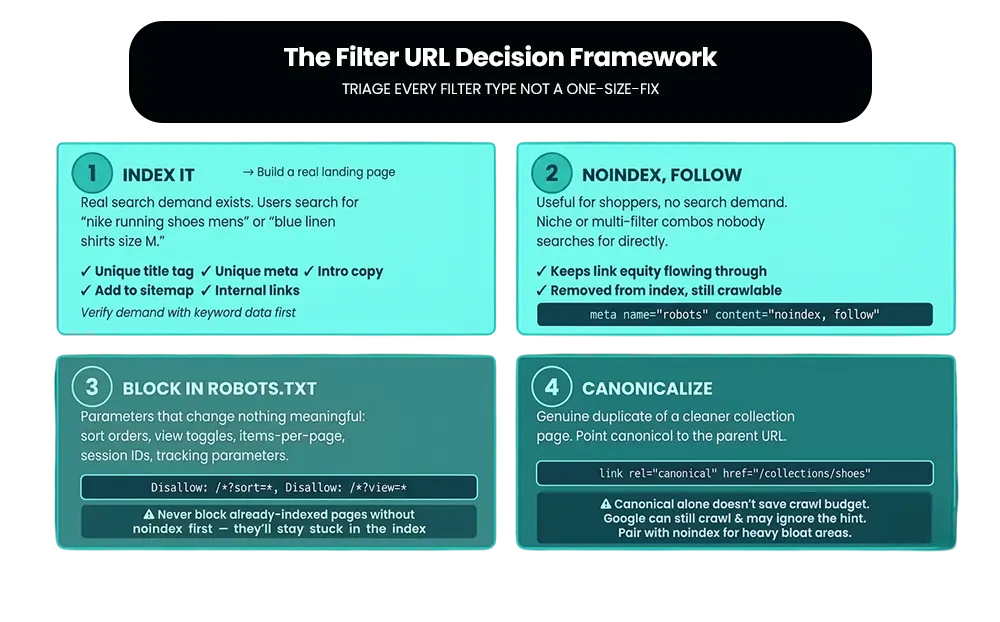
Not every filter URL should be treated the same way. Blocking all filter URLs throws away genuine ranking opportunities from high-demand filter combinations that match real search behavior. Indexing all filter URLs activates all four failure modes simultaneously. The correct approach is per-facet triage: decide, filter by filter, which pages have real search demand and deserve to exist in the index.
Bucket 1 — Index It (Promote to a Real Landing Page)
The filtered view matches real search behavior. Shoppers search “nike running shoes men’s,” “blue linen shirts size M,” “vegan protein powder under $40.” A single high-demand facet applied to a category produces a page worth indexing and ranking.
What to do: promote it to a static, indexable collection page with a clean URL, unique title tag, unique meta description, and a short block of unique intro copy. Add it to your internal link structure and XML sitemap. Validate demand with keyword data before building — only create pages for filters with confirmed search volume.
Bucket 2 — Noindex, Follow
The filtered page changes content usefully for shoppers but has no meaningful search demand. A niche single filter or a multi-filter combination nobody searches for. Apply noindex so the page never enters the index. Keep it crawlable so internal link equity flows through it. Use <meta name=”robots” content=”noindex, follow”> in the page header. This covers most single-filter long-tail combinations.
Bucket 3 — Block in Robots.txt
The URL parameter changes nothing meaningful about the page content: sort orders, view toggles, items-per-page selectors, session IDs, tracking parameters. These have zero indexing value and zero ranking value. Block the parameter pattern in robots.txt.
Critical: Never apply a robots.txt block to pages that are already indexed without first applying noindex and waiting for Google to deindex them. If Google can’t crawl the page, it can’t read the noindex directive — and the pages stay stuck in the index indefinitely.
Bucket 4 — Canonicalize
The filtered URL shows content that’s a genuine duplicate of a cleaner collection page. Apply a canonical tag using link rel=”canonical” href pointing to the clean collection URL. Pair it with noindex on sections where index bloat is heavy — canonical tags alone don’t save crawl budget because Google can still crawl canonicalized pages and can choose to ignore the canonical hint.
How to Fix Faceted Navigation SEO on Shopify — The Layer-by-Layer Implementation
Layer 1: Audit First
Crawl the store with Screaming Frog. List every URL parameter in use. For each parameter: does it change meaningful content? Does the resulting page have search demand? This inventory is the input for every other decision. Check Google Search Console → Pages for total indexed count vs. real page count. The gap between those two numbers is your filter URL problem.
Layer 2: Fix the Collection Path Canonical Issue
Screaming Frog → Canonicals → filter for “Missing” and “Non-indexable.” Every product accessible via a collection path URL needs a canonical pointing to the /products/ master URL. If canonicals are broken, check whether a recent theme update or app installation is the cause — this is the most common trigger for canonical breakage on Shopify stores.
Layer 3: Block Zero-Value Parameters in Robots.txt
Add Disallow rules in your robots.txt file for sort, view, and other parameters that produce no meaningful content change. Be precise with pattern matching — broad disallow rules can accidentally block product pages or collection pages that should be crawlable.
Layer 4: Apply Noindex to Low-Demand Filter Pages
Add <meta name=”robots” content=”noindex, follow”> to filter pages with no search demand. For Shopify specifically, this requires either theme modifications or an SEO app that gives you per-URL-type control over meta robots tags. Native Shopify gives limited control over this — most merchants use an app like SEO Manager or Yoast SEO for Shopify to manage noindex at scale.
Layer 5: Apply Canonical Tags to Duplicate Filter Views
For filter combinations that are clearly duplicates of the parent collection page, add canonical tags pointing to the clean collection URL. Use the link rel=”canonical” href=”https://yourstore.com/collections/collection-name” format. Verify after implementation using Screaming Frog → Canonicals.
Layer 6: Build Landing Pages for High-Demand Filter Combinations
Take Bucket 1 filter combinations — the ones with confirmed search volume — and build them as real Shopify collection pages with static URLs, unique title tags, unique meta descriptions, and short intro paragraphs. Add them to your XML sitemap and internal link structure. This is where faceted navigation stops being a liability and starts generating long-tail organic traffic you don’t currently have.
Related read: GEO for Shopify Stores: What Is Generative Engine Optimization & How to Optimize Your Shopify Store for AI Search — high-demand filter landing pages with unique content and structured data also perform better in AI-powered search. If you’re building these pages, this guide explains how to make them visible in generative search engines too.
Layer 7: Fix Internal Linking to Filter Pages
If your store’s filter UI generates crawlable links for every filter combination, internal PageRank is still flowing to all of them even after noindex is applied. Make sure crawlable internal links point only to collection pages, product pages, and the Bucket 1 landing pages you’ve intentionally built. Filter UI links that shouldn’t be crawled should use rel=”nofollow” consistently across every entry point.
Layer 8: Clean the XML Sitemap
Your sitemap should contain only live, canonical, indexable pages returning 200 status codes. Remove all parameter URLs, noindex pages, and collection path product URLs from the sitemap. Google uses your sitemap as a direct instruction — including parameter URLs is telling Google to crawl the exact pages you’re trying to suppress.
How to Know If the Fix Is Working — What to Measure?
- Indexed page count (Search Console → Pages): Should decrease toward your actual product + collection + content page count as filter URLs are removed from the index
- Crawl Stats (Search Console → Settings → Crawl Stats): Googlebot’s attention should visibly shift away from parameter URLs toward real pages
- Indexing speed: After the crawl budget is freed, measure how long a newly published product takes to appear in search results. For well-managed stores, this should be days, not weeks
- Site crawl comparison: Run Screaming Frog before and after. The total accessible URL count should drop significantly
- Organic traffic to collection and product pages: As crawl budget redistributes to real pages, impressions and clicks from those pages typically improve within 30–60 days
Realistic timeline: Index bloat clears over several weeks as Google recrawls and drops noindexed pages. Ranking improvements typically follow within 30–60 days of a complete fix. For most stores, meaningful ranking movement is visible within that window.
Related read: How to Plan Your Shopify Store Growth in 2026 — cleaning up faceted navigation is a foundational SEO task that compounds over time. This guide helps you sequence it within your broader store growth roadmap.
Common Mistakes Shopify Merchants Make With Faceted Navigation SEO
- Blocking everything: Throwing away high-demand filter combinations that could rank and drive genuine organic traffic — an overcorrection that creates missed opportunity.
- Indexing everything: Activating all four failure modes simultaneously with no triage — the most common default state for stores that have never audited their filter URLs.
- Applying robots.txt before clearing the index: Pages already indexed can’t receive the noindex signal if Google can’t crawl them — blocking before deindexing traps pages in the index permanently.
- Treating canonical as a complete fix: Canonical is a hint Google can choose to ignore. It doesn’t save crawl budget because Google still crawls canonicalized pages. It needs to be paired with noindex for the full effect.
- Ignoring internal linking: Applying noindex but still linking to every filter combination from the collection page UI, so Googlebot keeps crawling all of them, and link equity continues flowing into junk pages.
- Including parameter URLs in the sitemap: A direct instruction to crawl the exact pages you’re trying to suppress — the most avoidable of all faceted navigation mistakes.
- One-time fix mentality: As your catalog grows and filter options change, new parameter patterns appear. Faceted navigation SEO needs to be reviewed quarterly, not fixed once and forgotten.
How Mastroke Approaches Faceted Navigation SEO Audits?
Running through a checklist manually is a start. Knowing which filter combinations on your specific store have genuine search demand, which parameters are wasting the most crawl budget, and in what order to address them requires a systematic audit — not a one-size-fits-all ruleset.
Faceted navigation problems don’t affect every store equally. A store with 50 products and 3 filter types has completely different exposure than a store with 2,000 products and 8 filter types. A store that’s been on Shopify for five years without a canonical audit has a different starting point than a recently launched store. The right triage depends on the specific architecture.
At Mastroke, faceted navigation SEO is part of every technical SEO audit we run for Shopify stores — because it’s the single most common source of suppressed rankings on larger catalogs and the most frequently missed issue on smaller ones.
Our Shopify SEO services cover the full technical audit — including faceted navigation triage, canonical tag review, sitemap hygiene, and crawl budget optimization — specific to your store’s architecture and catalog size.
For stores where app-generated code, heavy filter UIs, or theme modifications have also created Core Web Vitals issues alongside the faceted navigation problem, our Shopify Core Web Vitals service addresses both the crawlability and the performance layer together.
If you’re not sure whether your Shopify filters are helping or hurting your rankings — or if your indexed page count looks far larger than it should — that’s the right starting question.
Related read: The Shopify Store Audit Checklist Every Brand Should Do in Q1 2026 — faceted navigation is one of the most commonly missed items in a full store audit. This checklist covers the broader picture before you go deeper on any single issue.
Conclusion
Faceted navigation SEO is not about removing your filters or limiting what shoppers can find. It’s about making sure the URLs those filters generate don’t exhaust Google’s patience before it gets to the pages that actually matter.
The four failure modes — crawl budget waste, index bloat, duplicate content, and link equity dilution — are all downstream of the same root cause: uncontrolled filter URLs treated as indexable pages by default. The fix is triage, not a toggle.
Index the filter combinations with real search demand. Noindex the ones without. Block the parameters that change nothing. Canonicalize the genuine duplicates. Clean the sitemap. Fix the internal links. And check your Shopify collection path canonicals as a separate, parallel task that affects every store regardless of filter complexity.
That sequence, applied consistently and revisited every quarter, is how faceted navigation stops being an invisible ranking suppressor and starts being a source of long-tail organic traffic you don’t currently have.
Need Help Fixing Shopify SEO and Technical Store Issues?
SEO problems often start with technical issues hidden beneath the surface. Mastroke helps Shopify merchants diagnose and resolve indexing errors, duplicate content issues, crawl problems, and store performance challenges that impact visibility and growth.
Frequently Asked Questions-
Q: Does faceted navigation hurt SEO on Shopify?
A: It can — but only if it’s left unmanaged. Faceted navigation that generates thousands of unchecked crawlable URLs wastes Google’s crawl budget, bloats the index with thin pages, and dilutes internal PageRank. Managed correctly with the right mix of noindex, robots.txt, and canonical tags, faceted navigation can actually be a source of long-tail organic traffic.
Q: What is the best way to handle faceted navigation for SEO?
A: The most effective approach is per-facet triage: identify which filtered pages have real search demand and build those as proper collection landing pages; apply noindex to low-demand single-filter combinations; block zero-value parameters (sort, view, pagination) in robots.txt; and canonicalize genuine duplicate filter views back to the parent collection page.
Q: How do I find out if my Shopify filter pages are being indexed?
A: Check Google Search Console → Pages and compare the total indexed count against your actual product, collection, and content page count. If the indexed count is significantly larger than your real page count, filter URLs are being indexed. You can also run a Screaming Frog crawl to see all accessible URLs and check for parameter-based patterns.
Q: Should I use noindex or robots.txt to block Shopify filter pages?
A: Both serve different purposes. Noindex keeps the page crawlable but removes it from the index — appropriate for filter pages with no search demand but where internal link equity should still flow. Robots.txt blocks crawling entirely — appropriate for parameters that produce no meaningful content change (sort, view, session IDs) and are not yet indexed. Never block already-indexed pages with robots.txt without applying noindex first and waiting for Google to deindex them.