This blog post explains why Shopify stores aren't appearing in Google's AI Overviews despite ranking well in traditional search results. It provides practical strategies to optimize ecommerce content so that Google's AI can better understand and cite your store's pages.
A shopper searches for a product you sell. Before they even click on a store, including yours, Google’s AI Overview answers their question.
Your Shopify store may already have strong Google rankings. But if the AI Overview at the top of the page is pulling answers from other sites, shoppers never reach you. That isn’t a ranking problem. It’s a content problem.
Thin product pages, weak collection copy, and recycled ecommerce descriptions make it hard for Google to figure out when your store deserves a citation in an AI-generated answer. That’s why more Shopify merchants are asking what it actually takes to show up in AI Overviews, and what needs to change on their store to get there.
This guide walks through the kind of Shopify content Google’s AI Overviews tend to favor, and the practical changes that move stores from invisible to cited.
Why Most Shopify Stores Don’t Appear in AI Overviews
Shopify stores are built to sell, not to answer questions. That’s exactly why they get skipped. Product pages lead with specifications and pricing. Collection pages drop products into a grid. Neither gives Google’s AI the context it actually needs: who is this product for, and what problem does it solve?
AI Overviews show up most often for decision-style searches. Queries like “best office chair for back pain” or “ceramic vs stainless steel cookware” pull them up almost every time. Those are searches where shoppers haven’t decided yet and are looking for guidance.
Onely’s research across 25,000 ecommerce queries found that roughly 80% of the pages cited in AI Overviews did not rank organically for the same query. Traditional rankings, in other words no longer guarantee AI visibility. What earns a citation is content that Google can clearly read and understand.
A few patterns show up over and over in stores that get skipped:
- Pages built only around buy-ready keywords, with no decision-stage content.
- Generic descriptions that give Google no sense of who the buyer is.
- Collection pages without copy, which tell Google products exist but not who they’re for.
Google can only cite what it understands. That’s both the challenge and the opening.
What Google’s AI Actually Looks for in Ecommerce Content
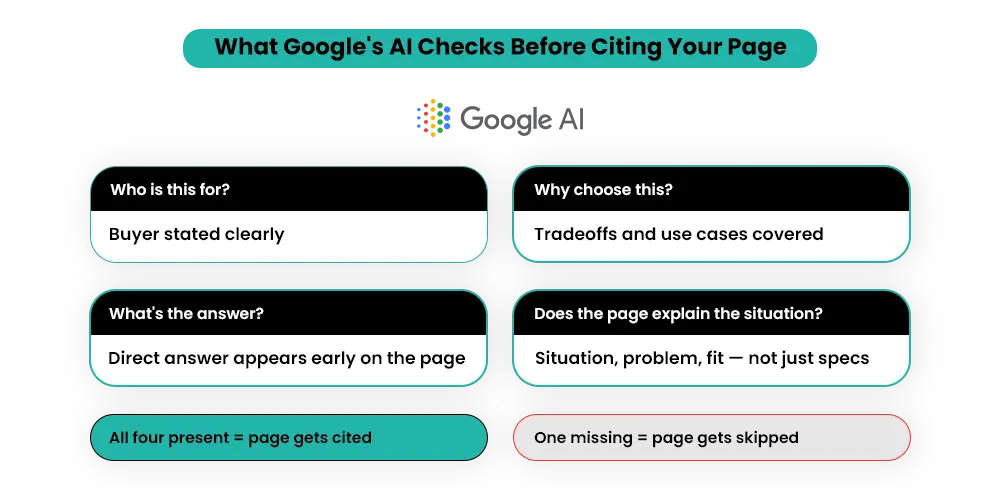
Google’s AI reads your page the way a careful shopper would – scanning for answers rather than features. Shopify pages often miss that test, not because they’re poorly built, but because they’re written for selling rather than answering.
Four things matter most:
- A clear buyer. Does the page say who this product is for? “Built for home offices under 100 square feet” tells Google something useful. “Premium quality chair” tells it almost nothing.
- A reason to choose. Why pick this over an alternative? Tradeoffs, use cases, and real-world situations all count here.
- A direct answer. If a shopper wonders whether a chair holds up for long workdays, the page should answer that early, not bury it.
- Real product context. Explain the material, purpose, fit, and where the product works best — not just dimensions.
A page that covers those four is a page Google’s AI can summarize and cite. One that doesn’t get skipped, regardless of where it ranks.
How to Optimize for AI Overviews: Shopify Store Changes That Get Results
The pages worth fixing first aren’t new ones. They’re the pages already pulling buyer-intent traffic. Five changes do most of the work.
1. Build Collection Pages Around Buyer Intent
A collection page titled “Office Chairs” tells Google that office chairs exist in your store. Nothing more. Google’s AI has nothing to summarize and no reason to pick your page over a competitor’s.
Organize collections around buyer situations instead of product types:
- Best Office Chairs for Long Work Hours
- Office Chairs for Small Home Offices
- Ergonomic Chairs for Lower Back Pain
Each version now has a clear use case, buyer intent, and context. Add a short copy block under each collection covering three things: who the products are for, what to look for when buying, and how the options differ. Here’s an example of collection copy.
What AI-Friendly Collection Content Looks Like
“This collection is for people who have to sit for six or more hours a day.
Built with adjustable lumbar support and seat depth to support long sitting hours.
Mesh chairs tend to hold up better than foam for long hours.”
That’s the type of content Google’s AI can actually understand, summarize, and cite. It gives context, identifies buyer intent, and explains how products solve specific problems.
Collection pages are usually the first place to focus when figuring out how to optimize for AI Overviews. No new pages are needed, just better content on the ones you already have.
2. Add FAQs That Answer Real Buying Questions
FAQs are one of the most direct paths to AI Overview visibility, because the format itself matches what the AI is looking for. A clear question paired with a useful answer is exactly what gets pulled into conversational results.
A lot of Shopify stores either skip FAQs entirely or fill them with questions nobody asks.
The second version matches how real shoppers actually search. Build FAQs around real decisions:
- Sizing and fit tied to real use cases, not just dimensions.
- Compatibility with the things buyers already own.
- Durability and maintenance over months and years.
- Use-case comparisons that explain when to choose this over an alternative.
- Shipping and returns, especially on higher-consideration purchases.
Writing these questions well is only half the job — the other half is structuring them in a way that AI systems can actually read, evaluate, and pull into results. That’s where understanding how Generative Engine Optimization works for Shopify stores makes a real difference.
FAQs belong on product pages, on collection pages, and sometimes as standalone content for common buying decisions. The same questions that win AI search visibility also tend to be the questions that close the sale.
3. Improve Product Descriptions With Context
Generic product descriptions are one of the main reasons Shopify stores get passed over in AI Overviews. Google’s AI needs to understand not just what a product is, but who it’s for and when it’s the right choice.
When rewriting descriptions for AI visibility, anchor each one on four points
- The buyer: who specifically is this for?
- The situation: where and how will they use it?
- The problem: what was frustrating before this product?
- The fit: not features, but match
Shopify’s GEO guidance also highlights the importance of authority and trust signals. Strong product content becomes more credible when it’s supported by customer reviews, external mentions, and other signals AI systems can use to validate your brand.
Those trust signals help search engines and AI systems assess your store’s credibility and reliability — principles that closely align with Google’s E-E-A-T framework (Experience, Expertise, Authoritativeness, Trustworthiness) used to evaluate content quality.
Ranking on Google. Invisible to AI.
4. Create Comparison and Buying Guide Content
This is where most Shopify stores leave the biggest gap, and where AI Overviews are most active.
When shoppers search “ceramic vs stainless steel cookware” or “running shoes vs training shoes,” they aren’t ready to buy yet. They’re deciding. Google’s AI steps in to help them. The stores that get cited in those moments are the ones with content built around that decision.
This content doesn’t need to be long. It needs to make the choice easier. What works:
- Direct comparisons — Ceramic vs Stainless Steel Cookware, Running Shoes vs Training Shoes
- Buying guides — How to Choose an Office Chair for 8+ Hour Workdays
- Situation-based recommendations — Best Protein Powders for People Who Don’t Like Shakes
For each piece, break down the tradeoffs between options, the situations each one fits best, and a clear recommendation based on the buyer’s needs. Not “it depends,” but “if X, choose Y.” This is what builds topical authority.
5. Connect Your Shopify Store to Google Merchant Center
Before Google can surface your products properly, it needs accurate and updated product data from Google Merchant Center. Many Shopify stores connect it once during setup, then stop updating or reviewing the feed over time.
Your product feed helps Google understand and index your products inside the Shopping Graph. Errors or disapproved listings cut your eligibility for Shopping visibility and make it harder for Google’s AI to confidently surface your products in buyer searches.
The most common feed issues on Shopify stores:
- Price mismatches between the store and the feed — Google flags this immediately.
- Missing GTINs, which make products harder to match against relevant searches.
- Incomplete product data, like missing size, material, or use case, which limits how confidently Google understands what’s on offer.
- Disapproved listings that sit quietly in Merchant Center, costing you visibility.
Technical Setup That Supports AI Overview Visibility
Good content on a poorly structured page still gets skipped. The right technical setup makes sure Google can read, understand, and cite your store. Getting the technical layer right directly affects whether your store gets cited or scrolled past.
Write Pages So Google Can Read the Answer
Lead with the answer. Don’t bury the useful part three paragraphs down. Put the direct answer or recommendation at the top, explain it next, and then add detail. Google’s AI favors pages where the answer appears early.
Specific headings tell Google exactly what each section answers. That’s the core of semantic search optimization.
Schema Markup — Help Google Read Your Pages
Schema is code that tells Google what your page is about. Without it, Google has to guess. With it, you give clear answers. Four schema types matter most for Shopify stores:
- Product schema tells Google your price, stock status, and brand. When this is in place, AI Overviews can pull current pricing directly into the answer.
- FAQ schema makes your answers eligible for direct citation. If a shopper asks a question your FAQ covers, Google can lift that answer straight into the AI response.
- Review schema feeds Google your star ratings and review counts — Google leans on this when deciding which products to surface in AI answers.
- Breadcrumb schema shows Google how your pages connect (Home → Office Chairs → Ergonomic). That contextual map matters more for AI Overviews than for traditional ranking.
Use JSON-LD format. Most Shopify themes ship with basic Product schema, but basic isn’t enough.
AI Crawlers — Do Not Block Them
This is one of the easiest ways to limit AI visibility without realizing it. If bots like GPTBot, PerplexityBot, or OAI-SearchBot are blocked in your robots.txt file can prevent those systems from directly crawling your content. Google-Extended separately controls whether Google can use your content for some AI-powered experiences.
Some SEO apps, custom settings, or robots.txt edits may block these bots unintentionally.
ACTION STEP
Open yourdomain.com/robots.txt and check whether any AI bots are disallowed. If you see Disallow: / under them, review whether that restriction is intentional.
Image Optimization for AI Visibility
Google uses image context, alt text, and surrounding page content to better understand products. Descriptive file names and alt text are quick wins that most Shopify stores skip.
- Replace generic file names like
IMG_4521.jpgwithergonomic-mesh-office-chair-black.jpg - Write alt text that describes how the product is actually used, not just what it is — e.g., “Adjustable mesh office chair for long workday use in a small home office.”
- Compress images so they load quickly without losing visual detail
Internal Linking — Connect Your Pages
Google doesn’t look at pages one by one. It looks at how they link together. Link your blogs to collections, collections to product pages, and products to FAQs. That signals consistent depth on the topics you cover.
llms.txt — An Emerging File for AI Crawlers
llms.txt is an emerging proposal designed to help AI systems better understand a website’s structure and important content. The idea is straightforward: give AI crawlers a plain-language overview of your store, your key pages, and the sections that matter most.
For now, treat llms.txt as an experimental rather than a proven ranking factor. It fits naturally into a broader strategy of making your Shopify store readable across Google, ChatGPT, Gemini, and Perplexity.
Site Performance Note
Slow load times, heavy app scripts, and weak mobile layouts hurt user experience and reduce search visibility regardless of content quality. If your Shopify store performs poorly in Google PageSpeed Insights or fails Core Web Vitals checks, fix those technical issues alongside your content improvements.
How to Optimize for AI Overviews: Common Mistakes to Avoid
Even with the right setup, a few mistakes still keep Shopify stores out of AI Overviews. They’re easy to miss and easy to fix.
- Publishing broad blogs with no buying relevance. A 1,500-word post on “how to choose cookware” that never helps a shopper pick between options gives Google nothing to cite for a real purchase search.
- Treating collection pages as product folders. A page with 30 products and no copy tells Google the products exist, not who should buy them. A short, intent-led copy block changes that.
- Copying supplier descriptions. When the same description appears on ten stores, Google has no reason to pick yours. Duplicate copy weakens both your store’s uniqueness and its AI search visibility.
- Ignoring FAQs. Every unanswered buyer question is a missed direct-answer opportunity. Stores with strong FAQs consistently appear in conversational searches.
- Focusing on keyword density over clarity. AI Overviews favor pages that answer questions well, not pages that repeat keywords. Clarity wins.
How to Measure Whether It’s Working
The point of all this work is visibility, so you need a way to check whether visibility is actually increasing. A few practical methods:
- Run your top buyer-intent queries in incognito every few weeks and note which sources the AI Overview cites. Track changes over time in a simple sheet.
- Use AI-mention tracking tools like Semrush’s AI Overview tracker, Ahrefs’ Brand Radar, or Profound to monitor how often your store appears across AI search.
- Watch Google Search Console for shifts in impressions on long-tail and question-style queries. A drop in impressions despite stable rankings can sometimes indicate AI Overview displacement or changing search behavior.
- Check referral traffic in GA4 for new sources like
chatgpt.com,perplexity.ai, orgemini.google.com. Even trickle traffic from these is an early sign that AI systems are surfacing your store.
What AI Overview Visibility Really Comes Down To
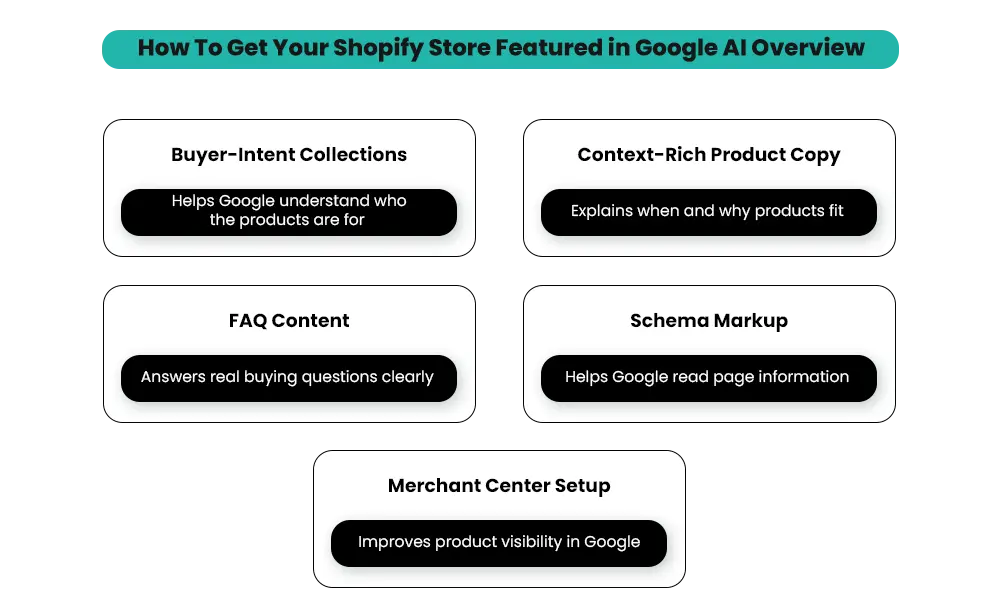
How to optimize for AI Overviews isn’t a question of producing more content. It comes down to five things: collection pages built around buyer intent, FAQs that match real buying questions, product copy with situational context, a clean Merchant Center feed, and schema that helps Google read your pages.
Start with the pages already pulling buyer-intent traffic. Rewriting one collection page today is worth more than publishing five new blog posts this month.
The same foundation also helps you show up in ChatGPT, Gemini, and Perplexity, where shoppers are increasingly starting their searches.
AI Search Is Changing Fast. Is Your Store Keeping Up?
Common Questions About Getting Cited in AI Overviews
The questions below come up most often when Shopify merchants start figuring out how to optimize for AI Overviews — practical answers to each.
1. Can Shopify stores actually appear in Google AI Overviews?
Yes, and increasingly do. AI Overviews pull from product pages, collection pages, FAQs, and blog content. The Shopify stores cited most often aren’t the ones with the highest rankings; they’re the ones with clear, context-rich content Google’s AI can read and summarize. Strong product descriptions, well-built FAQs, and proper schema markup all raise the odds of getting cited.
2. Why isn’t my Shopify store showing up in AI Overviews even though it ranks well?
Because ranking and AI Overview citation aren’t the same thing. AI Overviews surface content based on how clearly it answers a question, not your search position. Top-ranked pages get skipped when they only describe products without context. If your pages focus on specs without explaining who the product is for, Google’s AI has nothing to cite.
3. Does schema markup help with AI Overviews?
Yes. Schema is one of the most direct ways to help Google’s AI understand your Shopify store. Product schema covers price and brand, FAQ schema surfaces direct answers, Review schema adds trust signals, and Breadcrumb schema clarifies structure. Use JSON-LD format and run your pages through the Google Rich Results Test to verify what’s being read.
4. How long does it take to start appearing in AI Overviews?
There’s no fixed timeline. Some content gets cited within days of being indexed. Other pages take weeks. Content clarity and crawlability matter more than time. Make sure AI crawlers aren’t blocked in your robots.txt, your schema is in place, and your content is built around real buying decisions.
5. Do I need to write new content, or can I update existing pages?
Most Shopify stores don’t need new pages. They need better content on the ones already driving buyer-intent traffic. Start with your highest-traffic product pages and collections. Add context about who the product is for, what problem it solves, and when to choose it. That’s where the biggest gains come from.
6. What’s the difference between optimizing for AI Overviews and traditional SEO?
Traditional SEO focuses on ranking — getting your page to the top of search results. Getting cited in AI Overviews focuses on content extraction — getting your content pulled into Google’s AI answer. AI Overviews place more weight on content that directly answers buying questions and reads like an explanation rather than a sales pitch.
7. How often should I update my content for AI Overview visibility?
Review your top product pages and collections quarterly. Check whether FAQs still match real buyer searches, whether product context is accurate, and whether new buying questions have come up in reviews or support tickets. Buying guides and comparisons can be reviewed every six months. Consistency matters more than frequency.
Where Does Your Store Stand?
Every Shopify store has a different starting point. Some have strong product pages but no FAQs. Others have great content with blocked AI crawlers. Without knowing which gap is hurting you most, it’s easy to spend weeks fixing the wrong thing.
The Shopify AI Brand Visibility Audit checks your store across the five areas covered in this guide: collection page intent, FAQ depth, product context, Merchant Center health, and technical setup. You get a prioritized list of what’s costing you visibility right now and what to fix first.
That’s a practical place to begin if you’re working out how to optimize for AI Overviews for your store specifically.