This blog post explains the key differences between Shopify theme refreshes and full store redesigns to help store owners choose the right solution. It breaks down when each approach is appropriate based on whether you need to fix surface-level styling issues or deeper structural problems.
You look at your Shopify store, and something feels off.
Sales have slowed. The design looks outdated. New products don’t sit right on the homepage. You know something needs to change, but you’re not sure whether you need a full Shopify store redesign or whether a theme refresh will do the job.
Refresh vs Redesign: What Each One Actually Means
A Shopify theme refresh and a Shopify store redesign are not the same thing — even though they’re often treated that way. One fixes the surface. The other fixes the foundation.
A theme refresh changes how the store looks. That’s it.
- New colors, fonts, banners, and product card styles.
- Updated images, button styles, and spacing.
- Small layout tweaks on existing pages.
- Same theme structure underneath — usually Online Store 2.0, Shopify’s section-based theme architecture.
A redesign changes how the store works.
- New site architecture and navigation.
- Reworked homepage, collection, and product page flows.
- Often a new theme — sometimes custom-built.
- Liquid code changes, app stack cleanup, mobile rebuilt from scratch.
Pricing Context
Cost ranges above reflect US and UK agency pricing. If you’re outside those markets, your quote will likely differ — sometimes significantly.
The symptoms can look the same on the surface — a store that feels off, looks outdated, or isn’t converting. But the cause is rarely the same. A refresh repaints the room. A redesign rebuilds it.
When a Shopify Theme Refresh Is the Right Call
A refresh works when the foundation is solid but the styling has aged. The signs are usually clear once you look closely.
You probably need a refresh if:
- The brand updated, but the website didn’t. New packaging, new photography, new tone on social — but the website still looks like the old version of the brand. A customer coming from Instagram sees one brand, lands on the store, and sees another. That disconnect quickly kills trust. A Shopify theme refresh brings both in line without touching anything structural.
- The homepage got cluttered over time. Products are findable, collections make sense, search works — but the homepage has too many competing banners, unclear CTAs, and heavy images slowing it down. The navigation isn’t the problem. The visual layer on top of it is. That’s a refresh job.
- Mobile loads cleanly, and your Core Web Vitals look healthy. No layout shifts, no slow Largest Contentful Paint, no sluggish interaction response. The technical foundation is doing its job — the design just needs to catch up.
- Your theme runs on Online Store 2.0. Sections can usually be added, removed, or rearranged without major code changes, which makes visual refreshes faster and far less developer-dependent.
- Your app stack is clean and lean. No conflicting apps, no leftover scripts from tools you stopped using, no third-party widgets fighting for space. The store is running on solid plumbing.
If nothing is broken — only outdated — a refresh gets the job done without disrupting what already works.
When Your Store Actually Needs a Full Shopify Store Redesign
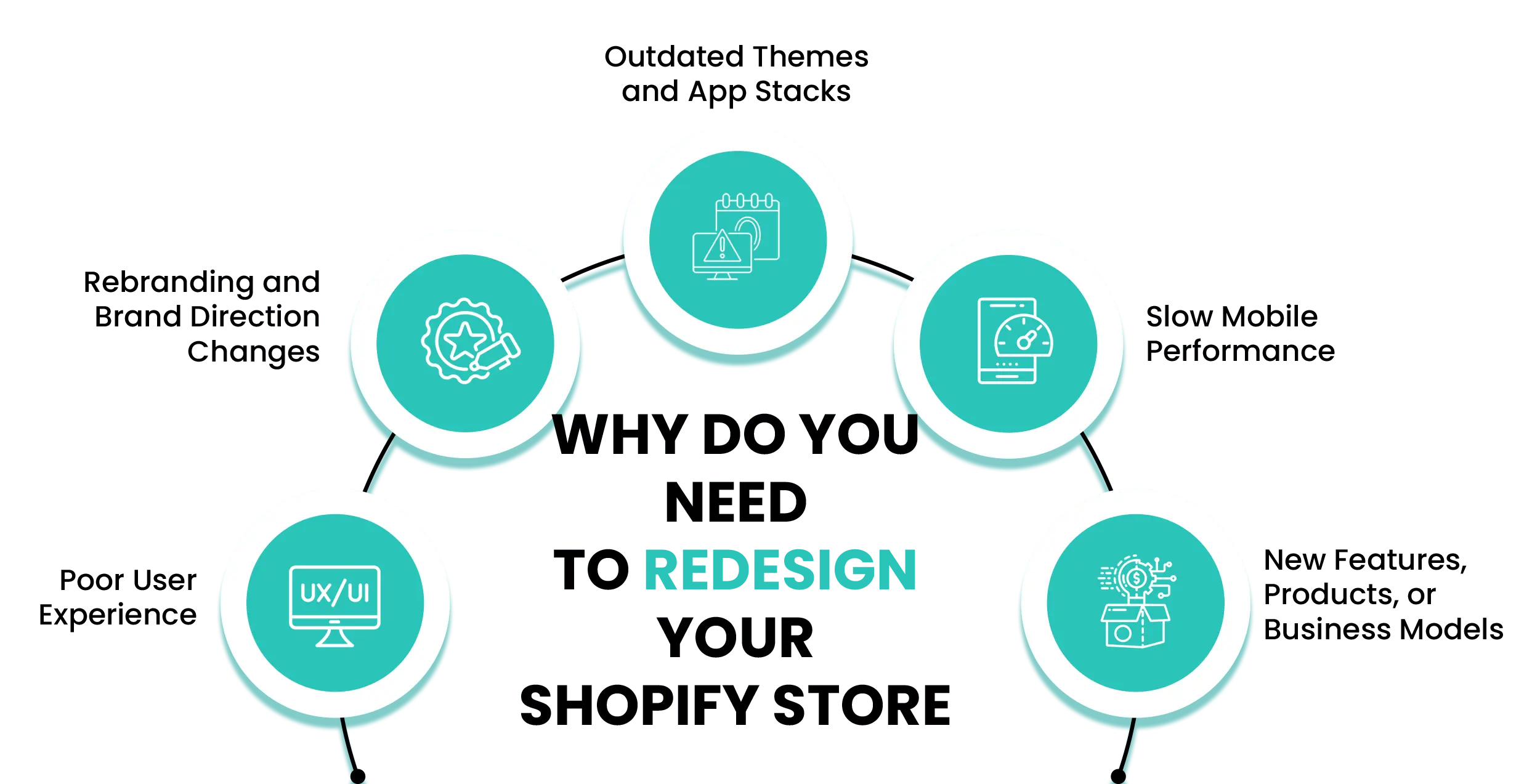
Structural problems don’t announce themselves through design. They show up in dropping conversion rates, broken mobile flows, and navigation that stops making sense as the business grows.
- Mobile experience keeps breaking, and small fixes don’t hold. You patch the mobile menu — few weeks later, the product page shifts on smaller screens. Then you adjust the cart drawer. Now the Add to Cart button overlaps the size selector. These aren’t isolated bugs. They’re a sign the theme was never designed for small screens first. Mobile now accounts for 59% of global ecommerce sales, and research by Deloitte found that even a 0.1-second improvement in mobile load speed was linked to an 8.4% increase in retail conversions. Patching buys you time. It doesn’t fix the foundation.
- Conversion rate has dropped and stayed low for months. Not a seasonal dip. Not a bad campaign. Just a store sitting low — traffic coming in, revenue not following. Open Google Analytics 4 and check where customers fall off. If customers keep dropping off at the same step across different pages, and conversion tweaks aren’t improving it, the buying journey itself is likely broken. That’s a redesign problem, not a refresh one.
- Customers can’t find products — even with search. New categories went in, collections multiplied, variants expanded. But the navigation is still built for the catalog you had two years ago. When search becomes the only way customers find anything, browsing has stopped working. The store layout has fallen behind the business it’s supposed to be selling for.
- The theme is older than Online Store 2.0. That usually means limited drag-and-drop flexibility outside the homepage, more developer dependency for layout changes, and higher maintenance overhead as customizations stack up. The gap becomes obvious when you compare it with modern OS 2.0 themes in the Shopify Theme Store, which are built for flexible sections, easier customization, and cleaner long-term scalability.
- The app stack is heavy, slow, and conflicting. A review app pushes the product page layout around. An upsell tool fights with the cart drawer. A loyalty widget drags down homepage load time. Some apps don’t just conflict — they need features the theme fundamentally can’t support, like a subscription app that requires checkout customizations the theme wasn’t built to handle. Each app made sense on its own. Together, they’ve made the store slow, inconsistent, and unreliable. This is the point where a full Shopify store redesign stops being optional.
If multiple of these signals are showing up at the same time, this guide on the clear signs your Shopify store needs a redesign will help confirm the decision. If you keep fixing one thing and something else breaks, the structure itself is the problem.
Quick Fixes Aren't Fixing It Anymore
Shopify Store Redesign Cost: What You’re Actually Paying For
Theme refresh — $200 to $3,000+
The Shopify theme refresh cost depends on three things:
- How much you’re changing visually — small updates like new colors, banners, and typography cost less than a full visual overhaul across multiple templates
- How many pages need work — refreshing only the homepage is one budget; updating the homepage, collection pages, product pages, and cart is a larger project
- Whether your theme runs on Online Store 2.0 — Stores already on OS 2.0 are usually easier and cheaper to refresh because sections can be rearranged with far less custom development. Older themes often rely on manual Liquid and CSS edits for layout changes, which increases both time and cost.
Timeline: 1–3 weeks. Usually one Shopify designer or a small team. Works when your store runs fine and only the look needs updating.
Full redesign — $5,000 to $30,000+
A Shopify redesign cost varies more because the scope varies more. What usually pushes the price up:
- Catalog complexity — larger catalogs increase filtering, collection organization, template logic, and QA testing workload
- Business model — subscriptions, B2B, wholesale, or multi-market selling add extra UX, development, and integration work
- Apps and integrations — apps often need reconfiguration, styling adjustments, and compatibility testing during a redesign
- How the store is built — theme-based redesigns usually run $5,000–$15,000. Fully custom builds typically range from $15,000–$30,000. Headless setups (Shopify Hydrogen or custom front-ends) often start above $30,000.
- Shopify Plus functionality — custom checkout extensibility, Shopify Functions, and B2B workflows require more advanced development expertise
Timeline: 6–12 weeks, with the first 2–3 weeks usually spent on strategy, UX, and design before development begins. You’ll need a team — strategy, design, development, and testing — not one freelancer doing all four.
The real cost isn’t the project. It’s choosing wrong. A refresh on a store that actually needs a redesign means paying once for the surface fix and again for the real fix you should have done first.
The Fastest Way to Decide (If You’re Still Stuck)
If you’ve read this far and still aren’t sure, run this one test. Open your Shopify analytics. Look at the last 90 days. Then read the numbers:
This answers the redesign vs refresh question for most merchants. To sanity-check your numbers, run your homepage through Google’s PageSpeed Insights. If speed looks healthy and conversions are still falling, the problem lives in how the store is built — not how fast it loads. Your numbers already know the answer. You just have to look.
Before You Commit: What Most Merchants Miss
Three things most merchants don’t plan for.
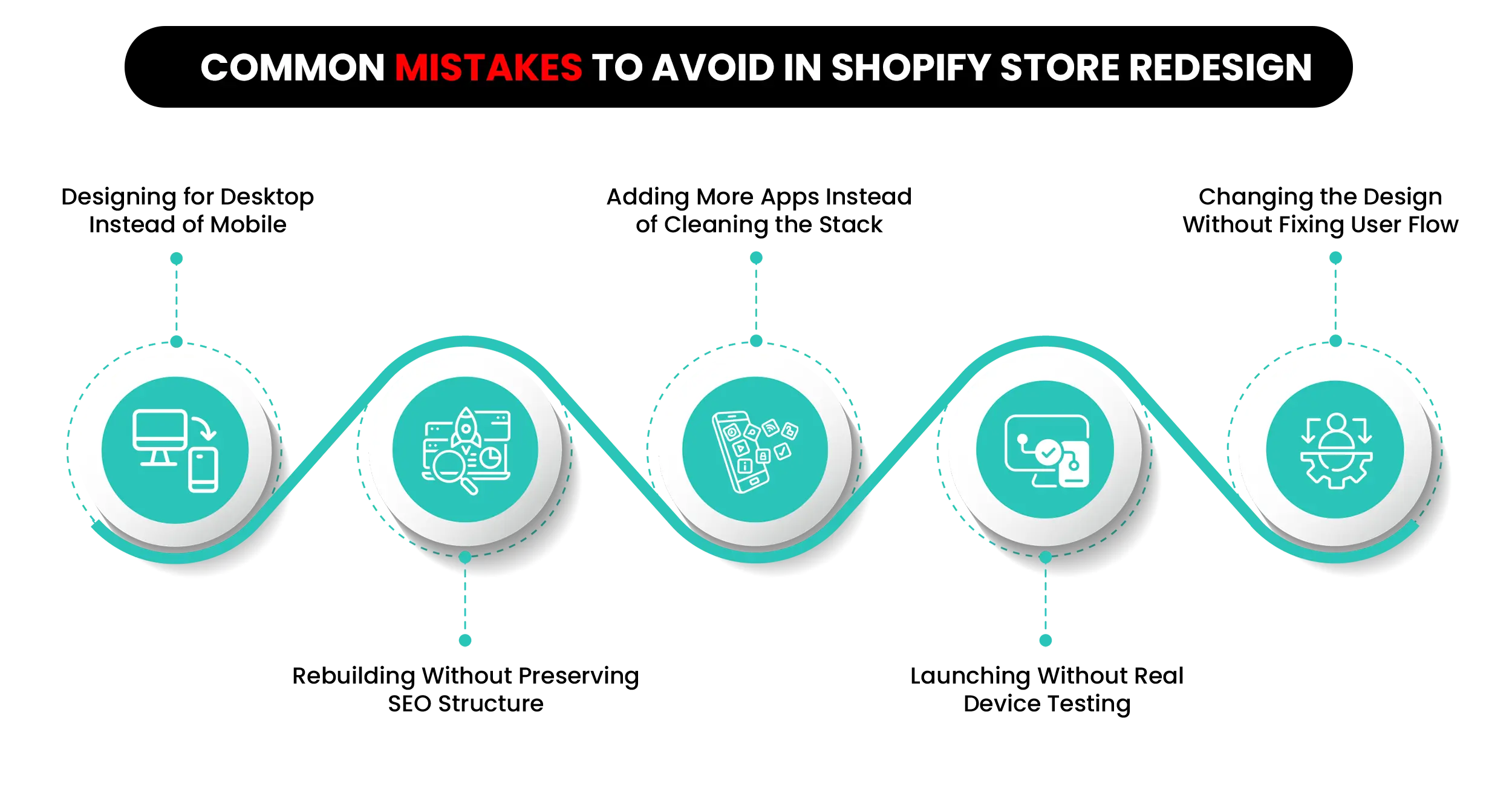
1. SEO migration is non-negotiable. When a Shopify store redesign launches, URLs change, meta titles get rewritten, and schema markup can disappear. Without a proper 301 redirect plan, organic traffic can drop sharply and stay low for months. Shopify covers the basics in their URL redirect docs, but the real work is mapping every old URL to a new one before launch and not after. Ask your team how they’ll handle it. If they can’t explain it clearly, that’s a signal worth paying attention to.
2. Real results take time. A refresh shows a visual change the day it goes live. A redesign’s impact on conversions and revenue usually surfaces within a few months after launch. That’s how long it takes for Google to re-crawl the new structure, returning customers to adjust to the new layout, and your analytics to give you clean, comparable data. Don’t judge a redesign in week one — the numbers won’t be telling the full story yet.
3. The wrong choice costs twice.
- Refresh when you need a redesign → the same problems return in 6 to 9 months.
- Redesign when a refresh would do → overspending, disruption, possible SEO drop.
- Pick the team before you pick the project. A bad team with the right brief still ships a bad store.
One more thing worth flagging: older Shopify themes like Debut, Brooklyn, and Venture no longer receive meaningful updates. If you’re still running one, long-term maintenance will get harder regardless of which path you pick.
Our Take on Shopify Store Redesign vs Refresh
After working with Shopify merchants across categories, here’s the honest pattern we see.
Nine times out of ten, the store doesn’t need a full Shopify store redesign. It needs someone to go in, remove the apps that haven’t been touched in two years, fix the homepage sections added in a hurry, and rebuild the product page that’s quietly dragging down conversions. That’s a refresh with cleanup — and it’s the right answer for most stores that come in asking for a redesign.
The other one out of ten is the store running on a theme that’s outlived the business it’s meant to support. Subscriptions layered on top of a one-time purchase theme. B2B running through a D2C checkout. No refresh fixes that. A Shopify store redesign is the only honest answer.
The mistake merchants make in both cases: they decide based on how the store feels. It feels dated, so they refresh. It feels broken, so they redesign. Feelings aren’t the data. Open Shopify analytics, look at the conversion rate by device for the last 90 days, and that number will tell you which conversation to have.
Still Not Sure Which One Your Store Needs?
The Bottom Line: Match the Fix to the Real Problem
The decision between a Shopify store redesign and a theme refresh isn’t really about budget. It’s about understanding what’s actually slowing your store down — and being honest about it.
A refresh fixes the surface. A redesign fixes the structure underneath. Match the work to the actual problem, not to what feels faster or cheaper on paper.
The goal isn’t a store that looks better. It’s a store that fits where your business is heading next — and keeps up when it gets there.
Common Questions About Redesigning a Shopify Store
Quick answers to the questions Shopify merchants ask most often when deciding between a refresh and a full Shopify store redesign.
Q. Will a Shopify theme refresh actually improve my conversions?
A: Sometimes — but only if conversions are dropping for visual or brand reasons. If the issue is structural (slow mobile, broken navigation, a heavy app stack), a refresh won’t move the numbers much. Check your mobile conversion rate in Shopify analytics and run a quick PageSpeed test before committing to either option.
Q. How much should I budget for a Shopify store redesign?
A: A: For a standard single-market Shopify store, $5,000 to $15,000 is a realistic range with an established agency. B2B, multi-market, or Shopify Plus redesigns typically land in the $15,000 to $30,000+ range depending on custom functionality, integrations, and migration complexity. Beyond the core project cost, budget separately for SEO migration, QA testing, and post-launch support — these are frequently underestimated or left out of the initial quote entirely. These ranges reflect US and UK agency pricing and can vary significantly by region.
Q. How long does a full Shopify store redesign actually take?
A: Most redesigns take 6 to 12 weeks. Larger catalogs, custom integrations, B2B setups, or Shopify Plus features push that timeline longer. Plan for 2 to 3 weeks of strategy and design work before any code gets written.
Q. Will a redesign hurt my SEO?
A: It can, if it isn’t planned properly. The main risks are URL changes, missing redirects, and lost metadata. A redesign that treats SEO as a day-one priority — not an afterthought — keeps those risks manageable. Most rankings recover within 4 to 8 weeks after launch when redirects and metadata are handled correctly.
Q. Do I need to migrate to Online Store 2.0 before redesigning?
A: If your store is still running on a legacy pre-2021 theme, moving to Online Store 2.0 is usually the smarter long-term path — and it’s best handled as part of the redesign project rather than as a separate migration later. OS 2.0 introduces section-based editing across more page types, giving merchants far more flexibility to update layouts and content without relying on developers for every small change.
Q. How do I know if I need a redesign or just better marketing?
A: If your traffic is healthy but conversions are weak, the store is likely the problem. If traffic is low to begin with, marketing comes first — a better-looking store won’t fix an empty top of funnel. A simple rule: fix traffic problems with ads and SEO, fix conversion problems with design.
Not Sure Which One Your Store Needs?
If you’re still on the fence, that’s normal — most merchants are at this point.
A short Shopify store audit from our team usually makes the answer clear. We look at your theme version, app stack, mobile performance, conversion data, and design gaps — then tell you honestly whether a refresh will do the job or if a full redesign is the right call.
No pressure, no upsell. Just a straight answer so you don’t spend money on the wrong fix. Book a slot this week, and you’ll have your answer before your next leadership meeting.