
This blog post explains the deprecation of Shopify Scripts for Shopify Plus stores, with a hard deadline of June 30, 2026, when all custom discount logic, shipping rules, and payment conditions will stop working. The post outlines the migration timeline and emphasizes that merchants need to transition to Shopify Functions before their checkout customizations break.
If your Shopify Plus store runs custom discount logic, shipping rules, or payment conditions at checkout — all of it stops working on June 30, 2026. Shopify Scripts are being fully deprecated, and there’s no automatic migration, no grace period, and no rollback. Whatever your Scripts currently handle will simply stop functioning at checkout.
And there’s a second deadline most merchants are underestimating: starting April 15, 2026, you can no longer edit or publish Scripts at all. If a Script breaks after that date, you can’t patch it — you can only replace it.
This guide walks you through the full migration process, based on Shopify’s published migration documentation and the Functions APIs available as of May 2026.
SHOPIFY SCRIPTS DEPRECATION
What Are Shopify Scripts — and Why Is Shopify Removing Them?
Shopify Scripts powered checkout customization for Shopify Plus stores for years. But the system they’re built on is now being fully retired — and merchants still relying on Scripts need to understand both what they’re losing and what replaces it.
What Shopify Scripts Did?
Shopify Scripts were small Ruby programs that ran server-side at checkout. They gave Shopify Plus merchants the ability to customize three specific areas.
Line Item Scripts
Handled discounts and cart behavior — BOGO deals, tiered pricing, gift with purchase, bulk discount thresholds.
Shipping Scripts
Controlled how shipping options appeared at checkout. You could hide specific carriers for certain regions, show free shipping only above a cart threshold, rename methods, or reorder them by location.
Payment Scripts
Managed which payment methods showed up. A common use case: hiding cash-on-delivery for high-value orders, or showing specific gateways only to wholesale customers tagged in Shopify.
For years, if you were on Shopify Plus and needed this kind of logic at checkout, Scripts were the only native way to do it.
Why Shopify Is Removing Them
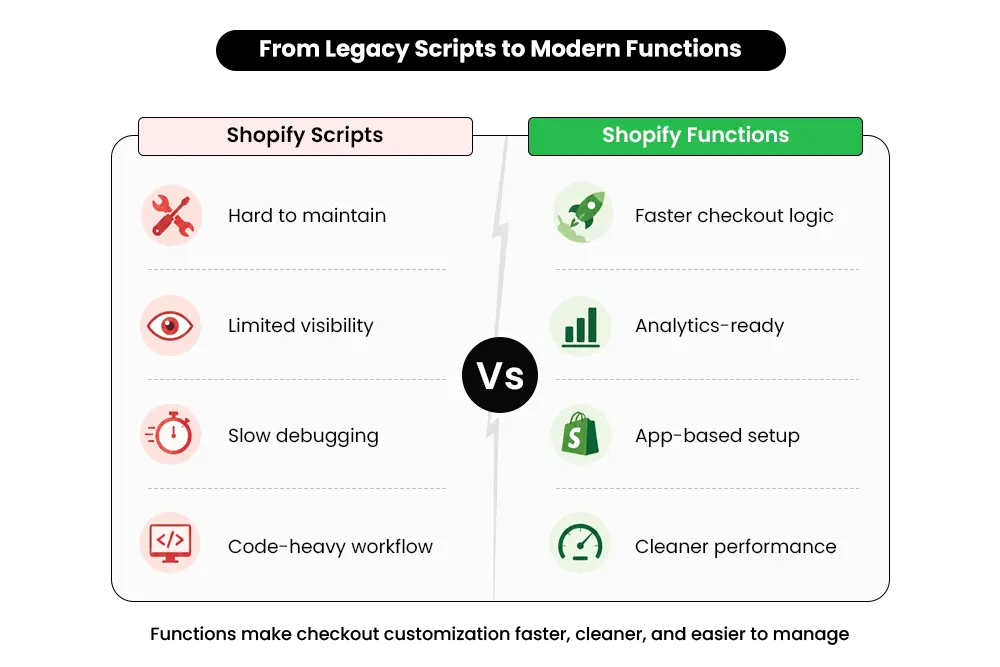
Scripts had real limitations. They ran in a sandboxed Ruby environment that was difficult to debug and nearly impossible to version-control. When something broke, tracking it down was slow. And because Scripts lived outside Shopify’s app layer, they were invisible to analytics. Discount logic running through Scripts didn’t properly show up in Shopify reporting.
Shopify Functions are a different approach.
They’re distributed as apps, version-controlled, and cleanly installable and removable like anything else in the App Store.
They run in a faster execution environment and plug directly into Shopify’s reporting layer — so Function-driven discounts actually show up in your Sales by Discount report. Scripts didn’t.
The migration isn’t just a compliance box to check. Merchants who do it properly end up with checkout logic that’s easier to maintain and easier to measure.
Migration Timeline
The Two Deadlines Every Shopify Plus Merchant Needs to Know
Most merchants focus only on the final shutdown date. That’s a mistake. The real operational risk begins much earlier.
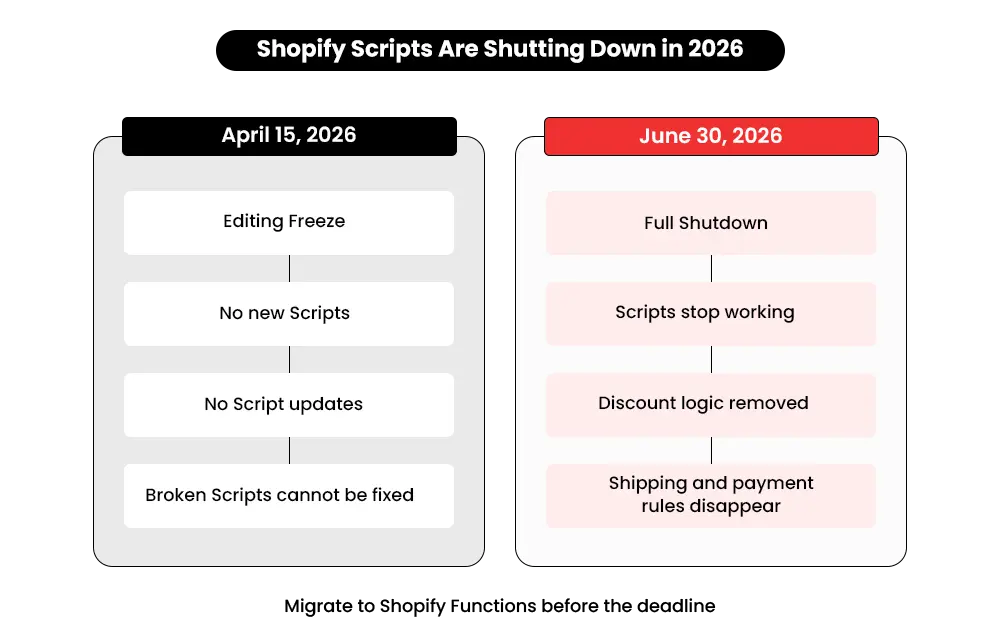
April 15, 2026 — The Editing Freeze
This is the more urgent date, and the one most merchants treat as a footnote. Starting April 15, 2026, you can no longer edit or publish Shopify Scripts. Your currently published Scripts will keep running until June 30 — but if one breaks between April 15 and June 30, you cannot fix it.
Think about what that actually means. A discount campaign breaks in early May. Your BOGO logic stops firing. Your tiered pricing no longer applies at checkout. You open the Script Editor — and you’re locked out.
You can’t push a fix. Your only option at that point is an emergency Function migration, under pressure, with a developer scrambling to finish before your next campaign goes live.
Merchants who treat April 15 as a “heads up” and June 30 as the real deadline are the ones who end up in that situation.
June 30, 2026 — The Full Shutdown
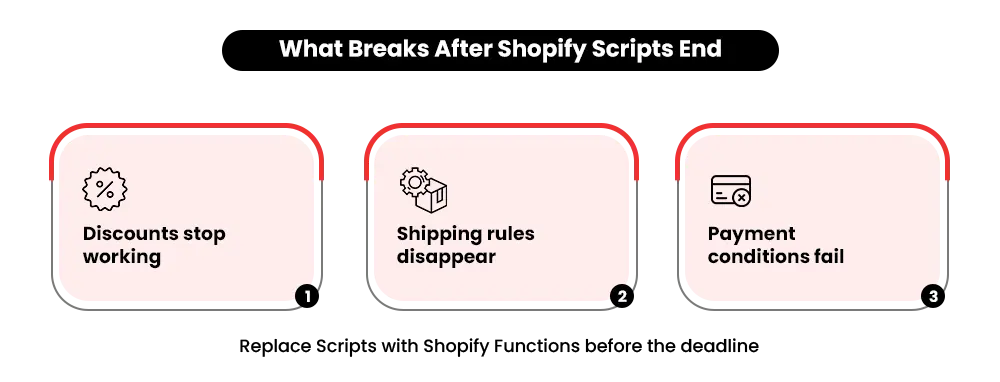
June 30 is a hard stop. After that date, Scripts are gone. No discounts apply. No shipping rules fire. No payment methods get hidden or shown.
Checkout still processes orders — it just does so as if your customization never existed.
Shopify has confirmed June 30, 2026 as the final date — the deadline has already been pushed twice (from August 2024, then August 2025).
There is no expectation of another extension.
Who Needs to Migrate
Who Actually Needs to Act?
Not every Shopify merchant is affected by the Scripts shutdown. But if your checkout currently depends on Script Editor logic, this migration is not optional.
Shopify Plus Merchants Using Script Editor
If you’re on Shopify Plus and have published Scripts in your Script Editor right now, you need to migrate before June 30. Full stop. The merchants most at risk are those whose Scripts were set up by a previous developer and haven’t been reviewed since. Those Scripts are still running. They’ll still stop working on June 30.
Run the audit in Step 1 before assuming you know what you have — stores regularly find Scripts they’d forgotten about.
Non-Plus Merchants
The Script Editor was a Plus-only feature, so merchants on standard plans were never using Scripts and have nothing to migrate. That said, public apps built on Shopify Functions now work across all plans. If you’ve been on a standard plan and wanted checkout customization that wasn’t available before, Functions-native apps make that possible now without upgrading.
If you’re adding new checkout functionality, keep an eye on how it affects your storefront performance.
Our guide on Shopify performance optimization strategies covers how to maintain fast load times while expanding what checkout can do.
Migration Process
Step 1 — Audit Everything With the Scripts Customizations Report
Before you can replace anything, you need to know exactly what’s running.
Go to Shopify Admin → Settings → Apps and Sales Channels → Script Editor and run the Scripts Customizations Report.
The report is generated automatically and exports as a CSV. It covers Payment Gateways, Shipping, and Product Discounts customizations.
For each Script, the report includes the name, description, source file links, recommended Functions-native apps matched to your specific customizations, and links to relevant Functions tutorials.
Once you have the report, go through every published Script and note:
- What it does — the actual business logic (e.g., “applies 15% off for orders above $200 when customer tag = wholesale”)
- Which checkout area it affects — line item, shipping, or payment
- Complexity level — single-condition logic vs. stacked rules with multiple variables
- Who built it and when — if it was an external developer, check whether the logic is documented anywhere
Export the CSV and share it with whoever will handle your migration. This becomes your migration brief.
One thing to watch for: Scripts set up during a promotional campaign that were never turned off. They’re still published. They’ll still stop working on June 30. The report surfaces all of them.
Functions API Mapping
Step 2 — Map Each Script to the Right Function API
Every Script type has a corresponding Function API. Use this table to map your existing Scripts before deciding how to replace them.
| Script Type | Function API | What It Handles |
|---|---|---|
| Line item | Discounts API | Product and cart discounts, BOGO, tiered pricing |
| Line item | Cart Transform API | Bundling, item merging, free gift logic |
| Line item | Cart & Checkout Validation API | Block checkout, validate cart rules, minimum order conditions |
| Shipping | Delivery Customization API | Hide, rename, or reorder shipping methods |
| Shipping | Discounts API | Apply conditional free shipping |
| Payment | Payment Customization API | Hide, rename, or reorder payment methods |
Line Item Scripts
Most discount logic maps to the Discounts API — BOGO, tiered pricing, percentage discounts for specific collections, cart-level discounts. If your line item Script was doing something more structural — creating bundles, merging two products into a kit, injecting a gift into the cart — that maps to the Cart Transform API instead. If your Script was blocking checkout under specific conditions (minimum order value, restricted product combinations, quantity rules), that maps to the Cart and Checkout Validation API.
Shipping Scripts
Scripts that hide, rename, or reorder shipping methods map to the Delivery Customization API. If the Script was applying a conditional free shipping discount, that part maps to the Discounts API.
Payment Scripts
Scripts controlling which payment methods appeared at checkout — hiding COD above a certain value, showing specific gateways only for B2B customers — map to the Payment Customization API.
For complex Scripts that combined multiple types, you may need more than one Function API. A Script that applied a discount and then validated the cart would need both the Discounts API and the Cart and Checkout Validation API.
Migration Paths
Step 3 — Choose the Right Migration Path for Each Script
There are three ways to replace a Script with a Function: use a native Shopify feature, install a Functions-native app, or build a custom Function. Which one fits depends on what your Script actually does.
Path 1 — Use Native Shopify Features (No App, No Code)
Shopify’s Automatic Discounts have expanded significantly. Basic scenarios — percentage off an entire order, fixed amount off, BOGO on a specific product — can now be handled natively without any app or custom code.
To set this up: go to Admin → Discounts → Create Discount → Automatic Discount.
This works well for simple, single-condition logic.
Where it falls short: complex stacking, customer-tag-based conditions, or multi-tier rules. For those, use one of the paths below.
Path 2 — Install a Functions-Native App (No Code Required)
For most Shopify Plus merchants, this is the right path. Apps built on Shopify Functions handle the logic through a configuration interface — no developer needed.
Some well-regarded options to evaluate:
Discount Ninja
Handles tiered discounts, BOGO, and stacked promotions.
Bundler — Product Bundles
Built for cart-level bundling and mix-and-match logic.
Bold Discounts
Supports volume pricing and automatic discount rules.
Checkout Blocks
Handles payment and shipping customization through Shopify Functions.
Before installing any app, verify it is Functions-native.
Look for the “Built for Shopify” badge on the App Store listing, or check that the app explicitly mentions Shopify Functions in its description.
Some older apps still use Scripts under the hood — those will break at the same June 30 deadline.
Path 3 — Build a Custom Shopify Function (Developer Required)
A custom Function is required for complex, store-specific logic that no off-the-shelf app covers.
This applies if you’re running:
- Wholesale pricing tiers based on customer tags and order volume combined
- Stacked promotions with product-level exclusion rules
- Regional payment routing based on shipping address
- Conditional free shipping with multiple eligibility criteria
If your checkout logic falls here, start scoping the developer work now. A custom Function build typically takes one to three weeks, depending on complexity — and that doesn’t include testing.
Budget six to eight weeks total if you’re starting from scratch today
Developer availability will tighten as the deadline approaches.
Rushed migrations break checkouts.
If you’re weighing app-based customization against fully custom Shopify development, our Shopify theme vs. custom build guide explains when custom development becomes the better long-term choice for your store.
Testing & Validation
Step 4 — Test Your Function Without Affecting Live Customers
This is where most migrations go wrong. Testing in a dev store alone is not enough. You need to validate the Function in production without exposing live customers to an untested experience.
Create a Passthrough Script to Isolate Your Live Script for Testers
Shopify’s official migration documentation outlines this approach:
- Go to Apps → Script Editor in your Shopify Admin
- Create a new Script with passthrough code — it does nothing except pass the cart through unchanged
- Save it as a draft — do not publish it
- Copy the preview URL for that draft Script
When a tester accesses checkout through that preview URL, the passthrough Script runs instead of your live published Script.
Your live Script is effectively disabled for that session, and your new Function runs without interference.
Live customers see nothing different. The passthrough only affects sessions accessed through the preview link.
Tag Internal Test Accounts
In your Shopify Admin, go to Customers and add a tag — something like TESTER — to internal team accounts and your developer’s test account.
In your Function’s logic, add a condition: only apply the Function if the customer has the TESTER tag.
This gates the Function to internal testers only. Real customers are completely unaffected.
Run full test orders through checkout on both mobile and desktop using the preview URL, and validate:
- Discount amounts match your old Script output exactly
- Edge cases work correctly: single-item cart, maximum order value, excluded products
- Shipping options display correctly after the Function runs
- Payment methods show or hide as expected
Run Parallel Testing Before Final Cutover
Keep the old Script published and the Function active but tag-gated simultaneously for a minimum of two weeks. Because the Function is only firing for TESTER-tagged accounts, real customers aren’t seeing both systems at once — so there’s no risk of conflicting logic during this window.
During parallel testing, watch your order data carefully. Confirm discount codes are applying correctly. Confirm shipping selections match expectations.
If anything doesn’t match the Script’s historical output, fix it before removing the test gate.
Our Shopify customization for better conversions guide covers broader testing and QA workflows that help prevent checkout issues from reaching customers.
Launch & Cleanup
Step 5 — Go Live and Clean Up
Once parallel testing is clean and you have confidence in the Function, it’s time to fully replace the old Script infrastructure.
- Remove the TESTER tag condition from your Function — it’s now active for all customers
- Go to Apps → Script Editor
- Find each Script you’ve replaced and unpublish or disable it
- Run a full test order through checkout on mobile and desktop
- Monitor checkout analytics for the first 48–72 hours post-cutover
Do not leave old Scripts running alongside active Functions.
The TESTER tag gate is what made parallel testing safe — without it, both systems run for all customers, and conflicting logic at checkout creates unpredictable behavior. Discounts may apply twice. Shipping options may conflict.
Once a Function is confirmed working, the corresponding Script must be unpublished immediately.
After Cutover, Watch For:
- Cart errors or checkout failures
- Discount amounts applying incorrectly
- Shipping options not displaying as expected
- Payment methods showing where they shouldn’t
Confirm in Shopify Analytics that Function-driven discounts are appearing in the Sales by Discount report.
Shopify Functions Benefits
What’s Actually Better About Shopify Functions
This migration is often framed as a burden. Here’s why it isn’t.
Analytics Visibility
Function-driven discounts show up in Shopify’s Sales by Discount report. Scripts didn’t.
You now have a direct way to measure the revenue impact of your checkout logic — something that wasn’t possible before.
Faster Checkout
Functions run in a faster execution environment than the legacy Ruby sandbox Scripts used.
Checkout speed directly affects conversion rates — especially on mobile.
Available to All Plans via Apps
Public apps built on Shopify Functions work on every Shopify plan.
Non-Plus merchants now have access to checkout customization logic that was previously locked behind Shopify Plus.
Easier to Maintain
Functions are distributed as apps — version-controlled, cleanly installed and removed, and maintained by the developer who built them.
Scripts had none of that structure. When something needed updating in a Script, it was usually a painful process.
Clean Uninstall
When you remove a Functions-based app, it removes cleanly.
No leftover code fragments. No residual logic firing at checkout.
Migration Risks
Common Mistakes to Avoid During This Migration
Most migration failures don’t happen because Shopify Functions are unstable. They happen because merchants rush the process or skip critical validation steps.
Waiting Until June
The April 15 editing freeze is the real danger zone. If a Script breaks between April 15 and June 30, you can’t fix it — you have to replace it under pressure. That’s the worst-case scenario.
Skipping the Audit
Merchants regularly find Scripts they didn’t know were running — set up by a previous developer, never documented, still published. The customizations report surfaces all of them. Skip it and you’ll find out what you missed when something breaks at checkout.
Migrating Everything at Once
Audit first, categorize by complexity, migrate one group at a time, test, stabilize, then move to the next. Doing everything simultaneously multiplies your exposure if something goes wrong.
Assuming Apps Are Functions-Native
Some apps in the App Store still use Scripts under the hood. They’ll hit the same June 30 deadline. Verify every app explicitly uses Shopify Functions before installing it as a replacement.
Leaving Scripts Published After the Function Is Live
Once your Function is confirmed working, the corresponding Script must be unpublished. Don’t skip this step.
Not Testing on Mobile
Most checkout failures surface on mobile before desktop. Always run your test order flow on an actual mobile device — not just the editor preview.
Still Running Shopify Scripts? The Migration Window Is Closing.
Migration Checklist
Shopify Scripts to Functions Migration Checklist
Use this before marking any Script as migrated.
Phase 1 — Audit
Go to Shopify Admin → Settings → Apps and Sales Channels → Script Editor
Run the Scripts Customizations Report
Export as CSV and review every published Script
Note the type (line item / shipping / payment) and logic complexity for each
Flag any Scripts set up by previous developers that may not be documented
Phase 2 — Plan
Map each Script to its Function API using the table in Step 2
Decide the migration path for each Script: native feature, Functions-native app, or custom build
Identify which Scripts need a developer — scope the timeline and book now
Phase 3 — Build and Test
Set up the replacement (native discount, app, or custom Function)
Create a passthrough Script draft in Script Editor and copy the preview URL
Tag internal test accounts with TESTER and add the tag gate to your Function
Run test orders through checkout on mobile and desktop using the preview URL
Validate discount amounts, shipping display, and payment method behavior — all must match the old Script output
Run parallel testing for a minimum of two weeks
Phase 4 — Go Live
Remove the TESTER tag condition — activate the Function for all customers
Go to Script Editor → unpublish or disable each replaced Script
Confirm no Scripts remain published alongside active Functions
Run a full test order through checkout on mobile and desktop
Monitor checkout analytics for 48–72 hours post-cutover
Confirm Function-driven discounts appear in Shopify’s Sales by Discount report
Conclusion
The Shopify Scripts Deadline Is Closer Than Most Merchants Think
The June 30 deadline is not moving. Every Shopify Plus merchant still running Scripts has a closing window to audit, map, build, test, and go live with Function replacements before checkout customizations stop working entirely.
The migration is manageable if you run it in phases. Know exactly what you have. Map each Script to its Function API. Choose the right path for each one. Test in production without touching real customers. That process works.
What doesn’t work is waiting.
Ready to Migrate Your Shopify Scripts to Functions Before the Deadline?
If your store runs complex Scripts — tiered pricing, stacked discounts, conditional payment logic — the safest move is working with a team that has done this before.
At Mastroke, we help Shopify Plus merchants audit their Scripts, build custom Function replacements, and test everything in production before going live. No checkout downtime. No broken discount logic on July 1.
FAQs
1. What happens if I don’t migrate before June 30, 2026?
Your Scripts stop working completely on July 1. Any discount, shipping rule, or payment customization built on Scripts will no longer apply at checkout. Orders may still go through — but customers won’t see the discounts, shipping conditions, or payment options your Scripts controlled. There’s no rollback and no way to recover without having already completed the migration.
2. Can I edit my Scripts after April 15, 2026?
No. After April 15, you can’t publish new Scripts or edit existing ones. Your currently published Scripts keep running until June 30 — but if any of them break between April 15 and June 30, they can’t be patched. The only resolution is a full Function migration.
3. Can Shopify Functions replace everything my Scripts did?
In almost every case, yes. Every major use case for Shopify Scripts has an equivalent in the Functions ecosystem. Complex logic may require combining more than one Function API rather than a single one, but the business outcome can be fully replicated.
4. Do I need a developer to migrate?
It depends on your Script complexity. Simple discount or shipping logic can often be replaced with a Functions-native app from the App Store — no developer required. Complex logic like wholesale pricing tiers, stacked promotions with exclusion rules, or conditional payment routing will need a developer to build a custom Function.
5. How do I know if an app is actually built on Functions and not Scripts?
Check the app’s Shopify App Store listing for the “Built for Shopify” badge, or look for an explicit mention of Shopify Functions in the description. You can also contact the app developer directly and ask. Any app still using Scripts will break at the same June 30 deadline.
6. Is this only relevant for Shopify Plus merchants?
Scripts were a Plus-only feature, so only Plus merchants need to migrate. However, public apps built on Shopify Functions are available to all plans — any merchant can now access checkout customization through apps regardless of their plan tier.
7. Will Shopify extend the deadline again?
The deadline has already been extended twice — originally August 2024, then August 2025. June 30, 2026 is Shopify’s confirmed final date. Every prior extension was used as a reason to delay. That approach no longer has any runway.
8. What should I do first if I’m not sure whether I even have Scripts running?
Go to Shopify Admin → Settings → Apps and Sales Channels → Script Editor and run the Scripts Customizations Report. It shows every published Script in your store, what it does, and which Function API should replace it. Start there before doing anything else.