This blog post explains Shopify's new Agentic Storefronts feature that allows merchants to track how their products perform in AI shopping conversations across platforms like ChatGPT, Microsoft Copilot, and Google AI. It covers what changed in Shopify, how to access the new AI sales tracking dashboard, and how to interpret the performance data to improve product visibility and sales.
Your products are already showing up in AI shopping conversations but until recently, you had no way to know how they were performing.
Shoppers are asking ChatGPT, Microsoft Copilot, and Google AI for product recommendations instead of typing into a search bar. Most merchants knew this shift was happening. But there was nothing to act on — no attribution, no channel breakdown, no data at all.
Shopify has now changed that. For the first time, you can track AI sales on Shopify, see which products are getting discovered, and understand which AI channels are actually sending buyers to your store. This blog covers what changed, why it matters for your store, and exactly what to do next.
What Actually Changed in Shopify
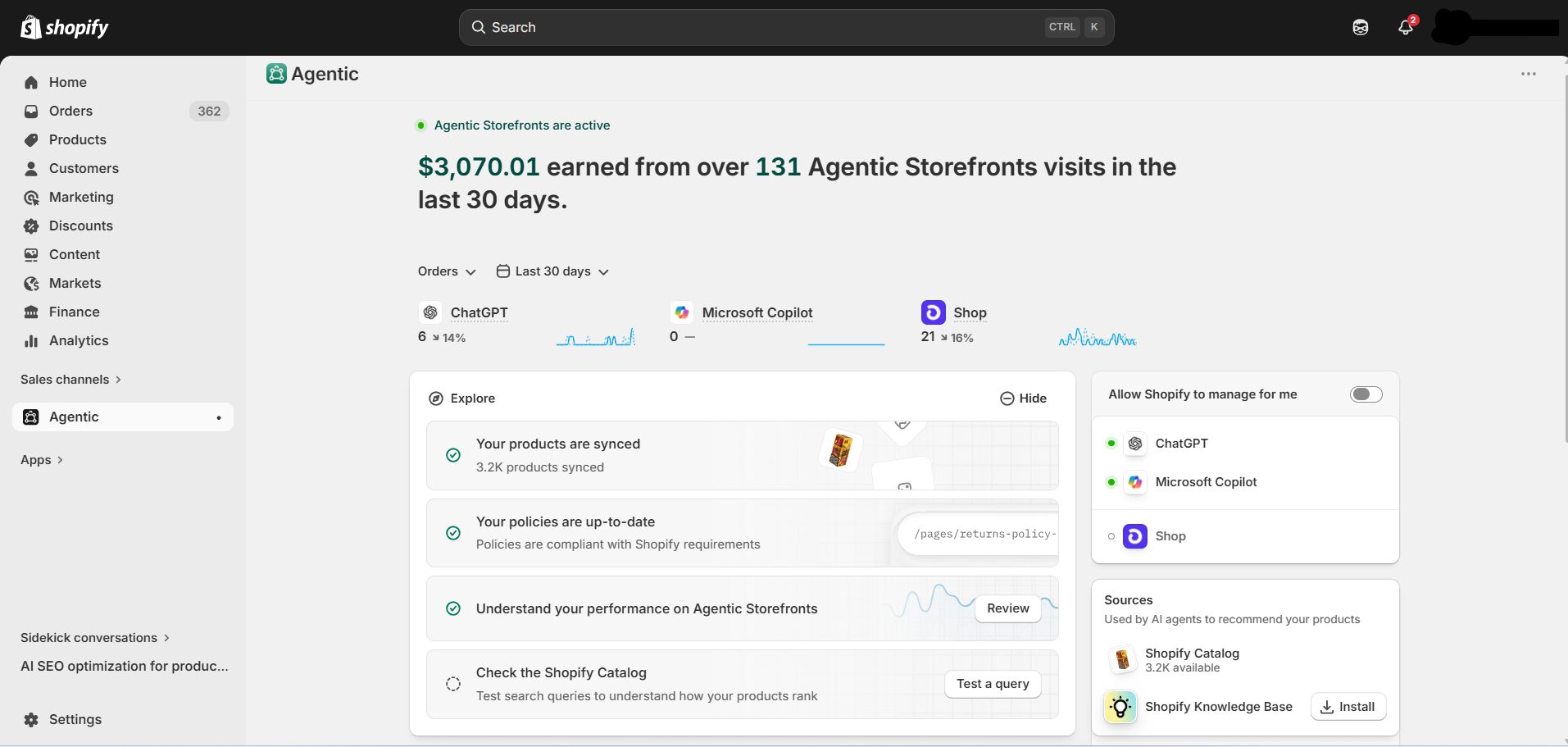
Shopify Agentic Storefronts now has its own section inside Admin — giving you your first real look at how your products appear and perform across AI shopping platforms.
From this section, you can:
- Manage channels like ChatGPT, Microsoft Copilot, and Google AI Mode
- Track sales and performance
- See how your products appear in AI searches
- Get suggestions to improve visibility
Your products are already accessible to these platforms by default through the Shopify Catalog — you were enrolled automatically. If you want to manage individual channels manually or understand what opting out means for your store, this guide on Shopify Agentic Storefronts covers exactly that. Shopify’s Agentic Storefronts official documentation also explains how enrollment and channel controls work.
What’s new is the visibility. AI Shopping Analytics on Shopify is now in one place — channel performance, query rankings, and product data recommendations all together.
Don’t see the Agentic section in your Admin yet? It’s still rolling out. Eligible merchants are expected to receive Admin prompts or updates as access becomes available for their store.
How to Track AI Sales on Shopify — Your New Agentic Dashboard
Go to Shopify Admin → Sales Channels → Agentic. There’s no separate app or additional setup required. If Agentic Storefronts is available for your store, the section will already be there.
Here’s what you’ll find:
Performance Overview (top of page)
View total sales performance data from your agentic storefronts across AI channels over the last 30 days. You can switch between Sales, Orders, Online Store Sessions, and Conversions, and filter by channel — ChatGPT, Microsoft Copilot, Google AI Mode, and Shop.
Explore Section
Two things worth your time here:
- Review — opens the full sales report. Filter by channel, switch between metrics, and set your own date range. Use this to identify which channel is sending high-intent buyers versus casual browsers.
- Check the Shopify Catalog — Run search queries to see how your products might rank in agentic storefronts using the search preview tool.
Sources Section (right side of the page)
Shows the data sources connected to your agentic storefronts, including your Shopify Catalog and Shopify Knowledge Base. If either is incomplete, AI is working with partial information about your store — and that directly affects what it recommends.
For a walkthrough of the Agentic Home dashboard and its available sections, Shopify’s Agentic Home help doc gives an overview of the reporting, search preview, and analytics features.
What This AI Shopping Performance Data Can Actually Tell You
Once you’ve found the Agentic section, the real question is what to do with what you see. Here’s how to read each data point.
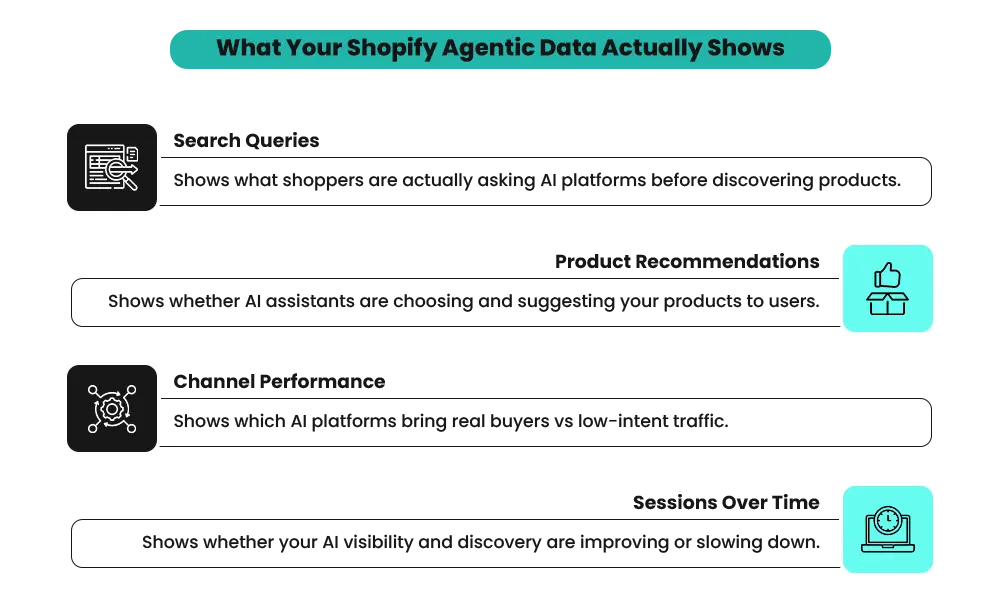
1. Query Rankings — How AI Sees Your Products
If your supplement ranks for “protein powder” but not “protein powder for muscle recovery after workout,” your query data is telling you something specific. AI is matching your product to generic searches but missing the high-intent ones. The shopper looking for a post-workout recovery supplement exists. Your product solves their problem. But your listing never mentions it — so AI can’t make the connection.
2. Channel Performance — Where Your Buyers Actually Are
ChatGPT might be sending 300 sessions but only four orders. Copilot might send 80 sessions but close nine. When you track AI sales on Shopify by channel, you can see which platform is driving buyers and which is driving browsers. Those are two completely different problems — and each one needs a different response.
3. Conversion Rate — Traffic Problem or Store Problem?
Strong sessions with weak conversions on a specific channel mean shoppers are arriving but not buying. That’s rarely the AI platform’s fault. It usually points to something on the product page — missing reviews, an unclear return policy, or a description that doesn’t answer the obvious buying question. The data tells you where to look. Your product page tells you what to fix.
4. Sessions Over Time — Is This Channel Growing?
40 sessions in January, 90 in February, 180 in March — that’s a channel worth investing in. Flat at 30 sessions for three months — that’s a discoverability problem. Track your AI shopping performance month over month. That’s the only way to know which situation you’re actually in.
What to Actually Fix First
Before touching anything, open the Agentic section in your Admin. Look at which products have low or zero AI sessions. Those are your starting point — not your whole catalog.
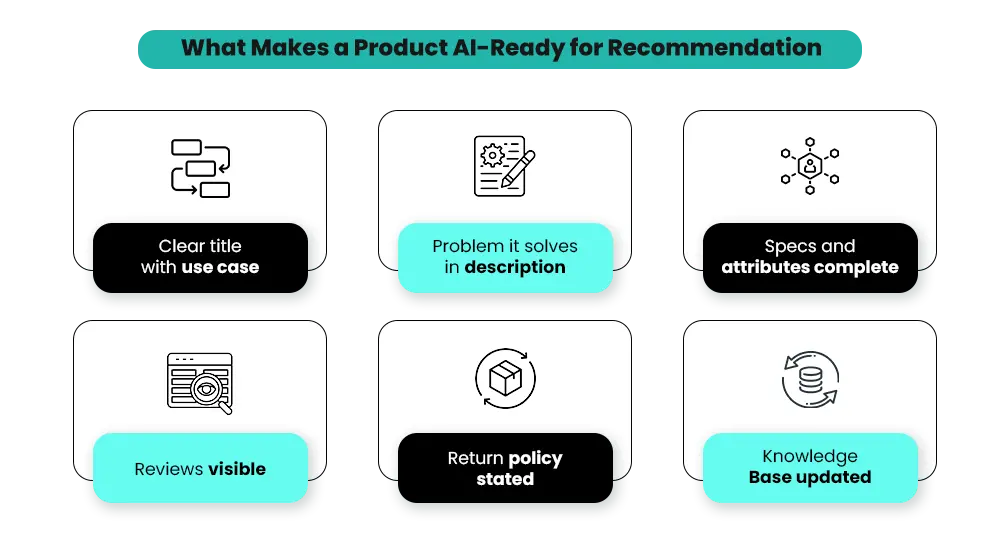
1. Product Titles and Descriptions
This is where most stores are losing AI visibility. If your title is just a brand name and a colour, AI has nothing to work with.
“Whey Protein — Chocolate” tells AI very little. “Whey Protein Powder for Muscle Recovery — 25g Protein Per Serving, Chocolate, 2lb” answers who it’s for, what it does, and what format it comes in. That’s what gets recommended when someone asks ChatGPT for a post-workout protein powder.
The same logic applies to descriptions. Don’t open with “Introducing our best-selling protein.” Open with the problem it solves: “Struggling to hit your daily protein target after training? This gives you 25g per serving with no artificial sweeteners.”
Start with your top five revenue products. Not your whole catalog.
2. Variants, Specs, and Use Cases
When a shopper asks ChatGPT, “What’s a good standing desk for a small home office with dual monitors,” AI scans listings for height range, surface dimensions, weight capacity, and setup type. If those details aren’t in your listing, your product won’t appear — even if it’s a perfect fit.
A listing that says “Electric Standing Desk — 48×24 inch surface, 250lb capacity, dual monitor ready, ideal for home office” will get matched. One that says “Standing Desk — Black, Electric” won’t. Every unanswered spec is a missed match.
3. Reviews, Policies, and Shipping Clarity
AI doesn’t just match on specs. It factors in whether your store looks credible enough to recommend. A product page with 200 reviews, a visible 30-day return policy, and clear shipping timeframes gets recommended more confidently than one with none of those.
Open your product page on mobile. Ask yourself:
- Can you see reviews without scrolling?
- Is the return policy visible before checkout?
- Does shipping time appear on the product page — not just at checkout?
If the answer to any of those is no, that’s your fix.
Products not surfacing in AI search?
4. Shopify Knowledge Base
The Knowledge Base lets you structure FAQs, policies, and brand information so AI shopping agents can better understand and represent your store. You can access it through Shopify’s Agentic Storefronts setup and the Shopify Knowledge Base app. This shapes how AI responds on your behalf when a shopper asks a question mid-conversation.
Think about the three questions your customers ask most before buying. For a skincare brand, it might be “Is this suitable for sensitive skin?” For a supplements brand, “Does this contain allergens?” For a furniture brand, “How long does assembly take?” Those answers belong in your Knowledge Base. If they’re not there, AI either gives a vague answer or skips your product entirely when that question comes up.
5. Catalog Hygiene
A merchant selling the same water bottle in three colours as three separate listings with different titles and categories — AI sees three inconsistent products, and none of them surface confidently. Consolidate variants, fix categories, and remove duplicates. Clean catalog structure improves your AI shopping results across the board, not just for one product.
It also directly affects how AI search engines discover and index your store beyond Agentic channels. This guide on GEO for Shopify explains how that works.
Where to start: Pick your top five revenue products. Run them through points 1, 2, and 3. That gives you a meaningful signal within 30 days without a full catalog overhaul.
Why Some Stores Will See Results Faster Than Others
If your products require research before purchase, AI shopping performance is already relevant for your store right now. Shoppers are asking ChatGPT and Copilot for product recommendations, and AI picks products to suggest based on how clearly they’re described. Detailed listings win. Vague ones don’t.
Categories likely to benefit early include supplements, fitness equipment, skincare, home office furniture, and tech accessories. These share one thing — shoppers usually research before buying, and AI-assisted discovery is becoming part of that research process.
If your products are impulse-driven — trend fashion, novelty gifts, or highly visual items — AI discovery may move more slowly for you compared to social or paid channels.
The same applies to strongly brand-led businesses where most revenue comes from repeat customers. It’s worth monitoring, but it’s not where your attention needs to be first.
If you want to understand how AI search works beyond the Agentic section, this guide on AI SEO for eCommerce covers the broader strategy. For now, the most useful thing is knowing which category you’re in — because it changes how urgently you should be acting on your Agentic data.
Mistakes to Avoid With This Data
Getting access to a new channel is straightforward. Drawing the wrong conclusions from it is easier than most merchants expect.
- Treating this exactly like SEO. A well-optimized Google listing won’t automatically perform well in AI shopping results. AI follows a different logic — a product needs clear context, use cases, and attributes to get recommended. Keyword density alone doesn’t move the needle here.
- Rewriting every product listing at once. Pick your top ten revenue products and fix those first. Trying to overhaul 200 SKUs simultaneously means nothing gets done properly.
- Opening the report once and drawing conclusions. One month of data means very little. Check your Agentic section every month on the same date. Three months of consistent data is the minimum before drawing any real conclusions.
- Confusing being listed with being recommended. Your products can appear in AI data with zero clicks. Visibility is not a recommendation. Clicks and conversions together tell the real story. And when those conversions do happen, they matter more than most merchants realize — according to Adobe Analytics data from March 2026, shoppers arriving from AI sources spend 48% longer on site and browse 13% more pages than non-AI traffic.
Should You Prioritize This Right Now?
AI shopping is not replacing your existing channels overnight. Paid ads, SEO, and email are still driving most revenue — and that won’t change in the near term.
But a new layer is forming. Shoppers are increasingly discovering products through AI conversations before they ever reach a search result or an ad.
If your store depends on new customer acquisition, operates in a competitive category, or sells products that require research before purchase, this deserves attention now. Set up the Agentic section, review your product data, and start monitoring your AI shopping performance monthly.
If your growth is primarily retention-led, keep it on your radar without pulling focus from what’s currently working.
The merchants who get familiar with their AI data early will be better positioned when this channel reaches full scale. The data is there. The channel is live. The question is whether your store is ready for it.
Getting AI traffic but not enough conversions?
Frequently Asked Questions About Tracking AI Sales on Shopify
Still have questions about AI shopping on Shopify? Here are the ones merchants ask most when getting started.
Q: Is the ability to track AI sales on Shopify available for every store?
A: Not yet. Agentic Storefronts are still rolling out and may not be available for all Shopify stores. Some AI channels, including Google AI experiences, also have limited availability. If you don’t see the Agentic section in your Admin, it likely hasn’t reached your store yet. Shopify will notify you by email and Admin notification when it does.
Q: Does AI shopping replace SEO?
A: No — they operate on different surfaces with different logic. SEO determines how you rank in traditional search results. AI shopping performance is about how well AI platforms match your products to shopper queries inside conversations. Strong product data increasingly helps both, but they’re not the same thing and shouldn’t be treated as interchangeable.
Q: What’s the difference between the Shopify Catalog and the Knowledge Base in the Agentic section?
A: The Shopify Catalog is your product data — titles, descriptions, variants, specs, and pricing. The Knowledge Base is your brand information — FAQs, policies, and answers to common pre-purchase questions. AI uses both when responding to shoppers. Gaps in either affect what AI says about your products and whether it recommends your store at all.
Q: How often should I check my Agentic performance data?
A: Once a month is the right cadence. Check it on the same date each month and track the trend — sessions, orders, and conversion rate by channel. Daily checks are too noisy to be useful at this stage. Give the data a few months before drawing strong conclusions about what’s actually working.
Q: If my AI sessions are growing but my overall revenue isn’t, what does that mean?
A: It usually means shoppers are discovering your products through AI but not completing the purchase. That often points to product page issues — weak reviews, unclear return policies, or descriptions that don’t answer key buying questions. It can also mean shoppers are discovering products through AI but converting later through a different path, like a direct visit or branded search, which may not appear in AI revenue attribution.
Q: Is there a minimum traffic volume before the Agentic data becomes meaningful?
A: Shopify doesn’t set a minimum threshold. In practice, patterns usually take a few consistent months to emerge. A single month with low numbers isn’t enough to judge performance. Focus on direction first — are sessions, visibility, or conversions moving up month over month? Early trends matter more than raw volume at this stage.
Need Help Improving Your AI Shopping Performance?
Your products are live on AI channels — but getting recommended consistently is a different challenge. It comes down to how well your store and catalog are structured for AI search, and that’s something many merchants haven’t had to think about before.
If you’re not sure where to start, Shopify AI Search Optimization is designed to identify exactly what’s holding your products back from being discovered and recommended — and fix it in the right order.