Growing a Shopify Plus store feels amazing — until operations take over instead of you. Orders come in fast. Inventory moves more quickly than expected. A risky transaction slips through. A VIP customer doesn’t get special treatment. Suddenly, your team is reacting all day instead of actually growing the business.
That’s where Shopify Flow steps in. Think of Shopify Flow as your behind-the-scenes operations manager. It watches what’s happening in your store and automatically takes action. With the right Shopify flow automation, you can tag high-value orders, flag fraud risks, alert your team about low stock, or segment customers — without lifting a finger.
For Shopify Plus merchants, Shopify Flow isn’t just about saving time. It’s about building systems that scale with you. In this guide, we’ll break down exactly how it works and the 10 must-have automations to set up today.
What is Shopify Flow?
At its core, Shopify Flow is an automation tool built directly into Shopify. It helps you create workflows that run automatically inside your store.
Originally, Shopify Flow was available only to Shopify Plus merchants. It is now also available on Advanced plans. However, Shopify Plus merchants typically benefit more from Shopify Flow due to larger order volumes, more complex operations, and advanced integration needs.
Instead of manually checking orders, tracking inventory, or tagging customers, Shopify Flow does it for you. You set the rules once, and the system follows them every time.
For deeper clarity and practical use cases, please refer to our blog, “Shopify Flow Features: What You Can Automate and How It Works,” where the automation capabilities are explained in more detail.
A Shopify Flow automation works on a simple logic:
If something happens → then do something.
For example:
- If an order is marked as high-risk → hold fulfillment.
- If inventory drops below 10 units → send an alert.
- If a customer spends over $500 → tag them as VIP.
That’s it. The best part? You don’t need coding skills. Everything is built using simple triggers, conditions, and actions inside your Shopify admin.
While Advanced merchants can use Shopify Flow, it becomes especially powerful for Shopify Plus brands managing high-volume orders, multiple workflows, and complex backend systems. In those cases, Shopify Flow often acts as the operational control center that keeps everything organized and efficient
How Does Shopify Flow Work?
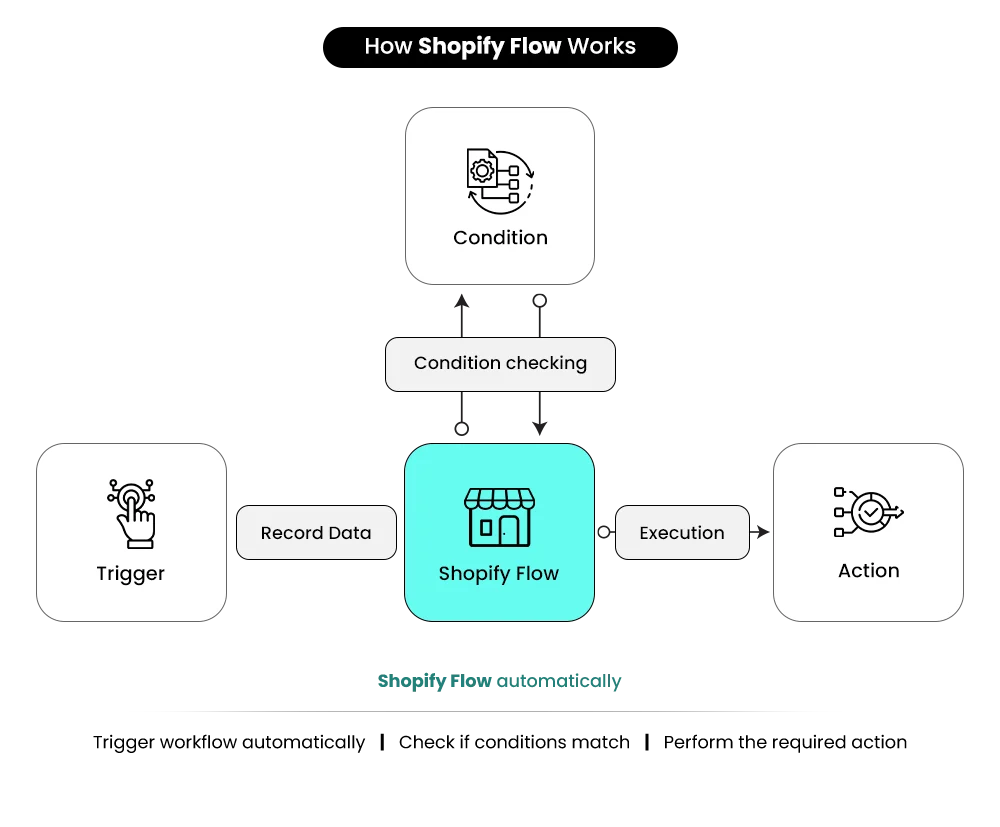
Every workflow inside Shopify Flow follows a clear three-step process. Once you understand this structure, building any Shopify Flow automation becomes much easier.
Step 1: Choose the Trigger
The process begins with a trigger. A trigger is the event that starts the workflow. This could be when an order is created, when payment is marked as high risk, when inventory levels change, or when a return is approved. As soon as this event happens, Shopify Flow activates the workflow.
Step 2: Add Conditions
Next, you define conditions. Conditions act as filters. They check whether certain criteria are met before moving forward. For example, you might set a condition to verify if an order value is above $500, if the customer is purchasing for the first time, or if inventory has dropped below a specific number.
Step 3: Set the Action
Finally, you choose the action. This is what Shopify Flow will automatically do once the conditions are satisfied. The action could be tagging an order, notifying your team, holding fulfillment, or triggering another connected app.
This simple three-step process is what makes Shopify Flow powerful. You define the rules once, and the system handles the rest consistently and automatically.
Shopify Flow vs Third-Party Automation Apps
While third-party automation apps can offer advanced cross-platform integrations, Shopify Flow has a key advantage: it is built directly into Shopify. This means faster performance, native data access, and fewer compatibility issues.
For most Shopify merchants — especially Advanced Plus stores — Shopify Flow is sufficient for operational automation inside the Shopify ecosystem. Third-party tools become useful when automation needs extend beyond Shopify into external systems.
In short, Shopify Flow is ideal for streamlined, in-platform automation, while third-party apps are better suited for broader, multi-platform workflows.
Why Shopify Plus Merchants Need Shopify Flow
As a Shopify Plus merchant, growth brings more than just revenue — it brings complexity. The processes that worked at 50 orders a day often fail at 500. This is where Shopify Flow becomes critical.
- High Order Volume: As order volume increases, small errors become costly. Missed high-value orders, delayed fulfillment, or unchecked high-risk payments can affect revenue and customer trust. Shopify Flow automates these checks, ensuring important orders never go unnoticed.
- Inventory Complexity: Large catalogs and multiple warehouses make manual tracking risky. A smart Shopify flow automation can monitor stock levels, trigger low-inventory alerts, and prevent overselling.
- Returns and Fraud Risks: Scaling stores face more returns and fraudulent transactions. Shopify Flow helps flag risky orders, hold fulfillment when needed, and streamline return management.
- Customer Segmentation at Scale: As your customer base grows, personalization becomes harder. Shopify Flow automatically tags VIPs and repeat buyers, keeping marketing targeted and efficient.
- Operational Efficiency: Ultimately, automation reduces manual work, improves consistency, and allows your team to focus on growth instead of routine tasks.
The Impact of Shopify Flow for Plus Merchants
| Business Challenge | Without Shopify Flow | With Shopify Flow |
| High Order Volume | Manual review, missed priority orders | Automated alerts and tagging |
| Inventory Management | Stockouts or overselling | Real-time low-stock monitoring |
| Returns & Fraud | Delayed review and financial losses | Automatic risk detection and holds |
| Customer Segmentation | Generic campaigns | Automated VIP and behavior-based tagging |
| Operational Workload | Staff are overwhelmed with repetitive tasks | Streamlined and consistent automation |
For Shopify Plus merchants, Shopify Flow is not just about saving time — it is about building a scalable operational foundation that supports long-term growth.
What Happens If You Don’t Automate?
Without automation, operational complexity grows faster than revenue. Teams spend hours reviewing orders, tracking inventory manually, tagging customers, and monitoring fraud risks — increasing the likelihood of human error. Missed high-value orders, delayed fulfillment, overselling, and inconsistent customer segmentation have become common.
As scale increases, this often leads to delayed response times, increased chargebacks, missed revenue opportunities, and even team burnout from handling repetitive tasks manually.
Over time, this reactive approach slows growth, increases operational costs, and limits scalability. For Shopify Plus merchants handling high order volumes, not automating is often more expensive than implementing structured Shopify Flow automation.
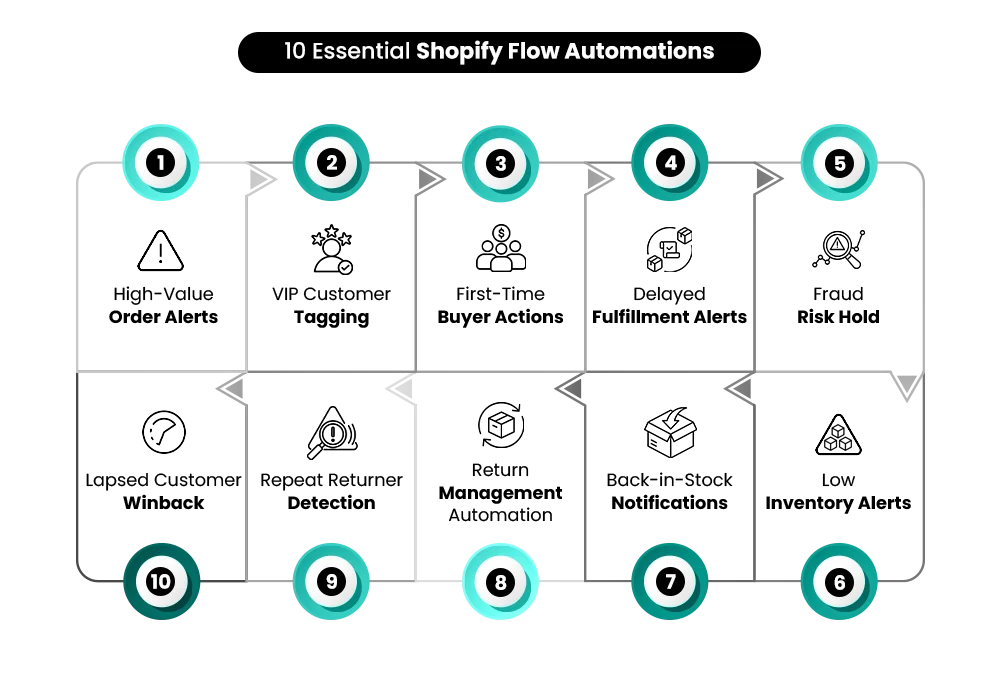
10 Shopify Flow Automations Every Plus Merchant Should Set Up
1. High-Value Order Alerts
What it does:
This automation identifies orders that exceed a predefined revenue threshold and instantly notifies your team. It ensures high-ticket purchases receive immediate visibility without manual monitoring.
How it works:
The workflow is triggered when a new order is created. Shopify Flow checks whether the total order value exceeds your set threshold and, if true, automatically sends an internal notification or tags the order for review.
How to set it up:
- Create a new workflow in Shopify Flow
- Select “Order Created” as the trigger
- Add a condition for total order value
- Define the threshold amount
- Choose notification or tagging action
- Activate the workflow
Why it matters:
Large transactions carry greater fraud and chargeback risk. Automating alerts ensures important orders are reviewed promptly, protecting revenue and customer trust.
2. VIP Customer Tagging
What it does:
VIP Customer Tagging automatically identifies high-value or repeat customers and tags them accordingly. This helps personalize marketing, rewards, and communication strategies at scale.
How it works:
The workflow evaluates customer lifetime spend or order frequency after a purchase. When predefined criteria are met, Shopify Flow assigns a VIP tag to the customer profile automatically.
How to set it up:
- Create a new workflow
- Select “Order Created” or “Customer Created” as a trigger
- Add a condition for lifetime spend or order count
- Define VIP qualification criteria
- Add action to tag the customer
- Activate workflow
Why it matters:
Manual segmentation becomes impossible at scale. Automating VIP tagging ensures your most valuable customers are consistently identified and nurtured.
3. First-Time Buyer Automation
What it does:
This automation detects new customers making their first purchase and triggers onboarding actions. It helps build stronger relationships from the very first order.
How it works:
When an order is created, Shopify Flow checks if it is the customer’s first purchase. If true, it triggers actions such as tagging the customer or sending data to an email platform for a welcome sequence.
How to set it up:
- Create a new workflow
- Trigger: Order Created
- Condition: Customer order count equals one
- Add action (tag customer or send notification)
- Activate workflow
Why it matters:
First-time buyers are more likely to churn. Automated onboarding improves retention and increases repeat purchase rates.
4. Delayed Fulfillment Alerts
What it does:
This workflow monitors orders that remain unfulfilled beyond a defined time frame. It ensures operational delays are flagged before customers are impacted.
How it works:
The automation tracks order fulfillment status and compares it against a time condition. If the order remains unfulfilled after the set duration, it triggers an alert to the team.
How to set it up:
- Create workflow
- Trigger: Order Created or Fulfillment Event
- Add a time delay condition
- Check fulfillment status
- Add internal notification action
- Activate workflow
Why it matters:
Shipping delays damage customer experience. Automating alerts helps resolve bottlenecks faster.
5. Fraud Risk Hold Automation
What it does:
This automation flags high-risk orders based on fraud analysis and places them on hold for manual review.
How it works:
When an order is created, Shopify Flow checks the fraud risk level. If marked as high risk, it automatically tags the order or pauses fulfillment.
How to set it up:
- Create workflow
- Trigger: Order Created
- Condition: Fraud risk equals high
- Add action to tag or hold fulfillment
- Activate workflow
Why it matters:
Chargebacks and fraudulent orders directly impact profitability. Automation reduces risk without constant manual monitoring.
6. Low Inventory Alerts
What it does:
This automation monitors product stock levels and sends alerts when inventory falls below a defined threshold.
How it works:
When inventory levels change, Shopify Flow checks whether stock is below the set minimum. If the condition is met, it triggers a notification.
How to set it up:
- Create workflow
- Trigger: Inventory Quantity Changed
- Add a condition for the minimum stock level
- Add notification action
- Activate workflow
Why it matters:
Overselling damages brand trust. Automated stock monitoring improves planning and prevents stockouts.
7. Back-in-Stock Automation
What it does:
Back-in-Stock Automation identifies when out-of-stock products are replenished and triggers customer notifications.
How it works:
When inventory is updated, Shopify Flow checks if stock has moved from zero to available. If true, it triggers tagging or sends data to marketing tools for notifications.
How to set it up:
- Create workflow
- Trigger: Inventory Quantity Changed
- Condition: Previous stock equals zero
- Add notification or integration action
- Activate workflow
Why it matters:
Customers waiting for products are highly motivated buyers. Automated notifications recover lost sales.
8. Return Management Automation
What it does:
This workflow streamlines the return process by tagging return requests and triggering internal notifications.
How it works:
When a return is initiated, Shopify Flow evaluates the return status and applies tags or alerts to ensure proper processing.
How to set it up:
- Create workflow
- Trigger: Return Created
- Add relevant condition if needed
- Add tagging or notification action
- Activate workflow
Why it matters:
Returns increase with scale. Automation improves consistency and reduces processing errors.
9. Repeat Returner Detection
What it does:
This automation identifies customers who frequently return products and flags them for review.
How it works:
The workflow tracks return frequency per customer. If the return count exceeds your defined limit, Shopify Flow applies a specific tag.
How to set it up:
- Create workflow
- Trigger: Return Created
- Add a condition for the return count threshold
- Tag customer profile
- Activate workflow
Why it matters:
Frequent returns can indicate abuse or sizing issues. Detection helps reduce financial losses.
10. Enterprise Operations & B2B Automation Framework
What it does:
Automates complex workflows across wholesale, ERP systems, and multi-store environments to support enterprise infrastructure.
Use Cases Include:
B2B Pricing & Wholesale Logic
- Automatically tag approved wholesale customers
- Apply custom pricing eligibility tags
- Notify sales teams when high-value B2B orders are placed
- Flag orders that exceed wholesale credit limits
ERP & Backend Integration Logic
- Send high-value or B2B order data to ERP systems
- Trigger fulfillment sync alerts if inventory mismatches occur
- Notify operations teams when order data fails to sync
Multi-Store Automation
- Tag customers based on region or storefront
- Route internal notifications to region-specific teams
- Monitor inventory across expansion stores
- Standardize automation logic across multiple storefronts
How it works:
Using triggers such as “Order Created,” “Customer Tagged,” or “Scheduled Time,” Shopify Flow applies enterprise logic conditions and triggers structured backend actions or integrations.
Why it matters:
At enterprise scale, complexity is the real challenge. This level of automation ensures that B2B operations, backend systems, and multi-store environments stay aligned — reducing operational risk while supporting global growth.
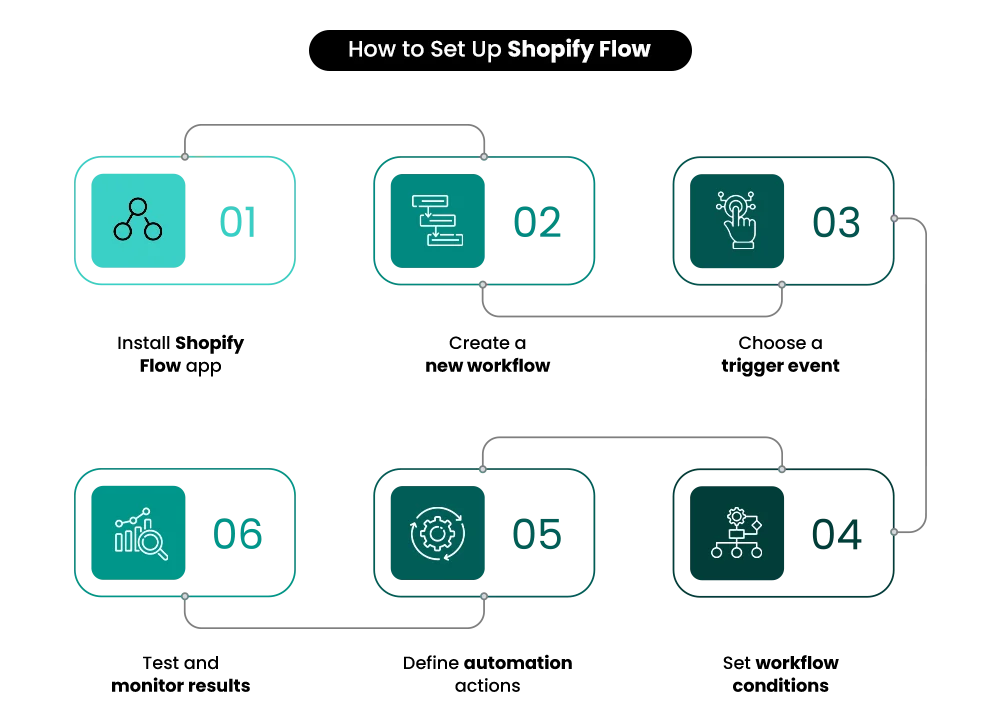
How to Set Up Shopify Flow (Step-by-Step Overview)
1. Install Shopify Flow
If you are on Shopify Plus, Shopify Flow is available within your admin. Go to the Shopify App Store, search for Shopify Flow, and install it in your store. Once installed, you can access it directly from your Shopify admin dashboard.
2. Create a New Workflow
Open Shopify Flow and click “Create Workflow.” You can either start from scratch or choose from pre-built templates depending on your use case. Templates are helpful if you’re just getting started.
3. Add a Trigger
Every workflow starts with a trigger. A trigger is the event that starts the automation — such as “Order Created,” “Customer Created,” or “Inventory Quantity Changed.” Choose the trigger that aligns with your business need.
4. Add a Condition
Conditions define the logic of your automation. This is where you set rules, such as order value exceeding a certain amount, fraud risk level being high, or inventory falling below a threshold.
5. Add an Action
Actions are what happen when conditions are met. This could include tagging a customer, sending an internal notification, holding fulfillment, or integrating with another app like Slack or your email platform.
6. Test and Monitor
Before relying fully on automation, test your workflow to ensure it behaves as expected. Monitor performance regularly and adjust conditions or thresholds as your business scales.
Build Your Shopify Store From Scratch With Mastroke
Launch faster with Mastroke, an official Shopify Partner. We build structured stores with conversion-first design, clean setup, and features built to scale!!
Common Mistakes to Avoid with Shopify Flow
While Shopify Flow can significantly improve operational efficiency, poorly configured automation can create more problems than it solves. Avoiding common setup mistakes ensures your workflows remain scalable, reliable, and easy to manage.
| Mistake | What Happens | Why It’s Risky | Recommended Fix |
| Overcomplicating Workflows | Too many conditions and actions in one flow | Difficult to debug and scale | Keep workflows simple and modular |
| Not Testing Automation | Incorrect tags, missed alerts, wrong action | Can impact fulfillment or customer communication | Always test before full activation |
| Workflow Conflicts | Multiple automations act on the same trigger | Data inconsistencies and operational confusion | Audit workflows regularly to avoid overlap |
| No Clear Naming or Ownership | Team confusion about purpose or creator | Lack of accountability and optimization | Use structured naming conventions and assign ownership |
By keeping workflows simple, tested, and well-documented, Shopify Plus merchants can ensure their Shopify Flow automation supports growth instead of creating operational friction.
Benefits of Shopify Flow for Plus Merchants
As Shopify Plus merchants scale, operational complexity increases rapidly. Manual processes that once worked efficiently begin to slow teams down and create room for costly errors. This is where Shopify Flow automation delivers measurable operational and financial impact.
Saves time – Automates repetitive tasks, freeing teams to focus on strategy and growth.
- Reduces errors – Minimizes manual mistakes in tagging, fulfillment, and order monitoring.
- Improves customer experience – Ensures faster responses, accurate segmentation, and smoother operations.
- Protects margins – Flags fraud risks, prevents overselling, and reduces chargebacks.
Scales operations without hiring – Handles increasing order volume without expanding headcount. By implementing structured Shopify Flow automation, Plus merchants create systems that support sustainable growth — improving efficiency, protecting revenue, and enabling scale without operational strain.
For a broader understanding of how Shopify Plus supports scaling brands beyond automation, you can also read our blog, “Shopify Plus for Enterprise Growth: Features & Benefits.”
Conclusion
Scaling a Shopify Plus store is not just about selling more — it’s about operating smarter. As order volumes grow, customer data expands, and risk increases, manual processes become bottlenecks. Shopify Flow eliminates that friction by turning repetitive tasks into intelligent automation. It gives Plus merchants control, consistency, and operational clarity at scale.
The smartest approach is to start with focused, high-impact workflows — such as fraud monitoring, high-value order alerts, or customer tagging — and then expand gradually. Automation works best when it’s structured, tested, and aligned with business goals. Over time, these workflows compound into a scalable system that supports growth without increasing complexity.
In today’s competitive ecommerce landscape, automation is not optional — it’s a strategic advantage. If you’re ready to unlock the full power of Shopify Plus, partner with Mastroke and build automation systems designed for serious growth.
FAQs
1. Is Shopify Flow free?
Shopify Flow is included at no additional cost for merchants on Shopify Plus. Meaning, Shopify Flow is available on the Advanced and Shopify Plus plans.
2. Is Shopify Flow only for Plus?
Yes, Shopify Flow is primarily available for Shopify Plus merchants. It is built to handle complex workflows and high-volume operations that typically come with enterprise ecommerce businesses.
3. Can Shopify Flow send emails?
Shopify Flow cannot directly send customer marketing emails on its own. However, it can trigger actions such as sending internal notifications or integrating with email marketing platforms like Klaviyo to automate customer communication.
4. Can Shopify Flow automate returns?
Yes, Shopify Flow can automate parts of the return process. It can tag return requests, notify teams, flag repeat returners, and trigger internal workflows to streamline return management.
5. Does Shopify Flow require coding?
No, Shopify Flow does not require coding. It uses a visual workflow builder with triggers, conditions, and actions, allowing merchants to create automation using a no-code interface.