This blog post guides Shopify store owners through choosing between three storefront options: pre-built themes, section-first builds, and full custom builds. It explains when each approach makes sense based on business stage, budget, and specific needs to avoid costly timing mistakes.
Every Shopify store owner hits this decision sooner or later. Some face it right at launch — wondering if a simple $400 Shopify theme is enough or if they should invest in a proper custom build from the start. Others face the same question later, when the business grows faster than the storefront can keep up, and even small layout changes suddenly need a developer.
Get it wrong in either direction, and it costs you. Go custom too early, and you’ve spent $20,000+ on a store that didn’t need it yet. Stick with a theme too long, and you’re running paid traffic to a storefront that’s quietly throttling your conversion rate.
This guide breaks down the real difference between a pre-built Shopify theme, a full custom build, and the Section-First approach — a middle option most brands never hear about — so you can make the right call for where your store actually is right now.
What You’re Actually Comparing
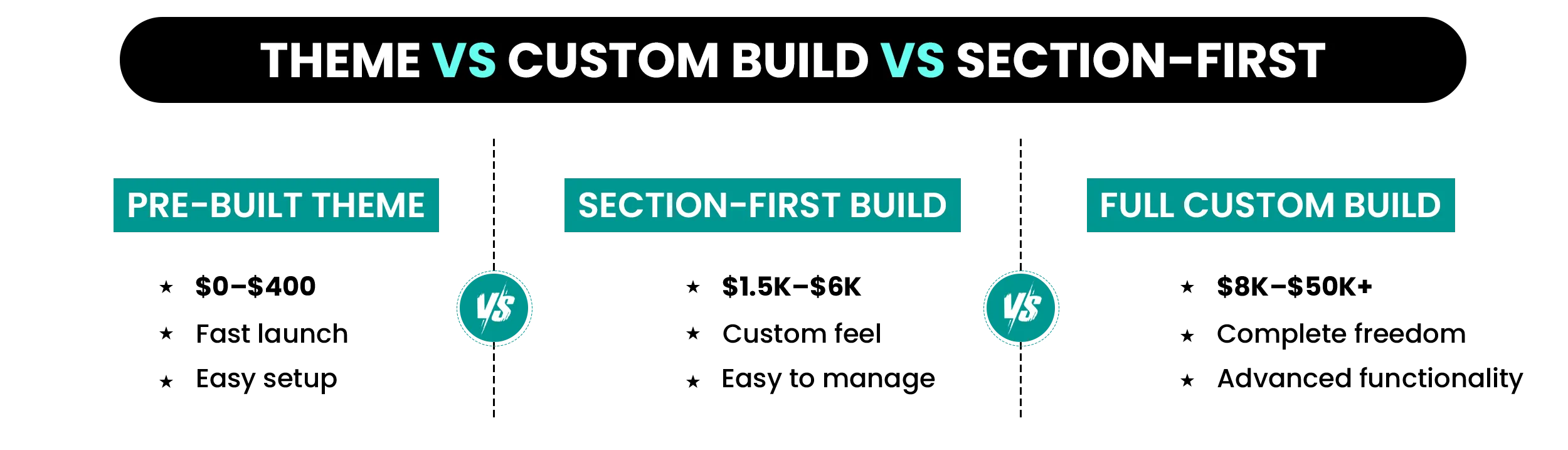
Most merchants think they’re choosing between two options when there are actually three.
Pre-Built Theme
A ready-made storefront from the Shopify Theme Store configured through Shopify’s native editor. The layouts, design system, and sections all come bundled with the theme.
Section-First Build
A storefront designed around your brand using Shopify’s native Sections and Blocks system. It delivers a more custom feel without requiring a fully custom codebase.
Full Custom Build
A completely custom Shopify storefront with bespoke Liquid development, custom frontend architecture, advanced integrations, and full design flexibility.
| Category | Pre-Built Theme | Section-First Build | Full Custom Build |
|---|---|---|---|
| Cost | $0–$400 | $1,500–$6,000 | $8,000–$50,000+ |
| Time to Launch | Days–2 weeks | 3–6 weeks | 3–6 months |
| Design Flexibility | Low–Medium | Medium–High | Full |
| Maintenance | Low | Low | High |
| Best For | Early-stage stores | Growing brands | Enterprise operations |
Pre-Built Shopify Themes: What You Get and Where They Stop Working
What a Pre-Built Theme Actually Gives You
The Shopify Theme Store offers a curated library of themes across nearly every niche — apparel, electronics, beauty, home goods, and more — with multiple style variants available inside each theme.
Every modern Shopify theme is built on Online Store 2.0, which means sections can be used across the entire store — not just the homepage — giving merchants far more layout flexibility without touching code.
A well-configured paid theme with strong product photography, clean navigation, and the right section structure will outperform a poorly executed custom build almost every time.
Many brands doing millions in annual revenue still run on paid themes. The quality of execution matters far more than whether the store was technically custom. For brands launching or growing below $200K/year, a paid theme is usually the right starting point. A $400 investment can realistically pay for itself within the first week if the product and offer are strong.
Before you pick one, it’s worth knowing how to evaluate themes beyond just how they look — this guide on how to choose the right Shopify theme for your store walks through the functional criteria that actually drive conversions.
Where Themes Start Hitting Their Limits
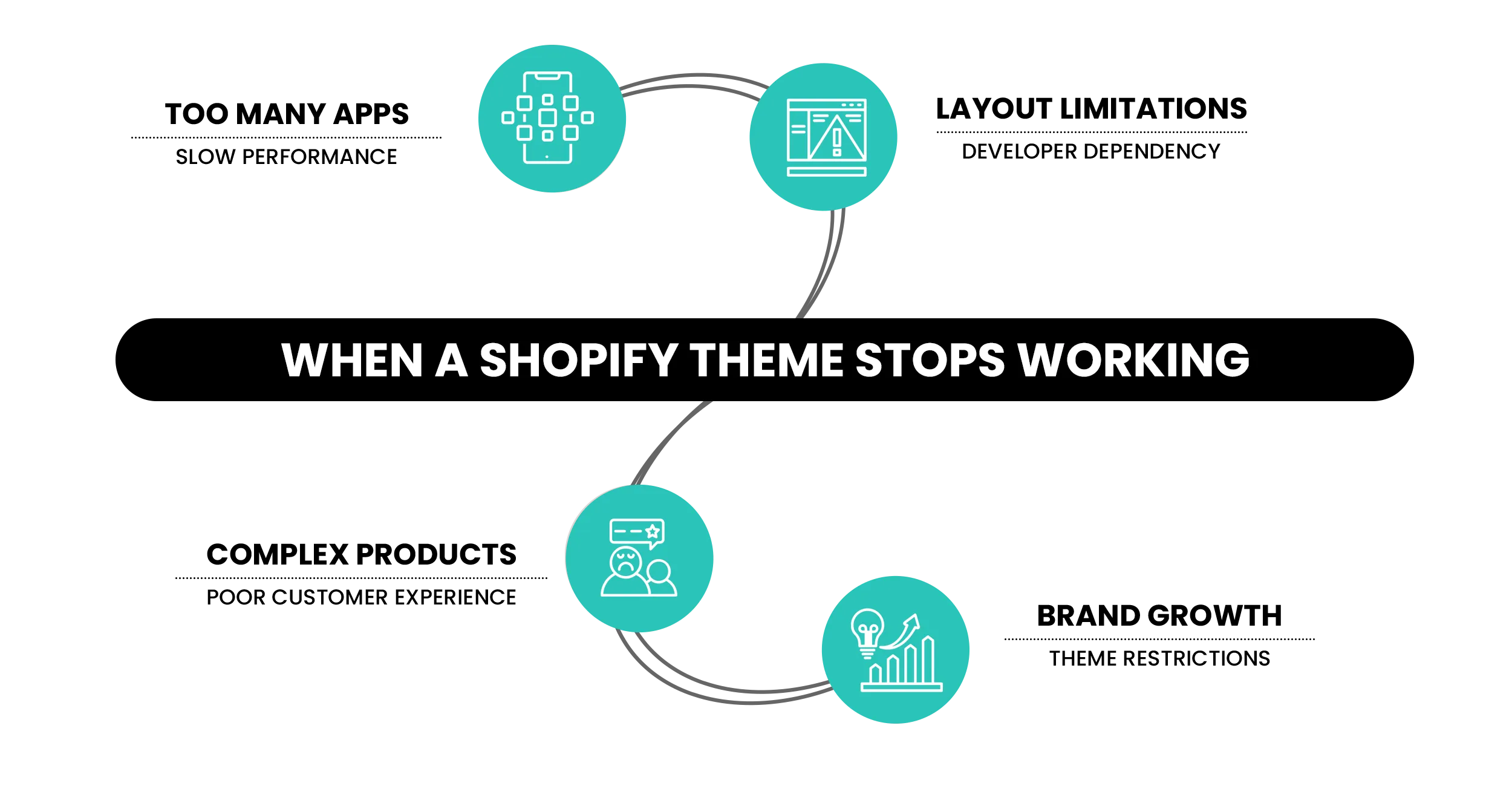
A pre-built Shopify theme eventually stops being enough when your store starts needing functionality or flexibility the original theme was never designed to support.
01. Your store needs advanced experiences like configurators, subscriptions, bundles, or custom filtering systems.
02. Your brand has outgrown the theme’s design system and every update feels restrictive.
03. App scripts, widgets, and third-party integrations have gradually slowed the store down.
04. Every meaningful layout change now requires a developer or custom code edits.
If two or more of these are true right now, it’s worth reading about the 10 signals that indicate it’s time to redesign your Shopify store before deciding whether a tweak or a full rebuild is the right path.
What “Custom” Actually Means on Shopify
Custom on Shopify doesn’t mean rebuilding the commerce engine itself. Shopify still handles checkout, payments, cart functionality, and order management regardless of how the storefront is built.
What becomes custom is the frontend experience — the design system, page architecture, layout structure, interactions, and storefront logic created specifically for the brand.
Every section, script, and design element exists intentionally instead of carrying the leftover code and unused features bundled into many pre-built themes. That reduces unnecessary CSS, JavaScript, and legacy app code that often slows storefronts down over time.
That means no unused theme components loading in the background, no bloated CSS from disabled features, and no unnecessary JavaScript running because of old app installations. Custom builds also allow deeper integrations with Shopify Functions, including advanced discount systems, B2B pricing logic, and checkout behaviors that standard apps often can’t replicate cleanly.
Improve Speed, UX, and Conversion Without Rebuilding Everything
A slow storefront, bloated app stack, or weak mobile experience quietly hurts conversion long before most brands notice. Mastroke helps identify exactly where performance and UX issues are costing revenue.
When a Custom Build Actually Makes Sense
A fully custom Shopify build only makes sense once the business has genuinely outgrown what themes and lightweight customization can realistically support.
01. Revenue has crossed $1M–$2M and conversion issues are directly tied to the current storefront structure.
02. The store needs advanced experiences like configurators, virtual try-ons, or complex B2B functionality.
03. You’re migrating from a legacy ecommerce platform with a complex catalog and operational setup.
04. The same layout and design limitations keep returning even after switching themes multiple times.
If several of these issues already exist, a fully custom storefront may be the more sustainable long-term solution.
What Custom Shopify Builds Really Cost
Freelance Shopify developers typically charge anywhere between $30–$165/hour, depending on experience level. Most mid-to-senior developers handling full custom builds fall somewhere in the $75–$150/hour range.
The bigger cost surprise usually isn’t the build itself — it’s the ongoing maintenance required to keep a custom storefront aligned with Shopify’s platform updates and evolving checkout infrastructure.
Shopify continues rolling out new features, deprecating older approaches, and updating its platform architecture. Without an active maintenance process, custom storefronts slowly drift out of alignment over time. Ongoing development retainers usually range between $500–$3,500/month, depending on the agency, workload, and how actively the storefront evolves.
On top of that, some Shopify apps behave differently on fully custom storefronts because app developers often build against Shopify’s standard theme architecture. That means additional integration work can become necessary every time new functionality gets added.
The Section-First Build: The Middle Option Most Brands Never Hear About
This is where most growing brands eventually land once they understand all three options. It’s also the option that rarely gets explained properly.
Shopify’s Online Store 2.0 changed how storefronts can be built by making sections available across every page — not just the homepage. Before that, creating custom-feeling layouts usually meant writing Liquid code from scratch.
A Section-First build uses Shopify’s native Sections and Blocks system to create a storefront that feels custom — without the long-term overhead of a fully custom build.
Instead of rebuilding the entire Shopify theme architecture, a Section-First build uses flexible native sections to create a storefront that matches the brand while keeping the backend lightweight and easy to manage.
Performance: Loads as fast as native Shopify themes without unnecessary code slowing the store down.
Flexibility: Content, layouts, and images stay editable through Shopify’s Online Store Editor after launch.
Timeline: Most Section-First builds launch within 3–6 weeks instead of several months.
Cost: Usually ranges between $1,500–$6,000 instead of full custom build pricing.
For brands between $200K and $2M in annual revenue, this is often the ideal middle ground — a storefront that feels branded and scalable without the cost or maintenance burden of a full custom build.
Does Build Type Actually Affect Speed and SEO?
Page Speed and Core Web Vitals
This part gets misunderstood constantly. Build type doesn’t automatically determine speed — execution does. A clean, well-configured theme can easily outperform a bloated custom storefront. Most Shopify performance problems come from the same issues regardless of build type: oversized images, excessive app scripts, render-blocking JavaScript, and third-party code injections.
The build type sets the ceiling. Execution determines whether the store actually reaches it.
Most Shopify stores can achieve strong Core Web Vitals scores when image compression, script management, and above-the-fold rendering are handled properly.
SEO
Custom builds provide deeper control over schema markup, heading structure, and technical SEO implementation. Themes limit some of that flexibility slightly. In practice, though, the SEO difference between a well-configured theme and a clean custom build is usually small. Content quality, internal linking, page structure, and authority drive far more ranking impact than the storefront architecture itself.
How to Decide: A Framework Based on Where Your Brand Is Right Now
The right build choice depends less on what looks impressive and more on where the business actually is today.
Choose a Pre-Built Theme If:
You’re launching or still validating the product
Annual revenue is below $200K
Your catalog and checkout flow are relatively straightforward
You need to launch within the next couple of weeks
Your total build budget is under $2,000
Choose a Section-First Build If:
Annual revenue sits between $200K–$2M
Your current theme limits layout flexibility and branding
You want a storefront your team can manage without constant developer help
The product is validated and now the storefront needs to catch up to the brand
Choose a Full Custom Build If:
Annual revenue is above $2M and conversion limitations are measurable
The storefront requires advanced UX like configurators, B2B systems, or headless architecture
You’re already operating on Shopify Plus with custom functionality requirements
You already have a development team or long-term agency support in place
For Shopify Plus brands specifically, enterprise features sometimes remove the need for a fully custom storefront altogether. The platform itself now handles much more than it did a few years ago.
Cost Breakdown: Real Numbers Across All Three Options
| Cost Area | Pre-Built Theme | Section-First Build | Full Custom Build |
|---|---|---|---|
| Initial Build | $0–$400 | $1,500–$6,000 | $8,000–$50,000+ |
| Launch Configuration | $500–$1,500 | Included | Included |
| Monthly Maintenance | Near zero | Low | $1,000–$3,500/mo |
| App Integration Work | Rare | Rare | $200–$1,000 each |
| Year 1 Total | $500–$2,500 | $2,500–$8,000 | $20,000–$90,000+ |
The biggest cost rarely appears on the invoice itself. If a full custom build takes four months to launch while your store is already processing $50,000/month, that’s roughly $200,000 in revenue still flowing through a storefront that wasn’t ready yet.
The Mistakes Brands Make When Choosing
Going Custom Too Early
One of the most common mistakes is brands at $100K–$200K in annual revenue spending $25,000+ on a custom build before they’ve actually proven their conversion model. A custom storefront doesn’t fix weak positioning, poor offers, or unclear messaging. If those fundamentals aren’t working yet, rebuilding the storefront usually just makes the same problem more expensive.
Staying on a Theme Too Long
The opposite problem happens just as often. Brands doing $1M+ in revenue keep stretching the same theme with more apps, scripts, and custom code injections long after the storefront has stopped scaling cleanly. At a certain point, the maintenance cost, performance degradation, and operational friction make a Section-First rebuild cheaper than continuing to patch the existing storefront together.
Choosing Based on Looks Instead of Conversion
A visually impressive storefront still fails if the mobile UX is cluttered, the hierarchy is confusing, or the add-to-cart flow is weak. The build decision should start with how the store needs to sell — not how impressive the homepage looks in a mockup.
Launching Without a Maintenance Plan
Shopify evolves constantly. Features change, older systems get deprecated, and checkout infrastructure keeps moving forward. The retirement of Shopify Scripts is a perfect example. Brands without an active development relationship were suddenly forced to migrate checkout logic to Shopify Functions under tight deadlines — and many realized too late how dependent their storefront had become on ongoing technical maintenance.
Planning a More Advanced Shopify Build?
For brands moving beyond standard themes and lightweight customization, Mastroke helps plan scalable Shopify Plus storefronts with stronger checkout experiences, automation, and enterprise-ready architecture.
Conclusion
Pre-built themes work. Section-First builds work. Custom builds work.
What doesn’t work is choosing the wrong one for where the business actually is right now.
A well-configured paid theme will consistently outperform a neglected custom storefront. A Section-First build closes the gap for most growing brands without the cost or long timelines of fully custom development. A custom build only makes sense once the business has genuinely outgrown what standard themes can support — and has the resources to maintain something more advanced long term.
The goal isn’t building the most impressive storefront possible. It’s building the one that converts properly today and still supports the business 18 months from now without needing another rebuild.
Need Help Deciding Which Direction Makes Sense?
Mastroke helps brands plan, rebuild, and scale Shopify storefronts across all three approaches — from optimized theme setups to Section-First builds and fully custom Shopify development.
Explore Shopify Development Services →
FAQs
1. How much does a custom Shopify store cost in 2026?
A full custom Shopify build typically runs $8,000–$50,000, depending on scope — number of custom templates, integration requirements, and checkout logic complexity. Enterprise agency builds go higher. If you want a custom-looking storefront without that investment, a Section-First build ($1,500–$6,000) delivers most of the same outcome in a fraction of the time, with far lower ongoing maintenance costs.
2. Is a Shopify theme good enough for a serious brand?
Yes — for most brands, especially those under $500K in annual revenue. Paid themes like Impulse and Prestige are built for conversion and are actively used by brands doing millions in annual revenue. The question isn’t whether a theme is serious enough. It’s whether your specific requirements have grown past what the theme’s architecture can handle.
3. What is a Section-First Shopify build, and how is it different from a custom build?
A Section-First build uses Shopify’s native Sections and Blocks system to create a custom-designed storefront without writing Liquid code. The result is a store designed to brand specification, fully editable by the merchant, that loads as fast as any native theme. It differs from a full custom build in that it runs on Shopify’s standard rendering infrastructure — which keeps costs and ongoing maintenance low while still delivering a genuinely custom look and feel.
4. How long does a custom Shopify build take?
Full custom builds typically take three to six months from brief to launch. Section-First builds take three to six weeks. Theme setups take days to two weeks. That timeline difference is a real business cost — if your store generates $50,000 a month, a four-month custom build means four months of revenue running through whatever you’re on now. Factor that into the decision, not just the upfront price.
5. Does a custom Shopify build improve SEO compared to a theme?
It can, but it’s not automatic. Custom builds give full control over heading structure, schema markup, and URL architecture — all of which matter for SEO. But a well-configured theme with strong content, fast load times, and clean internal linking will outrank a poorly built custom site. Execution and content quality account for far more of the ranking difference than build architecture does.
6. Can I switch from a theme to a custom build later without losing SEO rankings?
Yes, with careful planning. The key steps are preserving your URL structure, setting up 301 redirects for any changed URLs, keeping page titles and meta descriptions consistent, and not removing content that currently ranks. A well-managed migration causes no meaningful SEO impact. A poorly managed one — especially one that changes URL patterns without redirects — can cause ranking drops that take months to recover from.
7. How do I know if my current theme is holding my store back?
Check four things: your Core Web Vitals scores in Google Search Console (an LCP above 2.5 seconds is a real conversion problem), your mobile checkout abandonment rate, whether routine layout changes require a developer every time, and whether your app stack has grown past 15 tools to compensate for what the theme can’t do natively. If two or more of those are true, the build is costing you revenue.