This blog post explains how to conduct a proper Shopify CRO (Conversion Rate Optimization) audit to identify why stores have traffic but poor sales conversion rates. It provides a structured framework for diagnosing conversion problems through data analysis rather than making random changes to store elements.
Traffic is coming in. Sessions are up, ad spend is consistent, and on the surface, the store looks fine. But sales aren’t where they should be.
You’ve tried fixing things. A new hero banner. A different button color. Updated product images. Maybe a new Shopify app someone recommended. Nothing moved the needle — and you’re not sure why.
The problem usually isn’t what you fixed. It’s that you fixed things without knowing what was actually broken.
According to Littledata’s benchmark data from over 2,800 Shopify stores, the average Shopify store converts at just 1.4% of visitors — meaning 98 or 99 out of every 100 people leave without buying. That gap isn’t a traffic problem. Sending more traffic into a store that isn’t converting doesn’t fix the conversion problem. It just makes the loss bigger.
That’s what a Shopify CRO audit is designed to solve. Not guesswork. Not a redesign. A structured process that looks at your funnel data, customer behavior, and page-level experience together — to find exactly where visitors drop off and why.
This is the 7-point framework Mastroke runs with every Shopify client before making a single recommendation or change. If your traffic is growing but conversions are flat, this is where to start.
What a CRO Audit Actually Does — And What It Doesn’t?
A CRO audit is a diagnosis. You’re not redesigning the store. You’re finding what’s actually causing visitors to leave without buying.
It’s different from a regular site review, which usually catches surface-level problems — a broken link, a slow image, a missing CTA. A Shopify CRO audit looks deeper: funnel behavior, page-level friction, data patterns, customer language, and performance — together, not separately.
The most common mistake merchants make is running A/B tests before running an audit. That’s like trying different treatments before knowing what’s wrong. You might land on something, but you’ll mostly be testing the wrong things on the wrong pages.
When a CRO audit makes sense:
- Traffic is growing, but your Shopify conversion rate is flat or declining
- A product launch or campaign underperformed despite strong traffic numbers
- Something changed — a theme update, a new app, a redesign — and sales dropped afterward
- You’re spending on paid ads, but the return isn’t improving
When it’s too early:
If your store is getting fewer than 500–1,000 sessions per month, there isn’t enough data to identify real patterns. At that stage, building traffic is the priority. An audit needs volume to find a signal.
A good CRO audit doesn’t give you opinions. It gives you specific problems on specific pages — with specific evidence behind each one.
Before You Start — The Data You Need Ready
Before reviewing a single page, you need three types of data. Without them, you’re making decisions based on assumptions — and fixing assumptions is exactly what a CRO audit is meant to replace.
Before diving in, it’s also worth going through a Shopify store audit checklist to make sure you’re not missing foundational issues before the CRO work begins.
1. Analytics data — what the numbers say
Use Shopify Analytics and GA4 together. Either one alone misses things the other catches. What to pull before starting:
- Conversion rate broken down by device and traffic source
- Add-to-cart rate across your key product pages
- Funnel drop-off — which stage is ending the most sessions
- Landing page performance by campaign or channel
One number to anchor on: add-to-cart rate. According to Littledata, the average add-to-cart rate for Shopify stores is 4.6%. If yours is below that, the problem is happening before the cart — on the product page or landing page — not at checkout. That one number tells you where to look first.
2. Behavior data — what people actually do on the page
Analytics tells you how many people came and left. It doesn’t tell you what they did in between. Heatmaps and session recordings show you where attention went and where it stopped.
Look for: how far people scroll before leaving, what they click on (including things that aren’t clickable), and whether the add-to-cart button is even visible before most people stop scrolling.
Tools: Microsoft Clarity (free), Hotjar, Lucky Orange.
3. Customer voice — what people actually say
This is the most underused input in most CRO audits. Reviews, support tickets, and pre-purchase questions contain the exact language customers use when they’re hesitant about buying. That language belongs on your product pages — not buried in your inbox or ignored entirely.
With all three data types together, you’re not guessing anymore. You’re finding patterns across multiple sources — which is how you separate real problems from surface-level ones.
Is Your Shopify Store Getting Traffic But Not Sales?
A Shopify CRO audit reveals where your store is losing revenue. Mastroke helps you identify drop-offs, fix friction points, and turn more visitors into paying customers—without increasing ad spend.
The 7-Point Shopify CRO Audit Framework
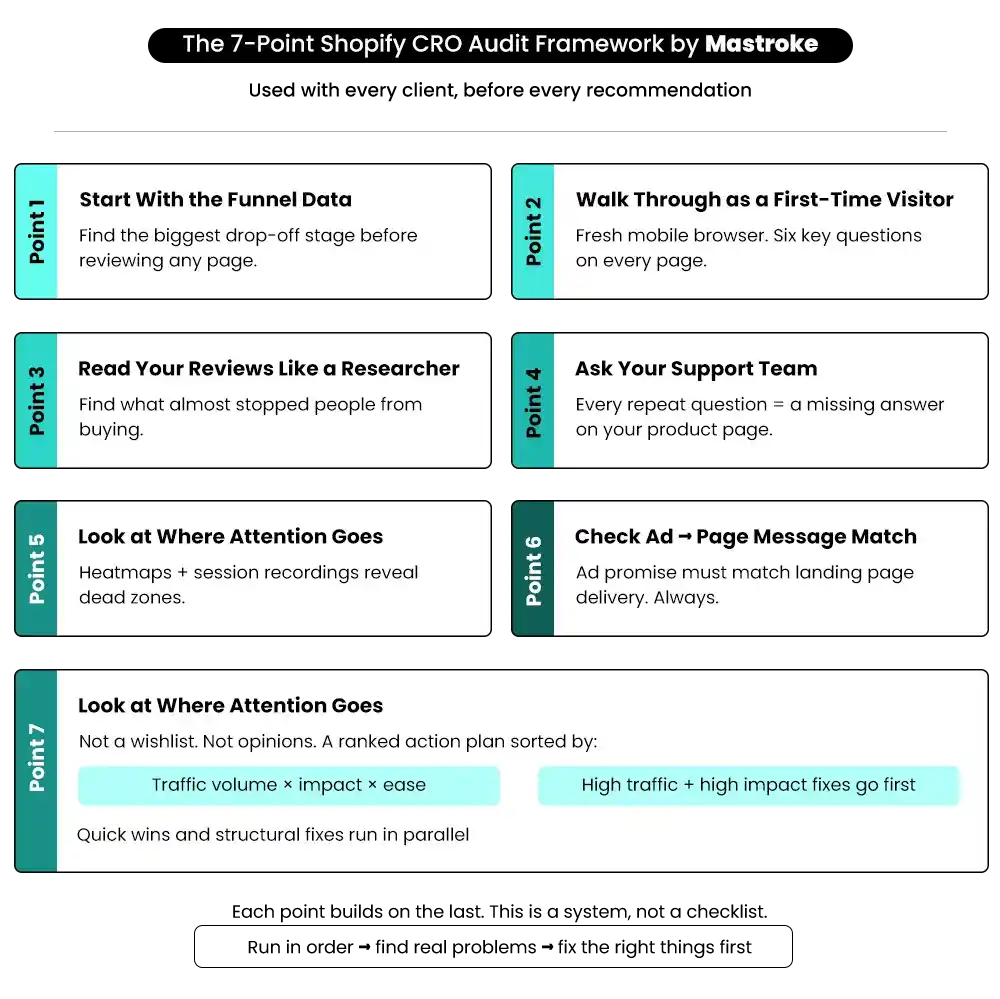
Point 1 — Start With the Funnel Data, Not the Design
Before looking at a single page, look at the numbers.
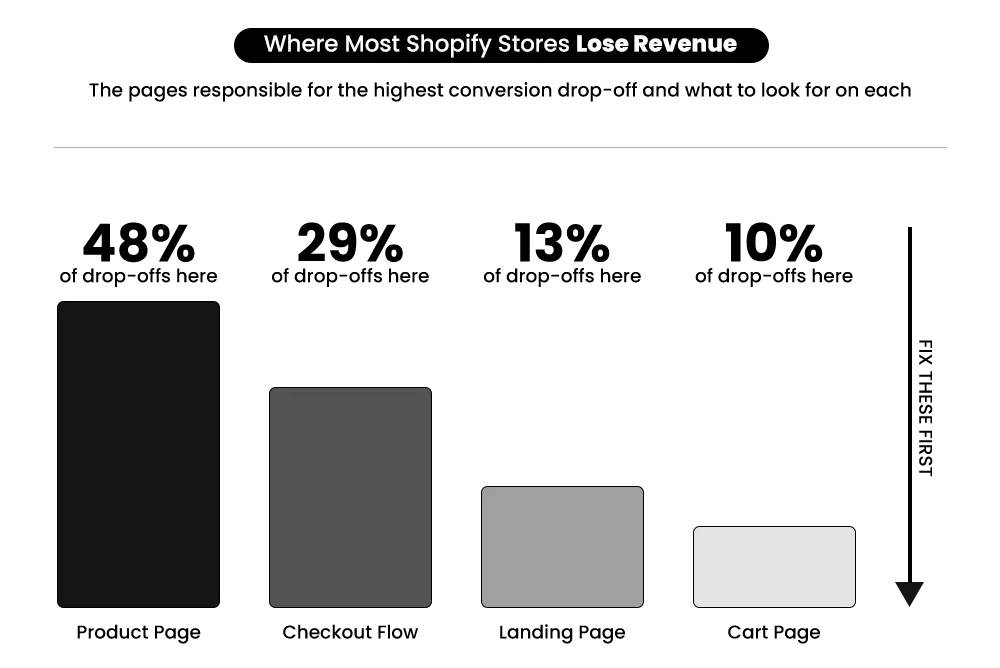
Pull your full funnel from analytics: landing page → product page → cart → checkout → purchase. Find the stage with the biggest percentage drop-off. That’s where the audit needs to focus most of its attention.
Then check device performance separately. Statista data shows that 73% of global eCommerce sales now come from mobile devices. Yet most self-audits happen on a laptop.
If 70% of your traffic comes from mobile but your desktop conversion rate is significantly stronger, the mobile experience is broken — even if it looks fine on your laptop. Speed is often part of that gap, too. If you haven’t looked at load times recently, these Shopify performance optimization strategies are worth working through before anything else.
The first rule of CRO for Shopify stores: fix the biggest leak first, not the easiest one.
This step sets the direction for everything that follows. It tells you which parts of the audit deserve the most time, so you’re not spending a week on checkout when the real problem is happening two stages earlier.
Point 2 — Walk Through Your Store Like a First-Time Visitor
Open your store on a fresh mobile browser — not your admin panel, not a device you’ve used to browse the store before. See exactly what a new customer sees.
The first screen matters more than most merchants realize. Within a few seconds, a visitor decides whether they’re in the right place and whether it’s worth staying. Ask yourself:
- Is it immediately clear what this store sells?
- Is there a reason to keep scrolling?
- Can a visitor figure out what to do next without having to think?
Then move through each key page with these six questions:
- Does this page match what my ad or link promised?
- Is the value of this product clear — not just the specs, but why it matters to the customer?
- Is there a reason to act now rather than come back later?
- What doubts might someone have at this point?
- What’s pulling attention away from the purchase?
- Is it easy to find what I’m looking for without scrolling or hunting?
Common findings at this stage: Hero sections that look clean but say nothing useful. Product pages that describe features but never explain what problem the product actually solves. Checkout pages with no trust signals — no returns policy, no security badge, nothing that answers the question “is this safe to buy from?”
The goal isn’t to judge the design. It’s to feel the friction a real customer would feel — because they feel it every single visit. The easiest way to spot these issues is to actually see how real users experience your store — not how it looks from the backend.
📌 Key Video
>
>
Point 3 — Read Your Reviews Like a Researcher
Most merchants read reviews to check satisfaction. In a CRO audit, you read them for something different: what almost stopped someone from buying. Look specifically for phrases like:
- “I was hesitant at first because…”
- “I almost didn’t order because…”
- “I wasn’t sure if this would…”
These are your conversion barriers — written in plain language by people who went through your funnel. They’re telling you exactly what your product page failed to address before they bought.
Also, pay attention to what convinced people. If customers consistently mention a specific reason they finally decided to buy, and that reason isn’t visible on your product page — that’s a conversion gap costing you sales every day.
3-star reviews are often more useful than 5-star ones. A 3-star review mentioning confusion about sizing, returns, or shipping is a specific, fixable problem. A 5-star review usually isn’t.
This also works with competitor reviews. Reading what customers say about similar products in your category — especially what they complain about — shows you trust gaps you can address that your competitors haven’t. If you want to understand how reviews connect directly to conversion decisions, this piece on why Shopify reviews aren’t improving conversion rate goes deeper into that relationship.
Point 4 — Ask Your Support Team What Customers Keep Asking
Your customer support inbox is one of the most valuable CRO inputs your store has. Most merchants never look at it this way.
Every question a customer asks before buying is a trust gap your product page didn’t fill. If someone has to send a message to ask “What’s your return policy?” or “Will this work for my skin type?” — that information needs to be on the page. Visible. Before the question even forms.
One conversation with your support team can surface problems that weeks of analytics work won’t show you. Ask them:
- What’s the most common question customers ask before placing an order?
- What’s the most common reason people reach out after buying?
- What do people seem most confused about — the product, the offer, or the process?
Example: If five customers a week are asking whether a supplement is safe to take alongside medication, that’s a missing section on your product detail page. Adding a clear FAQ takes an hour. But it removes a friction point that’s been quietly stopping purchases every single week.
This connects directly to how you manage trust at scale. If you haven’t built a systematic approach to review and trust signals across your store, this guide on online review management for Shopify stores covers that process well.
This step takes the least time of any in the audit. And the fixes it uncovers are often the quickest to implement.
Point 5 — Look at Where Attention Actually Goes
Analytics tells you how many people visited a page and how many left. Heatmaps tell you what happened in between — where attention went and where it didn’t.
Set up heatmaps and session recordings on your highest-traffic pages — especially your main product pages and landing pages — and look for three things:
- Scroll depth: How far are people getting before they leave? If most visitors stop halfway down the page, everything below that point is invisible. That matters especially if your key trust signals — reviews, guarantees, return policy, shipping info — are placed below where most people stop scrolling.
- Click patterns: What are people clicking on? Pay close attention to dead clicks — places where visitors tap or click and nothing happens. On product pages, this is often a variant image or a size guide that looks clickable but isn’t.
- Mobile thumb zones: On mobile, where is tapping concentrated? If people are navigating away via the header or tapping around the page without engaging with the product, the mobile layout isn’t working.
According to the Baymard Institute, the average documented online shopping cart abandonment rate is 70.19%, and a significant portion of that is due to checkout friction, which is only identified in behavior data, not just drop-off numbers.
A common finding at this stage: the section that gets the most engagement — often customer reviews or a key benefit block — is placed below the fold. Moving it higher is a low-effort change that’s usually worth testing immediately.
Point 6 — Check Whether Your Ads and Pages Are Telling the Same Story
This is one of the most expensive disconnects in Shopify stores — and one of the least talked about. Your ad makes a promise. The page that receives that traffic needs to keep it. When there’s a gap between what the ad says and what the page shows, visitors drop off within seconds. Not because the page is bad. Because the experience broke continuity.
How to check it:
- Pull your top-performing ad creatives. Open the exact page where that traffic lands. Then ask:
- Does the page headline reflect what the ad promised?
- If the ad led with social proof, does the landing page show social proof above the fold?
- Is the same tone, offer, and visual language carried from the ad to the page?
Also, look at the offer itself. If your ad is sending traffic to a product priced at ₹2,500 but free shipping only starts at ₹5,000, customers feel that friction even when they don’t say it out loud. It creates a sense that something is slightly off — and they leave.
The fix isn’t always a new page. Sometimes it’s one line of copy. It’s moving a review block above the fold. And sometimes it’s making sure the same image from the ad appears at the top of the landing page so the customer feels continuity from click to purchase.
Message match is one of the highest-return fixes in Shopify conversion rate optimization — and one of the most consistently missed. This is also why Shopify landing page optimization matters beyond the page itself. If the page isn’t built to match what the traffic source is saying, it doesn’t matter how well it’s designed.
Point 7 — Build a Prioritized Fix List, Not a Wishlist
After the first six steps, you’ll have a long list of problems. That’s normal. The last step is deciding which ones to fix first — and in what order. The rule: high-traffic pages before low-traffic pages.
A 2% improvement on a product page that gets 40,000 monthly visitors moves significantly more revenue than a 20% improvement on a page that gets 400. Start where the volume is.
Score each finding on two factors:
- Impact — how much could this realistically improve conversion rate on a page with real traffic?
- Ease — how quickly can this be done with the resources you have?
- Weight impact higher. A harder fix with high impact still belongs before an easy fix with low impact.
Not everything needs an A/B test before you act. If your product page is missing a return policy and that gap came up in both customer reviews and support tickets, just fix it. The evidence is already there across two independent sources.
What a useful priority list looks like:
- Specific page
- Specific problem
- Specific fix
- Expected impact
- Who owns it and when
Separate quick wins from structural changes — and work on both tracks in parallel. Quick wins (fixing headline clarity, adding review counts above the fold, correcting CTA placement on mobile) can go live this week. Structural changes — full page redesigns, checkout flow restructuring — take longer but carry higher impact. Running both simultaneously keeps momentum going while bigger changes are in progress.
Common Mistakes Shopify Merchants Make During a CRO Audit
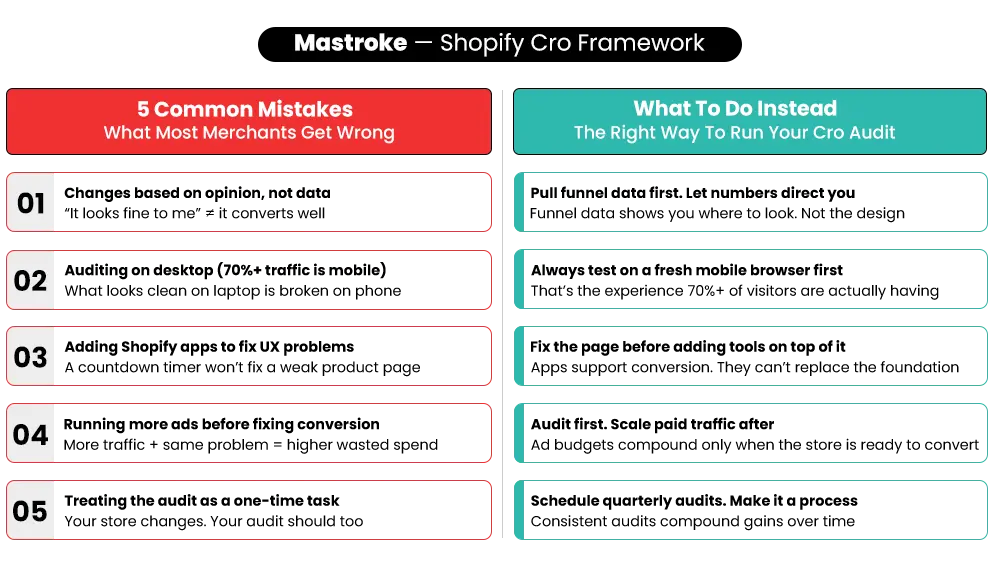
Even with the right approach, most merchants run into the same patterns when they try to audit their own store.
Making changes based on opinion, not data
“I think the checkout page looks fine” isn’t data. If your funnel shows a 60% drop-off at checkout, it isn’t fine — regardless of how it looks. Opinion-based changes are how stores end up fixing the right things in the wrong way.
Auditing on desktop when most traffic is mobile
73% of global eCommerce sales come from mobile devices. Most self-audits happen on a laptop. These are two completely different experiences. If you haven’t walked through your store on a fresh mobile browser, you’ve missed most of the friction your customers are actually experiencing.
Adding Shopify apps to solve UX problems that apps can’t fix
A countdown timer doesn’t solve a trust problem. A pop-up doesn’t fix a product page that never clearly explains what the product does. Shopify apps can support conversion — but they can’t replace the foundational work.
Running more paid ads before fixing conversion
More traffic into a store that isn’t converting means more wasted ad spend. The acquisition cost goes up. The return doesn’t. According to Littledata, stores with poor on-page experience consistently sit at or below 1% conversion rate — meaning they’re spending on ads to drive traffic into a funnel that was never going to convert.
Treating the audit as a one-time task. Your store changes
The Store’s traffic mix changes. Your offers change. A CRO audit that accurately reflected your store six months ago may not match what’s happening now. Revisiting it regularly — especially after significant changes — is what keeps improvements compounding over time.
What Happens After the Audit?
The audit is the beginning of the process, not the end of it.
Once you have a prioritized fix list, the next job is implementing changes and measuring what moves. Did the add-to-cart rate improve? Did revenue per session increase? Set a baseline before making changes — that’s how you know whether a fix actually worked.
Most Shopify stores start seeing meaningful movement within 30–60 days when they work through the priority list in order — quick wins first, structural fixes running in parallel.
One thing worth expecting: after fixing the biggest problem, a new one becomes visible. That’s not a sign that something went wrong. It’s a sign the process is working. CRO is a loop, not a checklist you complete once.
If your store is on Shopify Plus and the audit surfaced issues at scale — checkout customization, multi-market performance, flow-level drop-offs — those usually require more depth than a standard audit covers. That’s where Shopify Plus CRO work makes a real difference, because the problems at that level are different from what a standard store faces.
For stores on any plan, if the fixes require design and development work you don’t have in-house, that’s where working with a Shopify agency makes sense. Not because you can’t do it yourself, but because the time it takes to build those skills while running the store often means the most important fixes don’t happen fast enough to matter.
The Starting Point Is Always the Same
Getting traffic to a Shopify store is hard. Losing that traffic at the product page or checkout — without knowing why — is a problem that compounds every month it goes unfixed.
A proper Shopify CRO audit gives you a clear picture of what’s actually happening. Not assumptions. Not opinions. A specific set of problems with a specific order to fix them.
This 7-point framework is how Mastroke starts every new client engagement — before any redesign, before any A/B test, before any recommendation. Because changing things without understanding what’s broken is how stores stay stuck at the same conversion rate for years.
If you’re getting traffic and conversions are flat, this framework is your starting point. If you’d rather have a team run it with you, our Shopify CRO service covers the full audit process — identifying where your store is losing revenue and building a prioritized fix list with the evidence to back it.
Ready to Turn More Traffic Into Revenue?
You’ve seen how a Shopify CRO audit uncovers what’s holding your store back. Mastroke helps you go beyond insights—fixing conversion gaps, optimizing your funnel, and scaling revenue with a data-driven approach.
Frequently Asked Questions About Shopify CRO-
Q: What is a Shopify CRO audit, and why does it matter?
A: A Shopify CRO audit is a structured review of your store’s full conversion funnel — looking at analytics, on-page behavior, and customer feedback together — to find exactly where visitors are dropping off and why. It matters because most stores lose the vast majority of visitors before a purchase, and fixing the right things in the right order is what actually moves revenue. Without an audit, you’re making changes without knowing what’s actually broken.
Q: How often should I run a CRO audit on my Shopify store?
A: A full audit makes sense every 3–6 months, or after any significant change to your store — a new theme, a product launch, a shift in your primary traffic source, or a noticeable drop in conversion rate. Stores running active paid campaigns or scaling quickly may benefit from more frequent reviews, since traffic behavior and offer performance change faster at higher volume.
Q: What’s a good conversion rate for a Shopify store?
A: According to Littledata’s benchmark data, the average Shopify store converts at around 1.4%. A rate above 3.2% puts you in the top 20% of Shopify stores. Comparing your rate against your own historical data — and tracking trends over time — is more useful than benchmarking against broad industry averages alone.
Q: What’s the difference between a CRO audit and A/B testing?
A: A CRO audit finds the problems. A/B testing validates the fixes. You need the audit first — otherwise you’re running tests on pages that may have much bigger, unfixed issues underneath the thing you’re testing. A/B testing without an audit is how stores end up improving a button color while missing a checkout flow that’s losing half their buyers.
Q: How long does a Shopify CRO audit take?
A: A thorough audit typically takes 1–2 weeks when done properly — including data collection, behavior analysis, customer feedback review, and building a prioritized action list. Moving faster usually means skipping the steps that surface the most actionable findings. Rushing the diagnosis leads to fixing the wrong things first.