This blog post is a comprehensive guide to the best Shopify review apps in 2026, explaining how they help convert hesitant shoppers into buyers by building trust through customer reviews. The post covers both free and paid options with specific recommendations based on different store needs and business stages.
You spend time getting traffic to your Shopify store. A shopper lands on your product page, reads the description, likes what they see — and then hesitates. No reviews. No photos from real customers. No proof that anyone has bought it and been happy.
That moment of hesitation is where most stores lose the sale. Reviews fix it. They give a new visitor a reason to trust you before they’ve experienced your store firsthand. And with the right Shopify review app, collecting and displaying that trust becomes automatic — no manual work needed every day.
This guide covers the best Shopify review apps in 2026, both free and paid, with clear guidance on which one fits your store’s size, budget, and goals.
⚠️ If you’re still on Shopify’s native review app: Shopify discontinued it in 2024. Your existing reviews are still visible, but new reviews have stopped being collected. Every app in this guide supports importing your existing reviews, so you won’t lose what you’ve already built.
What Shopify Review Apps Actually Do for Your Store
Getting happy customers is one thing. Getting them to leave a review is another.
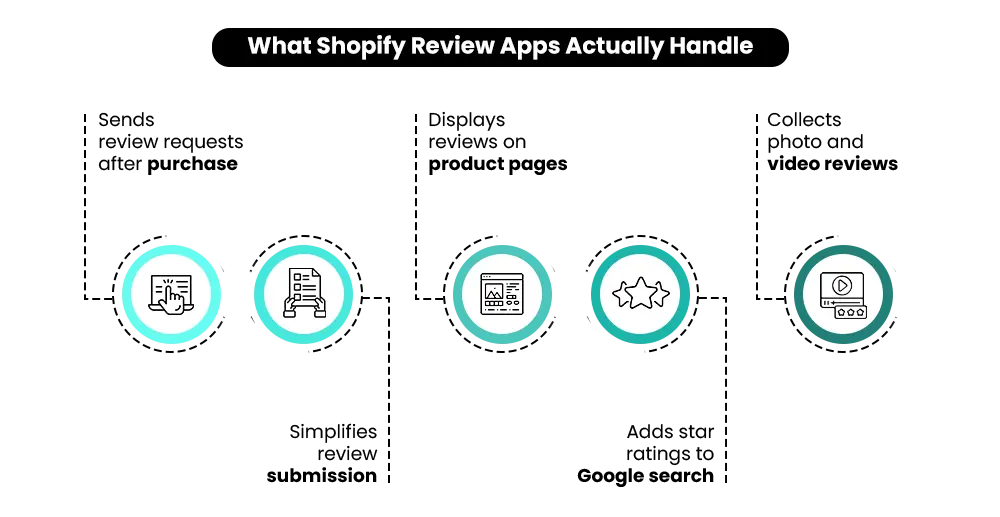
A review app automates the ask — sending post-purchase emails at the right time, making submission easy, and displaying reviews in a way that actually influences buyers. The best Shopify review apps go further than that:
- They show star ratings in Google search results (called rich snippets), which brings in more clicks from organic traffic before a buyer even lands on your site.
- They make it easy to collect photo and video reviews, which convert significantly better than text alone. According to Power Reviews, nine in ten shoppers are more likely to buy a product that has photo or video reviews.
You can browse all the options on the Shopify App Store — but with over a hundred apps listed, it’s easy to pick the wrong one. This guide cuts through that.
Free vs. Paid Shopify Review Apps: Which One Do You Need?
This is the question most merchants ask first, and the answer is simpler than it seems.
A free plan makes sense if you’re launching a new store, have low order volume, or just need the core mechanics working without adding to monthly costs. Judge.me’s free plan is genuinely strong — this isn’t a situation where “free” means stripped-down. You get unlimited review requests, photo and video reviews, and rich snippets out of the box. Many stores run on it indefinitely.
A paid plan starts making sense when you need:
- Advanced widget customisation that matches your exact brand aesthetic
- Photo and video review flows with built-in incentives
- Automation that connects directly to your email or SMS platform
- Deeper analytics on what your reviews are actually doing for conversions
- Loyalty and referral features are bundled alongside reviews
The mistake most merchants make isn’t choosing free over paid. It’s choosing a paid plan that’s more complex than their current stage requires.
That said, plan selection is only part of it. What happens after install — when the request fires, what it says, how the follow-up is structured — is where most stores quietly lose reviews they should have been collecting. If that side of your setup hasn’t been looked at, this guide to building a review collection flow breaks down it by product type, with the message copy and sequence that actually gets responses.
Quick Comparison: Best Shopify Review Apps
| What You Need | Best App | Why |
|---|---|---|
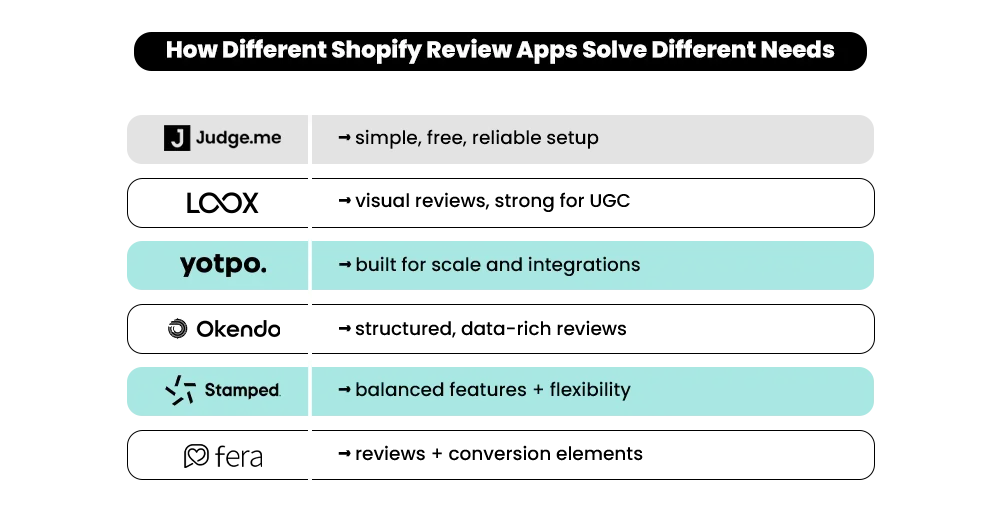
| Best free Shopify review app | Judge.me | Unlimited reviews, photo support, rich snippets — all on the free plan |
| Best for photo and video reviews | Loox | Built for visual brands with polished UGC galleries |
| Best for scaling brands | Yotpo | Reviews plus loyalty, SMS, and retention tools in one ecosystem |
| Best for premium DTC brands | Okendo | Attribute-based reviews, clean UX, strong customer data integration |
| Best balanced alternative | Stamped.io | Reviews plus loyalty with good customisation across plans |
| Best for conversion widgets | Fera | Reviews combined with trust elements and urgency displays |
Best Shopify Review Apps in 2026
All pricing verified as of May 2026. App pricing changes frequently — confirm current plans on each app’s Shopify App Store listing before committing.
1. Judge.me — Best Free Shopify Review App
Judge.me consistently comes up as the top recommendation for good reason. Its free plan includes features that most competitors charge a monthly fee for.
You get unlimited review requests, photo and video support, rich snippets for Google, and review widgets — all without spending a dollar. The onboarding is clear, the setup takes less than an hour, and the front-end experience makes it genuinely easy for customers to leave a review.
Where Judge.me stands out beyond the feature set is performance. It has one of the smallest impacts on Core Web Vitals of any review app available. A heavy widget that slows your pages can quietly cost you more in lost sales than it adds in trust — so this matters more than most merchants realise.
Best for: New Shopify stores, budget-conscious merchants, and anyone who wants a reliable review system without monthly costs.
Pricing: Free plan available. Paid plan (Awesome Plan) starts at $15/month, which adds in-email review forms, so customers can submit without clicking through to your site.
Watch out for: The interface is functional rather than visually polished. If brand aesthetics are a high priority, a paid alternative may feel more refined.
2. Loox — Best for Photo and Video Reviews
Loox is designed specifically to help stores collect and display photo reviews. If your products look better when real customers show them — fashion, beauty, home goods, accessories — Loox is likely the strongest fit.
The app makes photo and video submission as easy as possible for customers, and equally easy for you to display in ways that influence buyers: gallery-style widgets, review carousels, and product page displays that stay clean and on-brand. Paid plans also include automated review request emails and referral features.
The underlying case for visual reviews is strong. Bazaarvoice’s 2025 Shopper Experience Index, cited by Shopify, found that shoppers who engage with UGC reviews convert 144% more often and generate 162% higher revenue per visitor than those who don’t.
Best for: Fashion brands, beauty stores, lifestyle products, home décor — any category where customer photos carry real conversion weight.
Pricing: Free beginner plan available ($0/month). Paid plans start at $39.99/month (Scale), $49.99/month (Convert), and $299.99/month (Unlimited).
Watch out for: If photos aren’t central to your product category, you may end up paying for a feature set you rarely use.
3. Yotpo — Best for Growing and Scaling Brands
Yotpo has been in the Shopify reviews space longer than almost anyone. Over time it’s grown from a review app into a full customer retention platform — with modules for reviews, loyalty programs, and SMS that are built to work together from day one.
The reviews product itself is solid: Q&A functionality, strong display customisation, Google Shopping and rich snippet integration, and review collection via both email and SMS. For stores that are scaling and want to consolidate their retention tools under one roof, Yotpo makes that path cleaner. Instead of stitching together separate tools for reviews, loyalty, and SMS later, you build on one platform from the start.
Best for: Mid-size to large Shopify stores, brands with growing catalogs, merchants thinking about long-term retention alongside reviews.
Pricing: No free plan. Starter at $79/month (up to 500 orders/month), Pro at $169/month, Premium at custom pricing.
Watch out for: More than an early-stage store typically needs. Pricing scales with order volume, which can add up quickly if you’re growing fast.
4. Okendo — Best for Premium DTC Brands
Okendo is the review app of choice for many high-performance direct-to-consumer brands that want a more data-rich, branded experience.
Its most useful feature is attribute-based reviews. Customers don’t just leave a star rating and a sentence — they rate specific things like fit, quality, or value. That level of detail helps undecided buyers make faster decisions. If you sell clothing, tech products, or anything where shoppers need specifics before buying, attribute-based reviews do real work on your product pages.
Okendo also prioritises page load performance, which makes it well-suited for Shopify Plus stores where every millisecond matters. Pricing is custom and scales with your order volume — contact Okendo directly for a current quote.
Best for: Premium DTC brands, Shopify Plus stores, merchants who want richer customer data and a more polished review experience.
Pricing: Paid plans available with a free trial. Pricing is custom and based on order volume — request a quote directly from Okendo.
Watch out for: Better suited for growing or established stores. More setup than an early-stage brand typically needs.
5. Stamped.io — Best Balanced Alternative
Stamped sits in an interesting position in the market. It brings review collection, loyalty features, and NPS tools together in one platform, which appeals to merchants who want to consolidate without fully committing to an ecosystem like Yotpo.
It supports photo and video reviews, sends automated review requests by email or SMS, connects with Google Shopping, and lets you share reviews in ads. If you’re looking for a tool that does a lot of things at a reasonable level of depth, Stamped is worth shortlisting.
Best for: Mid-market stores comparing all-in-one options, brands that want reviews and loyalty under one roof without a custom enterprise setup.
Pricing: Reviews plans start at $199/month. Loyalty plans start at $299/month. Lifecycle plans start at $499/month. Multi-product bundles start at $798/month with a 20% discount. Smaller stores can explore lower-cost self-serve tiers via the Shopify App Store. No free plan.
Watch out for: The price point is high compared to most other tools, especially for stores primarily needing review collection. Some merchants have also reported the review widget can be slow to load — worth testing before committing.
6. Fera — Best for Conversion-Focused Stores
Fera is a good choice if you want reviews alongside trust-building elements — things like social proof popups, recent purchase notifications, and urgency widgets that work in tandem with your review displays.
It’s one of the more straightforward apps to get up and running, and it works across multiple platforms (Shopify plus Wix, for example), which makes it useful for merchants with a presence beyond Shopify. The review displays look professional from day one without heavy configuration.
Best for: New or small stores wanting a polished review setup quickly, conversion-focused merchants, and stores selling across multiple platforms.
Pricing: No free plan. Paid plans start at $9/month (billed monthly) or $7/month (billed yearly) for up to 100 order review requests. Plans scale by order volume up to $999/month. Every plan includes a free trial.
Watch out for: Fewer deep features than Judge.me or Yotpo. Better suited to stores that need simplicity over scale.
Reviews won't convert on a slow store. See what's broken with an audit.
A sluggish page undoes everything your reviews work for. Get a free Shopify performance audit and know exactly what to fix first.
Best Shopify Review App by Store Type
Different stores have different problems. Here’s how to match your situation to the right app.
- New store just getting started: Judge.me is the clear choice. Get your review system working without adding monthly costs, then reassess in six months.
- Fashion, beauty, or lifestyle products: Loox is built for exactly this. Customer photos on those product pages do more conversion work than any written review.
- Scaling and thinking about retention: Yotpo gives you a path to expand — reviews, loyalty, SMS — without switching tools later when you’re growing fast.
- Premium DTC brand: Okendo’s clean UX and attribute-based system fit stores where the experience of leaving a review matters as much as the review itself.
- Conversion-focused and want it simple: Fera packages reviews with urgency and trust elements in one straightforward setup.
- Mid-market store wanting reviews and loyalty together: Stamped.io consolidates both without requiring a full enterprise commitment — just make sure the price point fits your margin.
📌Related Video
Common Mistakes Merchants Make With Shopify Review Apps
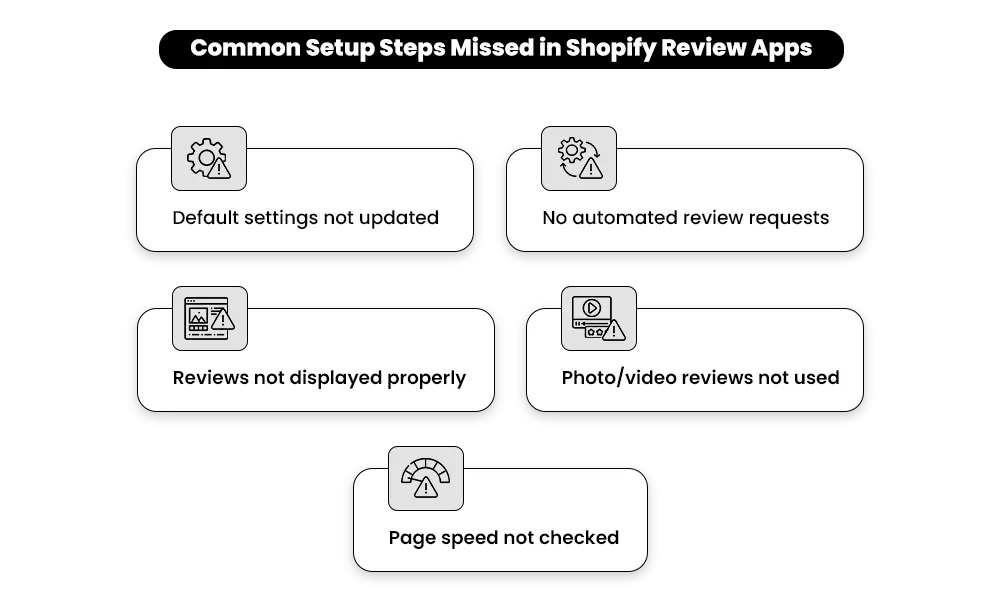
Installing a review app is the easy part. Using it well is where most stores leave results on the table.
Sending the review request at the wrong time.
A request that arrives before the customer has used the product gets ignored. One that lands a few days after expected delivery — when they’ve actually formed an opinion — gets a response. The timing alone can double your submission rate. If your app supports in-email review forms (where customers submit without having to click through to your site), enable it. It removes the single biggest drop-off point between receiving the request and completing it.
Treating photo and video reviews as optional.
A written review tells a buyer the product is good. A photo review shows them what it looks like on a real person, in a real home, in real conditions, which is the one thing your own product photography can’t do. According to Power Reviews, nine in ten consumers are more likely to buy a product that has photo or video reviews. If your app supports visual submissions, make it the default ask, not an afterthought.
Not checking what the app does to your page speed.
Some review apps make your store slower, and a slow page costs you sales before a buyer even sees your reviews. If the widget takes a few seconds to load, the customer is already deciding whether to buy while your social proof is still catching up.
Before committing to any app, check your store’s load speed before and after installation. If it gets meaningfully slower, the app may be costing you more in lost sales than it’s adding in trust.
How Reviews Actually Move the Needle on Conversions
Most merchants know reviews matter. Fewer understand exactly where in the buying journey they do their real work.
Before the customer scrolls. A page with no reviews signals an untested product. Even a handful of genuine reviews — especially with photos — tells a first-time visitor that real people have bought this and had a good experience, before they’ve read a single line of your copy.
While they’re evaluating. Customers have questions your product page doesn’t always answer. A review that says “runs small” or “held up after six months of daily use” answers the objection directly — more convincingly than anything you can write in a bullet point.
At the moment of decision. A buyer about to add to cart is looking for one final signal. A review from someone in the same situation — same concern, same use case, same hesitation — removes the last reason not to commit.
Research from the Spiegel Research Center, widely cited in conversion studies, found that products with just five reviews are 270% more likely to be purchased than products with none. Volume matters less than you might think. Quality and specificity matter more.
Most of this only works if the reviews you’re collecting actually answer the objections buyers have — not just “great product, fast shipping.” That comes down to how the review request is written, what customers are prompted to say, and where the review ends up on your page. A review buried at the bottom doesn’t reduce hesitation near the add-to-cart button.
If you want to see how the full review process fits together — collection, response, placement, and using reviews across channels — this guide to online review management covers it end to end.
Which Shopify Review App Should You Choose? Our Honest Take
There’s no single best Shopify review app for every store. But there is a right one for where your store is right now — and a clear signal for when to move on.
Start with Judge.me. If you’re early-stage, the free plan handles everything: collection, photo reviews, automated emails, and rich snippets. Most stores won’t outgrow it for a long time, and there’s no cost reason to jump ahead.
Move to Loox when photos are doing real conversion work. If customers are regularly submitting images and those images are influencing buyers, Loox’s visual-first setup earns its cost. If photo submissions are rare in your category, it won’t.
Consider Yotpo when reviews alone aren’t enough. Once you’re looking at loyalty programs, SMS flows, and retention as a system — not just individual tools — Yotpo’s consolidation starts making financial sense compared to paying for three separate platforms.
Switch to Okendo when brand experience becomes a business priority. If how your review flow looks and feels matters to your store’s positioning — premium DTC, Shopify Plus — Okendo’s attribute system and performance focus justify the step up.
Look at Stamped.io when you need reviews and loyalty in one place but aren’t ready for an enterprise-level commitment. Just verify the pricing works for your margin before signing on.
The clearest signal to switch apps is this: you’re working around your current tool rather than with it. You’re exporting data manually, patching gaps with other apps, or your review widget is slowing your pages. That’s the moment to move — not before.
FAQs — Shopify Review Apps
Q: Does Shopify have a built-in review app?
A: Shopify discontinued its native Product Reviews app in 2024. Your existing reviews are still accessible, but new collection has stopped. Every app in this guide supports importing your existing reviews, so you won’t lose what you’ve already built.
Q: Can I migrate reviews from Shopify’s discontinued native app to a new one?
A: Yes — most major review apps support import and export. Before switching, confirm the migration path with the app you’re considering. Most platforms make this straightforward, but it’s worth verifying before you commit.
Q: What is the best free Shopify review app?
A: Judge.me is the strongest free option. Its free plan includes unlimited review collection, photo reviews, automated request emails, and rich snippets — features most apps charge a monthly fee for.
Q: Which is better: Judge.me or Loox?
A: They solve different problems. Judge.me is the better all-around value, especially on a free plan. Loox is the better choice if customer photos are central to your category and you want a visually polished gallery experience.
Q: How long does it take to start collecting reviews after installing a review app?
A: Most apps take less than an hour to set up. Review requests go out on your next orders, and your first responses typically come in within a few days — once deliveries start arriving and the post-purchase email triggers.
Q: How do I get my first product reviews on Shopify?
A: Set up automated post-purchase emails through your review app, timed to arrive a few days after expected delivery. Keep the ask simple and to the point. In-email review forms have higher completion rates than asking customers to click through to your site.
Q: Do Shopify review apps slow down my store?
A: Some do, some don’t. Judge.me is known for having minimal impact on Core Web Vitals. Okendo also prioritises load performance. Before committing to any app long-term, test your store’s speed before and after installation.
Q: How many reviews does a product need before they start helping conversions?
A: Research from the Spiegel Research Center found that products with just five reviews are 270% more likely to be purchased than products with none. Quality and authenticity matter more than volume — a handful of detailed, specific reviews with photos will outperform dozens of one-word responses.
Q: Do Shopify review apps help with SEO?
A: Yes. Review apps support SEO in two key ways: product schema markup enables star ratings to appear in Google search results as rich snippets, improving click-through rates from organic search. Reviews also add fresh, keyword-rich content to your product pages on an ongoing basis. Most apps handle schema markup automatically — confirm the SEO or JSON-LD setting is enabled during setup.
Q: Are paid Shopify review apps worth it?
A: For most stores, not until you’re processing enough orders to justify the cost. Judge.me’s free plan is strong enough for early-stage stores. Paid plans earn their cost when you need advanced customisation, photo and video review flows with incentives, loyalty integrations, or deeper analytics.
Reviews Build Trust. But Trust Alone Doesn’t Close Sales.
Most merchants set up a review app and consider the job done. But reviews only influence buyers when the rest of the page is working too — the layout, the flow, the friction points that are easy to miss when you’re too close to your own store.
If you want help choosing the right app for your store or setting up your review collection flow properly, that’s exactly what we work on with Shopify merchants. Start with a free Shopify performance audit — it’ll show you where your biggest conversion gaps are, reviews included.
Your reviews deserve a store that converts. Let's build that.
Great reviews on a poorly built store are a wasted opportunity. Let’s fix the foundation and make every review count.