This blog post explains how effective online review management is crucial for Shopify stores to build customer trust and increase conversions. It outlines common mistakes merchants make with reviews and emphasizes that proper review management involves controlling the entire process from collection to strategic usage, not just gathering feedback.
A customer opens your product page.
They go through the images, maybe read a few details — but very quickly, they scroll down to the reviews. That’s usually where the real decision starts taking shape. And where your online review management either builds trust or quietly breaks it.
If the reviews feel genuine and helpful, they stay. If something feels off — too few reviews, too generic, or unclear — they leave. Most Shopify stores don’t struggle because of traffic alone. They struggle because the customer isn’t fully convinced. And reviews play a bigger role in that than most merchants expect.
Review management is often treated as a secondary task — collected inconsistently, not guided properly, or simply not used where it can actually influence decisions. In this blog, we’ll break down what usually goes wrong, what effective online review management for Shopify stores actually looks like, and how you can set up a system that builds trust and supports your store’s growth.
Traffic Is Coming In. Sales Aren't.
If visitors are leaving without buying, something on your store is creating doubt. We find it and fix it.
What Does Review Management Actually Mean for a Shopify Store?
Online review management is how you control when reviews are collected, what customers say, and where those reviews influence buying decisions.
Not just collecting. Not just displaying. Controlling the process end-to-end. Effective customer review management takes care of four parts:
- Collection — when and how you ask for reviews.
- Guidance — what customers are prompted to write.
- Response — how you handle positive and negative feedback.
- Usage — where reviews are placed and how they influence decisions.
That’s what review management on Shopify actually includes. Most stores only focus on the first part. They collect reviews. The rest is either missing or inconsistent.
Also Read – 10 Shopify Performance Optimization Strategies (That Improve Speed & Conversions)
What Usually Goes Wrong With Reviews
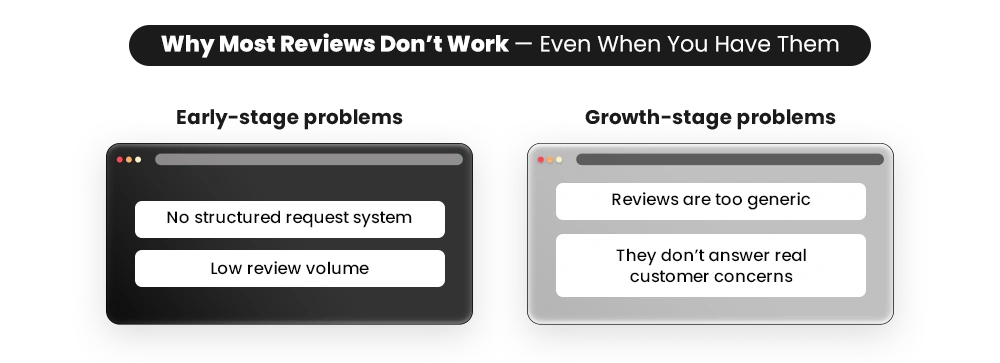
Most problems with online review management don’t come from missing reviews. They come from how reviews are collected, written, and used. Here’s where things usually break — and what that actually looks like.
1. Reviews Are Missing Where Decisions Happen
You might have reviews across your store. But not on the products that matter most.
- New launches.
- High-traffic products.
- Products you’re actively pushing through ads.
These are the pages where customers are deciding quickly — and looking for proof. If those pages have little or no feedback, the decision slows down. Not because the product is weak. Because the validation isn’t there when it’s needed.
2. Reviews Exist, But Don’t Help With Conversion
Most review forms ask vague questions. So customers leave vague answers such as – “Good product.” “Nice quality.” “Worth it.”
While a new buyer browsing through reviews try to understand:
- “Can I trust this product?” – They look for real experiences—does it actually work, match the description, and deliver on promises?
- “Will it solve my specific problem?”– Customers scan for reviews from people like them (same use case, concern, or expectation) to see if it fits their needs.
- “Is anything likely to go wrong?” -They actively check negative reviews—quality issues, delivery delays, poor support—to assess risk before buying.
If your reviews don’t answer these, they don’t convince future buyers. A 2023 survey by PowerReviews shows that 93% of consumers say online reviews influence their purchase decisions. Unclear reviews don’t just sit there — they delay or block the decision entirely.
3. Negative Reviews Are Ignored Or Mishandled
Most merchants treat a negative review as either a minor inconvenience or something to defend against. But to a buyer exploring your product reviews, it signals risk. They’re not just reading the complaint. They’re checking whether you’re owning up to your flaws and working on them.
This is where online reputation management actually shows up — in your responses, not just your ratings. And the impact is measurable – businesses that respond to at least 25% of their reviews average 35% more revenue than those that don’t. Most stores aren’t anywhere near that bar.
4. No System To Collect Reviews Consistently
You’re not getting enough reviews. Customers don’t leave reviews on their own—and without a system, most of them never do. This usually happens because:
- Timing is inconsistent—requests don’t go out at the right moment.
- Follow-ups are missed, so most customers are never prompted.
- No clear trigger to collect reviews after purchase.
5. Reviews Are Scattered Across Platforms
Your reviews are spread everywhere—and not working together. Customers leave feedback on your website, Google, marketplaces, and social—but it all sits in different places with no connection.
- Reviews live across multiple platforms with no consistency.
- No single place where customers see the full picture.
- No strategy to use reviews where they matter.
The System — How Review Management Should Work
By now, it’s clear the problem isn’t visibility—it’s how reviews are handled. Fixing this means moving beyond one-off efforts to a structured review management system. The next steps break this down — starting with how to collect reviews in a way that actually leads to better responses.
Step 1: Set Up How Reviews Come In
If reviews in your store feel inconsistent, the issue usually starts here. Not because customers don’t want to leave reviews, but because there isn’t a clear system deciding when and how feedback comes in. Most stores rely on one message, sent once, and expect results. That’s where things break.
What works better is a simple system:
- Ask for reviews after the product has actually been used.
- Keep the process quick so customers don’t drop off halfway.
- Follow up, because most people don’t respond the first time.
- Don’t rely on just one channel if responses are low.
Once this is set up, reviews stop coming in randomly. They start coming in consistently.
Step 2: Guide Customers to Leave Useful Reviews
Once reviews start coming in, the next issue shows up quickly — most of them don’t help. Short lines. No context. Nothing that helps a new buyer decide.
This usually comes down to how the question is asked. If you ask: “Leave a review”. You’ll get basic responses. But if you ask: “What did you notice after using this?” The answer changes. To improve this:
- Ask questions that bring out actual experience.
- Help customers explain what changed after using the product.
- Keep it simple, so response rates don’t drop.
The goal isn’t more reviews. It’s reviews that actually help someone decide.
Step 3: Respond to Reviews the Right Way
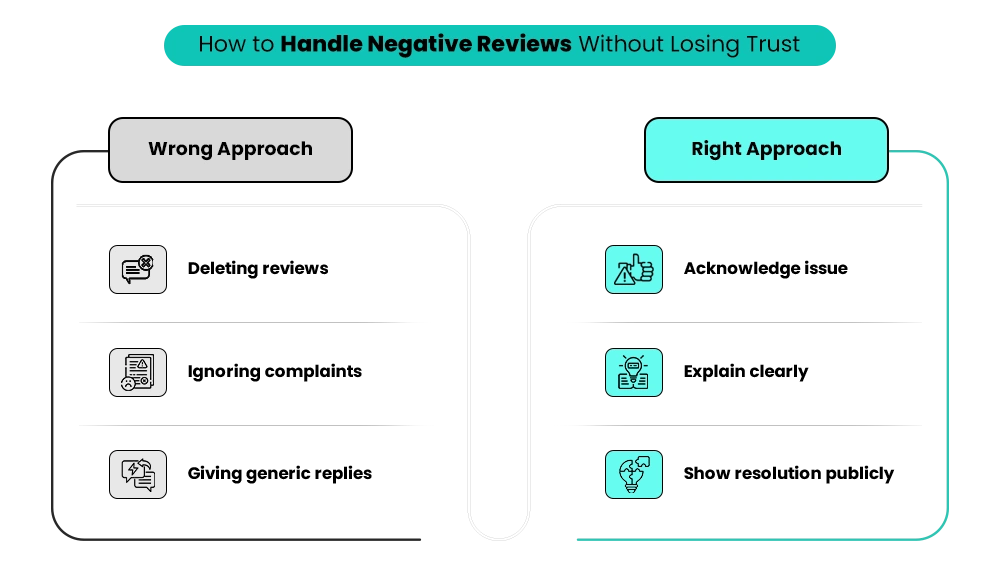
Most stores either don’t respond to reviews or only respond when something goes wrong.
Both create gaps. Because when someone reads reviews, they’re not just looking at feedback. They’re trying to understand how reliable your store is.
A missing response creates doubt. A generic response doesn’t help. What works better:
- Acknowledge what actually went wrong.
- Explain it in a simple, non-defensive way.
- Give a clear next step (exchange, support, fix).
For positive reviews, go beyond “Thanks.” Add one line that reinforces what worked — fit, comfort, results.
Step 4: Use Reviews Where Decisions Actually Happen
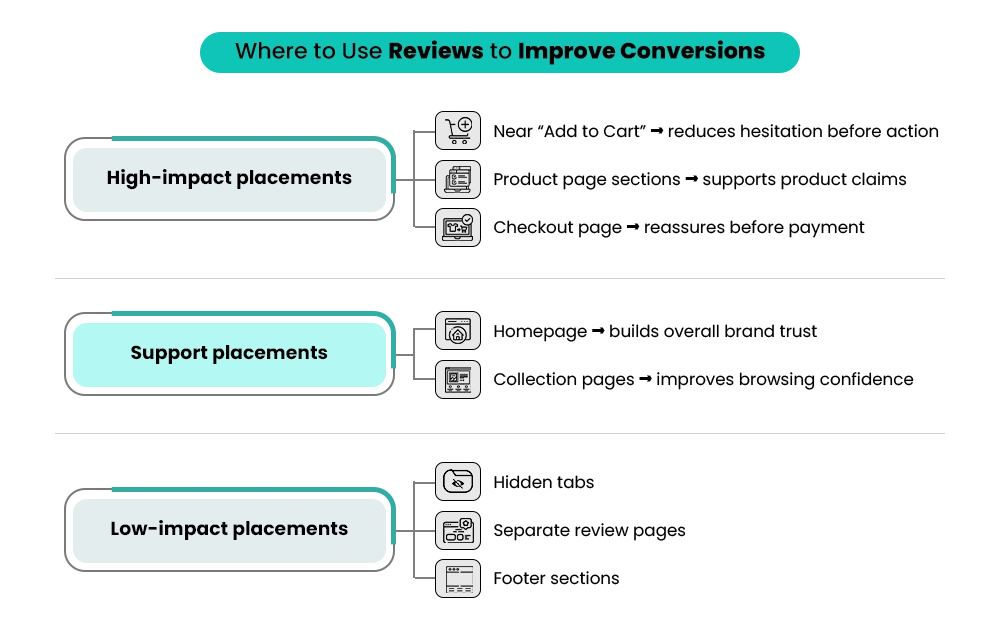
In most stores, reviews sit at the bottom of the product page. That’s not where decisions happen. They usually happen:
- Near the price.
- Around the add-to-cart button.
- While comparing products.
If reviews aren’t visible in those moments, they don’t help. And the cost of that gap is significant. According to the Baymard Institute, the average online average cart abandonment rate sits at 70.19%. While abandonment happens for many reasons, hesitation at checkout often increases when shoppers don’t see enough trust and reassurance to complete the purchase. So instead:
- Show star ratings on Shopify store near the product title.
- Add a short review close to the buy section.
- Include review signals on collection pages.
The goal is simple — show proof where hesitation happens.
Step 5: Handle Negative Feedback Without Hurting Trust
A few low ratings can feel like they’re hurting your product. So the instinct is to remove them or hide them. That’s where things go wrong. Because when everything looks perfect, it creates doubt. What works better is using negative feedback to improve what the next customer sees:
- Look for patterns across reviews.
- Fix the actual issue (not just the review).
- Update product pages to set clearer expectations.
Negative reviews don’t disappear. But they stop creating confusion.
Step 6: Use Reviews Beyond Your Website
A customer often sees your product in an ad or email first. At that point, they don’t have context — just the product. If reviews aren’t visible there, you’re missing the chance to build trust early. So instead of keeping reviews only on your site:
- Use short review lines in ads.
- Add customer feedback in emails.
- Turn real reviews into social content.
Only use reviews that explain something — results, use case, experience. Getting reviews into your email flows is one of the highest-leverage moves you can make at this stage. If your email system isn’t set up to do that yet, Mastroke’s email marketing service is built around exactly this kind of sequencing.
Step 7: Build a Review Strategy (Not Just Collection)
Once reviews start coming in consistently, the next step is using them properly. Because reviews are not just social proof — they’re signals.
They tell you:
- Where customers are getting confused.
- What’s working?
- What needs to change?
Use that to:
- Improve product descriptions.
- Update FAQs based on real questions.
- Identify which reviews actually influence decisions.
Also, keep your strongest reviews updated. Older reviews lose relevance over time. This is where review management stops being a collection task — and starts becoming part of how your store improves.
Also Read – Shopify User Experience Explained: 10 Practical Fixes to Improve Conversions
Review Management Best Practices That Actually Work
This is where most stores see the difference. The system only works if it’s implemented properly.
1. Get the Timing Right
Most stores ask for reviews too early — right after purchase or delivery. Instead, ask after the product has been used:
- Apparel → after first wear (3–5 days)
- Skincare → 5–7 days
- Supplements → 10–14 days
This improves both response rate and quality.
2. Reduce Friction in the Process
Even interested customers drop off if the process feels long. Make it easy:
- One-click entry into review form.
- No login required.
- Mobile-first design.
- Minimal required fields.
One Thing to Avoid — Review Gating
When making the process easier, one practice to stay away from is review gating — directing only customers who had a positive experience to leave a review. It sounds like a smart filter, but both Shopify and Google explicitly prohibit it. It artificially skews your ratings and puts your store at risk of having reviews removed or your account flagged. Ask every customer, not just the happy ones. A mix of ratings actually builds more trust than a wall of five stars.
3. Use Follow-Ups to Increase Responses
Most customers don’t respond the first time — they forget. Set up:
- Initial request → after usage window
- Reminder → a few days later
- Final nudge → short and clear
4. Improve How You Ask for Reviews
Generic prompts lead to generic responses. Instead of: “Leave a review” Ask: “How has your experience been with [product name]?”
Add 2–3 focused prompts:
- What made you choose this product?
- What did you notice after using it?
5. Structure Your Review Form for Better Responses
A good form improves review quality. Include:
- Star rating
- Purchase intent
- Usage experience
- Pros and cons
- Product-specific inputs (size, skin type, etc.)
- Optional photo/video
Example: Review Form Template
| Field | What to Ask | Why It Matters |
| Rating | ⭐ 1–5 stars | Easy starting point |
| Purchase intent | What made you buy this? | Adds context |
| Usage outcome | What did you notice? | Shows real experience |
| Key highlight | What stood out most? | Highlights value |
| Pros | What did you like? | Easy scanning |
| Cons | What can improve? | Builds trust |
| Product-specific | Size/Fit, Skin type | Adds relevance |
| Media | Photo/video upload | Builds credibility |
| Recommendation | Who is this for? | Helps decision-making |
6. Respond to Reviews in a Way That Builds Trust
When replying:
- Acknowledge the issue clearly
- Explain simply (no defensiveness)
- Offer a next step (support, exchange, etc.)
For positive reviews:
- reinforce what worked (fit, comfort, results)
7. Place Reviews Where They Influence Decisions
Don’t keep reviews only at the bottom.
Place them:
- Near product title and price.
- Close to add to cart.
- On collection pages (ratings + counts).
- On the homepage and checkout.
Use:
- snippets
- ratings
- customer images
8. Use Reviews Across Channels
Reviews should support decisions before users reach your site. Use them in:
- Ads → short review lines or ratings
- Emails → 1–2 key customer statements
- Social content → real feedback as captions
Only use reviews that:
- describe experience
- mention results
- give context
9. Use Negative Reviews to Improve Your Store
Look for patterns:
- sizing issues → improve size guidance
- delivery complaints → set clearer timelines
- product mismatch → update images/descriptions
Then:
- Update product pages
- add FAQs
- clarify expectations
10. Turn Reviews Into a System (Not a One-Time Setup)
Track what works:
- Which reviews influence conversions?
- What kind of formats (photo/text) perform better?
- Which placements drive engagement?
Keep updating:
- featured reviews
- homepage sections
- ad creatives
What This Changes
When this is done properly:
- Reviews come in consistently.
- Feedback becomes more useful.
- Customers find answers faster.
- Trust builds before purchase.
At this point reviews stop being a standalone task — they become part of how your entire store performs. And if you want to know what else is holding your conversions back beyond reviews, Mastroke’s Shopify CRO service is where that audit starts.
How to Get Google Reviews for a Shopify Store
Your on-site reviews build trust on the product page but Google reviews affect whether customers find you in the first place. The simplest way to collect them is to –
- Add a direct Google review link in your post-purchase email — separate from your product review request.
- Ask for it a few days after the product review, not at the same time.
- Stores that do this consistently tend to see stronger search visibility and better click-through rates from results pages.
📌Related Video
What This Means for Your Store
Once this system is in place, the difference starts showing in how customers behave:
- Product pages answer most questions upfront.
- Fewer customers leave to compare elsewhere.
- Support queries for basic concerns reduce.
You’ll also notice:
- Decisions happen faster.
- Trust builds without needing extra effort.
- Conversions improve without relying on discounts or heavy retargeting.
Great Reviews Mean Nothing If Buyers Can't Find You.
Get your store in front of shoppers who are already looking for what you sell.
How to Set Up a Basic Review Management System on Shopify
Start with one product you’re actively selling. That’s where you’ll set this up first. Before you set this up, quickly review your current setup:
- Where reviews are currently visible (product page, collection, or nowhere prominent)?
- What your review form looks like?
- When review requests are being sent?
1. Set when the review request should go
Inside your Shopify review app or email flow:
- Find the “send review request email Shopify” trigger.
- Change it from “after purchase/delivery” → add a delay (based on product use).
- Add one follow-up reminder after 2–3 days.
This is where your online review management starts becoming consistent.
And if you’re on Shopify Plus, you can take this a step further — automating the entire timing logic so nothing has to be managed manually.
Automating Review Requests With Shopify Flow – Instead of one blanket timing for all products, Flow lets you trigger requests based on product type or delivery confirmation — skincare after 7 days, apparel after 3, supplements after 14. Once set up, nothing needs to be managed manually.
2. Adjust what the customer sees when they leave a review
Open your review form settings (inside the app):
- Replace the single text box with 2–3 prompts.
- Add fields like “What made you buy?” or “What did you notice after using?”
- keep ⭐ rating required, rest optional
3. Place reviews where customers decide
Go to Shopify Admin → Online Store → Themes → Customize
Then:
- open a product page template
- Click “Add block” → select your review app block
- Drag the rating near the product title
- Add a small review snippet block near the add-to-cart section
For collection pages:
- open collection template.
- enable “show product rating”(usually a toggle in Shopify theme settings).
This is where review management on Shopify starts affecting conversions.
4. Enable Review Responses
Inside your review app:
- Turn on review reply functionality.
- Make sure responses are visible on product pages.
Responding to reviews — both positive and negative — is a core part of keeping your online reputation management active.
5. Test the full setup
Place a test order. Then:
- Check when the review email/SMS arrives.
- Submit a test review.
- Confirm where it appears on product + collection pages.
- Check mobile view to ensure everything is easy to use.
6. Activate Review Schema (SEO)
If your review app supports it:
- Set up structured data for product reviews.
- Ensure ratings are linked to the correct product pages.
This helps your star ratings show up directly in Google search results. Once this works for one product, repeat across others. That’s how your online reputation management system actually gets implemented — inside your store, not just planned.
Which Shopify Review App Should You Use?
The app matters less than how it’s configured — but these three cover most Shopify stores well:
- Judge.me — solid core functionality, automated requests, schema support, low cost. Good starting point for most stores.
- Loox — built around photo and video reviews. Strong fit for visual categories like apparel or skincare.
- Okendo — most feature-rich of the three. Better suited for stores that need advanced segmentation and deeper integrations.
What to Check Before Going Live
- Review request timing is correct.
- Follow-up reminder is working.
- Form is easy to complete.
- Reviews are visible in key areas.
- Review responses are enabled.
- Mobile experience is smooth.
- Schema/structured data is enabled (if supported).
Once this works for one product, repeat across others. That’s how your online reputation management system actually gets implemented — inside your store, not just planned.
Also Read – Shopify Store Audit: How Conversion and Performance Gaps Impact Sales and How to Fix Them?
Wrapping Up
Reviews aren’t the problem. How they’re managed is. When feedback comes in late, stays generic, or isn’t visible where decisions happen, it doesn’t help — even if you have plenty of it. That’s where most stores lose conversions.
Strong online review management fixes that. Not by adding more reviews, but by making them clearer, more visible, and easier for customers to trust when it matters.
Once your review system is working, the next question is whether the rest of your store is keeping up — page speed, structure, and experience all affect whether trust actually converts. A Shopify performance audit tells you exactly where the gaps are.
Fix What’s Actually Blocking Your Conversions
By this point, the issue usually isn’t hard to understand — it’s harder to pinpoint. Most stores don’t have one clear problem. It’s a mix of small gaps across the experience:
- Trust signals are not showing where decisions happen
- Product pages not answering key questions
- messaging, structure, or flow, creating hesitation
Even when the product is good, these gaps slow down decisions or push customers to compare elsewhere. This is where a proper audit helps.
At Mastroke, we work with Shopify stores to identify what’s actually affecting conversions — across page structure, content, trust signals, and overall experience — and fix it where it matters.
Instead of changing everything, the focus is on removing the friction that’s holding decisions back. If your store is getting traffic but not converting the way it should, this is usually where to start.
Frequently Asked Questions About Online Review Management
Here are the most common questions merchants ask once they start working on reviews — from collection and setup, to what actually makes feedback useful and worth acting on.
1. Should I use incentives to get more reviews?
Incentives can help increase review volume, especially early on, but they need to be used carefully. Rewarding honest feedback works well, while incentivizing only positive reviews reduces credibility. The goal is not just to collect more reviews, but to generate useful, trustworthy feedback that actually influences purchase decisions.
2. Should I delete negative reviews?
Negative reviews should only be removed if they are spam or abusive. Keeping genuine negative feedback actually improves credibility and makes the overall review system more trustworthy. Customers expect a mix of opinions, and what matters more is how those reviews are handled rather than trying to eliminate them entirely.
3. What should I do if I don’t have any reviews yet?
Start collecting reviews as soon as your first orders are fulfilled. If you have past or external reviews, import them to build initial trust. You can use incentives carefully to increase response rates, but focus on quality over quantity. Aim for detailed reviews that mention real usage or results. The first few reviews set the tone for all future feedback.
4. Are photo and video reviews really necessary?
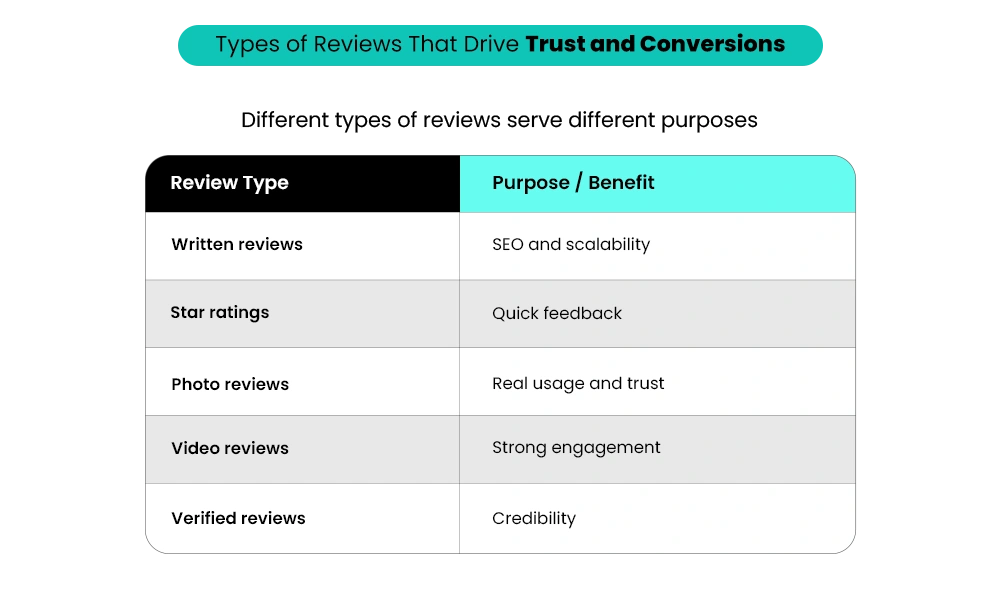
They are not mandatory, but they significantly improve trust and engagement. Visual reviews show real product usage, reduce uncertainty, and make the buying decision easier. While written reviews help build volume, adding photo and video reviews strengthens credibility and improves performance across marketing channels.
5. How do I know if my review system is actually working?
A working system shows consistent review collection and a visible impact on conversions. It’s not just about volume, but whether reviews are detailed, relevant, and engaged with. If reviews exist but don’t influence decisions, the issue is usually quality, placement, or how well they address customer concerns.
6. Can I import reviews from other platforms?
Yes, importing reviews is often necessary, especially for new stores. It helps build initial trust and avoids starting from zero. However, imported reviews should be relevant, accurate, and aligned with the product experience to ensure they contribute meaningfully to credibility and customer decision-making.
Not Sure Where Your Store Is Losing Buyers?
Tell us what’s happening. We’ll help you figure out what to fix first.