
This blog post explains Shopify's new Agentic Storefronts feature that automatically displays merchant products on AI platforms like ChatGPT and Google AI without merchant consent. The post addresses merchant concerns about this default activation and provides guidance on how to understand and potentially opt out of this feature.
If you opened your Shopify admin’s Sales Channels settings and noticed AI platforms like ChatGPT, Google AI Mode, and Microsoft Copilot listed there, you didn’t add them. That’s Shopify’s doing.
By the end of 2025, Shopify broadly activated Agentic Storefronts by default for all eligible merchants. No opt-in. No setup. Even if you haven’t changed anything, your products may still appear across these AI platforms.
That’s exciting for some merchants — more reach, zero effort. While for some, it’s raising real concerns: data sharing, vendor agreements, brand control, and missing checkout customizations. Naturally, not all merchants want to be a part of this update, and they are looking to opt out of Shopify agentic storefronts. But there’s still a lack of clarity around how to opt out and useful guidance from support.
So we brought the straight answer. This guide breaks down what Shopify Agentic Storefronts are, how you can limit or opt out, and what each choice actually costs you.
Shopify Agentic Storefronts — What They Do and Why They Matter
Shopify Agentic Storefronts let customers discover and purchase your products directly inside AI platforms — ChatGPT, Google AI Mode, Google Gemini, and Microsoft Copilot. Shopify Catalog makes this happen — it automatically sends your product data to these AI platforms without you doing anything. Shopify Catalog is Shopify’s system that organizes your product listing data in such a way that AI platforms can read and understand.
When someone asks an AI assistant something like “find me waterproof hiking boots under $8,000,” the AI can surface your products from the Shopify catalog with pricing and all. And depending on the channel, even let them complete the purchase right there in the conversation, without being sent to a separate website.
That’s the shift. Your store shows up where the decision starts — inside the AI itself. Your product list is being shared with AI platforms, and the direct checkout is two separate layers — and opting out of one doesn’t automatically mean opting out of both.
Note: Shopify’s AI storefronts with built-in checkout are currently limited to stores selling to US customers. For Google AI Mode and Gemini, the store must also be US-based. International merchants can still have products discovered through Shopify Catalog and AI search surfaces, but direct in-chat checkout is not broadly available to them yet.
Also Read – Shopify Just Changed Ecommerce Forever with AI Commerce – ChatGPT, Gemini
The Opt-Out Problem Nobody Warned You About
Unlike Facebook, TikTok, or Google Shopping — where you actively choose to enable a channel — Agentic Storefronts flipped the script entirely. Shopify turned this on by default for all eligible stores, leaving many merchants scrambling to figure out how to turn it off. That alone isn’t immediately obvious.
The confusion comes from the fact that there’s no single “turn off Agentic Storefronts” button. The controls are spread across multiple layers, and each one affects visibility, SEO, and storefront behavior differently. Understanding which layer to touch, and why, is the real decision here.
Why Some Merchants Want to Opt Out of Shopify Agentic Storefronts
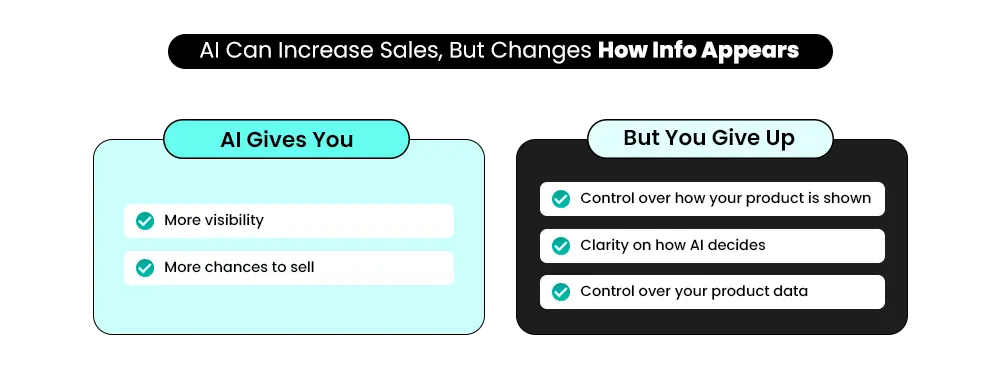
The concerns aren’t random — they’re specific. And they stack up fast.
1. Losing Control Over How Products Are Presented
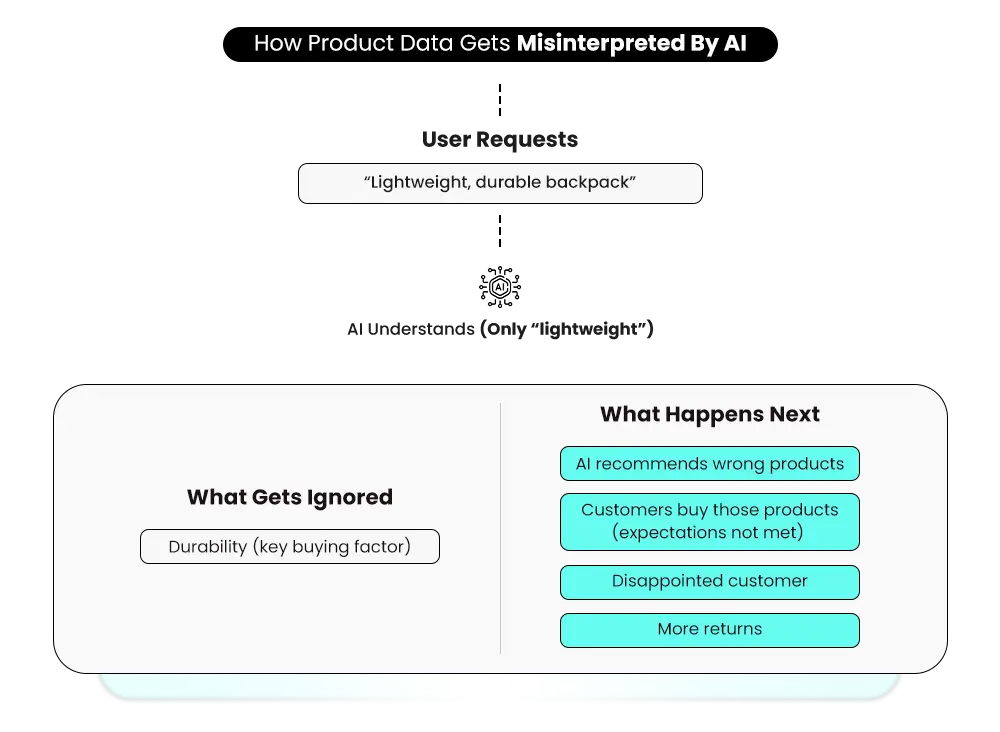
You’ve built your product pages deliberately — pricing, descriptions, specifications, and visual context. Inside an AI platform, most of that gets compressed. The AI summarises your product based on its own interpretation, not your intent. Details get missed. Context disappears. A product that earns its value through explanation gets stripped down to title and price. Instead of being chosen for its value, it ends up being compared mainly on price. When the experience doesn’t match what the customer expected, returns follow.
2. Check out Customisations and Tracking Both Break
Here, the problem breaks into two closely linked parts. Your full checkout setup doesn’t carry over into agentic storefronts. Upsells, loyalty program touchpoints, and specific delivery options — like local pickup or store collection — aren’t supported. That breaks the conversion logic that you may have spent time building.
The tracking loss compounds it. Tools like Google Analytics and custom pixels don’t function properly during AI-driven checkout flows. You can see that a sale happened, but you lose visibility into what brought that customer in — which ad drove the purchase, whether the buyer can be retargeted, and how they moved through the journey. For stores running performance marketing, this is a meaningful blind spot.
3. Vendor and Distributor Contract Risks
Some brands have authorized dealer agreements that restrict where products can be sold or surfaced. If your vendor contracts explicitly limit distribution channels, AI storefronts could put you in breach. This is a real legal concern, not paranoia. If this applies to you, it’s worth a conversation with your legal counsel before doing nothing.
4. No Clear Insight Into How Products Are Selected
There’s no clear answer to why some products get recommended, and others don’t. The AI’s selection process isn’t explained, and your existing analytics don’t fill that gap. When something works, you can’t trace why. When something stops performing, there’s nothing concrete to act on. For merchants who run their stores on data, this uncertainty is a real operating problem.
5. Your Brand Experience Gets Removed from the Buying Journey
Your store is built to guide a decision. It explains the product, builds trust, and shows why it’s worth choosing. None of that carries through in an AI platform view. Instead, your product appears as one option among many — competing on price like a commodity, not a brand.
Shopify’s own supplemental terms confirm this: participating partners may customize your customer’s experience on their respective user interface, including making the checkout match the AI platform’s branding — not yours.
6. Data Sharing Concerns Are Real
Shopify’s Agentic Storefronts Supplemental Terms of Service explicitly grant Shopify the license to list, combine, feature, promote, distribute, and display your materials, store, and trademarks in participating partners’ user interfaces. If data privacy is a concern for your business — especially in regulated industries — this language is worth a close read with legal counsel.
7. Higher Returns Due to Misunderstood Purchases
Buying decisions happen faster in these environments. Customers rely on summarized information instead of full context. That leaves gaps — expectations don’t always match what gets delivered. Returns increase. Support requests follow. The impact shows up after the sale in margins and operations.
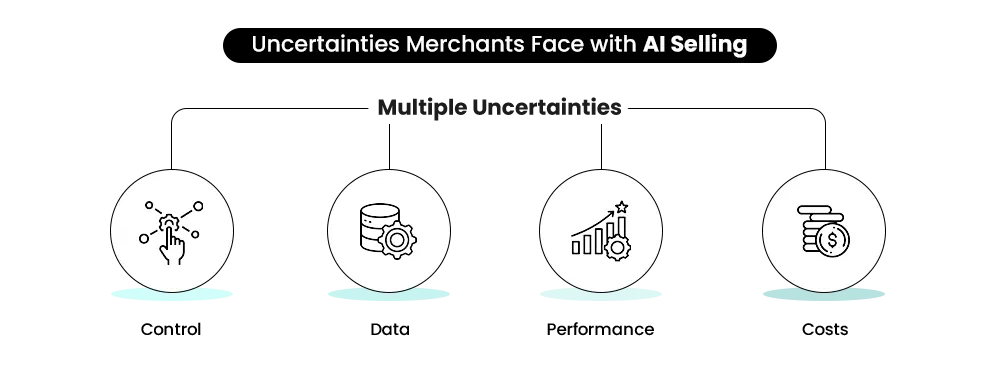
How to Opt Out of Shopify Agentic Storefronts — The 4 Levels
Since there’s no single opt-out button, your options exist across four levels — each with different implications for your visibility, SEO, and sales. Here’s what each one actually does.
Level 1: Turn Off Direct In-Chat Checkout (Lowest Impact)
This is the most careful and targeted option and the right starting point for most merchants with concerns. Agentic storefront checkouts are active by default for eligible stores. You can manage settings for individual agentic storefronts and decide whether customers can check out directly in a channel, or whether they’re redirected to your online store to complete their purchase.
How to do it:
- Go to Shopify admin → Settings → Apps and sales channels
- Find the Agentic Storefronts section
- Click the specific channel you want to manage (Copilot, Google AI Mode, etc.)
- In the Checkout section, deselect “Allow customers to purchase directly in this sales channel.”
You can do this per channel — disable direct checkout for Microsoft Copilot while keeping it active for Google AI Mode. The controls are granular.
What you keep: AI platforms still surface your products. Shoppers who find you through ChatGPT or Gemini are redirected to your actual store to complete the purchase. Your full checkout experience, upsells, loyalty widgets, and brand touchpoints stay intact.
What you lose: The easy, one-tap buying experience inside the chat. Some research suggests platforms may give slightly less prominence to merchants not opted into direct checkout, though nothing has been officially confirmed as a hard penalty.
Level 2: Remove Specific Products from a Channel (Moderate Impact)
Maybe you’re fine with Agentic Storefronts in general, but you have certain products that shouldn’t be surfaced — restricted by a vendor contract, or B2B-only products not meant for general consumers.
How to do it:
- Go to the product in your Shopify admin
- In the Sales channels and apps section on the right side, find the Agentic Storefront channel.
- Uncheck it for that specific product.
For B2B merchants, you can hide specific products from AI channels when they shouldn’t be discoverable by regular customers. If you’re on Shopify Plus, you also have the option to use a separate expansion store for your B2B business entirely.
What you keep: Most of your catalog stays discoverable and purchasable via AI channels. Your overall presence in AI-driven search is maintained.
What you lose: The specific products you unpublish won’t be recommended. If those are popular products, you’re leaving potential revenue on the table.
Level 3: Hide Products from All AI Discovery (Highest Impact)
Setting a product status to Unlisted removes it from AI discovery. but it also removes it from Google Search, Google Shopping, your sitemap, and Shopify-powered search and recommendation surfaces. It’s not a targeted AI opt-out. It broadly reduces the product’s visibility across your storefront and discovery channels.
Adding the SEO hidden metafield tells search engines not to index a product page. To add it: go to your product in the admin, scroll to the Metafields section, and add a metafield with namespace ‘seo’ and key ‘hidden’ set to ‘1’. This gives you slightly more control than Unlisted, but it can still remove the product from sitemaps and search visibility in ways that affect organic traffic.
What you keep: Some control over which products appear in AI discovery.
What you lose: your products stop showing on Google search, Google Shopping, and even your own site search. If you rely on organic traffic, this is too extreme for most products.
Level 4: The ChatGPT Problem — You Can’t Fully Opt Out
This is where most merchant frustration sits, and the answer is uncomfortable: you cannot fully opt out of your products appearing in ChatGPT.
There’s no Shopify setting that blocks ChatGPT discovery specifically. If your product is publicly crawlable and discoverable online, it can potentially surface in AI-generated recommendations as well. Shopify doesn’t fully control that layer.
The only stronger restriction is blocking crawlers through robots.txt or broader indexing controls — but that can also affect SEO visibility and organic traffic.
Sell on Amazon, Walmart and Etsy — and keep the relationship yours.
Agentic Storefronts sell for you — but you stay invisible. Marketplaces like Amazon, Walmart, and Etsy put your brand in front of millions of ready-to-buy customers. Mastroke helps Shopify brands break into these channels and grow without starting from scratch.
Quick Reference: Opt-Out Options at a Glance
| Action | Where in Admin | Blocks Direct Checkout | Blocks Discovery | Blocks Google |
| Disable in-channel checkout | Settings → Sales channels | Yes | No | No |
| Unpublish product from channel | Product editor → Sales channels | Yes | Yes (that channel) | No |
| Set product as Unlisted | Product status field | Yes | Yes (all AI) | YES — also removes from Google & site search |
| Add seo, hidden metafield | Product metafields | Partial | Partial | Partial |
| ChatGPT opt-out | No admin toggle available | N/A | Not possible | N/A |
What You’ll Lose If You Opt Out of Shopify Agentic Storefronts
This is the part most blogs skip. They tell you how to opt out — but not what that decision actually costs you. Here’s the honest breakdown.
1. Decisions Start Before Your Store Is Even Visited
Most customers don’t search for a product directly anymore. Capgemini’s 2025 consumer research found that 58% of consumers have already replaced traditional search engines with AI tools as their go-to for product recommendations. They ask an AI what to buy — and get a curated set of options back. For example, a customer asks ChatGPT for leather jackets — your competitor shows up in the recommendations, you don’t. By the time they find you elsewhere, they’ve already moved forward. You’re not invisible. But you’re late. And in buying decisions, being late is expensive.
2. You Miss the Ready-to-Buy Moment
There’s a specific point where the customer stops browsing and starts deciding. They want a clear recommendation. They’re ready to spend. According to Adobe Digital Insights, in March 2026, visitors arriving from AI sources to US retail sites spent 48% longer on-site and converted 42% better than non-AI traffic.
Customers arriving from AI channels aren’t casually browsing. They’ve already had a conversation with an AI, asked for recommendations, seen your product, and decided to take action. Without agentic commerce, your product doesn’t appear when intent is highest.
3. New Customers Become Harder to Reach
Existing customers already know you. But new customers need to discover you somewhere first. Agentic commerce is one of the strongest discovery layers available right now. When you step back from it, the stream of new customers slows down. Growth starts depending entirely on paid ads and SEO.
When your store gets through agentic commerce, it’s organic — the AI surfaces your product without you paying for placement. When you disable it, fewer people come across your products this way. Paid ads have to take over what discovery was handling. You’re not saving money — you’re moving the cost somewhere less efficient.
4. Your Category Moves On Without You
Every category has a shortlist. A small set of products customers see first, compare most, and buy from. That shortlist is shaped by what appears in AI recommendations. According to IAB’s 2025 study, nearly 90% of shoppers say AI helped them discover products they wouldn’t have found otherwise — meaning the shortlist is being built inside AI, before a shopper ever reaches your store. When you step back from Shopify agentic storefronts, your competitors stay visible and stay on the shortlist
Your product stops being part of early category decisions. Slowly, without anything dramatic happening, your presence shrinks. Nothing changes about your product. But it’s no longer part of the conversation where the decision gets made. You don’t just lose traffic. But the chance to be part of the decision.
Also Read – Sell on AI Platforms with Shopify: The Future of eCommerce Starts Now – ChatGPT, Google Gemini, Copilot
📌Related Video
Should You Opt Out — And What’s the Right Move?
The smart move for most merchants isn’t a blanket opt-out. The better approach is being selective — deciding where AI checkout makes sense, which products should stay visible, and where tighter control is necessary.
Limiting participation makes sense if:
- You have vendor or distributor contracts that may restrict distribution channels.
- Your conversion strategy depends heavily on custom checkout logic, upsells, or client-side pixel tracking.
- You have B2B-only products that shouldn’t be discoverable by regular customers
- Direct demand is already strong, repeat buyers are consistent, and you have full marketing systems in place
Staying in — and optimizing — makes more sense if:
- You’re still building your customer base and need discovery.
- Your category is crowded, and being visible is what gets you considered.
- Sustainable growth without heavy ad dependence is the goal.
For most merchants, the goal isn’t to opt out completely — it’s to control how you participate. Here’s the recommended approach for most merchants:
- Check your admin settings first. Go to Settings → Apps and sales channels and check the Agentic Storefronts section. Understand which channels are active and what your current settings are. Many merchants don’t know what’s already running.
- Start with checkout opt-outs if needed. If you have concerns about in-chat purchases — pixel tracking issues, checkout customization loss, or B2B product exposure — disable direct checkout on a per-channel basis. Your products stay visible. Your conversion logic stays intact.
- Use product-level controls for restricted items. If specific products violate vendor agreements or aren’t suitable for regular customer discovery, adjust visibility settings for those products individually. Don’t clear your entire catalog.
- Avoid setting products as Unlisted unless you have no alternative. It broadly removes products from AI discovery, but it also removes those products from Google.
- Review the Supplemental Terms of Service. Shopify’s Agentic Storefronts Supplemental Terms are worth reading in full, especially if you have vendor contracts, complex checkout requirements, or data privacy obligations.
- Clean up your product data regardless of what you decide. Merchants performing well in AI discovery tend to have clear, specific, well-structured product titles and descriptions. Vague listings like “Blue Shirt — M/L” provide very little context. Listings that clearly explain what the product is, who it’s for, and why it matters are much easier for AI systems to interpret and recommend. Treat product data quality the same way you’d treat a Google Shopping feed — it’s becoming increasingly important for AI-driven discovery.
Also Read – Shopify Just Changed Ecommerce Forever with AI Commerce — ChatGPT, Gemini, Copilot
The Real Decision Behind Opting Out
Customers are comparing options and narrowing choices before they ever visit a store. That’s the layer Shopify Agentic Storefronts operate in. Opting out doesn’t remove you from that world. It just removes you from your slice of it. Staying in without optimizing creates missed opportunities. Opting out without understanding the cost creates a different problem. Opting out entirely isn’t a neutral act — it’s a bet that
AI-driven commerce is a phase that will pass. Most of the evidence says it won’t. The goal is not just to be present in agentic commerce, but to be selected.
FAQ — What Shopify Merchants Should Know Before Opting Out of Shopify Agentic Storefronts
If you’re thinking about opting out, these are the exact questions you need clear answers to before making that call.
1. Can I fully opt out of Shopify Agentic Storefronts?
There’s no single switch that turns this off completely. Shopify agentic storefronts are built into a broader distribution layer — not an optional feature. You can limit participation by controlling integrations and data exposure. But full opt-out isn’t possible. The real choice is how visible or limited you want to be.
2. Will opting out affect how customers discover my products?
Yes — but not immediately. Your existing traffic stays stable for a while, which makes the impact easy to miss. What changes is discovery. Fewer new customers find you through AI-driven recommendations. That gap starts small but compounds. By the time it shows in your numbers, it’s already been building.
3. What happens if I do nothing and just leave things as they are?
Doing nothing is still a decision. Your store continues participating by default — products stay visible in agentic commerce, comparisons, and AI recommendations. You keep the reach but operate without actively managing it. For many merchants, that’s actually the right call — as long as your product data is accurate and current.
4. Is my product data safe in these AI-driven systems?
Your product data used here is what’s already publicly available on your store. Nothing new is being shared. But it is being interpreted, compared, and presented in contexts you don’t control. The concern isn’t safety — it’s accuracy. How your product gets read matters as much as what you’ve written.
5. Does opting out give me more control or just limit my reach?
Both — but not equally. You gain more control over how your products are presented inside your store. But you lose reach outside it. That trade-off only makes sense if your existing channels are strong enough to sustain growth independently. For most stores still building their audience, it’s a costly exchange.
Q6: How Do I Actually Opt Out of Shopify Agentic Storefronts?
A: Go to Settings → Sales channels in your admin, click each agentic storefront, and deselect direct checkout. But this only stops in-channel purchasing — your products stay discoverable. ChatGPT has no opt-out. Full removal requires setting products as Unlisted, which also affects Google and store search.
Q7: How do I know if Agentic Storefronts are already active on my store?
A: Go to Settings → Apps and sales channels in your Shopify admin. If Agentic Storefronts are available for your store, you’ll see them listed there with the individual channels — ChatGPT, Google AI Mode, Microsoft Copilot — shown underneath. If you see them, they’re already active.
The Better Alternative to Opting Out
Opting out feels like control. But it’s just a quieter way of losing ground. The real question isn’t how to exit — it’s why your products aren’t being selected in the first place. That’s where the actual problem lives.
If you step back from AI-driven discovery, that visibility doesn’t come back on its own. It shifts somewhere else — and most of the time, that “somewhere” is search.
At Mastroke, this is what we work on. We help Shopify stores stay visible where decisions are actually being made — through long-term Shopify SEO that builds sustained organic reach, and Ads management that captures high-intent demand precisely when buyers are ready to act.
Because if you’re stepping back from AI channels, your search presence needs to be doing more — not the same.
Opting out of AI storefronts? Your customers are still searching on Google.
Stepping back from AI channels doesn’t mean stepping back from growth. Mastroke builds and manages Google Ads for Shopify stores — so the customers who would have found you through AI still find you through search.