
This blog post explains how Shopify store owners can break free from manual task management by implementing automation systems. It provides a comprehensive guide on what can be automated in a Shopify store and how to strategically implement these systems to enable growth.
Are you actually running your Shopify store—or just managing tasks all day? Think about it!
How much time do you spend checking orders, replying to the same customer questions, updating inventory, or sending emails that follow the exact same pattern every single day?
Individually, these tasks feel small. But together, they quietly take over your time and limit how fast your store can grow. This is where most Shopify stores slow down—not because of poor marketing, but because everything depends on manual effort.
That’s exactly where Shopify automation changes the game. Instead of reacting to tasks, you build systems that handle them for you. Orders move, emails trigger, and workflows run in the background—without constant input.
In this guide, you’ll learn how to use Shopify automation the right way—what to automate, where to start, and how to build systems that actually support growth.
Why Shopify Automation Matters More Than You Think
Most Shopify store owners focus on traffic, ads, and conversions. But growth is not just about getting customers—it’s about handling operations efficiently once they arrive.
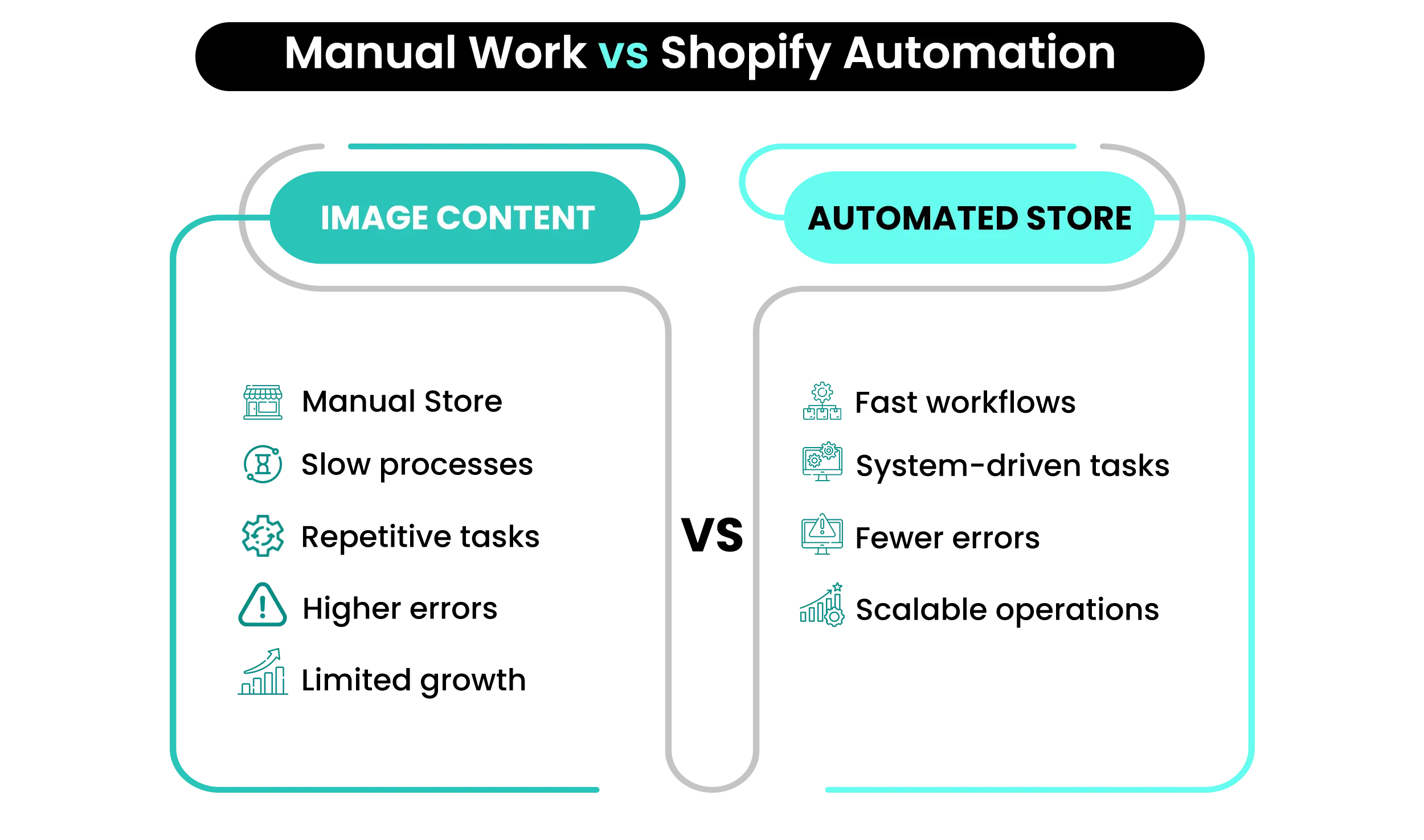
Every store runs on processes. When these processes are manual, they create friction. Tasks take longer, errors increase, and scaling becomes difficult.
Without Shopify automation, you often:
- Spend hours on repetitive work
- Delay responses to customers
- Struggle to manage increasing order volume
With Shopify automation, the entire workflow changes. Tasks are executed instantly, systems remain consistent, and your involvement is required only where it truly matters. This shift—from manual execution to automated systems—is what allows stores to scale smoothly. Shopify automation is not just a convenience; it is a growth enabler.
What is Shopify Automation?
Shopify automation refers to using tools, workflows, and integrations to handle repetitive ecommerce tasks automatically. Instead of manually performing actions, predefined rules trigger processes in the background.
For example, when a customer places an order:
- A confirmation email is sent automatically
- The order is tagged based on rules
- Inventory updates instantly
- Fulfillment processes begin
This entire sequence happens without manual input. At its core, Shopify automation transforms routine tasks into reliable systems. It ensures consistency, reduces effort, and improves operational efficiency.
📌 Key Video
What Can You Automate in a Shopify Store? (Complete Breakdown)
One of the biggest advantages of Shopify automation is its flexibility. It can be applied across multiple areas of your business, not just one function.
Order Processing Automation
Order handling is one of the most repetitive tasks. With Shopify automation, you can streamline this process and reduce manual effort.
- You can automate:
- Order tagging based on conditions
- Invoice generation
- Fulfillment triggers
This ensures faster processing and fewer errors.
Customer Communication Automation
Customer interactions often follow predictable patterns. Shopify automation allows you to handle these efficiently.
Examples include:
- Welcome email sequences
- Order confirmations and updates
- Abandoned cart recovery emails
These workflows improve response time and customer experience.
Inventory Management Automation
Inventory mistakes can impact both sales and trust. Using Shopify automation, you can maintain accurate stock levels without constant monitoring.
You can automate:
- Low-stock alerts
- Inventory syncing
- Supplier updates
This ensures your store runs smoothly without interruptions.
Marketing Automation
Marketing becomes more effective when it is consistent. Shopify automation enables continuous engagement without manual effort.
You can automate:
- Email campaigns based on behavior
- Customer segmentation
- Retargeting workflows
This improves both engagement and conversions.
Customer Support Automation
Support systems benefit significantly from Shopify automation, especially for repetitive queries.
You can implement:
- Chatbots for common questions
- Automated responses
- Ticket routing
This reduces workload while maintaining service quality.
How to Automate Your Shopify Store (Step-by-Step Guide for Beginners)
Implementing Shopify automation requires a structured approach. Trying to automate everything at once often leads to confusion.
Step 1: Identify Repetitive Tasks
Start by reviewing your daily workflow. Look for tasks that are repeated frequently and do not require decision-making.
These are ideal candidates for Shopify automation.
Step 2: Focus on High-Impact Areas
Not every process needs immediate automation. Prioritize tasks that consume the most time or directly affect customer experience.
Step 3: Use Built-in Shopify Tools
Shopify provides native automation features that are easy to implement. These are the best starting point for beginners exploring Shopify automation.
Step 4: Introduce External Tools
As your store grows, you can expand your automation capabilities with specialized tools. These tools allow more advanced workflows and integrations.
Step 5: Test and Monitor Workflows
Every automation setup should be tested carefully. Even small errors can affect customer experience. Monitoring ensures that your Shopify automation works as expected.
Step 6: Scale Gradually
Once your initial systems are stable, you can expand automation to other areas. Gradual implementation ensures better control and efficiency.
Best Shopify Automation Tools That Actually Save Time
Choosing the right tools is critical for effective Shopify automation. The goal is to solve real problems, not add unnecessary complexity.
Shopify Automation Tools Overview
| Tool | Primary Function | Best Use Case |
| Shopify Flow | Workflow automation | Backend processes |
| Klaviyo | Email automation | Customer retention |
| Zapier | Integration automation | Connecting apps |
| Gorgias | Customer support | Helpdesk automation |
| ReConvert | Post-purchase flows | Increasing repeat sales |
The effectiveness of Shopify automation depends more on how tools are used than which tools are chosen.
The Shopify Automation System (How Smart Stores Scale)
Most people think Shopify automation is about tools. In reality, it’s about systems.
A simple framework explains this clearly:
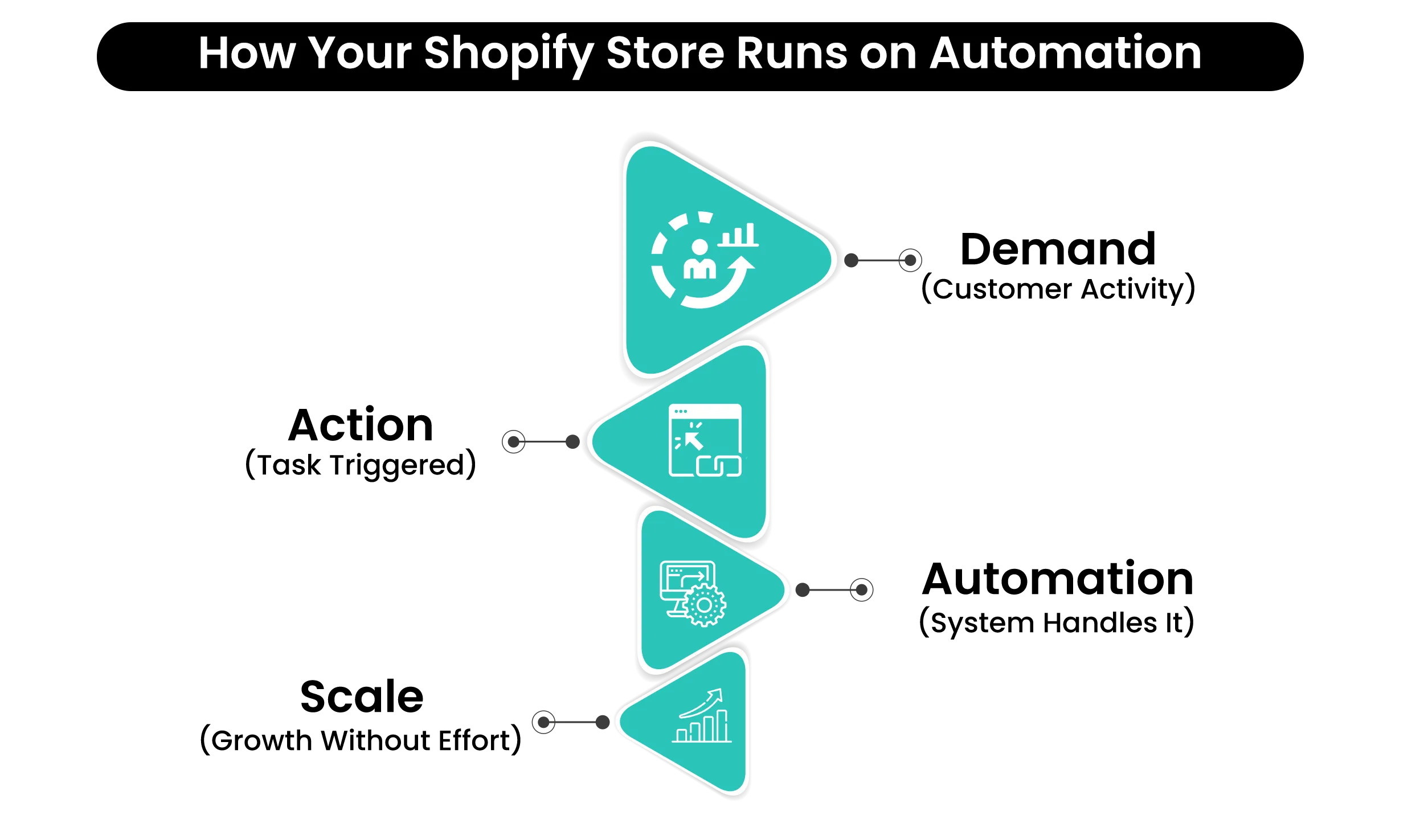
Demand → Action → Automation → Scale
- Demand starts with customer activity
- Action represents tasks triggered by that activity
- Automation replaces manual execution
- Scale happens when systems handle increased volume
This framework helps you build a structured approach to Shopify automation, rather than relying on disconnected tools.
Real Example: Before vs After Shopify Automation
Understanding the impact of Shopify automation becomes easier when comparing workflows.
Before vs After Shopify Automation
| Process | Before Automation | After Automation |
| Order Handling | Manual processing | Automated workflows |
| Emails | Sent individually | Triggered automatically |
| Inventory | Manual updates | Real-time syncing |
| Support | Manual replies | Automated responses |
The difference lies not only in efficiency but also in consistency and scalability.
Common Shopify Automation Mistakes (That Slow You Down)
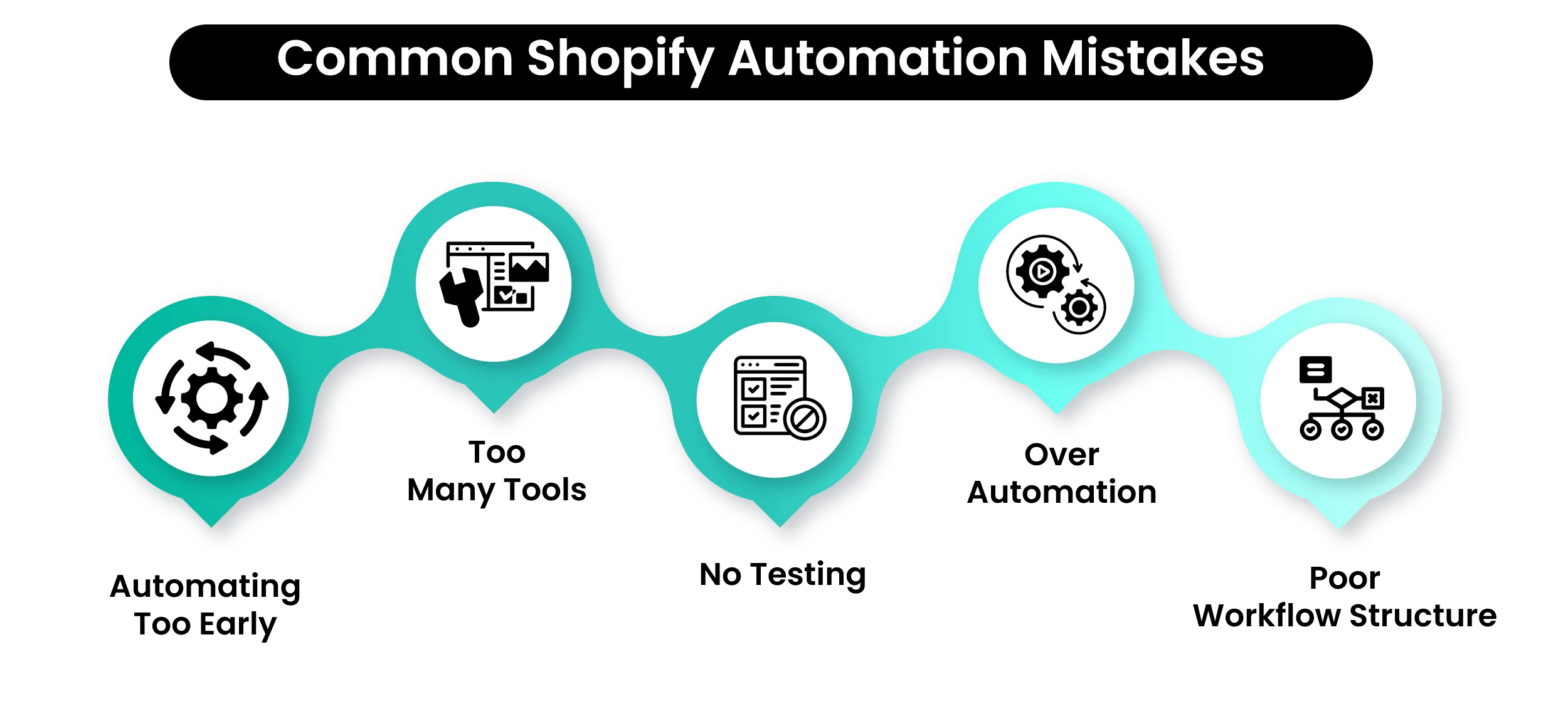
While Shopify automation is powerful, incorrect implementation can create challenges.
- One common mistake is automating too much too early. Without understanding your workflows, automation can introduce confusion instead of clarity.
- Another issue is relying on too many tools. Multiple disconnected apps can create fragmented systems that are harder to manage than manual processes.
- Lack of testing is also a major problem. Even small errors in automation can affect customer experience.
- Finally, over-automation can make interactions feel impersonal. A balance between automation and human touch is essential.
Effective Shopify automation simplifies operations—it does not complicate them.
Why Most Shopify Automation Setups Fail
Many stores invest in Shopify automation but fail to see results. The reason is not the tools—it’s the approach.
- Automation fails when workflows are unclear. If your manual process is not structured, automating it only amplifies inefficiencies.
- Another issue is focusing on tools instead of systems. Without a clear workflow, even the best tools cannot deliver results.
Successful Shopify automation requires clarity, planning, and gradual implementation. It is not about doing everything automatically—it is about doing the right things efficiently.
Manual Work Is Quietly Killing Your Shopify Growth
Orders, emails, inventory, follow-ups — doing it all by hand doesn’t scale. The stores winning right now have systems running behind the scenes.
When Should You Start Shopify Automation?
One of the biggest mistakes store owners make is trying to automate everything at once. This usually leads to confusion, tool overload, and workflows that are harder to manage than manual processes. A better approach is to start with one system that directly impacts your daily operations.
For most Shopify stores, the best starting points are:
- Order processing (to reduce manual handling)
- Email automation (to improve customer communication)
- Abandoned cart flows (to recover lost revenue)
- The goal is not to build a fully automated store overnight. It is to remove the most repetitive and time-consuming tasks first.
Once that system is working smoothly, you can expand automation gradually. This approach ensures that your Shopify automation setup remains simple, effective, and scalable.
How Much Does Shopify Automation Cost?
The cost of Shopify automation is not fixed—it depends on your store size, the level of automation you need, and the tools you choose to use alongside Shopify.
At a basic level, Shopify itself already includes some built-in automation features. However, to unlock more advanced workflows, you’ll likely combine Shopify with additional tools and apps.
Here’s a realistic breakdown:
Typical Shopify + Automation Cost Structure
Shopify Plan ($39 – $399/month)
- Covers core store functionality
- Includes hosting, checkout, and basic features
Apps & Automation Tools ($20 – $300+/month)
- Email marketing tools
- Workflow automation
- Third-party integrations
Advanced Tools (Optional) ($50 – $500+/month)
- CRM systems
- Advanced analytics
- Customer support automation
Transaction Fees (0.5% – 2% if using external payments)
- Payment processing charges
- Applies when not using Shopify Payments
What This Means in Practice?
- A small store can start with minimal costs using Shopify’s native features and a few essential apps.
- A growing store typically spends more on automation tools to handle email marketing, integrations, and customer support.
- A scaling store invests in advanced systems to streamline operations across multiple channels.
But here’s the key point:
The real value of Shopify automation is not in how much you spend—it’s in how much time and effort you save.
- When automation replaces repetitive tasks:
- You reduce operational errors
- You improve customer experience
- You free up time for growth-focused activities
In that sense, Shopify automation is not just a cost—it’s a growth multiplier.
Shopify Automation Checklist
- Identify repetitive tasks that consume time daily
- Prioritize workflows that impact operations and customer experience
- Select tools that fit your needs and integrate well
- Test each automation workflow before full implementation
- Monitor performance and fix issues regularly
- Expand automation gradually as your store grows
Conclusion — Automate Smart, Not Everything
Shopify automation is not about removing effort—it is about removing unnecessary effort. As your store grows, the difference between struggling and scaling often comes down to how your operations are structured. Manual processes may work in the beginning, but they quickly become a limitation.
By implementing Shopify automation gradually, you build systems that handle repetitive tasks efficiently while allowing you to focus on growth and strategy.
The goal is not to automate everything. It is to automate the right things.Because the most successful stores are not the busiest—they are the most efficient.
Ready to Simplify Your Shopify Store?
At Mastroke, we help you set up Shopify automation that actually works—so you spend less time managing tasks and more time growing your business.
Let’s build systems that scale, not just stores.
FAQs — Shopify Automation
1. What is Shopify automation?
Shopify automation is the use of tools and workflows to automatically handle repetitive ecommerce tasks such as order processing, email marketing, and inventory updates.
2. Can I automate my Shopify store for free?
Yes, Shopify provides built-in features that allow basic automation without any additional cost, making it possible to streamline simple tasks right away.
3. What is the best Shopify automation tool?
The best tool depends on your needs, but commonly used options include Shopify Flow for workflows, Klaviyo for email automation, and Zapier for integrations.
4. Is Shopify automation worth it?
Yes, automation helps save time, reduces manual errors, and improves overall efficiency, making it essential for scaling an ecommerce business.
5. How long does it take to automate a Shopify store?
Basic automation can be set up within a few hours, while more advanced workflows may take additional time to properly configure and optimize.
More Orders Shouldn't Mean More Stress
If your store can’t handle growth without breaking down, you don’t have a scaling problem — you have a systems problem. The good news? It’s fixable.