This blog post addresses budget allocation problems that scaling Shopify stores face, where merchants have adequate funding but are spending money in the wrong places at the wrong time. It provides a framework for intentionally allocating budget across three key categories - website, marketing, and tech - rather than reactive spending that leaves growth bottlenecks unaddressed.
Revenue is up. Margins are tighter. Ad costs keep climbing, and the store isn’t converting the way it should. You’ve added a handful of apps over the last year — and honestly, you’re not sure a couple of them are even doing anything.
If that sounds familiar, the problem probably isn’t how much you’re spending. It’s where it’s going. Most scaling Shopify stores don’t have a budget problem. They have a budget allocation problem — money going to the wrong places at the wrong stage, leaving the real bottlenecks untouched. Spending on ads, apps, and website work — but not sure if the split is right? This guide shows scaling Shopify merchants exactly where to put each budget dollar for maximum growth.
This guide breaks down how to think about business budget allocation across the three areas every growing Shopify store spends on: website, marketing, and tech. Not a generic formula — a real framework you can apply based on where your actual bottleneck is right now.
Why Growing Shopify Merchants End Up Budgeting Reactively
Here’s how it usually goes: an ad campaign underperforms, so you increase spend. A competitor adds a feature, so you find an app to match it. You hire someone because you’re overwhelmed, not because you planned for headcount. Everything gets funded in response to a problem, not ahead of one.
That’s reactive budgeting. It’s not laziness — it’s what happens when you’re running a store and trying to keep everything moving at once. The problem is what it quietly creates over time:
- Paid ads absorb more and more of the budget because they feel like the fastest lever
- The website only gets investment when something visibly breaks — not because it needs ongoing work
- Apps pile up silently — added to solve a problem, the problem moves on, the subscription doesn’t
- Retention gets close to zero attention because new customer acquisition always feels more urgent
What we see at Mastroke: Most stores that plateau aren’t underfunded — they’re misallocated. The budget is going to the wrong places at the wrong stage. Reallocating without spending more is often what breaks the plateau.
The shift from reactive to intentional budgeting starts with understanding what each spending category is actually supposed to do — and what it costs you when one of them gets starved of attention.
The 3 Budget Categories Every Scaling Shopify Store Needs
If you’re past the early stage and growing with intention, your business budget needs to cover three functions — each doing a completely different job, all competing for the same pool of money.
| Category | What It Does | What Breaks When You Underfund It |
| Website | Converts the traffic you’re already paying for into actual sales | Ad spend climbs, conversion stays flat, ROAS drops |
| Marketing | Brings people in through paid ads, organic search, and retention campaigns | Traffic dries up; growth becomes entirely dependent on existing momentum |
| Tech & Apps | Keeps operations running — automation, analytics, integrations, loyalty tools | Manual work piles up, data becomes unreliable, and costs creep up silently |
The mistake most merchants make is treating all three the same — spreading the budget equally with no real logic, or going all-in on one because it feels most urgent and quietly starving the others. Neither approach works at scale.
Website Budget: What Actually Moves the Needle and What Doesn’t
Here’s the signal worth keeping front of mind: if your store is getting traffic but conversions are flat, that’s almost always a website problem, not a marketing one. Running more ads in a store that doesn’t convert well just burns money faster. You’re amplifying the leak, not fixing it.
Website budget is one of the most mismanaged areas in scaling stores. Some merchants overspend on things that don’t move the needle. Others underspend because the site is “working well enough.” Both are expensive mistakes.
Where Website Budget Has a Measurable Return
- Speed. Page load time has a direct, documented impact on conversion rate — every second of delay costs you visitors, and the cost compounds on mobile, where most of your traffic arrives. A proper Shopify speed optimization effort isn’t just about passing Core Web Vitals scores — it’s about keeping customers on the page long enough to buy. For a full breakdown of what this involves technically and experientially, the Shopify performance optimization guide on the Mastroke blog covers it in detail.
- Checkout experience. Friction at checkout is one of the most expensive revenue leaks in any Shopify store. Confusing layouts, too many steps, unexpected costs appearing at the final screen — each of these kills conversions at the exact moment the customer is closest to buying. Even small fixes here often show an immediate, measurable return.
- Mobile experience. According to Brentonway commerce data, 79% of Shopify store traffic comes from mobile devices — and mobile accounts for 69% of total order volume. If your mobile experience is rough — slow loads, hard-to-tap buttons, a clunky checkout on a small screen — you’re losing the majority of your visitors before they get close to a purchase. This isn’t a Polish issue. It’s a revenue issue.
- Design that matches your brand stage. A store doing $5,000–$10,000/month can run effectively on a standard Shopify theme. A store doing $40,000–$80,000/month needs to look and feel like a real brand — not just a functional page. At that stage, professional Shopify theme development stops being optional and becomes a real investment that pays back through better conversion and stronger brand trust.
Where Merchants Typically Overspend
Full site redesigns, when only specific pages need fixing. A complete overhaul is expensive, slow, and disruptive. Most of the time, fixing the homepage hero, the product page layout, and the checkout experience delivers far more impact than rebuilding the entire site. A targeted Shopify conversion rate optimization effort on your highest-traffic, lowest-converting pages will usually outperform a full redesign — at a fraction of the cost.
What Usually Gets Ignored — and Shouldn’t
- Ongoing performance monitoring — not just fixing things when they visibly break
- Conversion fixes on pages with high traffic but below-average purchase rates
- Regular maintenance — keeping themes, apps, and integrations current and compatible
The most important mindset shift here: website work is not a one-time project. A 1% improvement in conversion rate on a store doing $50,000/month is $500 in additional monthly revenue — on the same traffic spend. Those gains compound quarter over quarter. That’s why growing stores budget for website work regularly, not as a one-off.
If you’re unsure where your website budget should go first, a Shopify performance audit is the fastest way to find your highest-impact gaps before committing to any spend.
Is Your Shopify Theme Slowing Down Your Store?
A theme isn’t just about design—it directly impacts speed, conversions, and user experience. Mastroke helps Shopify merchants optimize and customize themes to remove friction and improve performance where it matters most.
Marketing Budget: It’s More Than Just Ad Spend
Ask most growing Shopify merchants what their marketing budget looks like, and you’ll hear something like: most of it goes to Meta, some goes to Google, and the rest is influencers and whatever else feels like a good idea. That’s ad spend with a few side items — not a marketing budget.
A real marketing budget at the scaling stage covers three distinct areas. If one is missing, the whole system becomes fragile — and usually more expensive to run over time.
1. Paid Advertising
Paid ads are fast and measurable, which is exactly why they absorb a disproportionate share of most budgets. The problem is they have a ceiling — and it’s lower than most merchants expect.
Paid ads amplify what’s already there. If your landing pages aren’t converting, more traffic just means more money lost at the same rate. Before scaling spend, fix what the traffic is landing on.
The other reality: paid acquisition costs keep rising. According to Phoenix Strategy Group’s 2025 benchmarks, ecommerce customer acquisition costs jumped 40–60% between 2023 and 2025 — driven by iOS privacy changes, ad auction inflation, and more brands competing for the same audiences. Every dollar spent acquiring a new customer buys less than it did two years ago, and that trend isn’t reversing.
2. SEO and Content
SEO is where most scaling stores underinvest — because results take time, and time feels expensive when you’re trying to grow now. But that’s exactly why it compounds so well. Stores that build consistent organic presence today pay less for traffic 18 months from now. Stores that don’t are renting their audience — and the rent keeps going up.
A well-structured Shopify SEO strategy isn’t about chasing keyword rankings in isolation. It’s about building content and site structure that reduces your dependency on paid channels over time. If you want to understand how to build that investment across the year, the Shopify store growth strategy for 2026 on the Mastroke blog covers this specifically for merchants at the scaling stage.
3. Retention Marketing
This is the most underused part of the marketing budget for growing stores — and consistently one of the highest-returning investments when it’s taken seriously.
According to Bluecore’s 2024 Customer Growth Benchmarks Report, which analyzed more than 100 retail brands, active repeat buyers place 57.6% more orders and spend 69.2% more than new buyers. Meanwhile, acquiring a new customer costs five times more than retaining an existing one. Despite that, most scaling stores put almost nothing into email marketing, SMS, or loyalty programs — because new acquisition always feels more urgent.
Retention marketing isn’t just email blasts. It’s the full system for getting someone to buy a second time, a third time, and eventually to refer someone else. Managing your Shopify reviews and post-purchase trust signals — through consistent follow-up, social proof, and loyalty incentives — is what makes that investment compound rather than disappear.
A marketing budget spread across paid, organic, and retention channels is a stable one. A budget concentrated entirely in paid ads is one algorithm change away from a bad quarter.
Tech & Apps Budget: The Quiet Drain Most Stores Don’t Audit
This is where money gets wasted slowly, not obviously. Apps get added to solve a specific problem, solve it (or don’t), and then just sit there billing every month while nobody pays attention.
According to Shopify’s own platform data, top-performing Shopify stores use aroundsix apps on average. Many growing stores are running 15, 20, or more — with overlapping features and costs that haven’t been reviewed in over a year.
Where the Tech Budget Typically Goes
- Store apps: reviews, upsells, bundles, search functionality, and wishlists — these categories carry the most overlap. Review apps and upsell apps especially tend to get duplicated when a merchant switches products and never removes the original.
- Analytics and tracking: heatmaps, reporting dashboards, attribution tools — useful, but easy to accumulate. Three reporting tools doing the same job is a common finding in any stack audit.
- Automation: email flows, SMS sequences, abandoned cart recovery — often the highest-value category, but one where the setup gets done once, and nobody checks whether the flows are still performing.
- Third-party integrations: loyalty programs, inventory sync, ERP or accounting connections — often necessary, but worth reviewing annually as your operations evolve and grow.
The problem isn’t that these tools are bad. Most serve a real purpose when they’re first added. The issue is that nobody audits them. A tool gets added during a specific pain point, the pain point resolves or gets forgotten, and the subscription just runs indefinitely.
Do this every quarter: list every app in your Shopify store, its monthly cost, and whether someone on your team can immediately explain what it does and confirm it’s actively being used. You’ll almost always find tools you forgot you were paying for. Many scaling stores cut $300–$600/month in subscriptions just from doing this once — money that goes directly toward higher-impact work.
Every tool in your stack should answer one question clearly: What problem does this solve, and is it actively solving it right now? If the answer is slow or vague, that app is a candidate for removal.
If you’re at the scaling stage and wondering whether Shopify Plus belongs in your tech budget, the Shopify Plus pricing guide on the Mastroke blog covers what you’re actually paying for — and whether your current revenue stage justifies the move.
How to Allocate Your Shopify Business Budget: A Step-by-Step Process
Once you understand what each category does, here’s how to figure out the right split for your store right now.
- Identify your biggest bottleneck. Is the problem traffic (not enough people landing), conversions (people landing but not buying), or retention (customers not coming back)? Your bottleneck determines your allocation — not the other way around.
- Audit current spending across all three categories. List every dollar going to website work, marketing, and tech — including every app subscription. Most stores are surprised by the actual numbers, especially on the tech side.
- Reallocate based on impact, not urgency. The most urgent fire is often not the most expensive gap. Prioritize what’s costing you the most revenue — even if it doesn’t feel like it’s on fire right now.
- Set measurable targets before you spend. Define what success looks like: conversion rate, customer acquisition cost, repeat purchase rate. Without a target, you can’t tell whether the new allocation is actually working.
- Review and adjust every quarter. The right split at $30,000/month won’t be right at $80,000/month. Budget allocation should evolve as the store grows — build in a quarterly review as a standing habit.
How to Split Your Business Budget Across Website, Marketing, and Tech?
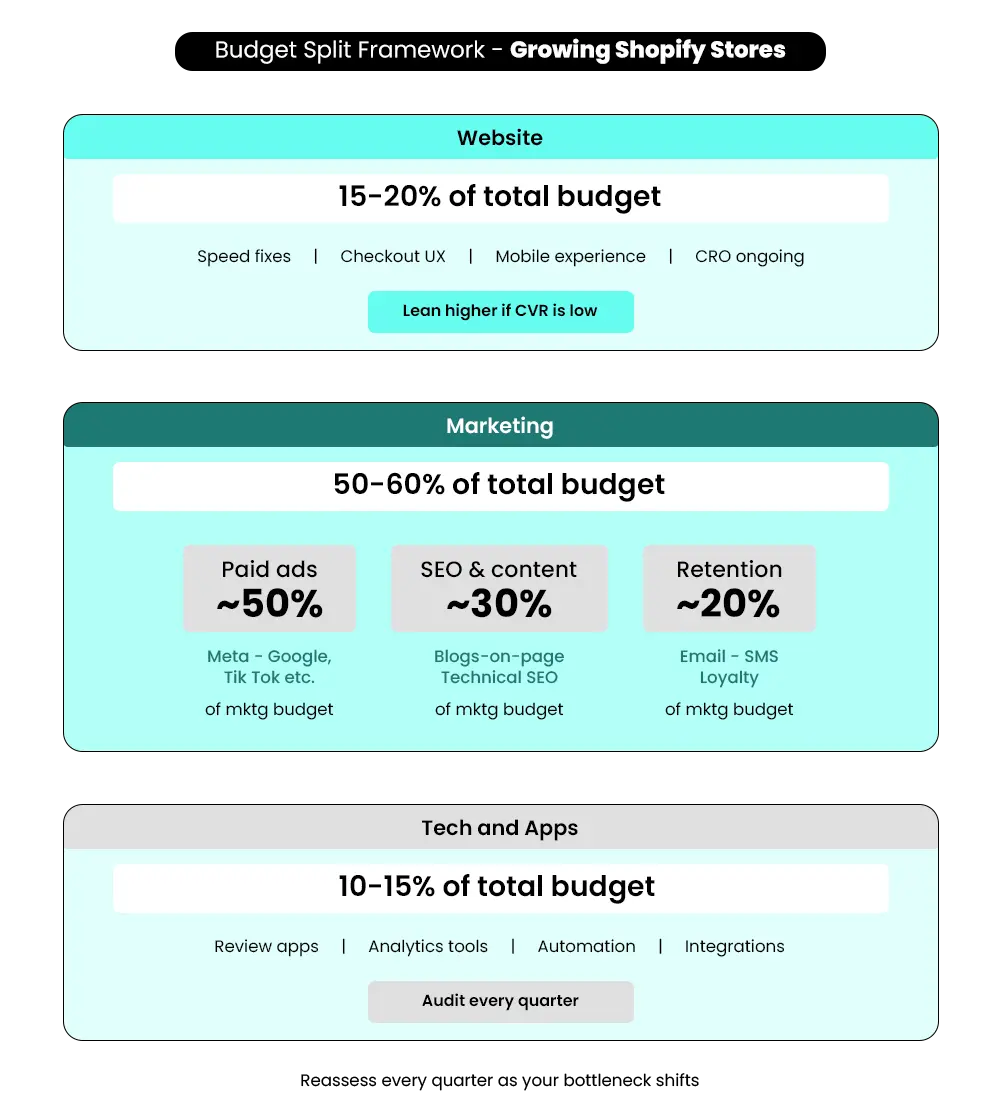
There’s no single right split that works for every Shopify store at every stage. But for stores actively scaling, here’s a general framework to start from:
| Category | Suggested Range | When to Lean Higher |
| Website | 15–20% | When the conversion rate is flat despite steady traffic |
| Marketing | 50–60% | Split across paid, organic, and retention — not concentrated in ads alone |
| Tech & Apps | 10–15% | After a proper audit, only for tools that are actively earning their place |
How to Find Your Specific Split?
- Traffic is low. Lean marketing-heavy. More of your budget should go toward paid ads and SEO to bring more people in. Improving a site that nobody’s visiting won’t change your revenue. Solve the traffic problem first, then optimize what those visitors land on.
- Traffic is solid, but conversions are flat. Shift budget toward the website. If people are landing and leaving, sending more of them through the same funnel is expensive. Fix what’s losing them before spending more to bring them in.
- Traffic and conversions are decent, but customers aren’t coming back. Invest more in retention. Make sure your tech stack supports it — email flows, SMS, loyalty programs, post-purchase sequences. This is the most profitable place to spend at this stage, because you’ve already paid to acquire those customers once.
Once you’ve identified your biggest gap, use the step-by-step process above to act on it — with targets you can measure against each quarter.
Budget Allocation Mistakes That Slow Scaling Stores Down
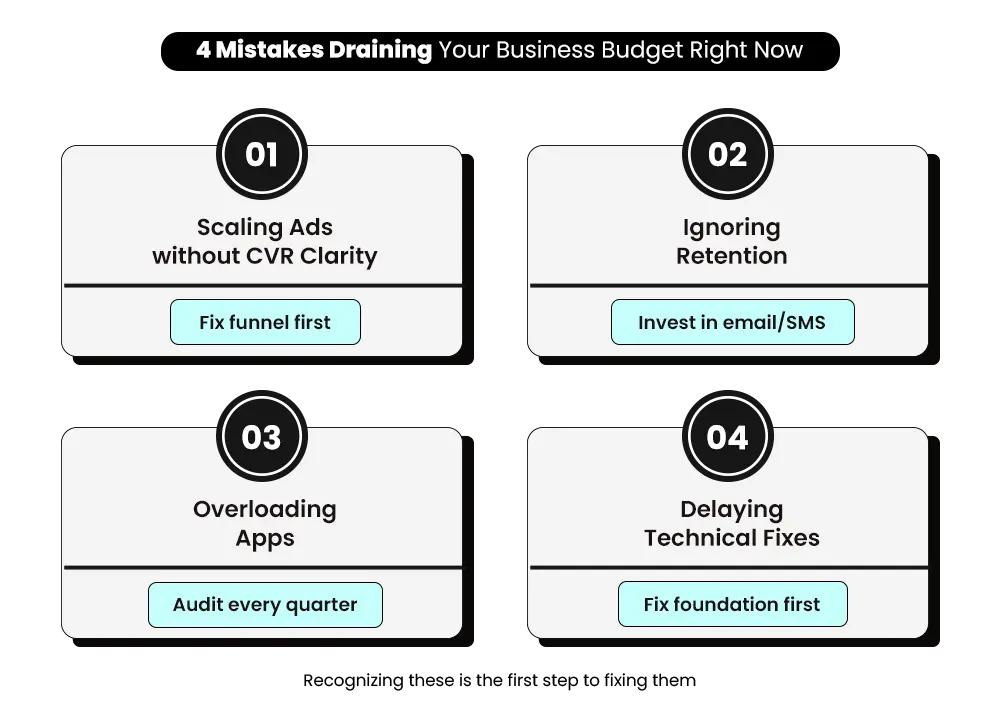
If any of these feel familiar, that’s a useful signal — recognizing the pattern is the first step to fixing it.
Scaling Ads Before Fixing Conversions
Doubling ad spend before the funnel is working is one of the fastest ways to drain a business budget without moving the revenue needle. Stores hitting a plateau are almost always over-indexed on paid acquisition and under-invested in conversion. More traffic doesn’t fix a conversion problem — it just makes the problem more expensive.
Ignoring Existing Customers
Acquiring a new customer costs five times more than keeping an existing one. And according to Bluecore’s 2024 Customer Growth Benchmarks Report, active repeat buyers spend 69.2% more per order than new buyers. If most of your marketing budget is chasing new customers while existing ones never hear from you again after purchase, you’re leaving that revenue on the table every month.
Overloading the Tech Stack
Adding apps to solve problems without removing old ones creates a bloated stack and a growing monthly bill that nobody questions. Every app should earn its place. If it’s not actively solving a real, ongoing problem, it’s just overhead with a recurring charge attached.
Treating Technical Fixes as Optional
A slow site, a confusing checkout, or a product page that doesn’t answer the customer’s core question — these aren’t “nice to fix someday” items. They sit at the bottom of the funnel and quietly determine how much of your marketing spend converts into actual revenue. Delaying technical fixes doesn’t save money. It drains what’s already being spent on traffic.
If you want a quick breakdown of the most common Shopify theme mistakes and how to avoid them, this short video will make it easier to spot them instantly:
📌 Key Video
>
>
What Good Budget Allocation Actually Looks Like in Practice?
A Shopify store doing $45,000–$60,000/month was allocating roughly like this: 80% of their marketing budget went to Meta and Google ads. About 5% went to website work, and only when something broke. The remaining 15% went to a mix of apps and tools, most of which hadn’t been reviewed in over a year.
Sales were growing, but slowly. Margins were tightening. Ad costs were climbing. The conversion rate had been flat for two quarters. And despite having a solid product with good reviews, almost no repeat customer revenue was coming in.
After a proper audit and reallocation — without increasing the total budget — the split shifted to: 55% paid ads, 20% website improvements (conversion-focused), 10% SEO and content, and 15% tech (after removing seven unused or overlapping apps).
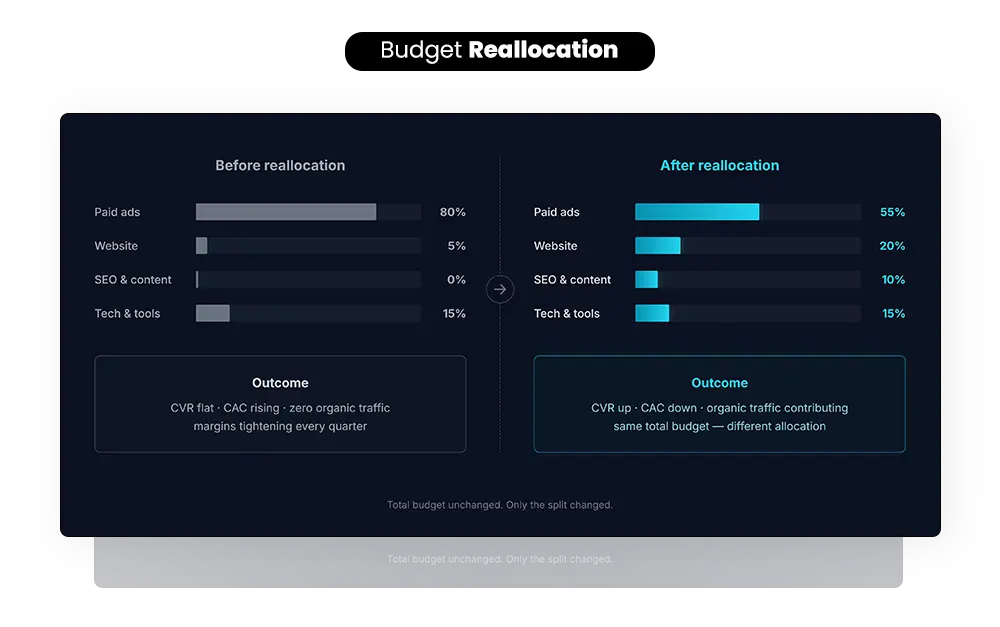
Within one quarter, the conversion rate improved, the cost per acquisition dropped, and organic traffic started contributing meaningfully for the first time. The total spend didn’t change. The allocation did.
That’s what intentional budgeting looks like. If you want to see how this plays out across real Shopify brands, the Mastroke case study page shows the actual results.
Not Sure Where Your Budget Should Go First?
The most common situations we work through with scaling merchants are exactly the ones described in this blog: consistent ad spend that isn’t reflecting in sales, a store stuck at the same monthly revenue, and a tech stack that’s grown over two years without a single proper review.
The pattern is almost always the same — the budget split is off, and the bottleneck isn’t the one the merchant thinks it is.
If you’re unsure whether your website, marketing, or tech spend is working as hard as it should, a Shopify performance audit is the fastest way to find out — before you commit to reallocating a dollar. We review your store, identify where the gaps are, and tell you exactly what to prioritize.
Conclusion
Business budget allocation isn’t about spending less. It’s about spending in the right places at the right stage. Website, marketing, and tech all need their share — and that share should reflect what your store actually needs right now, not what felt urgent last month.
Growing merchants who get this right stop feeling like they’re constantly catching up. The business starts to feel like something with a plan behind it, not just a series of fires being put out one at a time.
If your budget isn’t improving traffic, conversions, or retention — it’s not allocated correctly.
Ready to Find Out Where Your Budget Should Actually Go?
Mastroke works with scaling Shopify merchants to audit store performance, identify the real bottlenecks, and build a budget allocation that drives results — not just activity. Tell us where you’re stuck, and we’ll show you where to start.
Frequently Asked Questions About Shopify Budget Allocation-
Read the important questions about Shopify budget allocation for the website:
Q: What is the ideal business budget split for Shopify stores?
A: A solid starting point is 15–20% for website, 50–60% for marketing, and 10–15% for tech and apps. The right split depends on your biggest bottleneck right now. If conversions are low, lean more toward website work. When traffic is the problem, lean marketing-heavy. If customers aren’t returning, retention marketing should take a bigger share than new acquisition spending.
Q. Should I spend more on ads or the website first?
A: If your conversion rate is below average, fix the website first. Ads drive traffic — but if that traffic isn’t converting, more ad spend just means more money lost at the same rate. Run a store audit, identify your biggest conversion gaps, fix those, then increase ad spend to capitalize on the improvements. Scaling before fixing is one of the most common and expensive mistakes in ecommerce.
Q. How much should I invest in Shopify apps?
A: Keep tech and apps at 10–15% of your total budget and audit the stack every quarter. If someone on your team can’t immediately explain what an app does and confirm it’s actively being used, it’s a candidate for removal. Top-performing Shopify stores average around six apps — not fifteen or twenty. More apps mean higher monthly overhead, slower site speeds, and more maintenance to manage.
Q. When should I increase my business budget?
A: When your current setup is delivering consistent, predictable results. Increasing budget before your funnel is working doesn’t accelerate growth — it accelerates losses. Get your conversion rate to a stable baseline, confirm your retention systems are running properly, then scale what’s already working. Scaling a broken funnel just burns money faster.
Q. How do I track if my budget is working?
A: Track three numbers every month: conversion rate, customer acquisition cost (CAC), and repeat purchase rate. If the conversion rate is improving, your website spend is paying off. When CAC is holding steady or dropping despite rising ad costs, your marketing mix is healthy. If the repeat purchase rate is growing, your retention investment is compounding. Review all three quarters and adjust the allocation based on where numbers are moving — and where they’re not.