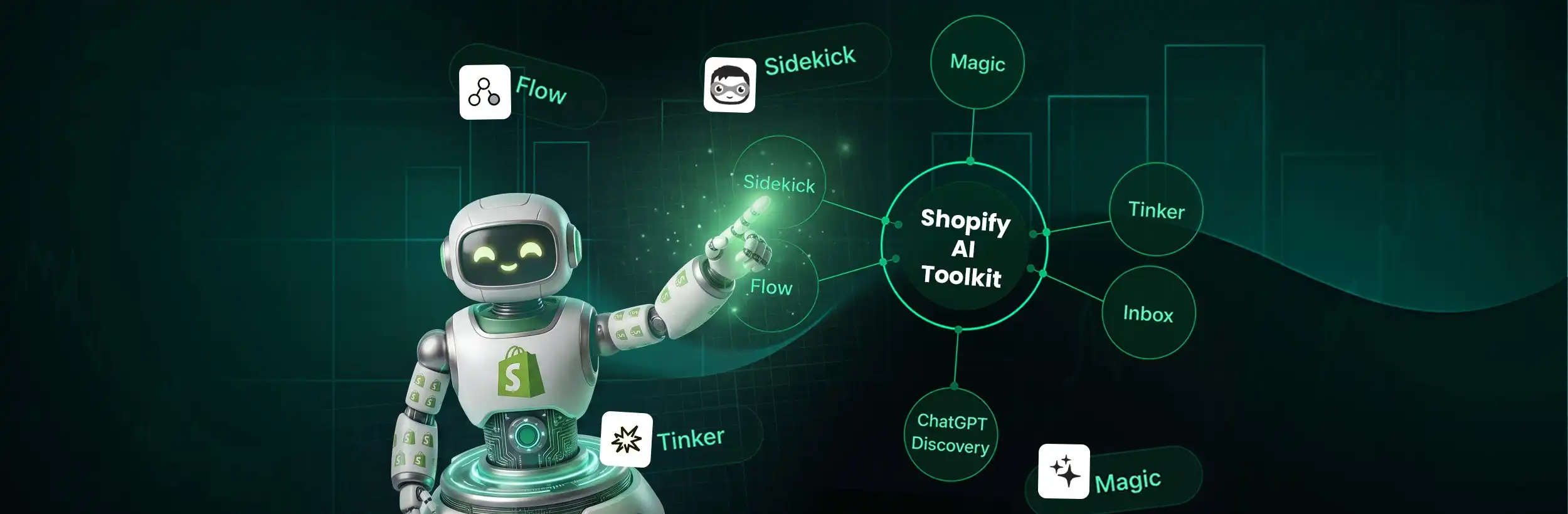
This blog post explains Shopify's merchant-facing AI tools available in 2026 that automate store operations like customer service, content creation, and cart recovery. It clarifies the difference between the developer-focused Shopify AI Toolkit and the actual AI tools that merchants can use directly in their stores.
Imagine waking up to find your store answered 200 customer queries, updated three collection pages, and sent personalized cart recovery texts — all while you slept. That’s not science fiction. That’s what Shopify’s merchant AI tools are enabling right now in 2026.
Not too long ago, running a Shopify store meant manually writing product descriptions, responding to customer chats one by one, chasing abandoned carts with generic email blasts, and guessing which products to promote next. That was the hustle. Today, AI has quietly stepped into every one of those roles — and it’s working 24 hours a day without a salary or a sick day.
Whether you’re a first-time store owner or a Shopify growth agency client scaling fast, this guide tells you exactly which AI tools are already active inside your store, how to use them, and — most importantly — where to start and in what order. By the time you finish reading, you’ll know precisely how to put AI to work for your business this week.
What Is the Shopify AI Toolkit — And Is It for Merchants?
The short answer: no, not directly — and this distinction matters.
The Shopify AI Toolkit is a developer infrastructure. According to Shopify’s official documentation, it is a set of MCP servers and plugins that connect AI coding tools — Claude Code, Cursor, and VS Code — to Shopify’s APIs, documentation, and code validation systems. It has no merchant-facing UI. It is not something merchants install, configure, or interact with directly. It’s the tooling that agencies and developers use to build on Shopify using AI.
This is an important correction to how the term has been used in a lot of content online. The Shopify AI Toolkit is not an ecosystem of merchant features.
What merchants actually use are Shopify’s merchant-facing AI tools?
A distinct, powerful, and genuinely transformative set of capabilities. These are:
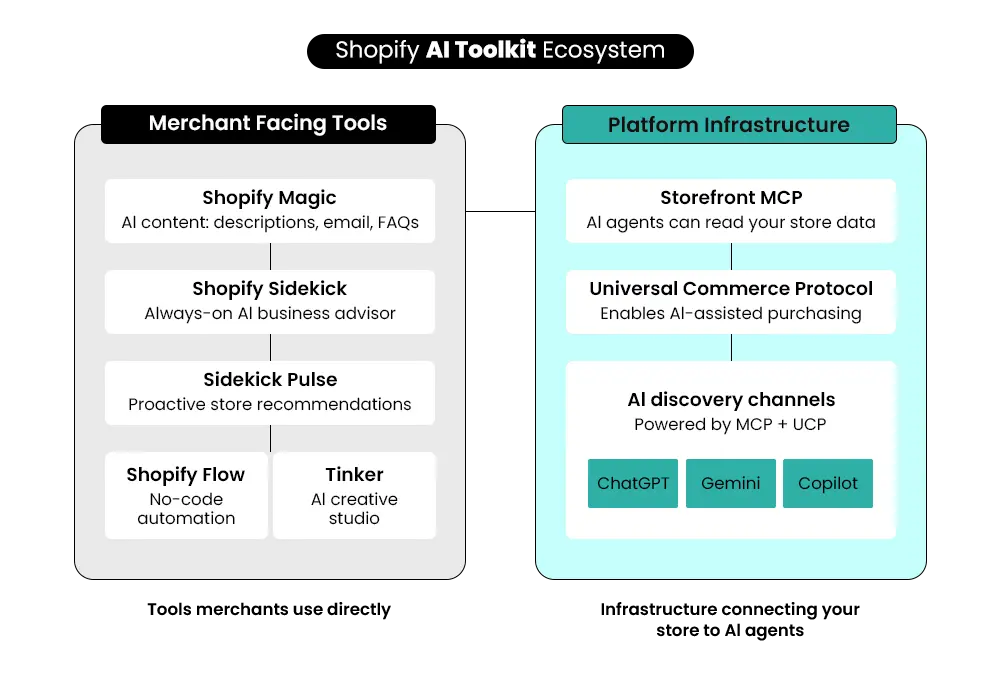
- Shopify Magic — Shopify’s native AI content engine for product descriptions, email copy, FAQ sections, and translations.
- Shopify Sidekick — Your always-on AI business advisor, accessible from the Sidekick icon (the masked face with purple glasses icon in the top-right corner of your Shopify Admin). Sidekick now also surfaces proactive recommendations without being prompted
- Shopify Flow — A no-code workflow automation builder. Through Sidekick, you can describe what you want in plain English and have it build the entire automation for you.
- Shopify Tinker — A mobile-first AI creative studio that consolidates premium AI tools for visuals, product photos, social content, and brand assets.
- Agentic Storefronts + Storefront MCP — The infrastructure layer that makes your store discoverable and shoppable by external AI agents like ChatGPT, Perplexity, and Microsoft Copilot.
For you to understand better through visuals, here is the video:
There are two distinct layers:
- Merchant-facing tools — the tools you interact with directly: Magic, Sidekick, Sidekick Pulse, Flow, and Tinker. These are what this blog focuses on.
- Developer-facing infrastructure — the Shopify AI Toolkit (Dev MCP and Storefront MCP), which is what your agency or development team works with. This layer is important to understand conceptually, but is not something merchants configure themselves.
Why 2026 Is the Inflection Point?
The numbers tell the story clearly. In 2025, 87% of retailers report that AI has had a positive impact on revenue, and 94% have seen it reduce operating costs. By 2028, approximately one-third of online retailers are expected to use advanced AI agents — up from less than 1% just a few years ago.
This is not a gradual shift. It’s a compounding advantage. Merchants who activate these tools now will have months of store-specific data training their AI systems. By the time late adopters start, the early movers will have AI that truly knows their catalog, their customers, and their conversion patterns.
Mastroke Insight: “The merchants who move now will have a compounding advantage — their AI tools learn from data over time. The merchants who wait will be playing catch-up with tools that haven’t had time to adapt to their store.”
The 5 AI Tools Working Inside Smart Shopify Stores Right Now
Here’s how real merchants are using Shopify’s AI tools to run leaner, sell smarter, and grow faster. These aren’t future possibilities — they’re live capabilities available inside your Shopify admin today.
The Content Agent: Shopify Magic
Every product page you’ve struggled to write, every email you’ve stared at a blank screen trying to start, every FAQ section you’ve put off building — Shopify Magic handles all of it.
This tool works quietly in the background to speed up content creation, streamline communication, and reduce manual effort — with no extra logins, no third-party integrations, and no learning curve beyond Shopify itself. It’s embedded directly in your product editor, your email builder, and your blog interface.
What it does in practice:
- Auto-generates product descriptions from basic attributes (product name, type, keywords)
- Translates product content for global markets
- Writes email subject lines, preview text, and body copy
- Creates FAQ sections based on product details
- Suggests SEO-optimized page titles and descriptions
Better, richer product content also means AI shopping agents can more accurately interpret and recommend your products to buyers searching on ChatGPT or Perplexity.
Action for merchants: Go to Shopify Admin → any product listing → click “Generate with AI” in the product description field. Your first AI-written description is one click away.
The Business Advisor: Shopify Sidekick
Sidekick is arguably the most transformative tool available to Shopify merchants today. It turns your admin panel into an intelligent command center — one that actually understands your store and can answer questions, surface insights, and build automations on demand. Sidekick now also surfaces proactive recommendations without being prompted.
Ask Sidekick plain-language questions like:
- “Why did my conversion rate drop last week?”
- “Which products are trending this month?”
- “What’s my average order value compared to last quarter?”
- “Show me customers who haven’t bought in 90 days.”
The real-world impact speaks for itself. Mordechai Hoffmann, co-founder of Blurrd Goods, put it simply: “Sidekick has been a massive game changer when it comes to marketing, product demand, inventory planning, and just maximizing my time.”
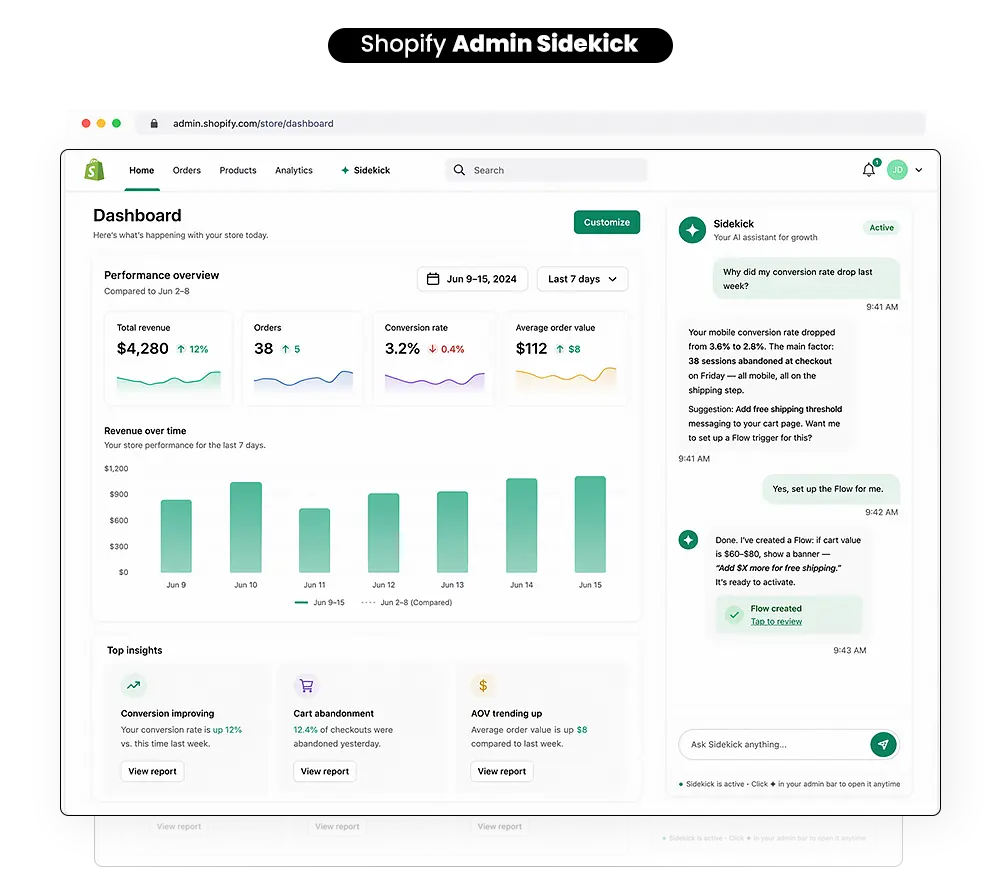
Action for merchants: Click the Sidekick icon — the masked face with purple glasses icon in the top-right corner of your Shopify Admin. Start with a simple question about your store data. You’ll be surprised by what it already knows about your business.
The Automation Engine: Shopify Flow
Shopify automation tools have existed for years, but Flow’s Sidekick integration has made them accessible to every merchant — not just those with developer support.
Here’s what Flow now enables:
- Low stock detected → automatically email your supplier
- Order value over $200 → tag customer as VIP and trigger a loyalty reward
- Negative product review posted → alert your support team instantly
- Customer hasn’t ordered in 60 days → add to re-engagement email segment
Previously, setting up these workflows required an understanding of logic, conditions, and triggers. Now, you simply describe what you want to accomplish — “Help me automatically tag customers if they place an order over $200”.
Sidekick builds and visualizes the entire flow for you, with no coding required. If you want a complete walkthrough of where to start and what to automate first, read our guide on how to automate your Shopify store the right way.
Action for merchants: Shopify Admin → Apps → Flow → Browse templates. Start with a pre-built template that matches a workflow you’re already doing manually. Activate it in minutes.
The Creative Studio: Shopify Tinker
If you’ve ever paid for a designer to create product visuals, social posts, or brand assets — only to wait a week and pay hundreds of dollars — Tinker will feel like a revelation.
This mobile-first AI-powered creative tool consolidates premium AI tools — drawing on models from OpenAI, Google, and Anthropic — organized not by model name but by output type. Merchants browse by what they want to create: a product photo, a logo, a social video, a 360° view — not by which underlying AI model produces it.
What makes Tinker genuinely different from other AI creative tools is its brand memory. Because all assets live in a single environment, the app applies context from prior creations to new ones — preserving visual and brand consistency without the merchant manually carrying references between disconnected tools.
What Tinker can generate:
- AI-generated product visuals and lifestyle photography
- Logos and brand identity assets
- Short-form social media videos and reels
- 360° product views for enhanced listings
- Campaign graphics and promotional banners
Action for merchants: Download the Tinker app (free) from the Shopify App Store. Create your first AI-generated product image within the first session.
The Customer Support Agent: Shopify Inbox + AI Chat
AI customer support has moved from a “nice to have” to a genuine competitive advantage. Shopify Inbox with AI suggestions means your store is now answering customer questions around the clock — even when you’re asleep, on vacation, or busy with operations.
The AI handles:
- Product FAQs and availability questions
- Order status updates
- Returns and exchange guidance
- Real-time product recommendations during conversations
- Cart abandonment follow-ups with personalized offers
The right approach: turn on Shopify Inbox for a basic FAQ bot first, then layer in generative AI once you have real transcripts to train on. The tool gets sharper with every conversation.
Action for merchants: Shopify Admin → Inbox → Enable AI Suggestions. Review your 10 most common customer questions and add them to your FAQ knowledge base. The AI will handle the rest.
The Real Shift — From “Run a Store” to “Train Your Store for AI”
Here’s the most important mindset shift in ecommerce right now — and most merchants are missing it entirely.
Traditional ecommerce looked like this: build your store → drive traffic → optimize conversion.
AI commerce in 2026 looks like this: an AI agent finds a product on your store → evaluates it against competitors → recommends or purchases it on behalf of a customer.
The critical difference: customers may never visit your store first. They may never see your homepage, your brand story, or your carefully designed navigation. They interact with an AI interface — ChatGPT, Perplexity, Microsoft Copilot, or Google AI Mode — and that AI makes the discovery, comparison, and recommendation for them.
This changes everything about what a “product page” is for.
Core Insight: “Your product page is no longer just for customers. It’s for AI systems that decide which products to surface, recommend, and sell.”
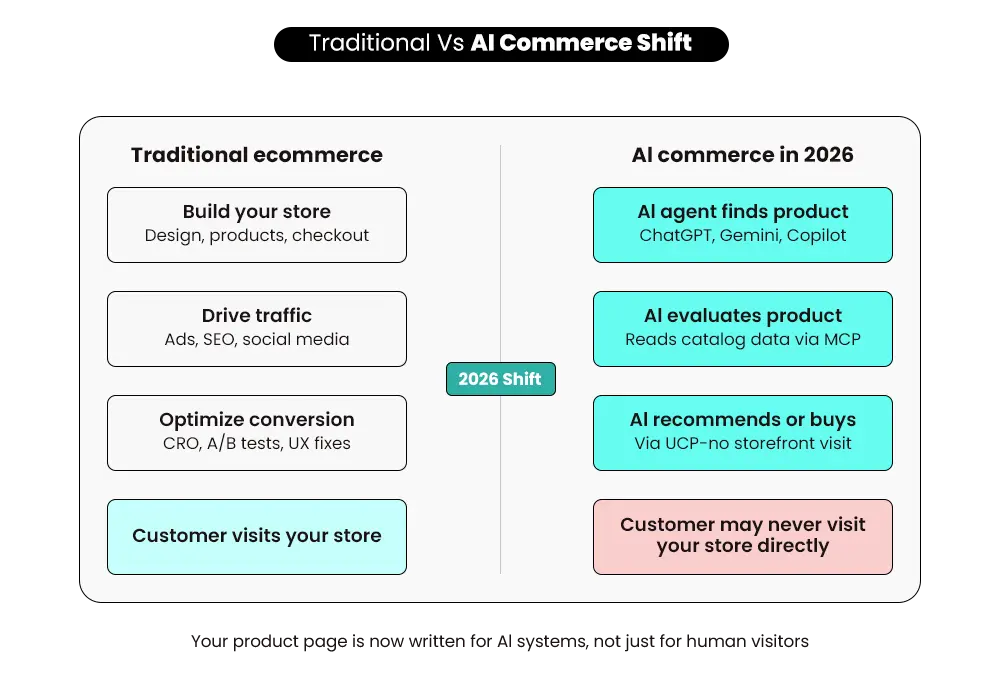
Shopify’s Agentic Storefronts — powered by Storefront MCP and the Universal Commerce Protocol (co-developed with Google) — connect your store to these external AI agents. The officially supported channels are ChatGPT, Perplexity, and Microsoft Copilot, in early access, according to Shopify’s Help Center. One setup in your admin, and your products are syndicated across all of them.
But the content and structure of your catalog are what determine whether those AI agents understand, trust, and recommend your products.
Note: The Storefront MCP is developer infrastructure — the layer your agency configures. Before making any changes to your agentic storefront settings, first read our guide on how to opt out of Shopify Agentic Storefronts and what you’ll lose if you do.”
How Smart Shopify Merchants Are Using These Tools (Real Use Cases)
1. AI-Powered Product Discovery
Your products can now appear in ChatGPT responses, Perplexity recommendations, and Microsoft Copilot shopping suggestions — without you running a single ad.
What winning stores do differently:
- Use complete, structured product data with every attribute filled in.
- Write titles that describe function, not just brand (“Merino Wool Crew-Neck Sweater for Cold Weather” beats just “The Classic Sweater”).
- Define clear use cases in product descriptions (“ideal for hiking, travel, and layering in winter”).
- Use consistent terminology across all product listings.
Without clean, interpretable data, even the best infrastructure can’t help your products get discovered. For a deep dive into exactly how to structure your product content for AI platforms, read our guide on ranking your Shopify products in ChatGPT and AI search.
2. AI Customer Support as a 24/7 Sales Layer
The merchants winning with AI customer support understand something important: AI support isn’t a cost-cutting measure. It’s a sales layer.
When a customer gets an instant, accurate answer to “Does this come in size XL?” or “Will this work for oily skin?”, the friction that would have caused them to leave your store is eliminated. The purchase happens.
3. AI-Driven Conversion Optimization
AI checkout optimization and personalized product recommendations are where the revenue impact becomes measurable and direct. Smart Shopify merchants are using these tools to work with a Shopify-focused conversion rate team that understands what moves the needle:
- Surface dynamic product recommendations based on browsing behavior, not just purchase history
- Deliver personalized discount offers based on customer lifetime value segments
- Trigger behavior-based popups and checkout nudges at precisely the right moment
- A/B test product page layouts using AI-generated variants
4. Backend Automation as an Invisible Growth Engine
The most underrated part of Shopify’s AI toolset is what happens in the back end — the invisible operations that keep a store running without requiring your constant attention.
Flow automations are handling order routing, dynamic inventory alerts, customer segmentation, and workflow triggers. The merchants who implement this layer find that their operational bandwidth shrinks significantly even as their sales volume grows. That’s what AI-powered backend automation actually delivers: growth that doesn’t cost proportionally more effort.
Common Mistakes Merchants Make With AI (And How to Avoid Them)
Read the section below and learn about the mistakes you must avoid:
Mistake 1: Treating AI as a “Set and Forget” Tool
AI tools are performance systems — they need real store data to perform well, and the more you engage with them, the smarter they get. Sidekick needs you to ask questions. Magic needs your product attributes to be filled in. Flow needs your workflows to be tested and refined. AI is a partnership, not a switch.
Mistake 2: Using Too Many Disconnected AI Apps
Tool sprawl is a real problem. Merchants install eight different AI apps — one for email, one for chat, one for product descriptions, one for ads — and end up with eight data silos that don’t talk to each other. Start with the native Shopify AI tools first. Only layer third-party tools selectively once you’ve maximized what’s built in.
Flow automations are handling order routing, dynamic inventory alerts, customer segmentation, and workflow triggers. To see the full picture of what’s possible before you decide what to build, explore everything Shopify Flow can automate.
Mistake 3: Not Measuring AI Impact
Before you activate any AI tool, set your baseline metrics: current conversion rate, support ticket volume, average content production time, and cart abandonment rate. Then measure those same metrics 30 days after activation. Without this, you’re flying blind.
Mistake 4: Skipping the Basics and Jumping to Advanced Tools
Start with what’s already inside your Shopify admin before buying third-party apps. Magic, Sidekick, Inbox, and Flow are all available to you right now — and most merchants haven’t fully activated even these foundational tools.
Mastroke Perspective: “We’ve onboarded dozens of Shopify merchants. The ones who win with AI are the ones who start small, track results, and expand systematically — not the ones who install 10 AI apps in week one.”
Your Action Plan — Where to Start If You’ve Never Used AI in Your Store
Never used AI in your store before? Start here. In this exact order.
Week 1 — Activate What’s Already Inside Shopify (Zero Cost)
|
Step |
Tool |
Action |
| 1 | Shopify Magic | Generate AI product descriptions for your top 10 products |
| 2 | Shopify Sidekick | Ask: “What are my top-performing products this month?” |
| 3 | Shopify Inbox | Turn on AI suggestions for customer chat |
| 4 | Shopify Flow | Set up one automation: low stock alert or VIP customer tag |
These four steps cost nothing. They require no technical knowledge. And they will give you your first direct experience of how the Shopify AI Toolkit changes the way you work.
Week 1 is designed specifically to eliminate all three of these barriers by giving you direct, hands-on experience with the tools that are already waiting inside your admin panel.
Week 2–3 — Build Your AI Content and Creative Engine
- Download the Tinker app (free) from the Shopify App Store → create your first AI-generated product visual or social post
- Use Sidekick to receive personalized growth recommendations for your specific store.
- Set up an AI-powered abandoned cart email using Shopify Email — this one alone typically delivers measurable ROI within the first 30 days
- Review your first week of AI chat transcripts from the Inbox and identify gaps in your FAQ knowledge base
Week 4+ — Scale With Third-Party AI Tools (Only After Basics Are Working)
Once your native Shopify AI integrations are running and you have baseline metrics to compare against:
- Layer in Klaviyo (AI email segmentation) if you have 500+ customers.
- Add an AI review management tool to respond to UGC at scale.
- Consider AI-powered ad optimization tools if you’re running paid campaigns on Meta or Google.
Where to go:
- Shopify Admin panel → Sidekick icon (the masked face with purple glasses icon in the top-right corner, always visible, always on)
- Shopify App Store → search “Shopify Magic,” “Flow,” “Tinker.”
Custom Shopify Development That Scales With Your Business
Build beyond templates with Mastroke. As a Shopify Partner, we develop custom features, scalable architecture, and performance-focused solutions tailored to your store’s growth stage.
What Shopify’s AI Tools Can’t Do (Honest Take)
It won’t replace human judgment on brand strategy. AI can write product descriptions, but it doesn’t know your brand story, your customers’ cultural context, or the emotional angle that makes your copy convert. Human creative direction remains essential.
The developer-facing Shopify AI Toolkit is not for non-technical merchants. The Dev MCP and Storefront MCP — the developer infrastructure that connects Shopify to external AI agents — are powerful but require technical setup. Attempting to work with them without proper technical knowledge can cause immediate, irreversible changes to your live storefront. This layer is for your agency or development team.
AI-generated content still needs human review. Shopify Magic produces excellent first drafts. But first drafts require editing. Read every AI-generated description before publishing it. Check for accuracy, brand voice consistency, and any claims the AI may have generated that need verification.
Bottom line: Use the native merchant tools confidently. Leave the Dev MCP and developer layer to your technical partners. And always review before you publish.
How to Know If Your Store Is AI-Ready?
Before AI agents can discover, evaluate, and recommend your products, they need to be able to understand your catalog. Most stores look good to humans. Very few are fully interpretable by AI.
Ask yourself these three questions:
1. Can an AI understand your product instantly?
If someone — or something — looked at your product title and description with zero context about your brand, would they immediately understand what the product is, who it’s for, and what problem it solves? If the answer requires brand knowledge to decode (“The Signature,” “The Classic”), the answer is no.
2. Are your product attributes complete?
Material, dimensions, weight, compatibility, care instructions, and intended use — these aren’t just nice details. They’re the structured data that AI shopping agents use to match products to queries. Incomplete attributes mean your products don’t show up in AI-generated recommendations.
3. Is your catalog structured logically?
Consistent collection naming, logical categorization, and coherent product hierarchies allow AI systems to navigate your catalog the way a knowledgeable sales associate would. Inconsistent structure creates confusion — and confused AI agents don’t recommend your products.
Reality Check: “Most Shopify stores look great on the surface. The ones that win in AI commerce are the ones that are also interpretable — structured, specific, and rich in the right data.”
Benefits of Shopify’s AI Tools for Merchants
- Faster decisions. Sidekick gives you instant analysis of your store data, turning what used to take hours of report-reading into a 30-second conversation.
- Better product visibility. With Agentic Storefronts enabling AI product discovery across ChatGPT, Perplexity, Copilot, and Google AI Mode, your products have new channels of exposure that don’t require ad spend — they require good data and clear content.
- Higher conversion rates. AI-powered product recommendations, personalized chat responses, and behavior-triggered offers all contribute to a measurable lift in conversion.
- Reduced manual work. Flow automations, Magic-generated content, and Inbox AI chat collectively eliminate dozens of repetitive tasks from your weekly workload.
- New traffic channels. AI shopping agents represent an entirely new discovery channel — one that doesn’t yet appear in most merchants’ traffic analytics but is growing rapidly. Getting positioned for this channel now is the equivalent of getting on Google Shopping before it became crowded.
Challenges Merchants Should Know About
- Less direct control over discovery. When AI agents are recommending your products, you’re not in the room. You can’t control the phrasing, the context, or the comparison set. The best response is to invest in product data quality.
- Dependency on data quality. AI tools are only as good as the data they have access to. Incomplete product information and sparse customer data will limit the performance of every AI tool.
- AI misinterpretation risk. Particularly with AI-generated content, there is always a risk of factual inaccuracy or off-brand phrasing. Human review at every stage is non-negotiable.
- Reduced direct brand interaction. When AI handles customer support, there is a trade-off in brand intimacy. Train your AI well, review transcripts regularly, and escalate complex or emotional conversations to human agents.
How Mastroke Helps You Leverage Shopify’s AI Tools
Shopify’s AI tools are powerful. But power without direction is just noise.
Mastroke exists to bridge the gap between Shopify’s AI capabilities and the real merchant results that justify using them. We’re not just a Shopify agency — we’re a Shopify AI activation partner. See how we’ve done this across different merchant categories in our Mastroke case studies.
Here’s what working with Mastroke looks like in the context of AI adoption:
- Store Audit and AI Readiness Assessment — Before we configure anything, we assess your current store against the criteria AI shopping agents use to discover and recommend products. We identify gaps in your product data, content structure, and catalog architecture.
- Shopify Store Setup and Optimization — For new and existing stores, we build and configure with AI tools pre-activated. You start selling with an AI-powered store, not a store you have to retrofit later.
Ready to make AI actually work for your store? Let’s build your AI growth plan together.
Conclusion
AI has moved well past the experimental phase. It’s now core infrastructure for ecommerce — the kind of capability that compounds over time as your data improves, your models learn, and your workflows get smarter.
Start this week: activate Sidekick and Magic in your Shopify admin, set your baseline metrics, and measure what changes in 30 days. Then expand from there — deliberately, sequentially, with data guiding every decision.
Not sure where to start? Let the Shopify experts at Mastroke do the audit for you.
Need Help Making Shopify AI Work for Your Store?
Not sure where to start with Shopify AI tools or how to structure your store for better results? Connect with Mastroke, a Shopify Partner, and get clear, practical guidance tailored to your store’s growth stage.
Frequently Asked Questions About Shopify AI Toolkit-
Here are the questions merchants ask most often once they start using Shopify’s AI tools:
What is the Shopify AI Toolkit, and is it free?
The Shopify AI Toolkit is a developer infrastructure. According to Shopify’s official documentation, it is a set of MCP servers and plugins that connect AI coding tools — Claude Code, Cursor, Gemini CLI, and VS Code — to Shopify’s APIs, documentation, and code validation systems.
How is Shopify Sidekick different from regular chatbots?
Shopify Sidekick is not a generic chatbot — it’s an AI business advisor trained on your specific store data. You can ask questions like “Why did my conversion rate drop last week?” or “Which products are trending this month?” and get answers based on your actual store performance. Sidekick now surfaces proactive recommendations without being prompted.
Can Shopify AI tools really help small or beginner stores, or is this only for big brands?
The Shopify AI Toolkit is designed for developers at every level — from first-time store owners to scaling brands.
What is agentic commerce on Shopify, and does it affect my store automatically?
Agentic commerce refers to the ability of external AI agents — like ChatGPT Shopping and Microsoft Copilot — to discover, evaluate, and recommend (or even purchase) products from your Shopify store on behalf of customers. Shopify enables this through its Storefront MCP and Universal Commerce Protocol (UCP).
How do I make my Shopify store AI-ready for product discovery?
To make your store interpretable by AI shopping agents, focus on three areas: (1) Complete product attributes — fill in every field, including material, dimensions, weight, compatibility, and intended use. (2) Descriptive titles — write titles that describe function and use case, not just brand names (e.g., “Merino Wool Running Socks for Cold Weather”, not “The Performance Sock”). (3) Consistent catalog structure — use logical collection naming, clear categorization, and coherent product hierarchies.