This blog post explains why growing Shopify Plus stores need ERP integration to overcome operational challenges that arise when scaling their business. It addresses how disconnected systems create inefficiencies and demonstrates how ERP integration centralizes operations to support sustainable growth.
Your Shopify Plus store is growing — orders are increasing, SKUs are multiplying, and operations are becoming harder to manage. But somewhere along the way, systems stop syncing smoothly.
Inventory numbers no longer match actual stock. Finance teams work from outdated spreadsheets. Customer support teams struggle to confirm product availability. Manual fixes slowly become part of daily operations.
This is the stage where many merchants realize the issue is not Shopify Plus itself — it’s the disconnected systems surrounding it.
An ERP helps connect inventory, orders, finance, warehousing, and operations into one centralized system, helping businesses scale without depending on spreadsheets and manual workflows.
In this guide, we’ll explain what ERP means for Shopify Plus brands, which ERP solutions are worth considering, and how businesses can avoid costly implementation mistakes during integration.
Why Shopify Plus Brands Hit a Wall Without ERP
Shopify Plus is a powerful ecommerce platform. But as businesses grow, they often begin stacking additional systems around it — inventory tools, accounting integrations, warehouse management software, shipping platforms, and operational dashboards. Individually, these systems may work well. The problem starts when they stop communicating properly with each other.
Inventory exists in one platform. Orders move through another. Accounting happens somewhere else entirely. When operational issues occur — overselling during a flash sale, fulfillment delays, or inventory mismatches between the storefront and warehouse — teams struggle to identify the source quickly enough to prevent larger problems.
Shopify’s ERP integration resources describe operational fragmentation as one of the biggest scaling challenges for growing ecommerce brands. Manual reconciliation slows reporting, delays decision-making, and forces teams to spend more time fixing operational issues instead of focusing on growth.
The impact goes beyond operational frustration. Overselling creates refund overhead and damages customer trust. Poor forecasting leads to dead stock on slow-moving products and stock shortages on bestsellers. Leadership teams often make decisions using outdated reporting rather than real-time operational data.
What Is a Shopify Plus ERP System?
Before choosing an ERP system, it helps to understand what the term actually means.
ERP stands for Enterprise Resource Planning. In simple terms, it’s one centralized system that connects inventory, orders, finances, customer data, warehousing, and fulfillment so every part of the business works together in real time.
Instead of using multiple disconnected tools that each hold part of the operational picture, an ERP creates one connected system that keeps everything synchronized.
For a Shopify Plus merchant, this usually means:
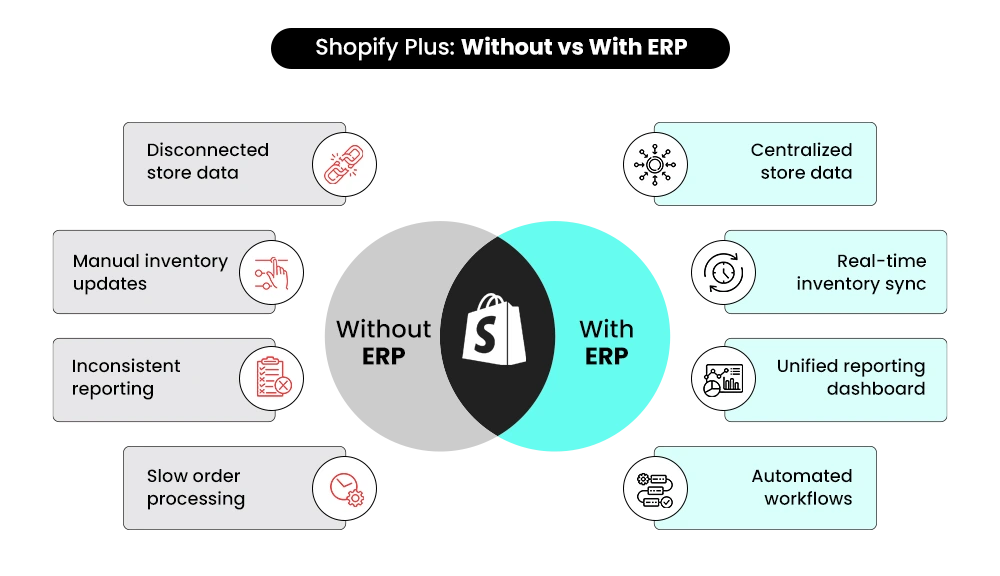
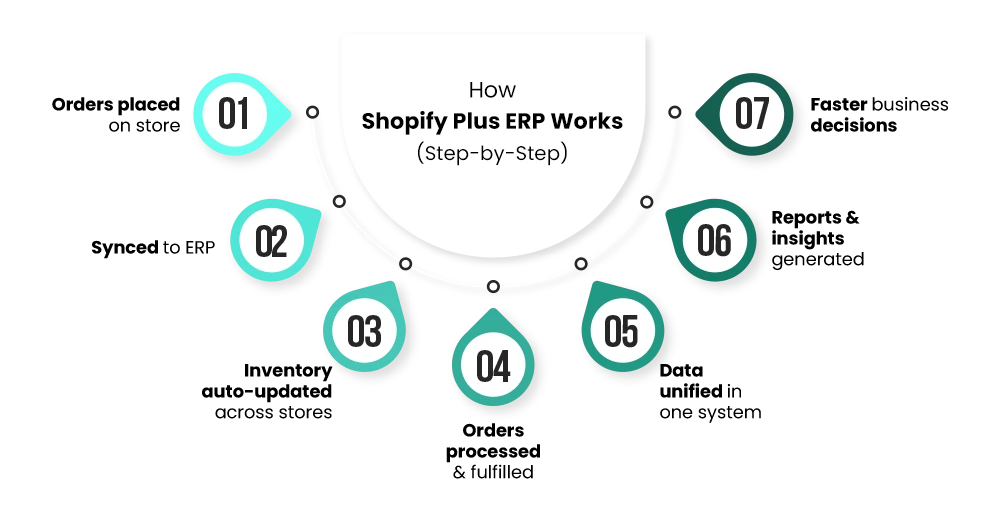
- An order placed on the storefront updates instantly inside the ERP
- Warehouse inventory adjustments reflect on the live store in real time
- Financial data flows directly from sales into accounting automatically
- Leadership teams work from one centralized operational data source instead of multiple conflicting dashboards
According to Cargoson ERP market analysis, the global ERP software market grew to $73 billion in 2025. The growth reflects how important ERP systems have become for businesses managing operational complexity and scaling ecommerce operations.
At scale, an ERP is not simply an enterprise software upgrade — it becomes part of the operational infrastructure that keeps the business running efficiently.
What a Shopify Plus ERP Typically Handles
- Real-time inventory synchronization across warehouse locations and storefronts
- Automated order routing and fulfillment updates
- Centralized financial reporting without manual data entry
- Multi-store and multi-region operational management from one dashboard
- Demand forecasting using unified sales and inventory data
📌 Key Video
How ERP Drives Real ROI for Shopify Plus Stores
The business case for ERP comes down to one simple question: what is the lack of one currently costing your business?
Every manual reconciliation consumes team time. Every inventory mismatch creates customer service issues. Every delayed report means decisions are being made using outdated information. As operational complexity increases, these problems become recurring costs that continue compounding alongside growth.
A properly integrated ERP helps eliminate much of this operational friction. More importantly, it gives teams real-time visibility across inventory, fulfillment, financials, and reporting so decisions can be made faster and with greater accuracy.
The real ROI of ERP is not simply operational automation — it’s the ability to scale the business using reliable, centralized data.
Industry research consistently shows that many ERP implementations fail to meet their original business goals. In most cases, the problem is not the software itself, but poor planning, incomplete data preparation, unclear operational requirements, and weak implementation processes.
Choosing the right ERP platform is important, but implementation quality usually determines whether the business actually sees long-term operational return.
| Operational Area | Without ERP | With ERP |
|---|---|---|
| Inventory Tracking | Manual and error-prone | Real-time and automated |
| Order Management | Fragmented across tools | Synchronized across systems |
| Reporting | Delayed and inconsistent | Unified and current |
| Scalability | Operational bottlenecks appear quickly | Infrastructure scales alongside growth |
| Multi-store Operations | Difficult to manage efficiently | Centralized operational visibility |
Best ERP Systems for Shopify Plus Stores
Several ERP platforms consistently appear when Shopify Plus merchants evaluate enterprise operational systems. The right choice depends on business size, operational complexity, warehouse structure, international expansion requirements, and the technology ecosystem already in use.
1. NetSuite
NetSuite is one of the most widely adopted ERP platforms among mid-market and enterprise ecommerce brands. It provides advanced financial management, inventory control, and order processing while supporting international operations with multi-currency and multi-entity functionality.
Pricing typically starts above $1,000 per month and increases depending on modules, users, and implementation scope.
Best for: Enterprise brands requiring deep financial control alongside advanced operational management.
2. SAP Business One
SAP Business One is designed for growing mid-market businesses — typically companies generating between $5M and $50M in annual revenue — that need structured operational systems without the full complexity of large-scale enterprise SAP products.
It combines financial management, purchasing, inventory, and operational reporting within one centralized platform while offering an established Shopify integration ecosystem.
Best for: Mid-market businesses preparing for larger operational scale.
3. SAP S/4HANA
SAP S/4HANA is SAP’s enterprise-grade ERP platform built for global organizations with highly complex operational structures, international supply chains, and multi-region infrastructure.
Implementation is significantly larger in both cost and timeline compared to other ERP platforms, making it most suitable for businesses operating at very large scale.
Best for: Large enterprise organizations with advanced global operational requirements.
4. Microsoft Dynamics 365 Business Central
Microsoft Dynamics 365 Business Central is a strong choice for brands already using the Microsoft ecosystem, including Azure, Teams, and Office 365.
The platform integrates with Shopify Plus through connectors and offers strong reporting, analytics, and operational visibility. Pricing generally ranges between $70–$200 per user monthly depending on licensing structure.
Best for: Businesses already operating within Microsoft infrastructure.
5. Acumatica
Acumatica is a cloud-native ERP platform known for operational flexibility and strong multi-location inventory management.
Unlike many ERP systems that charge per user, Acumatica uses usage-based pricing, which can make operational costs more predictable as businesses scale.
Best for: Multi-location and warehouse-driven mid-market businesses.
6. Odoo
Odoo is a highly flexible open-source ERP platform. The Community edition is free to use, while the Enterprise version includes official support and advanced features with pricing typically ranging from $25–$37 per user monthly.
Because of its flexibility, Odoo works best for businesses with in-house technical capabilities or development support.
Best for: Technical teams seeking flexibility and reduced vendor dependency.
7. Brightpearl
Brightpearl is designed specifically for ecommerce and retail operations, with native Shopify Plus integration capabilities.
It supports inventory management, order processing, fulfillment, and returns within one centralized system while offering faster implementation timelines than many traditional ERP platforms.
Best for: Retail and ecommerce-focused brands seeking faster implementation and operational simplicity.
| ERP Platform | Best For | How It Connects to Shopify Plus | Estimated Price Range | Setup Complexity |
|---|---|---|---|---|
| NetSuite | Enterprise brands | Via middleware | $1,000+/month | High |
| SAP Business One | Growing mid-market businesses | Via connector | Custom quote | Medium |
| SAP S/4HANA | Large global enterprises | Custom integration | Enterprise pricing | Very High |
| Dynamics 365 Business Central | Microsoft ecosystem brands | Via connector | $70–$200/user/month | Medium |
| Acumatica | Multi-location mid-market brands | Native/API | Usage-based pricing | Medium |
| Odoo | Technical and cost-conscious teams | Via connector | Free (Community) / $25–$37 per user monthly | Medium |
| Brightpearl | Retail-focused ecommerce brands | Native integration | Custom quote | Low |
How ERP Systems Connect With Shopify Plus
- Native Integration: Built directly for Shopify Plus. Usually faster to implement with lower maintenance requirements.
- Via Connector: Uses a pre-built integration bridge between Shopify Plus and the ERP platform. Reliable and widely used with moderate configuration requirements.
- Via Middleware: A third-party platform such as Celigo or Dell Boomi manages data flow between Shopify Plus and the ERP. More flexible but operationally more complex.
- Custom Integration: Built directly using Shopify APIs. Provides maximum flexibility but requires ongoing development and maintenance resources.
Key Features to Look For Before You Choose
Not every ERP platform is built specifically for ecommerce operations. Some systems are excellent at financial management but weaker on inventory synchronization. Others support retail workflows well but struggle with international operations.
For Shopify Plus brands, the following capabilities usually matter most:
- Real-time inventory synchronization across warehouses, storefronts, and fulfillment locations
- Automated order routing based on fulfillment rules such as warehouse proximity, stock availability, or logistics partner priority
- Native or well-documented Shopify Plus API support instead of loosely maintained third-party connectors
- Multi-currency and multi-language support for international ecommerce operations
- Demand forecasting based on actual sales and operational data
- Centralized operational visibility across multiple storefronts, inventories, and customer records
One practical test worth doing with any vendor: ask them specifically how their system performs on your highest-volume days. Black Friday, product launches, and flash sales are where poorly integrated ERPs fail first. If the vendor can’t answer that question with confidence, take note.
For a wider look at how ERP fits into your overall Shopify Plus technology stack, our guide on Shopify Plus Integrations: The Stack That Works covers the full picture.
How ERP Actually Integrates With Shopify Plus
There are three primary ways ERP systems integrate with Shopify Plus. Understanding these approaches helps businesses evaluate implementation complexity before speaking with vendors.
Native Connectors
Native integrations are built specifically for Shopify Plus. They are generally faster to implement, easier to maintain, and require less custom development work.
When available, native integrations are often the lowest-risk implementation option.
Middleware Platforms
Middleware tools such as Celigo or Dell Boomi act as operational translators between Shopify Plus and the ERP platform.
These systems move and transform data between platforms while supporting more complex operational structures such as multiple storefronts, multiple ERP environments, or legacy systems.
Middleware offers greater flexibility but also introduces additional operational complexity.
Custom API Integrations
Custom integrations are built directly using Shopify APIs and developer infrastructure.
This approach offers maximum flexibility but requires long-term development resources, ongoing maintenance, documentation management, and testing.
Custom API integrations are generally best suited for businesses with highly specialized operational requirements.
Why Data Mapping Matters
The most common reason ERP integrations fail is not the integration method itself — it is poor data mapping.
Data mapping ensures that inventory fields, order structures, product identifiers, fulfillment statuses, and operational records align correctly between Shopify Plus and the ERP system.
When these fields do not match properly, businesses experience inventory drift, reporting inconsistencies, missing orders, and operational errors.
Before any ERP integration goes live, every operational data point should be mapped and tested against real-world business scenarios, including peak traffic events and high-volume sales periods.
How to Choose the Right ERP: A Step-by-Step Approach
Step 1 — Document Operational Workflows
Before evaluating vendors, businesses should map exactly how orders move through operations — from storefront purchase to fulfillment, warehousing, returns, and financial reporting.
This workflow documentation becomes the foundation for all ERP evaluation decisions.
Step 2 — Define Requirements Before Product Demos
ERP vendors naturally focus on showcasing ideal workflows. Businesses should instead test operational edge cases and real-world problem scenarios.
Examples include warehouse overselling, high-volume order spikes, split fulfillment handling, and multi-location returns.
Step 3 — Verify Shopify Plus Integration Depth
Businesses should request live demonstrations of Shopify Plus integrations rather than relying only on feature descriptions.
References from merchants operating at similar scale and operational complexity are also extremely valuable during evaluation.
Step 4 — Calculate Total Operational Cost
The ERP subscription itself is often only a small part of the total investment.
Implementation costs typically include data migration, customization, onboarding, training, testing, maintenance, and operational support.
In many cases, a lower-priced ERP with difficult implementation becomes more expensive long term than a higher-priced platform with stronger native integrations.
Step 5 — Test Under Peak Operational Load
Businesses should evaluate how the ERP performs during realistic peak-order scenarios before signing long-term agreements.
High-volume testing helps identify synchronization delays, infrastructure bottlenecks, and operational limitations before they become expensive problems.
Step 6 — Evaluate Whether an Integration Partner Is Needed
For many growing Shopify Plus brands, working with an experienced ERP integration partner significantly reduces implementation risk.
Experienced partners understand common failure points, operational dependencies, and rollout strategies that internal teams may not have handled before.
Common Mistakes That Cost Merchants the Most
- Choosing an ERP without documenting requirements first. Picking a platform based on feature lists rather than mapped workflows is how brands end up with the wrong product for their actual situation.
- Underestimating how complex the integration is. A poorly planned integration creates the exact problems ERP is supposed to eliminate — inconsistent data, delayed updates, reporting gaps.
- Going live without testing at peak load. Many brands discover their ERP integration breaks under pressure only during a major sales event. That’s the worst possible moment to find out.
- Skipping user training. An ERP only delivers value if the team uses it correctly and consistently. Skipping training is a reliable way to waste a significant investment.
- Choosing an implementation partner based on the lowest price. ERP implementations done well require
- Shopify Plus-specific experience. The cost of fixing a poor implementation is almost always higher than the cost of doing it right the first time.
For more on how Shopify Plus handles performance at enterprise scale, read our breakdown of Shopify Plus for Enterprise Growth: Features & Benefits.
Do You Need a Shopify Plus ERP Integration Partner?
For many growing Shopify Plus brands, the answer is yes.
ERP implementation involves operational mapping, data synchronization, testing, workflow restructuring, and rollout coordination across live business systems.
Experienced integration partners help reduce operational disruption while improving implementation quality and long-term scalability.
You May Not Need a Partner If:
- Your ERP platform includes a strong native Shopify Plus integration
- You have experienced in-house technical and project management teams
- Your operational structure is relatively simple with lower order complexity
You Almost Certainly Need a Partner If:
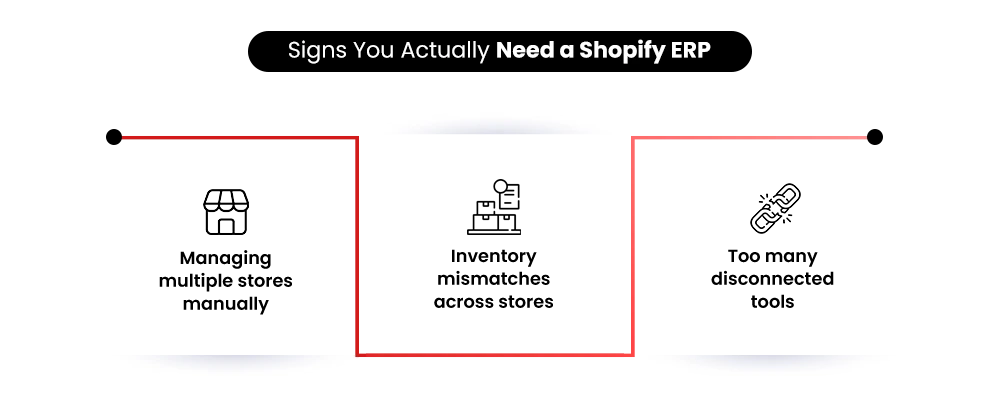
- You operate multiple storefronts or international regions
- You are migrating from older legacy systems during the ERP rollout
- Your fulfillment process involves multiple warehouses or third-party logistics providers
Build Your Shopify Store From Scratch With Mastroke
Launch faster with Mastroke, an official Shopify Partner. We build structured stores with conversion-first design, clean setup, and features built to scale!!
Conclusion
An ERP integration is not simply an IT project. It is an operational decision that affects how the entire business functions — from inventory visibility and financial reporting to fulfillment workflows and leadership decision-making.
The right ERP system, properly integrated with Shopify Plus, creates reliable data, more predictable operations, and significantly better operational efficiency as the business scales.
At the same time, a poorly planned implementation can create the exact operational problems businesses are trying to eliminate.
Before choosing any ERP platform, businesses should take the time to document workflows, evaluate operational requirements carefully, calculate total implementation costs, and test systems thoroughly before launch.
For growing Shopify Plus brands, ERP integration is often less about software alone and more about building infrastructure capable of supporting long-term operational scale.
At Mastroke, we work with Shopify Plus brands on ERP strategy, implementation planning, operational optimization, and long-term scalability improvements. If your current systems are becoming difficult to manage as your business grows, a properly structured ERP integration can help create a far more stable and scalable operational foundation.
What is a Shopify Plus ERP?
A Shopify Plus ERP connects inventory, orders, finances, fulfillment, and operations into one centralized system.
When does a Shopify Plus brand need an ERP?
Businesses usually need an ERP when operations become difficult to manage manually across multiple systems and storefronts.
What is the difference between ERP, OMS, and CRM?
An ERP manages operations, inventory, and financials, while OMS handles orders and CRM manages customer relationships.
Which ERP is best for Shopify Plus?
NetSuite, Brightpearl, Acumatica, SAP Business One, and Dynamics 365 are commonly used depending on business size and operational complexity.
How long does ERP integration take?
A Shopify Plus ERP integration can take anywhere from a few weeks to several months depending on system complexity and migration requirements.
Why do ERP integrations fail?
Most ERP integrations fail because of poor planning, incorrect data mapping, weak testing, or lack of proper implementation support.
Will ERP integration slow down Shopify Plus?
A properly built ERP integration usually runs in the background without affecting storefront performance.