
At scale, e-commerce doesn’t break because of traffic — it breaks because of complexity. When you’re operating at Shopify Plus, you’re not handling dozens of orders. You’re managing hundreds or thousands daily, across campaigns, regions, customer segments, and sometimes even B2B channels. Every flash sale, product drop, or international launch multiplies operational pressure behind the scenes.
Manual processes that once worked for a small store quickly become bottlenecks at enterprise volume. And the cost is real. Businesses lose up to 20–30% of annual revenue due to operational inefficiencies, and at scale, even minor errors can translate into significant financial impact.
This is where Shopify Flow becomes critical infrastructure — not just a helpful tool.
Built as Shopify’s native automation engine, Shopify Flow enables Shopify Plus workflows that replace repetitive manual tasks with structured, logic-based automation. Instead of reacting to growth, your store operates on predefined rules that execute instantly and consistently.
In this guide, we’ll explore how Shopify Flow works, what you can automate, and how high-growth brands use Shopify Flow automation to scale without operational friction.
Shopify Flow Automation: Why It Matters for Shopify Plus Merchants
Shopify Flow is Shopify’s built-in automation tool that helps you create rule-based workflows inside your store.
In simple terms, Shopify Flow works like this:
Trigger → Condition → Action
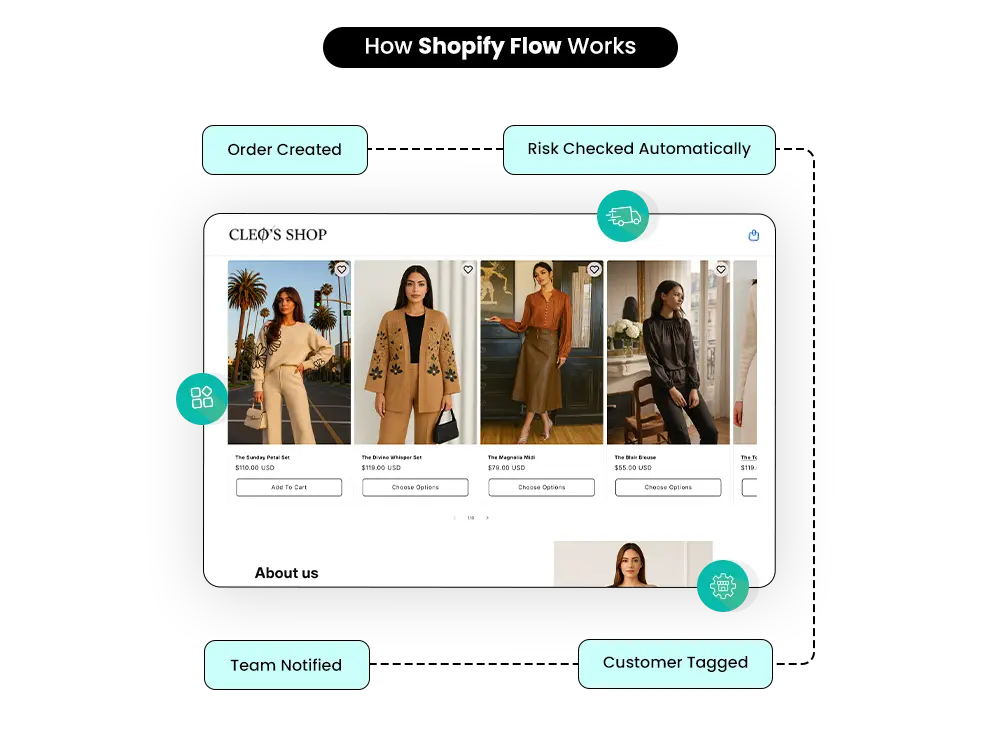
When something happens in your store (like a new order), Shopify Flow checks specific conditions (for example, order value or risk level) and then acts automatically (such as tagging the customer or notifying your team).
With recent updates, Shopify Flow has become more flexible by supporting deeper access to Shopify Admin API fields and introducing “Get Data” actions. This allows workflows to not only react to events but also fetch and use real-time store data for more advanced decision-making.
Who Is Shopify Flow Built For?
Shopify Flow is designed for stores that operate beyond basic e-commerce needs. It is especially powerful for:
- Shopify Plus merchants
- High-volume brands
- Stores with large product catalogs
- B2B businesses
- Teams managing multiple campaigns and customer segments
At a Shopify Plus level, operational efficiency becomes critical. Shopify Plus workflows help systemise processes that would otherwise require manual oversight.
Which Shopify Plans Support Shopify Flow?
Originally, Shopify Flow was available only to Shopify Plus merchants, positioning it as an enterprise-grade automation advantage.
Today, Shopify Flow is available on:
- Shopify Advanced
- Shopify Plus
While Advanced users can access it, Shopify Plus workflows typically leverage deeper automation due to higher order volume, larger teams, and more complex operational requirements.
Do You Need Coding Skills to Use Shopify Flow?
No. One of the biggest advantages of Shopify Flow automation is that it requires zero coding knowledge. The platform provides a visual workflow builder where you create logic using a drag-and-drop interface. This makes Shopify Flow accessible to operations managers, marketers, and ecommerce teams — not just developers.
Where Do You Access Shopify Flow Inside Shopify?
Shopify Flow is accessed directly within your Shopify admin dashboard.
Once enabled, it integrates natively with:
- Orders
- Customers
- Products
- Inventory
- Fulfillment data
Because Shopify Flow operates inside Shopify’s ecosystem, there’s no need for external automation tools for many operational tasks.
How Shopify Flow Actually Works (Without the Tech Confusion)
If the word automation sounds intimidating, Shopify Flow does a good job of keeping things simple. At its core, Shopify Flow works on a straightforward idea: when something happens in your store, Shopify automatically checks a few rules and then takes action for you.
You don’t need to think like a developer to understand it — just like a store owner.
Workflows: The Building Blocks of Shopify Flow
A workflow is the complete automation you create inside Shopify Flow. It defines what should happen, when it should happen, and what action should follow.
For example, a workflow could:
- Detect when a new order is placed
- Check if the order value is high
- Tag the customer
- Notify your internal team
Once switched on, the workflow runs quietly in the background, handling repetitive decisions automatically.
Triggers: What Starts a Workflow
Every Shopify Flow automation begins with a trigger. A trigger is simply an event that occurs in your store.
Some common triggers include:
- An order is being created or paid for
- A new customer account is being created
- Inventory levels changing
- A product is being updated
Without a trigger, a workflow won’t run. Think of triggers as the starting signal for automation.
Conditions: Adding Logic to Automation
Conditions allow Shopify Flow to make decisions before taking action.
Using basic IF / THEN logic, you can control when automation should or shouldn’t run. For example
- IF the order total exceeds a certain amount
- IF an order is marked as high risk
- IF a customer already has a specific tag
This keeps your automations precise instead of firing for every single event.
Actions: What Shopify Flow Does for You
Actions are the results of your workflow. Once conditions are met, Shopify Flow carries out tasks such as:
- Tagging orders or customers
- Sending internal notifications
- Updating order details
- Cancelling or flagging high-risk orders
These actions replace manual checks and repetitive admin work.
Connectors: Going Beyond Shopify
Shopify Flow can also connect with other tools you already use, like Slack, Google Sheets, Klaviyo, or Asana.
These connectors allow Shopify Flow to share information across systems — keeping teams aligned, data organised, and workflows running smoothly beyond your Shopify admin.
If you’d like to explore broader automation strategies beyond workflows, also read our detailed guide on “Shopify Plus Automation: Practical Ways to Automate Store Operations” to understand how enterprise brands streamline backend operations at scale.
Shopify Flow vs Third-Party Automation Tools
While Shopify Flow is a powerful native automation tool, many brands also consider third-party platforms like Zapier or other automation apps. The right choice depends on how complex your workflows are and whether your automation needs stay inside Shopify or extend across multiple tools.
Below is a quick comparison to help you understand the key differences.
| Feature | Shopify Flow | Zapier / Apps |
| Integration | Native to Shopify | External connection |
| Best For | Shopify Advanced & Plus | Multi-platform automation |
| Speed | Real-time inside Shopify | Depends on API calls |
| Cost | Included in plan | Paid subscription |
| Scalability | Ideal for high-volume stores | Better for cross-tool workflows |
The Real Power: Core Shopify Flow Features You Should Know
Understanding how Shopify Flow works is important — but what truly makes it powerful are the features that make automation flexible, scalable, and easy to manage. Let’s look at what makes Shopify Flow automation especially valuable for growing brands and Shopify Plus workflows.
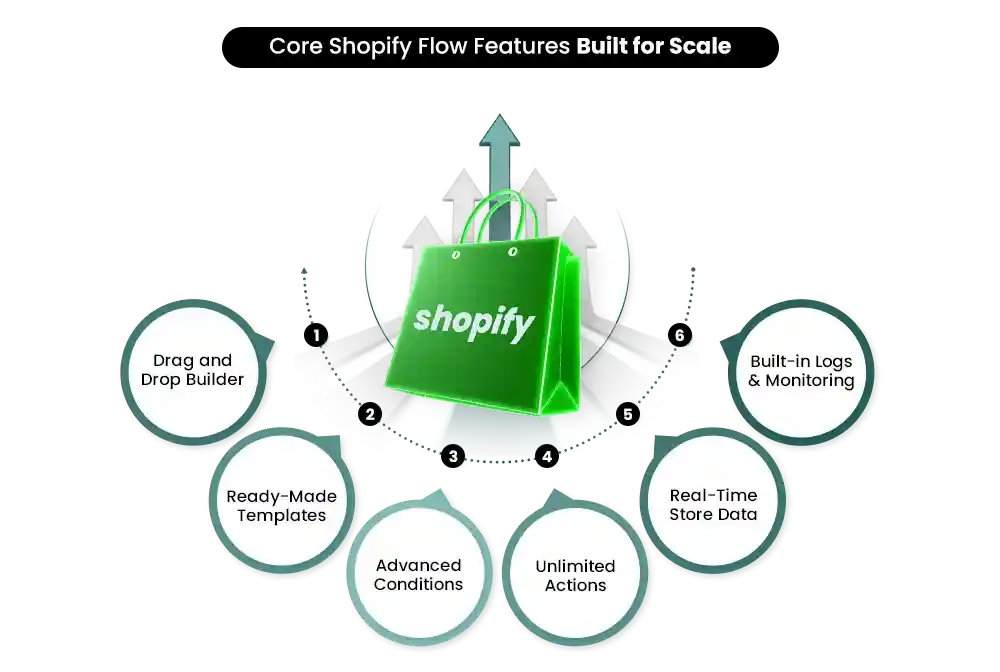
1. Drag-and-Drop Workflow Builder
Shopify Flow comes with a visual, drag-and-drop builder. You don’t need technical skills to create automation. Simply choose a trigger, add conditions, and define actions. The interface clearly maps out your workflow, making it easy to understand and adjust.
2. Ready-Made Automation Templates
Not sure where to start? Shopify Flow provides pre-built templates for common use cases like tagging high-value customers or managing fraud risk. These templates help you launch automation quickly without building everything from scratch.
3. Advanced Logic with Multiple Conditions
Shopify Flow allows you to layer multiple conditions within a single workflow. This means your automation can make smarter decisions based on order value, customer tags, product type, risk level, and more.
4. Unlimited Actions in a Single Workflow
Within one Shopify Flow automation, you can trigger multiple actions — tagging, notifying teams, updating orders — all at once. This makes workflows efficient and structured.
5. Real-Time Access to Store Data
Shopify Flow works directly with live data from orders, customers, products, and inventory. Automation runs instantly as events happen.
6. Built-In Logs, Testing & Monitoring
You can monitor workflow activity through built-in logs, helping you track performance and troubleshoot easily.
7. Built for Scale
For high-volume brands, especially Shopify Plus merchants, Shopify Flow ensures operations remain consistent even as order numbers grow.
8. Data-Driven Workflows with “Get Data” Actions
Shopify Flow now allows you to fetch structured data—such as abandoned checkouts, inventory, and workflow runs—directly within workflows. This enables more dynamic, condition-based automation without relying on external API calls or custom apps.
What Can You Actually Automate? (5 Real-World Use Cases)
Understanding the mechanics of Shopify Flow is helpful — but what truly matters is how it works inside a real store.
For Shopify Plus merchants and growing brands, Shopify Flow automation replaces repetitive operational decisions with structured logic. Instead of reacting manually to every order, inventory change, or customer action, you define the rules once — and the system handles the rest.
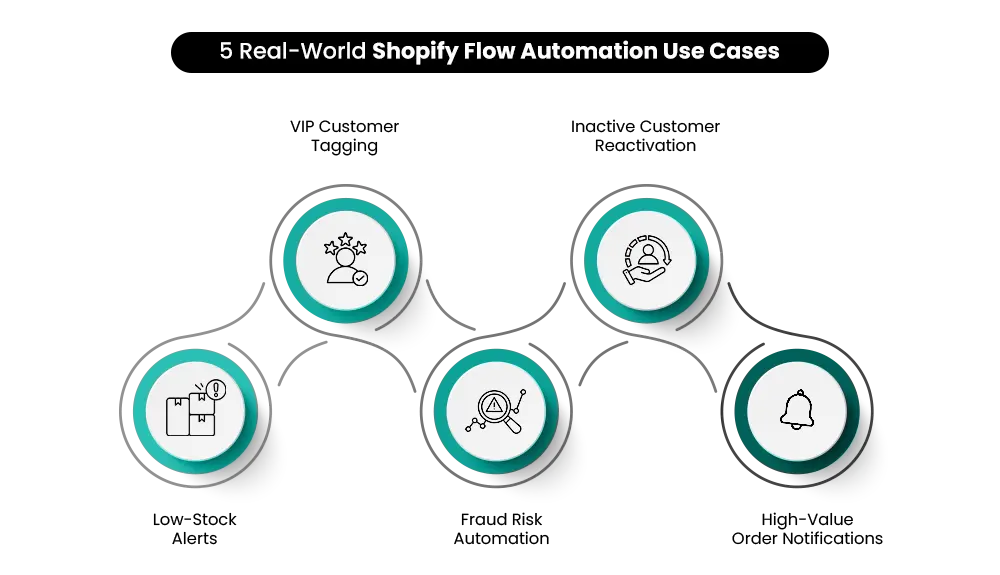
Here are five real-world Shopify Plus workflows that deliver immediate operational impact.
Real-World Use Case 1: Prevent Stockouts with Automated Low-Stock Alerts
Inventory gaps often go unnoticed until sales stop. With Shopify Flow, you can create a workflow that monitors inventory levels in real time.
When product quantity drops below a defined threshold, Shopify Flow automatically notifies your team via email or Slack. This ensures restocking decisions happen early — protecting revenue and campaign performance. For high-volume stores, this single automation prevents unnecessary sales loss.
Real-World Use Case 2: Automatically Tag and Segment High-Value Customers
Manually identifying VIP customers is inefficient. Shopify Flow automation can tag customers automatically when:
- Their order value crosses a certain amount
- Their lifetime spend exceeds a defined limit
These tags power better personalization, loyalty programs, and targeted campaigns — especially important in Shopify Plus workflows where customer data volume is high.
Real-World Use Case 3: Reduce Fraud with Risk-Based Automation
High-risk orders require fast decisions. Shopify Flow can detect orders marked as “high risk” and automatically tag, flag, or even cancel them based on predefined logic. This reduces chargeback exposure and removes the need for constant manual review.
Real-World Use Case 4: Reactivate Inactive Customers
Using new data-fetching capabilities, Shopify Flow can identify abandoned checkouts or inactive customers more precisely and trigger re-engagement actions automatically. That tag can then trigger re-engagement campaigns through marketing tools — helping recover lost revenue without manual tracking.
Real-World Use Case 5: Get Instant Alerts for High-Value Orders
For large orders or priority customers, Shopify Flow can send immediate Slack or email notifications to your team. This ensures important transactions never go unnoticed — maintaining operational visibility at scale.
Who Should Be Using Shopify Flow (And Who Probably Doesn’t Need It Yet)
Not every store needs automation on day one. But as operational complexity increases, Shopify Flow quickly shifts from being helpful to essential. The real question isn’t whether Shopify Flow automation is useful — it’s when your store reaches the point where manual processes start slowing growth.
For growing ecommerce brands, automation creates consistency. As order volume rises, repetitive tasks like tagging customers, reviewing orders, and monitoring inventory become inefficient. Instead of expanding your team for routine backend work, Shopify Flow handles it automatically.
High-order-volume brands benefit the most. Shopify Plus workflows help automate fraud checks, VIP tagging, low-stock alerts, and internal notifications — all without interrupting daily operations.
Large catalog stores and B2B sellers also gain structure through real-time automation and rule-based logic. For Shopify Plus merchants, automation becomes infrastructure.
However, very small stores with low order volume may not yet need advanced Shopify Flow automation. Simpler operations can remain manual until growth demands more structured systems.
When Shopify Flow Makes Sense
| Business Type | Why Shopify Flow Helps |
| Growing Stores | Reduces manual backend workload |
| High-Volume Brands | Automates fraud, tagging, alerts |
| Large Catalog Stores | Monitors inventory and product logic |
| Shopify Plus Merchants | Supports structured enterprise workflows |
| B2B Sellers | Manages complex order logic |
| Very Small Stores | May not need automation yet |
Shopify Flow becomes most valuable when growth creates operational pressure.
Smart Automation Starts with Smart Setup: Best Practices
Automation delivers results only when it’s implemented strategically. Research in e-commerce operations consistently shows that poorly configured workflows can create as many inefficiencies as manual processes. That’s why setting up Shopify Flow correctly is just as important as using it.
A structured approach ensures your Shopify Flow automation improves performance instead of complicating it.
1. Start Simple
Begin with one clear objective. Instead of building complex multi-layered Shopify Plus workflows immediately, automate a single task — such as VIP tagging or low-stock alerts. Gradual implementation reduces risk and makes troubleshooting easier.
2. Use Templates First
Shopify Flow provides ready-made templates built around common ecommerce scenarios. These are practical starting points and help teams understand workflow logic before creating custom automation.
3. Name Workflows Clearly
As automation grows, clarity becomes critical. Use descriptive names like “High-Value Order Alert” instead of generic titles. Clear naming improves internal coordination and long-term management.
4. Test Before Going Live
Even a small mistake in a condition can trigger unintended actions. Always test workflows in a controlled environment before activating them fully.
5. Avoid Workflow Conflicts
Multiple workflows with similar triggers can overlap. Regularly review active automations to prevent duplication or contradictory actions.
6. Monitor Logs Regularly
Shopify Flow includes logs to track execution history. Reviewing them helps identify errors early and maintain efficiency.
7. Respect Customer Consent & Data Privacy
Automation should enhance trust. Ensure all data usage aligns with privacy policies and customer consent standards.
Is Shopify Flow Worth It? Let’s Talk ROI
For growing brands, the value of Shopify Flow isn’t theoretical — it’s operational. The return on investment from Shopify Flow automation shows up in time saved, errors reduced, and smarter decision-making.
First, consider time savings. Tasks like customer tagging, fraud checks, inventory monitoring, and internal notifications can consume hours every week. Automating them frees teams to focus on strategy instead of repetitive admin work.
Second, automation reduces operational errors. Manual processes increase the risk of missed alerts, incorrect tagging, or delayed responses. Shopify Plus workflows execute rules consistently, lowering costly mistakes.
Fraud prevention is another key benefit. Automatically flagging or cancelling high-risk orders helps reduce chargebacks and financial losses.
Shopify Flow also improves customer targeting. Automated segmentation enables better personalisation and more effective marketing campaigns.
Most importantly, Shopify Flow supports long-term scalability. As order volume grows, automation ensures operations remain efficient without continuously expanding your team.
Common Shopify Flow Mistakes (And How to Avoid Them)
While Shopify Flow is designed to simplify operations, poor implementation can reduce its effectiveness. Automation should remove friction — not create new complexity. Many issues with Shopify Flow automation don’t come from the tool itself, but from how workflows are structured and maintained.
Below are some common mistakes brands make when building Shopify Plus workflows — and how to avoid them. Automation works best when it’s intentional. Instead of building dozens of workflows at once, focus on clarity and control. Regularly reviewing your Shopify Flow automation ensures your systems stay aligned with business goals.
When managed correctly, Shopify Plus workflows strengthen operations. When ignored, they can quietly create operational noise. The difference lies in a disciplined setup and consistent monitoring.
If you’re new to automation strategy, also read our detailed guide on “Common Setup Mistakes Shopify Beginners Make” to understand foundational errors that can impact store performance early on.
Final Thoughts: Automate Smarter, Grow Faster
At its core, Shopify Flow transforms repetitive store operations into structured, automated systems. From customer tagging and fraud detection to inventory alerts and internal notifications, Shopify Flow automation enables brands to replace manual effort with consistent logic.
With its latest updates, Shopify Flow is evolving beyond simple automation into a more powerful orchestration layer—connecting store data, logic, and operations within a single system. Shopify Plus workflows allow growing brands to operate with precision, reduce operational errors, and respond faster to real-time store activity. The result is better efficiency, stronger customer experiences, and smoother scalability.
If you’re just getting started, begin with one simple workflow. Automate a high-impact task, measure the improvement, and expand gradually. Smart automation compounds over time.
For brands ready to scale seriously, expert implementation makes all the difference. Mastroke specializes in Shopify Plus development and advanced Shopify Flow automation — helping businesses build efficient, growth-ready systems.
Scale smarter. Automate strategically. Grow without operational limits.