What You’ll Learn in This Post
- What does Shopify custom payment really mean on Shopify Plus
- The difference between manual, third-party, and conditional payment methods
- How Shopify Plus checkout customization works
- When to use the Payment Customisation API
- How to show or hide payment methods based on cart value or customer type
- How to enable Net 30 checkout for B2B buyers
- How to hide COD for high-value orders
- Ways to reduce Shopify Plus payment fees strategically
- Real-world examples of custom payment logic in action
- A practical roadmap to implement custom payments correctly
Checkout is where growth either compounds — or leaks. As brands scale, payment strategy becomes more complex. Expanding internationally, serving both B2B and DTC customers, offering local payment methods, managing fraud exposure — these challenges cannot be solved by simply activating another gateway.
This is where Shopify custom payment capabilities within Shopify Plus become strategically important.
Through advanced Shopify Plus checkout customization, merchants gain the ability to apply logic to how payment methods appear and behave. Using Shopify Functions and payment extensions, Shopify custom payment rules can be structured around cart value, customer segmentation, region, or business model.
That level of precision influences more than flexibility. It impacts conversion rates, risk control, and even how effectively you manage shopify plus payment fees. Instead of accepting default configurations, enterprise brands structure shopify plus payments intentionally — aligning checkout with growth, margin, and scale.
You can also read our blog, “Shopify Plus: What Big Brands Know That You Don’t”, to understand how enterprise brands strategically use Shopify Plus beyond basic configurations.
What “Custom Payment Method” Actually Means
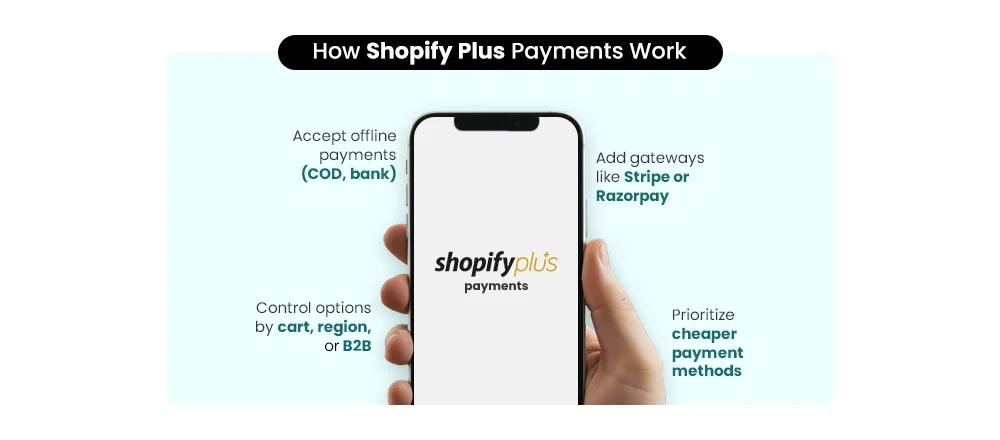
The phrase Shopify custom payment is often misunderstood — even among experienced merchants. “Custom” does not automatically mean complex, and it certainly does not mean simply activating another gateway like Razorpay or PayU.
On Shopify Plus, custom payment capability exists on multiple levels, and understanding the difference is essential before making architectural decisions.
Build Your Shopify Store From Scratch With Mastroke
Launch faster with Mastroke, an official Shopify Partner. We build structured stores with conversion-first design, clean setup, and features built to scale!!
1. Manual or Offline Payment Methods
At the most basic level, a custom payment method can refer to manual options such as:
- Cash on Delivery (COD)
- Direct bank transfer
- Demand drafts or offline settlements
These methods are configured inside Shopify and processed outside the platform. While useful, they are operational setups — not advanced Shopify custom payment architecture.
2. Third-Party Gateway Integration
Many merchants equate customization with integrating external providers. Connecting Stripe, Razorpay, PayU, or regional gateways expands coverage and can influence shopify plus payment fees. However, this is still configuration, not dynamic control.
3. Advanced Conditional Payment Logic (Shopify Plus Level)
True Shopify custom payment capability emerges through Shopify Plus checkout customization. This includes:
- Showing or hiding gateways based on cart value
- Enabling Net 30 or PO-based flows for tagged B2B buyers
- Restricting methods by region or currency
- Reordering options to prioritize lower-fee providers
This logic is built using Shopify Functions and integrates seamlessly with shopify plus payments or third-party processors.
In short, “custom” is not about adding a gateway. It’s about controlling how payment infrastructure behaves.
Shopify vs Shopify Plus — What’s the Difference?
When discussing Shopify custom payment, the real distinction appears only when you compare infrastructure access. Both Standard Shopify and Shopify Plus allow payment setup — but only one allows payment control.
Here’s the functional difference:
Feature |
Standard Shopify |
Shopify Plus |
|
Add manual payment methods |
✅ |
✅ |
|
Integrate third-party gateways |
✅ |
✅ |
|
Modify checkout logic |
❌ |
✅ |
| Hide payment methods conditionally | ❌ |
✅ |
|
Payment Customization API access |
❌ |
✅ |
|
Checkout extensibility framework |
Limited |
Advanced |
On standard plans, merchants can activate gateways and enable shopify plus payments (Shopify Payments). However, the checkout flow itself remains largely fixed. Payment methods appear based on configuration — not business logic. For a detailed comparison of plan differences, also read “Shopify vs Shopify Plus: Pricing, Features & When to Upgrade.”
Shopify Plus introduces programmable checkout infrastructure.
The Technical Reality Behind Shopify Custom Payment
Only Shopify Plus provides access to:
- Checkout Extensibility (the modern checkout framework)
- Payment Customization Functions
- Custom-built Payment Apps
- Shopify Functions for logic-based control
This is where Shopify Plus checkout customization becomes powerful. Developers can write logic that dynamically shows, hides, or reorders payment methods at runtime based on cart attributes, customer tags, market configuration, or risk conditions.
For example:
- Hide Cash on Delivery above a certain order value
- Display Net 30 terms only for verified B2B accounts
- Prioritize lower-fee gateways to manage shopify plus payment fees
In short, Standard Shopify lets you configure payments. Shopify Plus lets you engineer Shopify custom payment behavior strategically — while still integrating seamlessly with shopify plus payments and external processors.
The 4 Ways to Add Custom Payment Methods on Shopify Plus
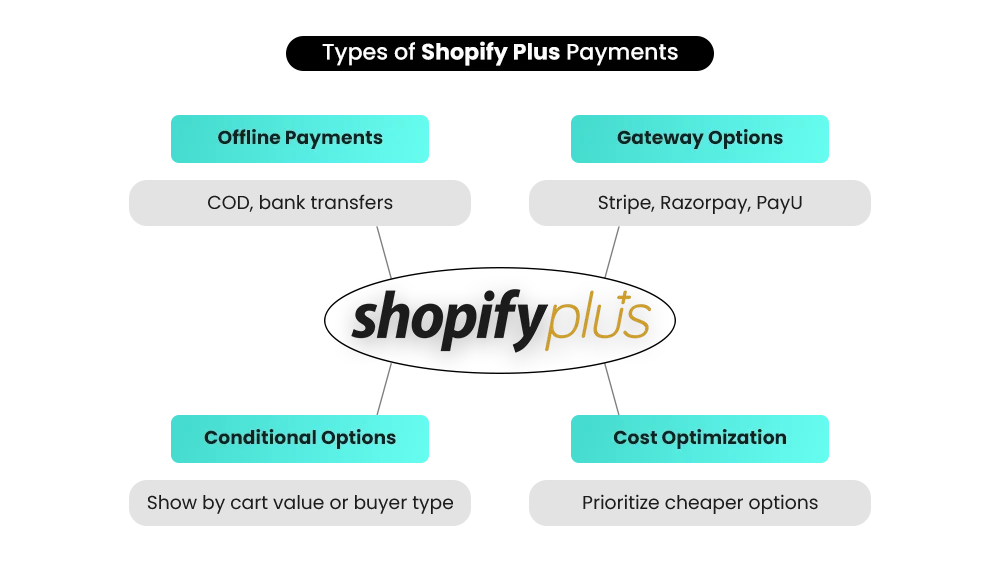
When we talk about Shopify custom payment, we’re not talking about one single feature. On Shopify Plus, there are four distinct approaches — each serving a different level of operational maturity.
Understanding these layers helps you decide whether you need configuration, integration, or engineered checkout control.
Method 1 — Manual Payment Methods (Operational Level)
This is the most basic form of Shopify custom payment.
Best suited for:
- COD-heavy markets
- Bank transfer businesses
- Offline settlement models
How it works:
- Go to Settings → Payments
- Click Add Manual Payment Method
- Add payment instructions
- Orders are marked as “Pending” until manually reconciled
This approach works well in emerging markets or high-trust B2B environments. It integrates smoothly alongside shopify plus payments or other gateways.
Limitation: There is no automation, no logic control, and no dynamic behavior. It does not use Shopify Plus checkout customization capabilities.
Method 2 — Third-Party Gateway Integration (Expansion Level)
This form of Shopify custom payment focuses on expanding regional and global payment coverage.
Best suited for:
- International DTC brands
- Multi-currency businesses
- Brands requiring UPI, wallets, or regional methods
Real-life scenario:
An Indian DTC brand scaling globally needs:
- UPI for domestic customers
- Wallet payments for mobile-first users
- International card processing
They integrate Razorpay for India, Stripe for global markets, and PayU for specific regions — alongside shopify plus payments.
How it works:
- Apply for a merchant account with the provider
- Obtain API credentials
- Configure the gateway inside Shopify Payments settings
- Test transactions before going live
Technical considerations:
- Merchant approval timelines vary
- Settlement cycles differ by gateway
Shopify may charge additional transaction fees if Shopify Payments is not primary (impacting shopify plus payment fees)
Limitation: Gateway integration alone does not allow dynamic checkout logic. Payment methods still display statically unless enhanced with Shopify Plus checkout customization.
Method 3 — Custom Payment App (Enterprise Workflow Level)
This is advanced Shopify custom payment infrastructure built for complex business models.
Best suited for:
B2B wholesalers
Marketplace-style businesses
Brands with internal credit systems
Companies requiring approval workflows
Real-life scenario:
A B2B wholesaler wants:
- “Pay Later – Net 30”
- Credit limit validation before checkout
- Internal approval before order confirmation
How it works:
- Create a Custom Payment App
- Use Shopify’s Payment App Extension
- Connect via API to ERP or CRM
- Handle authorization and validation externally
Technical requirements:
- Shopify Partner Account
- Payment App Extension development
- Secure API integration
- PCI compliance awareness
- Shopify approval review
This operates within Shopify Plus checkout customization and can coexist with shopify plus payments.
Limitation: This is development-led infrastructure. It requires technical expertise and compliance awareness.
Method 4 — Conditional Payment Display (Strategic Logic Level)
This is the most powerful layer of Shopify custom payment, exclusive to Shopify Plus.
Best suited for:
- High-AOV brands
- International multi-market businesses
- B2B + DTC hybrid models
- Risk-sensitive merchants
Real-life examples:
- Show COD only for orders under ₹5,000
- Hide PayPal for wholesale customers
- Display “Wire Transfer” only for EU buyers
- Suppress specific gateways in high-risk countries
How it works:
- Implement Payment Customization API
- Deploy logic using Shopify Functions
- Conditions run server-side during checkout
Rules can be based on:
- Customer tags
- Cart value
- Product type
- Shipping method
- Market or location
This enables dynamic control over gateway exposure, conversion optimization, and management of shopify plus payment fees — while still integrating with shopify plus payments and third-party providers.
Limitation: Available only on Shopify Plus and requires structured implementation.
Real-World Use Cases — Shopify Custom Payment in Action
Enterprise brands implement Shopify custom payment differently based on market, model, and risk exposure. Here’s how it works in practice.
-
DTC Brand in India
Business Context
A high-volume DTC brand supports UPI, COD, wallets, EMI, and cards via shopify plus payments.
Customization Applied
Using Shopify Plus checkout customization, the brand hides COD for high-value orders and displays EMI only above ₹3,000. Lower-fee gateways are prioritized to better manage shopify plus payment fees. This structured logic improves conversion while reducing fraud and return risk.
-
Global Brand —B2B + DTC
Business Context
One storefront serves both retail and wholesale buyers globally.
Customization Applied
Customer tags control visibility. Retail buyers see cards and wallets. B2B buyers see Net 30, invoice terms, and PO upload. Through Shopify Functions, Shopify custom payment logic dynamically adjusts checkout behavior without splitting stores.
-
Luxury Brand — High AOV Control
Business Context
Premium products require tighter payment governance.
Customization Applied
Bank wire appears only above defined thresholds. High-risk gateways are suppressed by geography. Here, Shopify custom payment acts as a risk-control framework — balancing conversion with margin protection.
Maximizing Revenue and Conversion with Custom Payments
Custom payments don’t just add flexibility — they directly impact your bottom line. For example:
- Dynamic checkout logic reduces cart abandonment by ensuring only eligible methods appear.
- Prioritizing lower-fee gateways can save thousands annually on transaction costs.
- Segmenting B2B vs DTC customers allows high-value buyers to use Net 30 or wire transfers, increasing average order value.
Technical Things You Must Know Before Starting
Implementing Shopify custom payment logic is not just a feature decision — it’s an infrastructure decision. Before using Shopify Plus checkout customization, you need clarity on compliance, approval, and technical requirements.
1. PCI Compliance
If you build custom payment apps or external authorization flows, PCI awareness is essential. While shopify plus payments handles core compliance, custom integrations must never expose sensitive card data.
2. Shopify Approval Process
Custom payment apps interacting with checkout must pass Shopify’s review. Approval ensures platform integrity and protects the stability of your Shopify custom payment architecture.
3. Transaction Fee Implications
Using third-party gateways may trigger additional platform fees beyond processing rates. Understanding how this affects shopify plus payment fees is critical before finalizing your setup.
4. Checkout Extensibility Is Mandatory
Checkout Extensibility is deprecated and no longer viable for advanced customization. All modern Shopify custom payment logic must be built using Checkout UI Extensions and Shopify Functions.
5. Development Resources Required
Custom payment methods are not no-code configurations. You will need developer support, API knowledge, and proper testing before deploying Shopify Plus checkout customization to live checkout.
Limitations to Be Aware Of
Even with advanced Shopify custom payment capabilities on Shopify Plus, there are structural boundaries you must respect. Understanding these limitations builds stronger architecture — and stronger trust.
- You cannot directly modify the core logic of shopify plus payments. Shopify controls authorization flow, risk checks, and core processing behavior.
- Payment capture timing rules still apply. Whether you capture immediately or manually, Shopify’s settlement framework cannot be bypassed through Shopify Plus checkout customization.
- Some third-party gateways are country-restricted. Availability depends on merchant location, business type, and regional compliance requirements.
- Additional transaction charges may apply when using external providers, which impacts overall shopify plus payment fees.
- Custom payment apps must follow Shopify’s technical and security standards. All implementations using Shopify Functions or the Payment Customization API are subject to platform review and approval.
Shopify Plus offers flexibility — but within a governed ecosystem. Strategic Shopify custom payment implementation works with the framework, not against it.
When Should You Add Custom Payment Methods?
Not every brand needs advanced Shopify custom payment architecture from day one. But when complexity increases, structured payment logic becomes a competitive advantage — especially with Shopify Plus checkout customization.
Add Them If:
- You operate across multiple regions and need localized gateways alongside shopify plus payments.
- You run both B2B and DTC models within the same storefront.
- You require payment-based segmentation (e.g., Net 30 for wholesale, cards for retail).
- You want greater control over checkout conversion and gateway prioritization.
- You manage fraud or margin through structured logic that impacts shopify plus payment fees.
In these cases, Shopify custom payment becomes a growth enabler — not just a checkout feature.
Avoid (For Now) If:
- You are early-stage with a simple checkout flow.
- Your order volume is low and operational complexity is minimal.
- You do not have developer support for advanced Shopify Plus checkout customization.
Start simple. Scale strategically.
Implementation Roadmap (Practical & Strategic)
Implementing Shopify custom payment requires a clear, step-by-step approach to balance flexibility, compliance, and conversion.
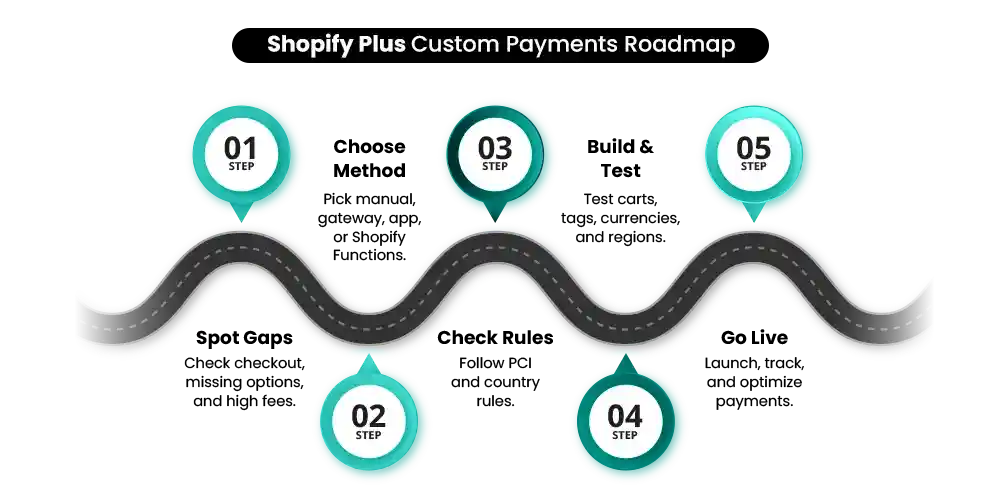
Step 1 – Identify Payment Gaps
Audit your checkout to spot friction, missing gateways, or high shopify plus payment fees. Understand where Shopify custom payment can add real value.
Step 2 – Decide Customization Level
Choose between manual methods, third-party gateways, custom apps, or Shopify Functions logic. Match complexity to your business need.
Step 3 – Review Compliance
Check PCI standards, Shopify approval requirements, and country-specific gateway restrictions. Compliance ensures smooth operations and avoids setbacks.
Step 4 – Develop & Test in Staging
Build the chosen solution in a test environment. Validate customer tags, cart thresholds, currencies, and geo-specific logic before going live.
Step 5 – Go Live with Monitoring
Launch gradually and track conversion, authorization rates, and settlement timings. Fine-tune logic to optimize Shopify Plus checkout customization and shopify plus payment fees.
Conclusion — The Strategic Angle
Yes, Shopify Plus lets you implement custom payment methods, but it’s far more than just connecting another gateway. It’s about designing a checkout that works intelligently for your business. Custom payments allow you to manage risk, reduce fraud, and boost conversions while supporting complex B2B workflows and enabling global expansion.
With Shopify custom payment logic, you can control which payment options appear for different customer segments, set thresholds for high-value orders, and optimize the checkout experience to match your business goals. This level of customization ensures operational efficiency, reduces friction for your customers, and positions your brand to scale confidently.
Custom payments on Shopify Plus are not just a feature—they are infrastructure. If you want to dominate your market, maximize conversions, and future-proof your checkout, Mastroke is your partner to make it happen. Don’t wait—unlock the full potential of Shopify Plus checkout customization today and take your business to the next level.
Build your dream Shopify store today
Bring your vision to life with Mastroke, an official Shopify Partner. We design and develop high-converting, scalable Shopify stores with clean structure and future-ready features—built to grow with your business.
FAQs
- Can I add multiple custom payment methods on Shopify Plus?
Yes, Shopify Plus supports multiple methods simultaneously, including manual, third-party, and conditional logic setups.
- Do I need developer resources for custom payment methods?
Basic manual or third-party integration may not require developers, but advanced apps and conditional logic need API knowledge and staging environment testing.
- Will using custom payment methods increase Shopify Plus fees?
Using third-party gateways may trigger additional shopify plus payment fees, while Shopify Payments avoids most platform fees.
- Can I show different payment methods to different customer groups?
Yes, with Shopify Functions and the Payment Customization API, you can display payment methods based on location, cart value, or customer tags.
- Are custom payment apps required to be PCI compliant?
Absolutely. Any custom payment integration handling card data must comply with PCI standards to ensure security and Shopify approval.
- What is the Shopify Payment Customization API?
The Shopify Payment Customization API is a Shopify Plus feature that allows merchants to dynamically show, hide, reorder, or modify payment methods at checkout. It works using Shopify Functions and enables logic-based control based on cart value, customer tags, location, product type, or other conditions.
- Does Shopify Plus Allow Net 30 Checkout?
Yes. Shopify Plus allows Net 30 or pay-later checkout options through custom payment apps or conditional payment logic. This is commonly used for B2B customers, where approved buyers can place orders with invoice terms instead of immediate payment.
- Can I Hide COD for High-Value Orders?
Yes. On Shopify Plus, you can use the Payment Customization API and Shopify Functions to hide Cash on Delivery (COD) for orders above a specific cart value. This helps reduce fraud risk and limit high-value return exposure.