This blog post explains why product validation is crucial before launching a Shopify store, addressing the common mistake of building stores without confirming market demand first. It outlines a systematic approach to test whether customers will actually purchase a product before investing in full store development.
Have you ever wondered why some Shopify stores start getting sales quickly, while others struggle even after weeks of effort? In many cases, the problem is not the website, ads, or pricing. It starts much earlier—with the product itself.
Many store owners build their Shopify store first and think about demand later. They invest time in design, apps, and marketing, only to realize that customers are not interested in the product in the first place.
This is where product validation becomes important. It’s the step that tells you whether real people will actually pay for what you’re planning to sell — before you invest in a full store, inventory, or a marketing budget.
This guide walks you through exactly how to do it on Shopify: what to check, how to read the signals, and how to know when you’ve got enough proof to move forward.
Quick Answer: What Is Product Validation for Shopify?
Product validation is the process of confirming that customers are willing to pay for your product before you fully build and launch your store. It replaces guesswork with actual data — search behavior, competitor activity, page engagement, and most importantly, purchases.
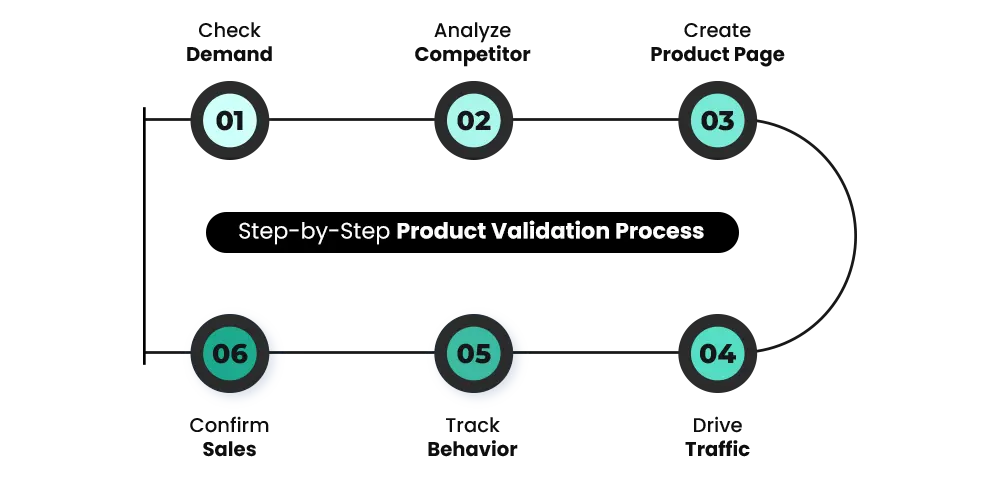
The process follows a clear flow:
- Check whether demand already exists for your product
- Study what competitors are doing and where gaps exist
- Set up a simple Shopify product page — not a full store
- Drive targeted traffic and watch how users behave
- Track purchases as the final confirmation of real demand
If all five steps give you positive signals, your product has a real shot. If they don’t, you’ve saved yourself from a much bigger loss later.
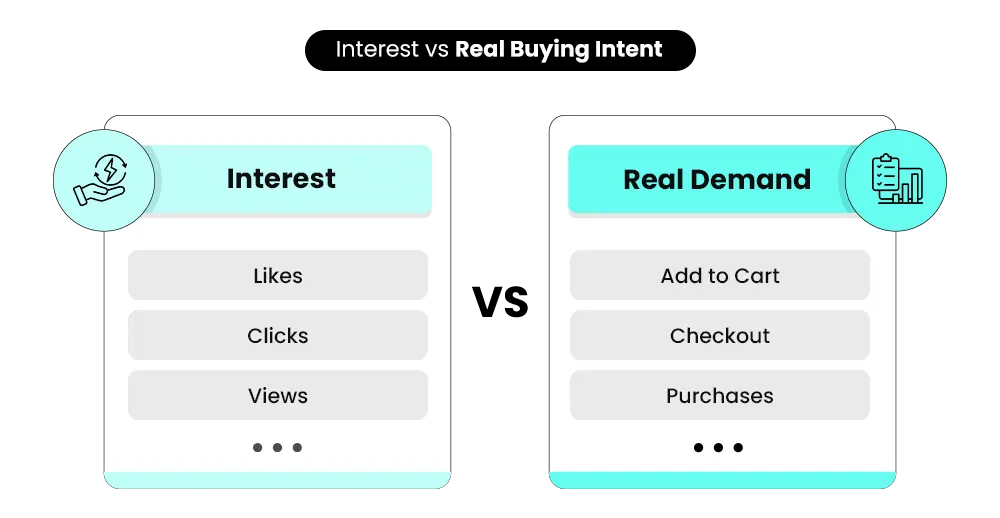
Interest Is Not the Same as Demand
This is where a lot of first-time sellers go wrong. They show their product idea to a few people, get positive reactions, and take that as proof the product will sell. It isn’t.
Likes, comments, and verbal encouragement show that people find your idea interesting. But actual buying behavior — clicking “add to cart,” entering payment details, completing a checkout — is a completely different thing. People support ideas for free. They only buy products that solve a real problem they care enough about to pay for.
When you validate a product, you’re specifically looking for that second signal: willingness to pay. Everything else is noise.
Why Building a Full Store Before Validating Is a Mistake
It’s tempting to want everything looking polished before you show your product to the world. But spending weeks on your theme, your logo, and your product photography before you’ve confirmed anyone wants the product is exactly backwards.
A validated product can sell from a basic page. An unvalidated product will underperform no matter how good the store looks. Design problems are fixable. Zero demand is not.
If you skip validation and build first, you’re likely to run into:
- Ad spend with no return, because the product wasn’t the right fit
- Inventory you can’t move, purchased before you knew what people actually wanted
- Weeks spent fixing the wrong things — the store, the copy, the ads — when the real problem was always the product itself
This is also why many merchants find that design, speed, and marketing all matter less than product-market fit in the early stages of a store. Get the product right first, then build around it.
How to Validate a Product Before Launching Your Shopify Store
Think of this less like a checklist and more like a progression. Each step builds on the one before it.
Step 1 — Check Whether Demand Already Exists
Start here before anything else. You want to know whether people are actively searching for and buying products like yours, or whether you’d be entering a market where demand is still unclear.
- Look at Google Trends to see whether search interest is growing, stable, or declining.
- Check Amazon bestseller lists in your category — products that appear consistently can indicate ongoing buyer interest.
- Browse TikTok Creative Center to see whether similar products are getting traction from sellers.
If you see multiple sellers running ads for the same type of product over several months, that’s a strong signal the market is real.
What you’re trying to avoid is entering a market where you’d need to create demand from scratch. That’s usually harder and more expensive than entering an existing market with a better offer or clearer positioning.
Step 2 — Analyze Your Competitors
Once you’ve confirmed that demand may exist, study who’s already serving it. Look at how competitor products are priced, what their reviews say, and how they’re positioning themselves. The Meta Ads Library is useful here — if a brand has been running similar campaigns over time, the product is likely converting for them.
Pay particular attention to negative reviews on competitor products. One-star and two-star reviews often reveal what customers actually want but aren’t getting. If you see the same complaints repeated — poor quality, confusing sizing, slow shipping, or bad customer service — those are gaps you can potentially fill.
The goal at this stage isn’t to copy what’s already out there. It’s to understand what’s working, what isn’t, and where there’s a genuine opportunity to do something better.
Step 3 — Set Up a Simple Shopify Product Page
You don’t need a full store to validate a product. A single, well-structured product page on Shopify is enough to run a real test.
The page needs four things:
- A clear description of what the product is and what problem it solves
- Who it’s for
- Why it’s worth the price
- A strong, direct call to action
Keep the design simple. This isn’t the version of your store you’ll be proud to show people at scale — it’s a test vehicle. The goal is to get honest behavioral data, not to launch your brand.
One Shopify-specific approach worth knowing: Shopify Draft Orders can help with manual early sales, custom orders, or pre-orders by letting you send a checkout invoice link to interested buyers.
Step 4 — Drive Targeted Traffic
Your product page can’t tell you anything until real people visit it. At this stage, the point isn’t scale — its signal quality. You need visitors who are genuinely likely to want your product, not random traffic that inflates your numbers without telling you anything useful.
Paid ads are often the fastest way to get this right. A small Meta or Google campaign targeting a specific audience gives you quick, interpretable data. Organic approaches — posting in relevant communities, reaching out to niche audiences, or working with micro-influencers — take longer but can still give you meaningful early signals.
Keep the budget small at this stage. You’re paying for information, not sales.
Step 5 — Watch How Users Behave on the Page
Once traffic is coming in, the way people interact with your page tells you a lot.
Strong signals include:
- High click-through rates from your ads (people are interested enough to click)
- Time on page above a minute or two (they’re reading, not bouncing)
- Add-to-cart activity (they want it, even if they don’t buy yet)
- Checkout attempts (they’re serious)
Weak signals to take seriously:
- High traffic but near-zero engagement (the product or the page isn’t landing)
- Add-to-cart activity but no checkouts (often pricing, trust, or shipping friction)
- High bounce rates (the audience isn’t right, or the page isn’t communicating quickly enough)
Shopify’s built-in analytics dashboard lets you track sessions, behavior flow, and funnel activity directly. You can see exactly where people drop off and what’s holding them back. Available reports vary by plan, but even basic data can help identify what needs attention.
Step 6 — Confirm Demand Through Actual Sales
This is the only real validation. Everything else gives you signals — this gives you proof. There is no fixed number of sales that validates every product. What matters is whether purchases are happening consistently from relevant traffic.
Even a few purchases from a targeted audience is meaningful data, because it confirms that real people, with no obligation to support you, decided your product was worth their money.
However, instead of chasing one magic number, look at:
- Are strangers buying, not just friends or existing followers?
- Are purchases repeating over multiple days or campaigns?
- Is your cost to acquire a customer reasonable for your margin?
- Are visitors adding to cart and progressing through checkout?
If those signals are positive, you may be ready to scale further. If sales are not happening, the next question is whether the product, pricing, page, or audience is the issue — then test one variable at a time to find out.
Tools That Make Product Validation More Accurate
You don’t need a complex tech stack to validate a product. There are some widely available tools that can help you understand demand, competition, and buyer interest before you spend anything significant.
Use them as research signals — not final proof. Real validation still comes from how people respond to your own offer.
Some of the most useful tools include:
- Google Trends – Helps you understand whether interest in a product is growing, stable, or declining. A rising trend indicates increasing demand, while a declining trend may signal limited long-term potential.
- TikTok Creative Center – Useful for spotting viral products and trending creatives. If multiple sellers are pushing similar products successfully, it often indicates strong demand.
- Amazon Best Sellers – Shows products that are already converting well. Consistent rankings usually indicate stable demand and proven buying behavior.
- Meta Ads Library – Lets you analyze competitor ads. If brands are running ads consistently over time, it suggests the product is generating results.
- Reddit/Forums – Helps you identify real customer pain points, complaints, unmet needs, and how buyers talk about the problem.
Using these tools together gives you a clearer picture of demand instead of relying on assumptions.
The Three-Stage Validation Framework
Here’s a simple way to think about where you are in the process at any point:
| Stage | What You’re Measuring | What a Positive Signal Looks Like |
|---|---|---|
| Demand | Are people searching for or talking about this product? | Consistent search volume, active competitor market, trending on social |
| Behavior | Are visitors engaging with your product page? | High time-on-page, add-to-cart activity, checkout attempts |
| Purchase | Are people actually buying? | Even two to five real purchases from targeted traffic |
If all three stages give you positive signals, your product has real validation. If one stage is weak, that’s where the problem is — and that’s worth understanding before you invest further.
📌 Suggested Video
Signs Your Product Is NOT Validated (Red Flags)
Not every product will work, and that is completely normal. The key is to recognize early signals that show your product may not have enough demand. During product validation, certain patterns indicate that something is not working.
Some of the most common warning signs include:
- people click but do not engage
- no add-to-cart activity after meaningful traffic
- high ad costs with weak response
- Customers seem confused about the product or its value
- margins are too thin even if sales happen
- interest comes only from friends or personal network
Not every weak result means the product is bad.
Sometimes the issue is:
- Weak product-market fit
- wrong audience
- Poor positioning or messaging
- weak pricing
- Lack of real demand
- lack of trust
- low-quality page experience
Test one variable at a time so you know what actually changed the result. Recognizing these early helps you avoid investing further in a product that may not succeed.
Build Your Shopify Store From Scratch With Mastroke
Launch faster with Mastroke, an official Shopify Partner. We build structured stores with conversion-first design, clean setup, and features built to scale!!
When Should You Move from Validation to Scaling?
Once you complete product validation, the next question is when to move forward. You do not need perfect results before scaling. What you need are consistent signals that your product is working.
Some indicators that you are ready to move forward include:
- You are getting consistent orders
- Your conversion rate is stable or improving
- Your cost per purchase is manageable
- Customers respond positively to the product
These signals show that your product has potential.
At this stage, you can start investing more in:
- Store setup & design
- Marketing campaigns
- Inventory planning
The key is to move forward with confidence, knowing that your product has already been validated.
Why So Many Stores Get This Wrong
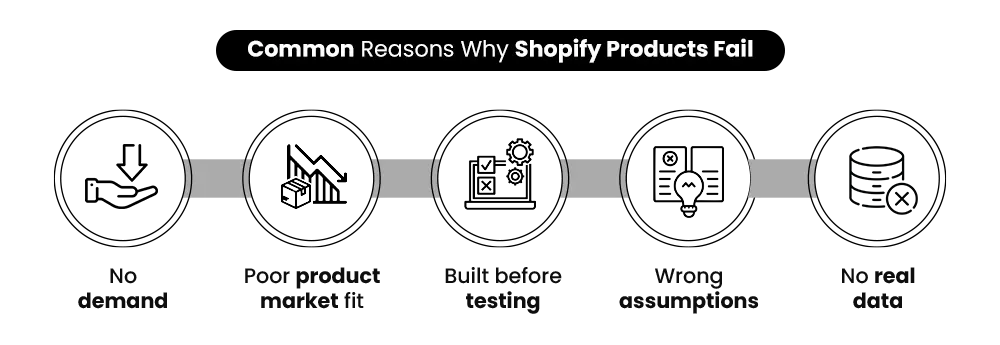
Here’s the part most people don’t hear until it’s too late: the majority of Shopify stores that fail weren’t beaten by better competitors. They just never had real market demand to begin with. According to research from CB Insights, lack of market need is one of the top reasons startups fail — and Shopify stores are no exception.
That’s not a marketing problem or a design problem. It’s a validation problem. And it’s almost entirely preventable with a few days of testing before you build.
Validate First, Then Build
Product validation isn’t about being cautious or slowing yourself down. It’s about making sure the time and money you’re about to spend are going somewhere they’ll actually work.
The process doesn’t have to be complicated. A simple product page, a small amount of targeted traffic, and a clear eye on the signals — demand, behavior, purchases — can tell you in a week what most merchants spend months and thousands of dollars figuring out the hard way.
Before you go further with your product idea, ask yourself one question: do you have actual proof that people will pay for this? Not opinions. Not likes. Purchases.
If the answer is yes, build with confidence. If it’s not yet, that’s the right place to start. And if you want help with the store side of things — setting it up the right way from day one, with the right structure and foundation — that’s exactly what we do at Mastroke.
FAQs — Product Validation for Shopify
1. How do I know if my product is worth selling?
A product is worth selling when there is clear and consistent demand. This is best confirmed through real customer actions like purchases or add-to-cart behavior, not just likes, clicks, or verbal feedback.
2. Can I validate a product without running ads?
Yes, you can validate using organic methods like social media, communities, or competitor research. However, paid ads help you test faster and bring in more targeted traffic, making validation more reliable.
3. How many sales confirm product validation?
There is no fixed number. A few genuine purchases from relevant traffic can be encouraging. Focus on consistency and quality of traffic, not one magic number.
4. Should I build a full Shopify store before testing my product?
No, it is better to start with a simple product page. This allows you to test demand quickly and avoid spending time and money on a full store before confirming interest.
5. What’s the difference between product validation and product testing?
Product testing usually refers to checking the quality of the product itself — making sure it works, looks right, and meets quality standards. Product validation is about confirming market demand — whether people will actually pay for it. They’re related but different.
6. How long does product validation take?
It depends on your method and traffic source. Some products show clear signals within a few days, while others may require longer testing to gather meaningful data.
7. What free tools can help validate a product?
Google Trends, Meta Ads Library, Amazon Best Sellers, Reddit, forums, and competitor research are useful starting points.
Got a question? Leave it in the comments below.
Build your dream Shopify store today
Bring your vision to life with Mastroke, an official Shopify Partner. We design and develop high-converting, scalable Shopify stores with clean structure and future-ready features—built to grow with your business.