
This blog post explains why product validation is crucial before launching a Shopify store, addressing the common mistake of building stores without confirming market demand first. It outlines a systematic approach to test whether customers will actually purchase a product before investing in full store development.
📌 Key Takeaways
This section highlights the most important insights:
- Is product validation really necessary before building a Shopify store?
Yes. Many stores fail not because of poor marketing, but because there is no real demand for the product in the first place. - Does interest mean customers will buy?
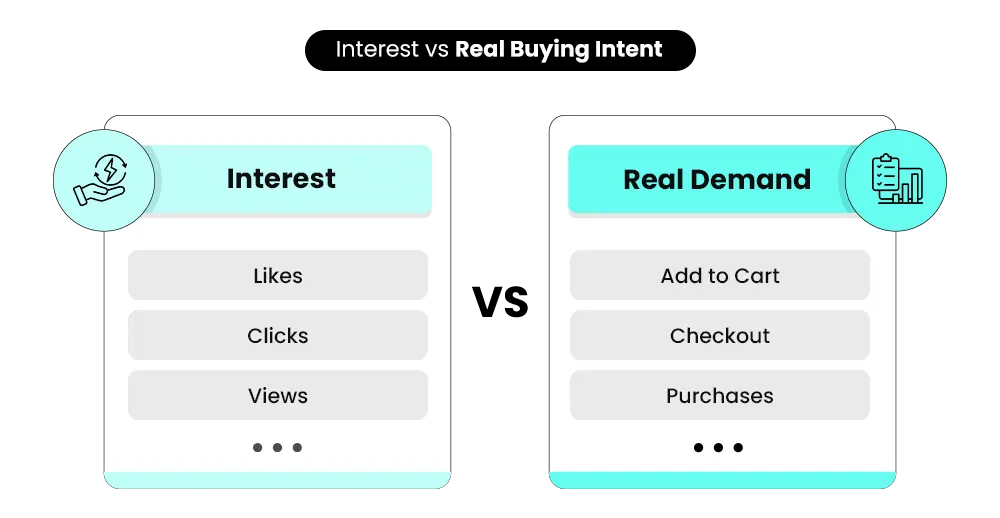
Not always. Likes, clicks, or comments show interest—but only purchases confirm real demand. - Should you build a full store before testing your product?
No. A simple product page is enough to test your idea and understand how users respond before investing more time and money. - What actually proves a product is validated?
Real user actions—clicks, add-to-cart, and especially purchases—are the strongest indicators of demand. - What gives you an advantage after validation?
Clear data. When you validate early, you reduce risk, avoid wasted spend, and can scale your Shopify store with confidence.
Have you ever wondered why some Shopify stores start getting sales quickly, while others struggle even after weeks of effort? In many cases, the problem is not the website, ads, or pricing. It starts much earlier—with the product itself.
Many store owners build their Shopify store first and think about demand later. They invest time in design, apps, and marketing, only to realize that customers are not interested in buying.
This is where product validation becomes important.
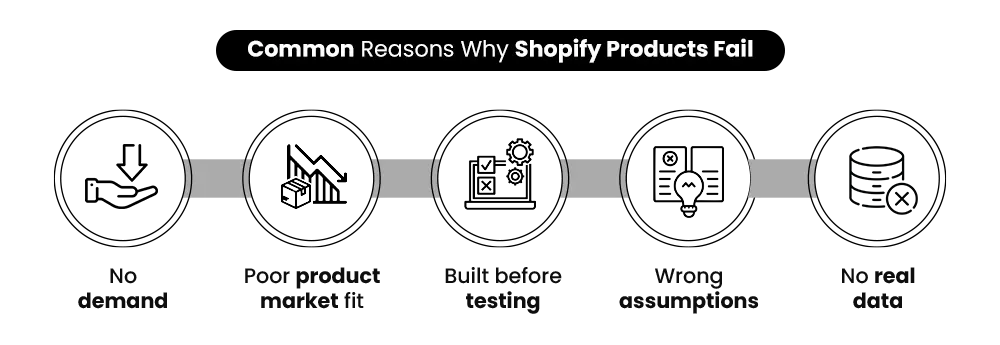
According to data from CB Insights, 42% of startups fail because there is no market need for their product. Similarly, research from Exploding Topics shows that 34% fail due to poor product-market fit.
Most Shopify stores don’t fail because of bad marketing—they fail because nobody wanted the product in the first place. Understanding product validation helps you test demand early, reduce risk, and make better decisions before launching your Shopify store.
Quick Answer: How to Validate a Product Before Launching?
Product validation in Shopify is the process of testing whether customers are willing to buy a product before fully launching a store. It involves analyzing demand, testing a product page, and tracking real user actions like clicks, add-to-cart, and purchases.
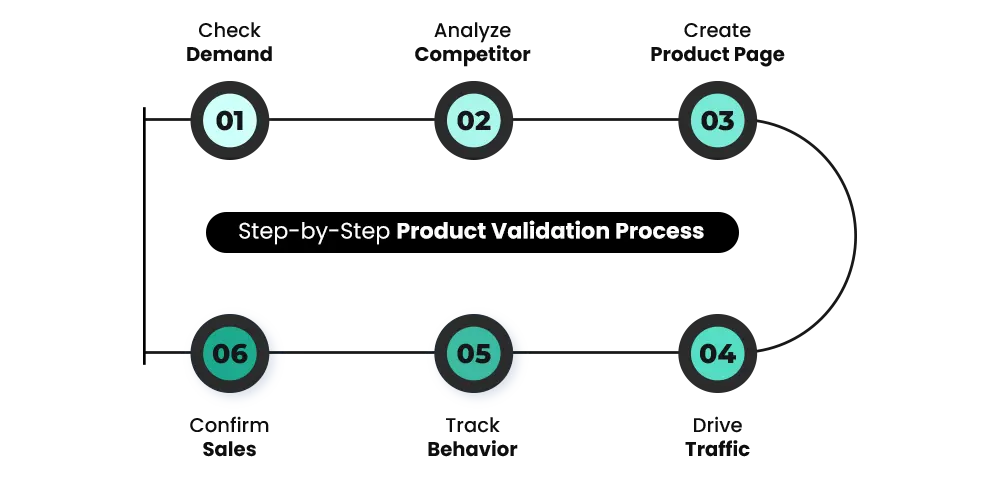
If you are looking for a straightforward overview, the process of product validation can be broken down into a few clear steps.
- First, you need to check whether there is existing demand for your product. This is not just about seeing if the product exists, but understanding whether people are actively searching for it, buying it, or engaging with similar offers. For Shopify merchants, this step is critical because it determines whether you are entering an existing demand pool or trying to create demand from scratch—which is significantly more expensive and risky.
- Next, analyze competitors. Understanding how similar products are positioned, priced, and reviewed helps you identify what works and where improvements can be made. Competitor analysis is not just about copying—it helps you identify gaps in positioning, pricing, and messaging. This allows you to differentiate your product instead of competing blindly.
- After that, create a simple product page instead of building a full store. The goal at this stage is to test your idea, not to perfect your website. At this stage, speed matters more than perfection. A basic Shopify product page is enough to test user response, as the goal is to validate demand—not invest in full store development.
- Once your page is ready, bring in targeted traffic through ads or organic channels. This step allows you to observe how real users interact with your product. Without traffic, you cannot validate anything. Even a small amount of highly targeted traffic can give meaningful insights into whether your product resonates with the right audience.
- Finally, track meaningful actions such as clicks, add-to-cart behavior, and purchases. These actions provide real insight into whether your product has real demand. These actions provide real behavioral data. Among them, purchases are the strongest validation signal because they confirm actual buying intent—not just curiosity.
In simple terms, validation is about replacing assumptions with real data before you launch your Shopify store.
What Does Product Validation Actually Mean?
Before you start testing tools or running ads, it’s important to clearly understand what product validation actually means in a real business context.
At a simple level, validation is about answering these key questions:
Will people actually pay for this product?
Why vanity metrics mislead Shopify founders?
What actually counts as validation?
This might seem obvious, but it’s where most people go wrong. They confuse interest with demand.
For example, someone might:
- Say your product looks useful
- Like your post on social media
- Click on your product page
But none of this guarantees a sale. That’s because there is a difference between interest and intent. This is where many Shopify sellers make a mistake. They assume that engagement equals demand. In reality, people often interact with products without any intention to buy. Real validation only happens when users are willing to spend money. That is why actions like completed purchases carry far more weight than likes, clicks, or comments.
Why Product Validation Matters More Than Store Design?
One of the most common mistakes new Shopify sellers make is focusing on building a perfect store before validating their product.
They spend time choosing themes, adjusting layouts, and improving visuals. While this can make the store look professional, it does not guarantee sales. The reality is simple.
Product-market fit matters more than design.
If a product does not meet a real need, even the best-looking store will struggle to convert visitors into customers.
On the other hand, a validated product can perform well even with a basic setup. Customers are willing to overlook minor design issues if the product solves their problem. This is why validation should always come first.
If you skip this step:
- You risk wasting money on ads
- You may invest in inventory that does not sell
- You end up fixing the wrong problems
Validation helps you avoid all of this by ensuring that your product has demand before you build around it.
How to Validate a Product Before Shopify (Step-by-Step + Real Examples)
When approaching product validation, the goal is not to follow a rigid checklist, but to understand how customers respond at each stage. Instead of thinking in terms of steps, it is more useful to see this as a flow—from identifying demand to confirming real purchases.
STEP 1: Checking if Demand Already Exists
The first step is to understand whether people are already interested in similar products. You can explore search trends, marketplaces, and social platforms to see what people are buying or discussing. If a product appears consistently across different sources, it usually indicates existing demand. This stage helps you avoid starting from zero and gives you a stronger foundation for product validation.
STEP 2: Learning from Competitors
Once you identify demand, the next step is to study competitors. Look at how competitors price their products, position their offers, and run ads (you can explore platforms like Meta Ads Library to analyze active campaigns). Reviews are especially useful because they highlight both strengths and weaknesses. Instead of trying to create something completely new, focus on improving what already works.
STEP 3: Creating a Simple Product Page
At this stage, you do not need a full Shopify store. A simple product page is enough to begin product validation; you can also follow a structured Shopify product page guide to improve clarity and conversions.
Your page should clearly explain:
- What the product is
- Who it is for
- Why it is useful
- The goal is to test the idea, not to perfect the design.
Even a simple product page should follow basic conversion principles like clear messaging, strong calls to action, and trust signals. This is where conversion rate optimization becomes important, even at the validation stage.
STEP 4: Bringing in Targeted Traffic
After setting up your page, you need visitors who are likely to be interested in your product. Page speed also plays a role during validation. A slow-loading Shopify store can reduce conversions, making it harder to accurately judge whether the product itself is the problem. You can use ads, social media, or influencer promotions to drive traffic. Start small and focus on learning how users respond rather than trying to scale immediately.
STEP 5: Observing User Behavior
Once users start visiting your page, their behavior becomes your most valuable source of information.
Pay attention to:
- Clicks
- Add-to-cart actions
- Checkout attempts
These signals help you understand how interested users are in your product.
STEP 6: Confirming Demand Through Sales
The final step in product validation is confirming whether people are actually buying. You do not need large numbers. Even a few orders can indicate that your product has potential. If users are completing purchases, it is a strong sign that you can move forward with confidence.
Tools You Can Use to Validate Product Demand
To make product validation more accurate, you can use a combination of free and paid tools that show real market behavior.
Some of the most useful tools include:
- Google Trends – Helps you understand whether interest in a product is growing, stable, or declining. A rising trend indicates increasing demand, while a declining trend may signal limited long-term potential.
- TikTok Creative Center – Useful for spotting viral products and trending creatives. If multiple sellers are pushing similar products successfully, it often indicates strong demand.
- Amazon Best Sellers – Shows products that are already converting well. Consistent rankings usually indicate stable demand and proven buying behavior.
- Meta Ads Library – Lets you analyze competitor ads. If brands are running ads consistently over time, it suggests the product is generating results.
- AliExpress Orders Filter – Helps identify products with real purchase history. High order volume over time indicates proven demand rather than temporary hype.
Using these tools together gives you a clearer picture of demand instead of relying on assumptions.
Simple Product Validation Framework
You can think of validation as a simple 3-stage flow:
Demand → Behavior → Purchase
- Demand: Are people searching or talking about this product?
- Behavior: Are users clicking, engaging, or adding to cart?
- Purchase: Are they actually buying?
If all three signals are present, your product has strong validation.
Product Validation Methods Compared
Different methods can be used during product validation, but each one varies in speed, cost, and accuracy depending on how you test your idea.
| Method | Speed | Cost | Accuracy | Best For |
| Surveys | Fast | Low | Low | Early idea testing |
| Competitor research | Medium | Free | Medium | Market understanding |
| Landing page testing | Medium | Low | High | Real validation |
| Paid ads testing | Fast | Medium | Very High | Strong demand proof |
| Pre-orders | Medium | Low | Very High | Confirming intent |
Real Example — What Product Validation Looks Like in Practice
In our experience working with Shopify stores at Mastroke, we’ve seen how small validation steps can make a big difference.
In one of our Shopify projects, a product was tested using a single-page setup and a controlled ad budget.
Within the first few days:
- Over 1,000 targeted visitors
- Consistent add-to-cart activity
- Initial purchases confirming demand
These early signals helped validate the product before any major investment in inventory or full store development. Based on this data, the brand refined its messaging and moved forward with scaling more confidently. This is the difference between testing an idea and building blindly.
📌 Key Video
Signs Your Product Is NOT Validated (Red Flags)
Not every product will work, and that is completely normal. The key is to recognize early signals that show your product may not have enough demand. During product validation, certain patterns indicate that something is not working.
Some of the most common signs include:
- You are getting traffic, but no sales
- Users add items to the cart but do not complete checkout
- Advertising costs are high, but returns are low
- Customers seem confused about the product or its value
These signals usually point to one of three issues:
- Weak product-market fit
- Poor positioning or messaging
- Lack of real demand
Recognizing these early helps you avoid investing further in a product that may not succeed.
Most Stores Fail Before They Even Launch
The difference is validation. Know your product has real demand before you go live — or risk building something nobody wants.
Shopify-Specific Validation Tips Most Blogs Don’t Tell You
While general product validation principles apply everywhere, there are a few Shopify-specific approaches that can make the process more effective.
- One useful method is using draft orders. This allows you to simulate purchases and understand how customers move through the buying process.
- Another approach is testing pricing quickly. Even small changes in pricing can affect conversion rates, so it is important to experiment early.
- You can also use a “coming soon” page to measure interest before fully launching. This helps you collect early signals without committing to a full store.
- Finally, Shopify analytics can give you valuable insights into user behavior. Tracking how users navigate your page, where they drop off, and what actions they take can help you refine your product validation strategy.
These small adjustments can make a big difference in how accurately you validate your product.
Common Product Validation Mistakes (And Why They Kill Stores)
Many Shopify stores fail not because of bad ideas, but because of mistakes made during the validation stage. Understanding these mistakes can help you avoid them.
Some of the most common ones include:
- Building a full store before testing the product
- Relying too much on opinions instead of data
- Ignoring user behavior and focusing only on traffic
- Scaling too quickly without proper validation
- Testing too many products at once without clear focus
Each of these mistakes leads to the same outcome—uncertainty.
Instead of having clear data, you end up making decisions based on assumptions. This increases risk and often results in wasted time and money. Product validation works best when it is simple, focused, and based on real actions.
When Should You Move from Validation to Scaling?
Once you complete product validation, the next question is when to move forward. You do not need perfect results before scaling. What you need are consistent signals that your product is working.
Some indicators that you are ready to move forward include:
- You are getting consistent orders
- Your conversion rate is stable or improving
- Your cost per purchase is manageable
- Customers respond positively to the product
These signals show that your product has potential.
At this stage, you can start investing more in:
- Store design
- Marketing campaigns
- Inventory planning
The key is to move forward with confidence, knowing that your product has already been validated.
Product Validation Checklist Before Launch
| Validation Factor | What to Check | Good Signal | Red Flag |
| Demand | Search trends, market interest | Consistent or rising interest | No search volume |
| Engagement | Clicks, time on page | Users interact with content | High bounce rate |
| Add to Cart | User intent | Regular add-to-cart actions | No cart activity |
| Conversions | Actual purchases | Even small consistent sales | Zero sales |
| Pricing | Customer response to price | Stable conversion rate | =Drop after price test |
| Feedback | Reviews, comments | Positive or actionable feedback | Confusion or no response |
Conclusion — Validate First, Then Build
Most Shopify stores don’t fail because of design or ads—they fail because the product was never tested. That’s why product validation matters. It helps you understand real demand before you invest time and money.
Instead of building first and hoping for results, test your idea early. Even a few sales can give you clarity, while no sales can save you from bigger losses later.
Before you launch, ask yourself one simple question: “Do I have proof that people will buy this?” If not, start there.
At Mastroke, we don’t just build Shopify stores—we help you validate what actually sells before you invest time or money. If you’re unsure whether your product will work, we’ll help you test demand, analyze real user behavior, and make decisions based on data—not guesswork.
Because the difference between a store that struggles and one that scales often comes down to one thing: validated products.
FAQs — Product Validation for Shopify
1. How do I know if my product is worth selling?
A product is worth selling when there is clear and consistent demand. This is best confirmed through real customer actions like purchases or add-to-cart behavior, not just likes, clicks, or verbal feedback.
2. Can I validate a product without running ads?
Yes, you can validate using organic methods like social media, communities, or competitor research. However, paid ads help you test faster and bring in more targeted traffic, making validation more reliable.
3. How many sales confirm product validation?
There is no fixed number, but even 2–5 consistent sales from the right audience can indicate potential. The key is consistency and intent, not just volume.
4. Should I build a full Shopify store before validating?
No, it is better to start with a simple product page. This allows you to test demand quickly and avoid spending time and money on a full store before confirming interest.
5. What is the cheapest way to validate a product?
Competitor research and organic traffic are the most cost-effective methods. You can analyze existing demand and user behavior without spending much, then combine it with small-budget ads for faster insights.
6. How long does product validation take?
It depends on your method and traffic source. Some products show clear signals within a few days, while others may require longer testing to gather meaningful data.
7. Can Shopify help with product validation?
Yes, Shopify provides tools like analytics, product pages, and checkout tracking that help you monitor user behavior and understand how customers interact with your product.
8. How many sales confirm product validation?
Even a small number of real purchases—around 2–5—can indicate demand, as long as they come from targeted traffic and consistent user behavior rather than random visits.
Got a question? Leave it in the comments below.
Don't Launch Blind. Validate First.
Most merchants skip this step — and pay for it later. Make sure your product has real demand before your store goes live.