This blog post explains why most Shopify stores struggle to collect customer reviews despite having review apps installed. It provides a systematic approach to fix poor review collection by focusing on proper timing, messaging, and automated flows rather than just sending single review requests.
You installed a review app. You turned on the email. Reviews still aren’t coming in — not because your customers are unhappy, but because nothing is catching them at the right moment.
That’s the real problem with how most stores approach collecting reviews on Shopify. It’s not the tool—it’s the timing and the message. There’s no real system, just a single email sent to everyone at the same time, whether they’ve used the product or not.
This guide shows you how to fix that. You’ll get the right timing for your product type, a three-step post-purchase flow you configure once and leave running, the exact message copy that gets responses, and where to place reviews so they actually move sales.
Why Customers Don’t Leave Reviews (And It’s Not What You Think)
Most store owners assume low review volume means unhappy customers. It usually doesn’t.
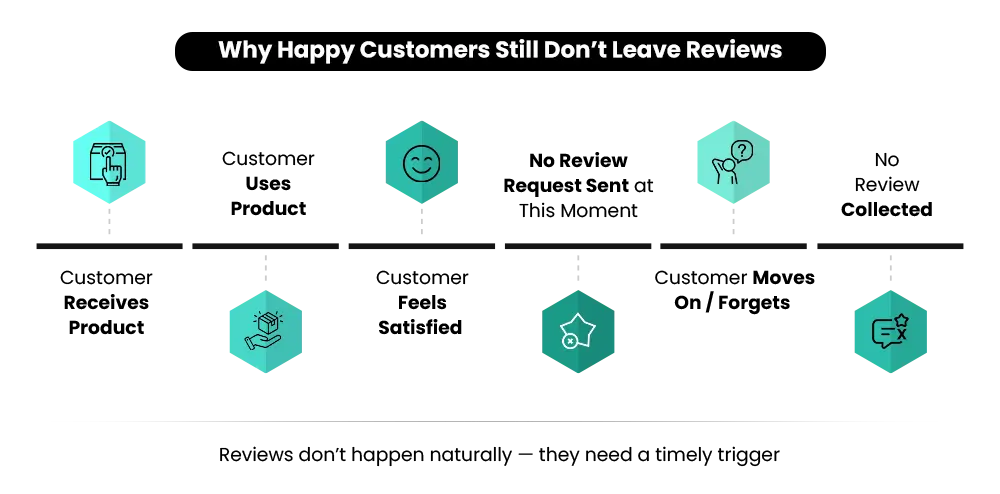
The real reason is simpler: the moment to respond passes, and nothing brings it back. Here’s how it keeps happening:
- The purchase feels complete at delivery — there’s no obvious reason to go back to your store
- The request arrives before the customer has actually used the product or formed any real opinion
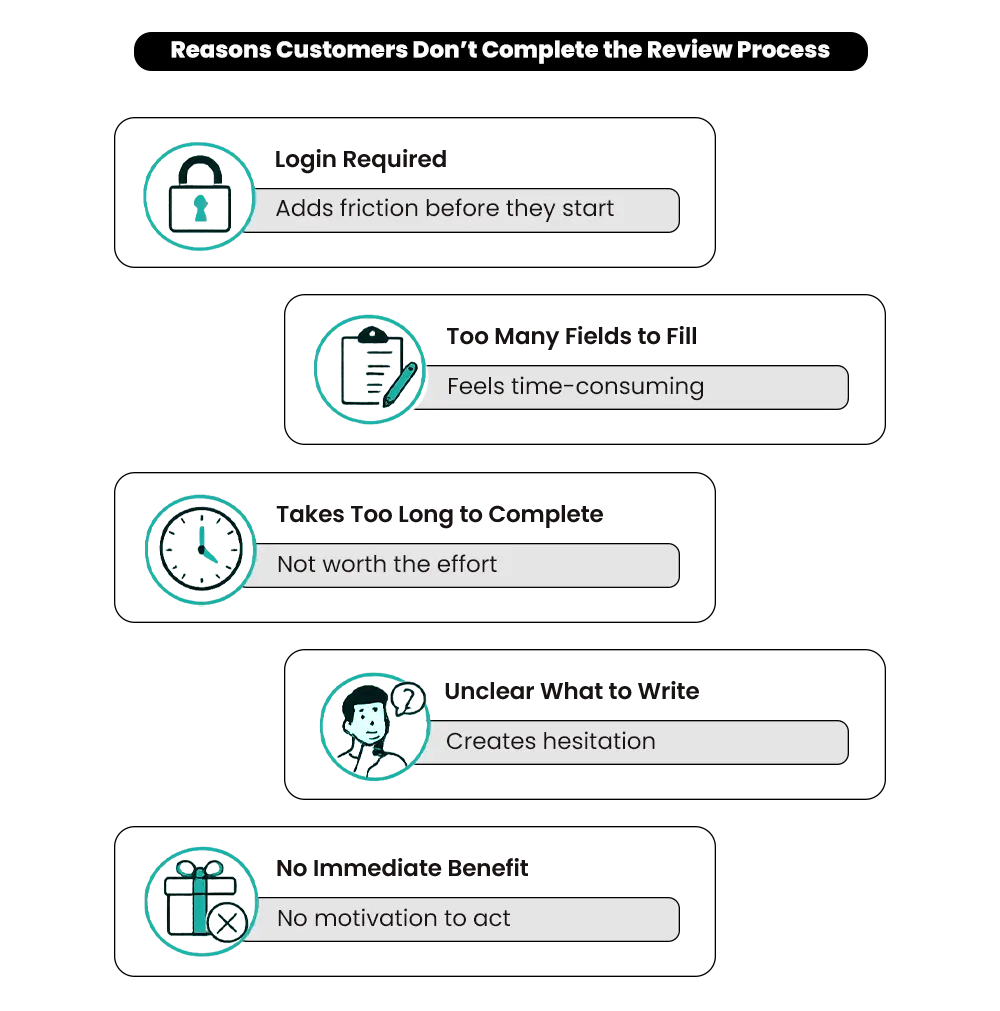
- A login wall or a multi-step form kills follow-through before it starts
- One missed email means the moment is gone — there’s no second trigger pulling them back
Think about it this way. You have Judge.me set up. The review request goes out one day after purchase. Your open rate is decent — maybe 30%. But the review response rate is stuck under 2%. Not because people aren’t seeing it. Because they haven’t used the product yet. They have nothing real to say. So they ignore it, and the moment is gone.
PowerReviews, analysing data across hundreds of thousands of post-purchase emails, found that up to 80% of all reviews come from post-purchase emails. Yet most stores leave that potential untapped by sending requests before the customer has used the product.
The gap isn’t unhappy customers. It’s a broken moment.
That’s exactly why collecting reviews on Shopify consistently feels harder than it should. The opportunity is there. The system to catch it isn’t.
A Review Request Isn’t a Review System — Here’s the Difference
Most stores have a review request. Very few have a review collection strategy.
A request is one email, sent once, after purchase. A system is a short automated sequence — timed to your product type, written to get a response, and simple enough for the customer to complete in under a minute.
This is where most merchants get stuck. They install a review app, leave the trigger at one or two days post-purchase, and never touch the message copy.
If you sell skincare, supplements, or anything that takes time to show results, that request lands before the customer has experienced anything worth writing about. So they ignore it. Sending more requests doesn’t fix this. It just scales the problem. A review system that actually works does three things:
- Reaches the customer after they’ve used the product — not just after they’ve received it.
- Makes responding effortless — one link, no login, under 60 seconds to complete.
- Gives the customer a clear prompt — a specific question, not a blank box.
That’s what collecting more reviews on Shopify actually comes down to. Get the setup right first. Then let it run.
How to Collect Reviews on Shopify: Build the Post-Purchase Flow
Most merchants send one review request and stop. That’s not a flow — it’s a single message with no backup. If you’ve been wondering how to collect reviews on Shopify without manually chasing every customer, this is where the answer starts.
A post-purchase review flow is a short set of messages that go out automatically after a customer receives their order. You configure it once. It runs for every order after that.
Step 1 — Send the First Request at the Right Time
The single biggest mistake is sending the request too early. Here are the delays that work, broken down by product type:
- Fashion and apparel: 5–7 days after delivery
- Electronics and gadgets: 3–5 days after delivery
- Skincare, supplements, and wellness: 14–21 days after delivery
- Food, coffee, and consumables: 5–7 days after delivery
- Home goods and furniture: 7–10 days after delivery
Use one direct link to the review form — no account login required.
Step 2 — Send One Follow-Up
If there’s no response, wait two to three days and send a shorter message. Write it fresh — don’t resend the same email. Different subject line, slightly different angle, same direct link.
Step 3 — One Final Nudge for High-Value Orders Only
For orders above a certain threshold, follow up three to four days after the second message. Keep it simple — a short thank-you with a gentle reminder. Stop there. Beyond three messages, customers start unsubscribing rather than responding.
How to Automate Review Requests on Shopify
You don’t need to send any of this manually. Review apps — Judge.me, Loox, and Okendo — handle the full sequence once you configure them correctly. Inside the app, change these four things:
- Trigger: Set it to delivery confirmed, not order placed
- Delay: Match it to your product type using the timing guide above
- Follow-up: Turn it on and write a fresh message — don’t reuse the first email
- Form: One direct link, no password required
That’s the full setup. Under an hour. Once it’s running, you don’t need to touch it again. In most cases, fixing these four settings alone is enough to see a meaningful improvement within the first few weeks. Shopify removed its native product reviews feature, all review collection now runs through third-party apps. You can browse the current options in the Shopify App Store.
Email vs. WhatsApp — Which Channel Gets More Reviews?
Right now, you’re probably sending review requests only by email. That’s where most stores start — and where most stores stay.
The problem: inboxes are crowded. Your review request looks like every other marketing message the customer received that day. It gets opened, skimmed, and closed without a response.
WhatsApp Business messages carry a 98% open rate, compared to around 30% for ecommerce email, according to Omnisend’s 2026 benchmark data. A review request arriving as a WhatsApp message feels personal, not like a broadcast. That gap matters when you’re trying to build review volume consistently. But adding WhatsApp doesn’t mean dropping email. Use both — in the right order.
What Works on Email
- Plain text format — looks personal, not promotional.
- Product name in the subject line, not just ‘leave us a review’.
- One question, one link, nothing else in the message.
What Works on WhatsApp
- Short message, customer’s first name, one direct link.
- Sent from a recognizable business number, not a random one.
What to Avoid on WhatsApp
- Bulk message tone — customers can tell immediately.
- Sending a follow-up if the first message was read and ignored.
- Mixing review requests with promotional offers in the same chat.
How to Use Both Together
Start with WhatsApp for visibility. If there’s no response within two to three days, follow up by email. Two channels used in the right order will always outperform one channel used repeatedly.
If you want all of this — email flows, WhatsApp review requests, and post-purchase automation — running as one connected strategy, Mastroke’s Shopify email marketing and retention service is built to handle exactly that.
Your emails are going out. But are they bringing reviews back?
Sending review requests is the easy part. Getting responses is where most stores struggle — because the timing is off, the copy is generic, and there’s no real follow-up sequence. A proper email marketing setup fixes all of that, automatically.
How to Ask for Reviews — The Message That Gets Responses
You have the timing right. You have the channel. Now comes the part most stores still get wrong — what you actually say.
Most review requests look like this:
Hi [Name], please leave a review for your recent order.
No direction. No prompt. Just a blank page and an expectation. The customer opens it, doesn’t know where to start, and closes it — not because they don’t want to help, but because you made it harder than it needed to be.
Here’s what to send instead:
Hi [Name], you’ve had [Product] for a few days now — what’s been your experience? One line is enough. [Direct link]
You gave them a starting point. You told them one line is enough. You removed the blank-page problem entirely. Inside the review form itself, add two to three short optional prompts:
- What made you choose this product?
- What did you notice after using it?
- Who would you recommend it to?
Keep them optional — not required. The goal is to guide, not to turn a review into a survey. One clear, specific question will always outperform a generic request sent five times.
📌Related Video
Where to Place Reviews So They Actually Drive Sales
Collecting reviews is only half the job. Where you put them is what drives conversions. Most stores place reviews on the product page and stop there — and that’s a mistake. A customer goes through several moments of doubt before buying. If your reviews aren’t showing up at those moments, they’re not doing their job.
Product Page
Put the star rating directly under the product title, above the fold. If a customer has to scroll to find social proof, most won’t bother. Trust needs to be visible before the visitor decides whether to keep scrolling.
Cart Page
This is where doubt is highest. The customer is about to pay. A relevant review right here — one that addresses a common concern — can be the difference between a completed order and an abandoned cart. It reduces hesitation exactly where hesitation costs you the most.
Homepage
One or two real reviews near the top of your homepage tell a first-time visitor something meaningful before they’ve explored anything. Credibility in the first five seconds matters.
Email Flows
A review inside an abandoned cart email or a welcome sequence works better than almost any promotional line you could write. Social proof arriving at the moment a customer is deciding whether to buy is about as effective as it gets.
Reviews placed in the right spots reduce doubt — and doubt is what stops most visitors from completing a purchase. For a full look at what else might be causing drop-off, the Shopify store performance audit from Mastroke walks through the most common friction points across product pages, checkout, and trust signals.
Common Mistakes That Kill Review Volume
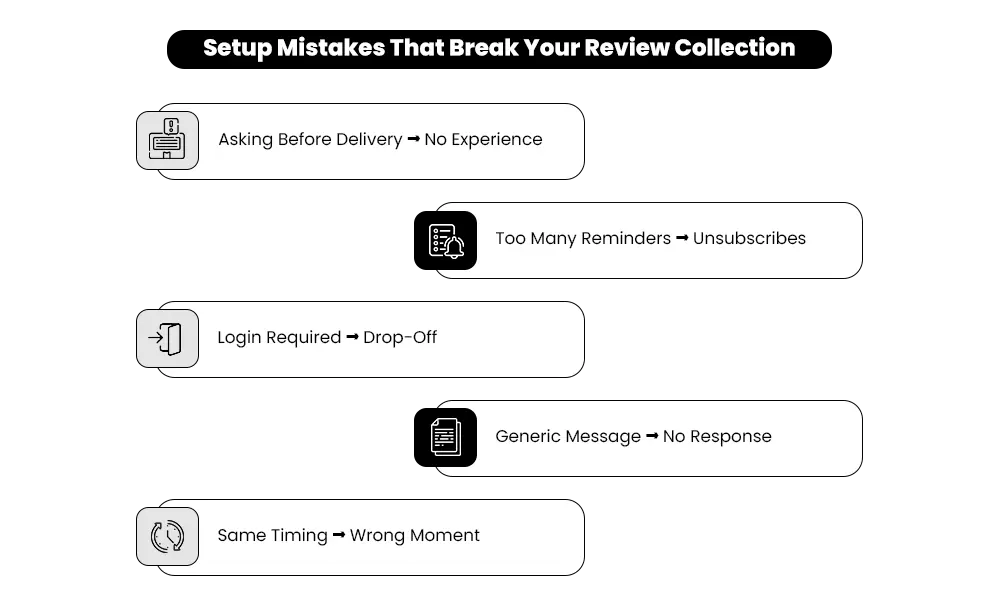
Most stores make at least one of these mistakes without realising it and never feel like they’ve cracked it. Fix these first, and the system starts working the way it should.
| Mistake | What It Does | Fix |
| Asking before delivery | Customer has no experience yet to write about | Trigger on delivery confirmed, not order placed |
| Sending 4+ reminders | Drives unsubscribes, not reviews | Cap at two to three messages total |
| Login required to review | Most customers drop off at this step | Direct one-click link, no account needed |
| Generic message copy | No direction means no response | Ask one specific question |
| Too many form questions | Feels like a survey — customers abandon it | One main ask + two optional prompts max |
| Same timing for all products | Requests land before the product is used | Set delays by product type (see timing guide above) |
| Review gating* | Violates Shopify and Google policy | Ask every customer, not just satisfied ones |
*Review gating means only requesting reviews from customers you think had a positive experience, and deliberately not asking unhappy or neutral customers at all. Both Shopify’s terms of service and Google’s review policies prohibit it — and a suspiciously perfect score tends to hurt trust more than help it.
How Do You Know If Your Review System Is Actually Working?
You’ve set up the flow. Fixed the timing. Written better messages. But how do you know it’s doing its job?
Checking your review count isn’t enough. These are the signs your system is genuinely working:
- Reviews come in consistently — not in random bursts after you manually chase someone. If you’re still following up individually, the automation setup needs revisiting.
- New products collect feedback quickly. A new launch should have its first reviews within two weeks. Nothing after a month means the timing or the copy is off.
- Your response rate sits above 5%. Well-timed, product-specific flows achieve a 5–10% response rate as a baseline — anything below 3% signals something in the setup needs fixing.
- Customers respond without needing a third message. If most of your reviews only come after the third nudge, your first two aren’t landing. Go back to the timing and the copy.
Your review count grows week by week — not overnight, not in big jumps. Steady, consistent growth is the sign of a system running properly. If it’s not: timing first, copy second. That’s almost always where the fix is.
Which App Should You Use?
The app matters less than the setup, but here’s a quick breakdown of the three most reliable options:
- Judge.me: Most widely used. Solid automation, supports email and web push, generous free plan. Good starting point for most store sizes.
- Loox: Built around photo and video reviews. Better fit if your product is visual and you want user-generated content alongside written feedback.
- Okendo: Better suited for scaling or mid-to-large stores. More customization, deeper Shopify integrations, and stronger analytics on review performance.
If nothing comes in after three to four weeks of running this, don’t add more messages. Go back to the timing and the copy. That’s where the answer always is.
Stop Chasing Reviews. Build the System That Catches Them.
More reviews don’t come from asking more. They come from asking at the right moment, in the right way, through the right channel.
You now have everything you need: timing by product type, a three-step automated flow, message copy that gets responses, and the right spots on your store to put reviews to work. The stores that consistently collect reviews on Shopify aren’t doing anything complicated. They built a simple system, got the settings right, and let it run.
Most stores don’t lack happy customers. They lack a process that catches feedback before the moment passes. Set the system up once. Let it do the work from there.
If your store is getting traffic but reviews alone aren’t closing the gap, the issue is usually friction elsewhere — product page hesitation, checkout drop-off, or trust signals that need attention. Mastroke’s Shopify CRO service identifies exactly where drop-off is happening and what to fix first. Book a free audit, and we’ll review your store and send you a prioritized list of changes.
Frequently Asked Questions About How to Collect Reviews on Shopify
Common questions about timing, automation, and getting customers to respond — answered simply.
Q: How do I automate review requests on Shopify?
Open your review app — Judge.me, Loox, or Okendo — and change four settings: trigger to delivery confirmed (not order placed), delay to match your product type, follow-up turned on with a fresh message, and the form simplified to a single direct link. No coding needed. The whole setup takes under an hour, and once it’s live, it handles every order automatically.
Q: How long should I wait before sending a review request?
It depends on the product. Electronics: three to five days after delivery. Fashion and apparel: five to seven days. Food and consumables: five to seven days. Skincare, supplements, and anything that needs time to show results: 14–21 days. Sending before the customer has actually experienced the product is the most common reason review requests get ignored.
Q: How do I increase review response rates without sending more messages?
Fix the timing and the copy before increasing frequency. A request sent at the right time with a specific question will always outperform a generic request sent multiple times. Ask one clear question, use a direct link with no login required, and keep the whole process under 60 seconds. That alone is usually enough to move response rates significantly.
Q: Which is the best review app for Shopify?
It depends on your store. Judge.me is the most widely used — affordable, simple to configure, works for most store sizes. Loox is a better fit if your product is visual and you want photo reviews alongside written ones. Okendo suits larger stores that need deeper analytics and more customization. If you’re just starting out, Judge.me is the right place to begin.
Q: Is it against Shopify’s rules to only ask satisfied customers for reviews?
Yes. This practice — review gating — violates both Shopify’s terms of service and Google’s review policies. You should send the review request to every customer, not just the ones you expect had a positive experience. Selectively filtering who gets asked inflates your score and creates a misleading picture that can hurt trust rather than build it.
Q: How many review request messages should I send per order?
Two messages is the working standard. Three is the absolute maximum. Anything beyond that drives unsubscribes without improving your response rate. A first request timed to your product type, one follow-up two to three days later, and — for high-value orders only — an optional final nudge. More messages create opt-outs, not more reviews.
Q: Where should I display reviews on my Shopify store?
Product page first — star rating above the fold, directly under the product title. Then the cart page, where a well-chosen review reduces hesitation right before checkout. The homepage builds instant credibility for first-time visitors. And email flows, especially abandoned cart and welcome sequences, are one of the most effective places to use social proof with customers who haven’t committed yet.
Need help building a review system that actually works? Get in touch.
Most stores have the tools but not the setup. If your review requests are going out but responses aren’t coming back, the fix is usually simpler than you think. Tell us where you’re stuck and we’ll point you in the right direction.