📌 Key Takeaways
This section highlights the most important insights:
- Indexing is the gateway to visibility and revenue:
If your product pages aren’t indexed, they simply don’t exist on search—no traffic, no discovery, no sales. - Most indexing issues stem from structure, not surface-level errors:
Duplicate URLs, weak internal linking, and technical misconfigurations are the primary reasons Shopify product pages fail to get indexed. - Technical SEO and performance directly impact crawl and indexing behavior:
Noindex tags, robots.txt errors, slow page speed, and poor sitemap structure can silently block or delay indexing.
Shopify SEO issues often show up when product pages stay invisible on Google, even though your store is live and ready to sell products daily.
Many merchants notice their product pages not appearing in search results, while organic traffic stays low despite investing time, effort, and resources into their Shopify store.
According to Ahrefs, 90.63% of pages get no organic traffic from Google, showing how common indexing and visibility problems are across ecommerce websites today.
The real problem is that indexing issues are rarely obvious, and most Shopify SEO issues happen quietly within your store’s technical setup or structural foundation.
Many merchants assume traffic problems come from ads or demand, but often the issue lies deeper, within how search engines crawl, understand, and prioritize product pages.
This blog explains why product pages don’t get indexed, how to identify Shopify SEO issues early, and how to fix them step-by-step for consistent organic growth.
What Does “Not Indexed” Actually Mean?
Shopify SEO issues often start when merchants assume pages are visible, but in reality, Shopify pages not indexed simply means Google has not included them in search results.
Crawling means Google discovers and scans your page, while indexing means it stores that page in its database, making it eligible to appear in search results.
In many Shopify indexing issues, Google crawls product pages but chooses not to index them, usually due to low content quality, duplication, or unclear page value.
Common signs include product pages not appearing on Google, or messages like “Discovered – currently not indexed” inside Google Search Console, confusing many Shopify merchants.
Indexing matters because without it, your product pages cannot generate organic traffic, meaning even well-designed stores fail to attract search visibility or consistent, high-intent customers.
– Also Read- Mobile-First Store Design: Why New Shopify Stores Ignore the Thumb Zone
Why Shopify Product Pages Often Face Indexing Issues?
Shopify SEO issues often arise because the platform creates multiple versions of the same product page, causing confusion for search engines and leading to Shopify pages not indexed.
• Duplicate URLs from collections, tags, and filters create multiple paths to the same product, making it harder for Google to decide which version to index.
• Auto-generated and app-created pages often add unnecessary URLs, which dilute crawl focus and increase the chances of Shopify product pages not being indexed across your store.
• Thin or repetitive product descriptions reduce page value, while weak internal linking makes it harder for Google to discover and prioritize important product pages effectively.
Please check our video here:
📌 Key Video
7 Common Shopify SEO Issues That Prevent Indexing
Shopify SEO issues that prevent indexing are often not obvious, but they quietly affect visibility, causing Shopify product pages not indexed even when everything appears functional.
Before fixing anything, merchants need to understand that Shopify indexing issues usually come from structural, technical, and content-related gaps rather than a single visible problem.
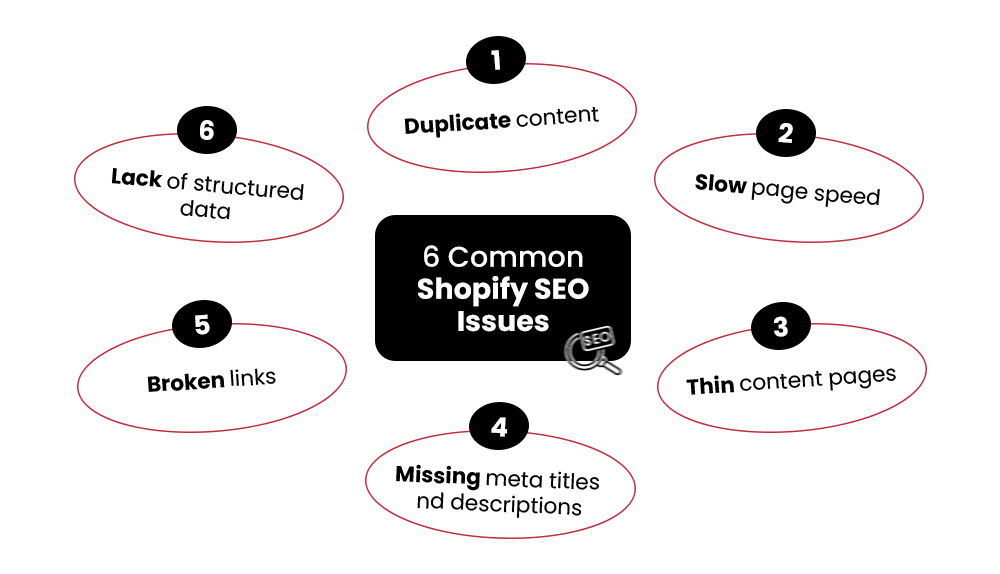
Here are the most common Shopify SEO issues that prevent indexing and how you can address them effectively to increase search engine optimization and long-term organic visibility.
1. Duplicate Content from Collections & Variants
The same product often exists under multiple collection URLs and filtered paths, creating duplication that leads to Shopify pages not being indexed across different versions of your store.
Google struggles to determine which version should rank, and this confusion often results in skipped indexing, especially when similar URLs compete for the same content signals.
Fix this by using canonical tags correctly and maintaining a clean URL structure, which helps search engines identify the primary version of each product page.
2. Thin or Low-Quality Product Descriptions
Many stores rely on supplier descriptions, which creates repeated content across multiple websites and reduces the perceived value of your product pages in search results.
This is one of the most common Shopify SEO issues, where pages exist but fail to provide enough context for Google to justify indexing them.
Improve this by writing unique, intent-driven descriptions, and include FAQs, specifications, and real use cases that help both customers and search engines understand product relevance clearly.
3. Incorrect Noindex Tags or Robots.txt Blocking
Sometimes, Shopify technical SEO issues come from pages being accidentally blocked, preventing Google from indexing important product pages without merchants realizing the problem exists.
This can happen due to incorrect theme configurations or SEO apps adding unintended noindex tags or restrictive robots.txt rules that block crawling and indexing completely.
Fix this by auditing your robots.txt file and checking meta tags regularly to ensure critical product pages are accessible and eligible for indexing by search engines.
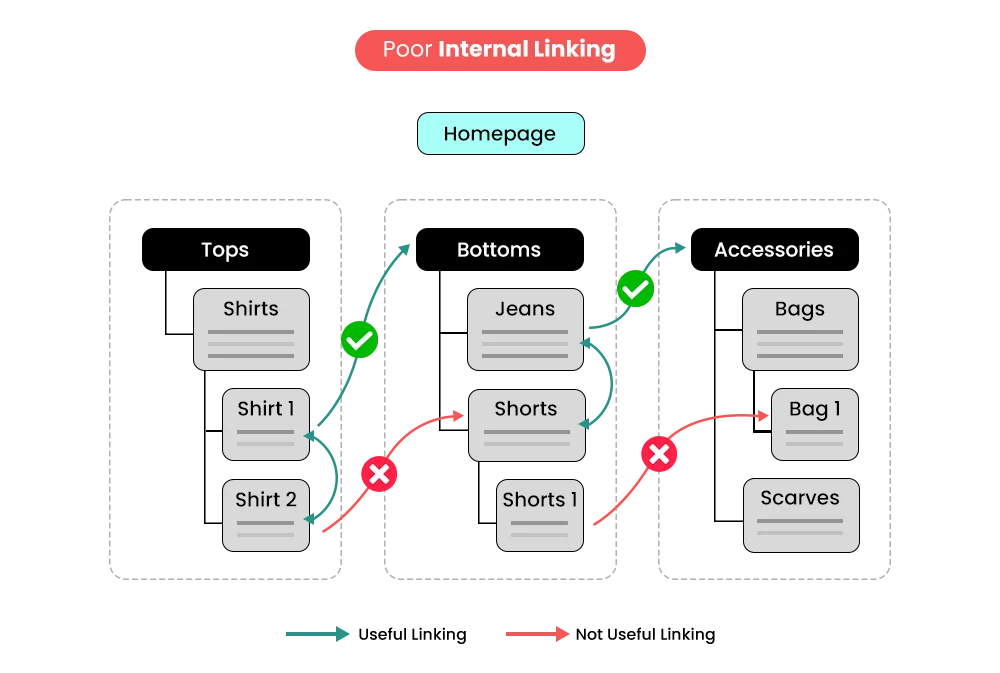
4. Poor Internal Linking Structure
When products are not linked from collections, homepage sections, or blog content, search engines struggle to discover and prioritize them during the crawling process.
This often results in Shopify product pages not indexed because Google cannot easily navigate your store structure or understand which pages matter most.
Strengthen your internal linking by connecting products through collections, content pages, and navigation elements to improve discoverability and reinforce page importance signals.
5. Slow Page Speed and Performance Issues
Heavy themes, excessive apps, and unoptimized scripts can slow down your store, negatively impacting crawl efficiency and contributing to Shopify indexing issues over time.
When pages load slowly, search engines may reduce crawl frequency, which means important product pages may remain undiscovered or unindexed for longer periods.
Improve performance by removing unused apps, optimizing scripts, and ensuring your store loads quickly across devices to support better crawling and indexing behavior.
6. Lack of XML Sitemap Optimization
A poorly structured sitemap can include irrelevant pages while missing important product URLs, making it harder for search engines to prioritize what should be indexed first.
This leads to Shopify pages not indexed because Google relies on clear signals to understand which pages deserve attention within your store hierarchy.
Fix this by submitting your sitemap through Google Search Console and ensuring it reflects a clean, organized structure focused on high-value product and category pages.
7. Low Domain Authority or Weak Backlinks
New or growing stores often face Shopify SEO issues because they lack authority signals, making it harder for search engines to trust and index their product pages quickly.
Without backlinks or external validation, even well-optimized pages may struggle to gain visibility, especially in competitive ecommerce categories where authority plays a major role.
Build authority through content marketing, partnerships, and backlinks, which strengthen trust signals and support faster indexing as part of a long-term search engine optimization guide strategy.
Understanding these common Shopify SEO issues helps you move beyond surface-level fixes and address the real reasons why Shopify product pages not indexed continue affecting your store growth.
Why Isn’t Your Store Ranking on Google?
Hidden SEO issues could be costing you traffic and sales. We optimize your store to rank higher, load faster, and convert better.
How to Check If Your Product Pages Are Indexed
Shopify SEO issues often surface when Shopify product pages not indexed appear missing in search, even though stores are live and accessible to customers browsing directly.
Start with a simple check using Google search: type site:yourdomain.com/product-name to see whether your product page appears, which helps identify early Shopify indexing issues quickly.
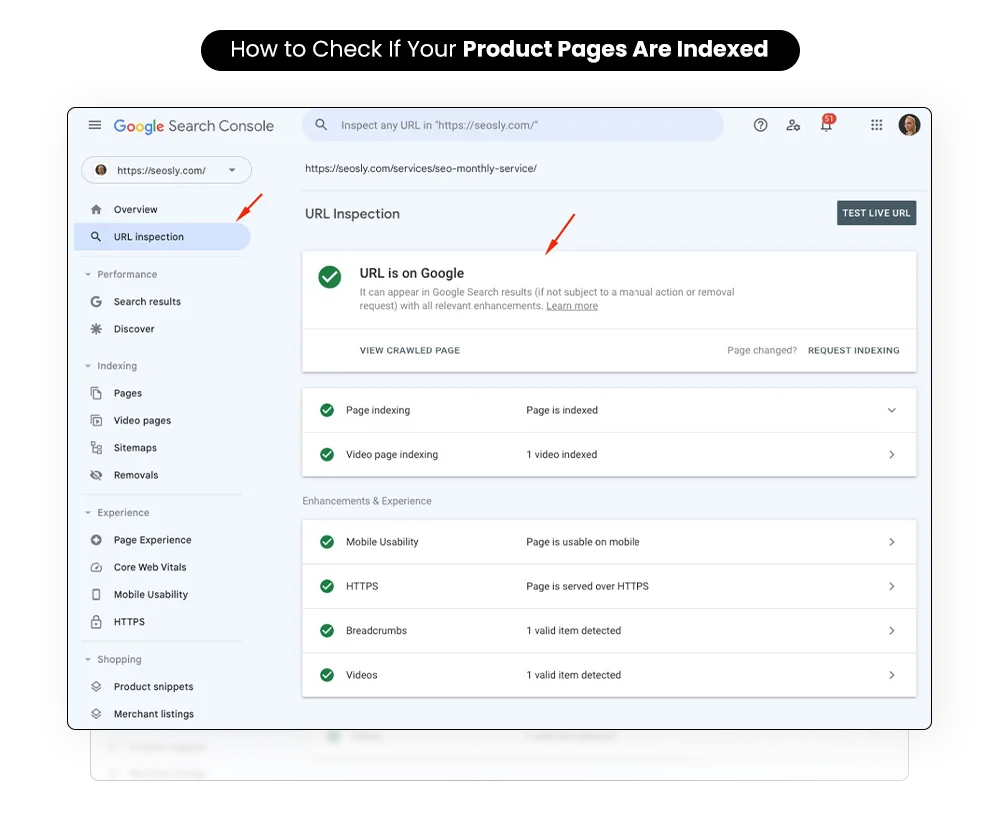
Next, open Google Search Console and review the Page indexing report to understand how Google processes your pages, especially if Shopify product pages not indexed appear frequently.
Focus on signals like “Crawled – not indexed” and “Excluded pages,” as these indicate Google found your pages but chose not to include them in search.
How to Fix Shopify SEO Issues Step-by-Step
Shopify SEO issues rarely fix themselves, so merchants need a structured process to resolve Shopify indexing issues and ensure that Shopify product pages not indexed start appearing consistently.
Step 1: Audit Your Product Pages
Start by identifying gaps that cause Shopify SEO issues and prevent indexing.
• Check for missing product pages that are live but not indexed
• Identify duplicate URLs created through collections or filters
• Compare indexed pages using Google Search Console with your actual catalog
This step reveals where Shopify product pages not indexed exist.
Step 2: Improve Product Content
Content quality directly impacts Shopify indexing issues and visibility.
• Replace duplicate supplier descriptions with unique, intent-driven content
• Add relevant keywords naturally within titles, descriptions, and headings
• Include structured information like specifications, FAQs, and use cases
Strong content helps Google understand and prioritize your pages better.
Step 3: Fix Technical SEO Issues
Many Shopify SEO issues are caused by incorrect technical settings.
• Ensure canonical tags point to the correct primary product URL
• Review robots.txt to confirm important pages are not blocked
• Check for accidental noindex tags applied through themes or apps
Fixing these ensures Shopify product pages not indexed become eligible for indexing.
Step 4: Strengthen Internal Linking
Google discovers pages faster when internal links are clear and consistent.
• Link products from relevant collections and category pages
• Add contextual links within blog content pointing to product pages
• Ensure important products are accessible within a few clicks
Better linking reduces Shopify indexing issues by improving crawl paths.
Step 5: Improve Site Performance
Slow performance can limit how Google crawls and indexes your store.
• Compress and optimize images across product pages
• Remove unused apps that add unnecessary scripts
• Use a lightweight, optimized theme for faster loading
Improved speed helps reduce Shopify SEO issues tied to crawl efficiency.
Step 6: Submit Pages for Indexing
After fixes, guide Google to re-evaluate your pages quickly.
• Use Google Search Console to inspect updated product URLs
• Request indexing for pages previously excluded
• Monitor the Page indexing report for status updates
This step ensures that Shopify product pages not indexed get reconsidered and indexed faster.
– Also Read- 8 Best Shopify Apps for Custom Shipping Rates, Delivery Dates, and Store Pickup
How Long Does Indexing Take on Shopify?
Shopify SEO issues often raise one common question: how long does indexing take when Shopify product pages not indexed remain invisible despite updates and active store traffic.
- In most cases, indexing can take anywhere from a few days to several weeks, depending on factors like site authority, crawl frequency, and overall Shopify indexing issues.
- New stores or low-authority domains usually experience slower indexing because Google crawls them less frequently, which increases delays in resolving Shopify product pages not indexed.
- If technical or content-related Shopify SEO issues exist, indexing may take longer, as Google may repeatedly crawl pages but choose not to include them in search.
Fixing Shopify indexing issues—like improving content, resolving duplicates, and correcting technical errors—can significantly speed up indexing and help your product pages appear faster in search results.
– Also Read- Shopify Plus ERP Integration Guide (2026): Scale Faster with Smart Automation
How Mastroke Solves Shopify SEO Issues?
Shopify SEO issues often persist because merchants cannot identify why Shopify product pages not indexed and continue missing, even after updates, fixes, and ongoing efforts to improve visibility.
Mastroke works as a Shopify SEO agency and ecommerce growth partner, focusing on resolving Shopify indexing issues through structured audits, data analysis, and long-term optimization strategies.
• Technical SEO audits to identify hidden Shopify SEO issues affecting indexing
• Product page optimization to fix Shopify product pages not indexed problems
• Structured fixes for Shopify indexing issues like duplicates and crawl barriers
• Performance optimization to improve crawl efficiency and indexing speed
Instead of quick fixes, Mastroke focuses on data-driven decisions that improve long-term visibility, helping Shopify stores move from indexing issues to consistent organic growth and revenue.
Conclusion
Shopify SEO issues often feel confusing because Shopify indexing issues are rarely visible, yet they quietly limit traffic, prevent product discovery, and reduce your store’s potential revenue.
The good news is that most Shopify SEO issues are fixable once identified, especially when you improve structure, content clarity, and technical signals that help search engines understand pages.
Better structure and stronger content directly improve indexing, ensuring your products appear in search results rather than staying hidden behind unresolved Shopify indexing issues that affect visibility.
If your store isn’t growing through organic traffic, it’s worth auditing your setup now, fixing Shopify SEO issues early, and building a stronger foundation for consistent long-term visibility. Connect with Mastroke Shopify Experts now!
Stop Losing Sales — Start Ranking Your Store Today with Shopify SEO
Bring your store to the top of search results with proven Shopify SEO strategies. We optimize your site for higher rankings, better visibility, and consistent organic traffic—built to scale with your business.
FAQs-
Why are my Shopify product pages not indexed?
Shopify product pages are often not indexed due to technical errors, duplicate URLs, weak content, or poor internal linking that prevents search engines from prioritizing them.
How do I fix Shopify SEO issues?
You can fix Shopify SEO issues by improving product content, resolving duplicate URLs, correcting technical settings like canonicals and noindex tags, and strengthening internal linking.
Can apps cause Shopify SEO issues?
Yes, some apps can create Shopify SEO issues by adding duplicate pages, unnecessary scripts, or incorrect tags that interfere with crawling and indexing.