This blog post examines why functioning shipping setups can still cause lost sales by creating customer uncertainty at checkout. It explains how the best Shopify shipping apps should focus on reducing decision friction rather than just adding features.
📌 Key Takeaways
A quick look at what counts:
- Why do growing stores move beyond basic shipping and look at Advanced Shipping Rules?
Flat rates stop making sense once orders vary across products, locations, and combinations. Adding control fixes the logic on your end, but customers don’t always experience that clarity the same way at checkout. That gap between setup and perception is easy to miss—and fixing it properly needs a deeper look than just enabling rules. - At what point do you need Intuitive Shipping?
It usually starts when your shipping setup no longer behaves consistently—what you expect to show isn’t always what customers see at checkout. You keep adjusting rules to fix it, but the outcome still feels slightly off. That’s where it stops being just about adding structure and starts needing a clearer understanding of how everything comes together. - Where do delivery and pickup setups start needing structure like ShipZip?
Offering both delivery and pickup seems helpful until customers are faced with too many unclear choices at once. Structuring these options improves clarity, but deciding what should be visible—and what should be simplified—takes more thought than it first appears. This is where most setups need closer attention. - What changes when you introduce delivery timing control with Stellar Delivery Date & Pickup?
You move from open-ended choices to defined availability, which reduces overpromising and makes the experience feel more reliable. But those limits also shape what customers expect from their order, and small gaps here can affect trust in ways that aren’t immediately obvious. - Why do stores bring in early delivery visibility through Estimated Delivery Date (EDD)?
When customers don’t know when their order will arrive, they hesitate before completing the purchase. Showing delivery timelines earlier helps reduce that uncertainty, but it also changes how customers evaluate the order—something that depends heavily on how and where this information is presented.
The issue is not whether your shipping setup functions, but whether it helps customers decide faster. Faster decisions at checkout usually lead to more completed orders, and that is where many stores lose revenue—even when using the best Shopify apps.
A customer reaches checkout, sees the shipping cost, delivery timeline, and options, and pauses. That pause introduces doubt, and even small uncertainty can stop a purchase. Because nothing appears broken, you’ll miss this friction unless you actively look for it. Most merchants misunderstand how these apps actually work. They are not just tools to add features but systems that shape how clearly your store communicates shipping decisions.
Research suggests that 48% of cart abandonments are caused by extra costs like shipping and fees. Shopify’s default shipping settings are often limited, so many merchants explore apps and wonder, what are the best Shopify apps for their use case? However, adding more apps does not always improve clarity at checkout. This blog will not just list the best Shopify apps, but explain what each app actually changes and where most shipping setups fall short.
Why Do You Actually Need Shipping Apps?
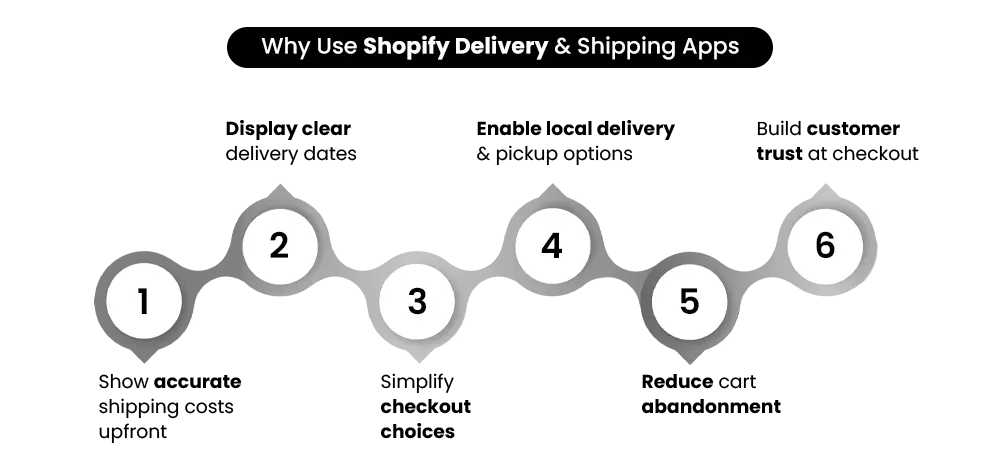
Before choosing the Best Shopify Apps, it is important to understand what your checkout experience is silently struggling with.
Are you trying to show accurate shipping rates or reduce cart abandonment from delivery confusion? Or manage local delivery and store pickup together?
Each of these reflects a different kind of customer decision. Most merchants explore Shopify apps with a feature in mind—better rates, delivery dates, or pickup options—and often ask, “What apps do I need?” But the real issue is not the feature itself; it is the clarity it creates.
This is where many Shopify apps get used incorrectly. The focus stays on what the app can do, instead of what the customer needs to understand. Customers make three key decisions during shipping.
- Custom shipping rates (dynamic pricing) – Does this cost make sense for me?
- Delivery date selection (customer control) – When will I receive this order?
- Store pickup or local delivery (operational flexibility) – What’s the most convenient option?
If any of these are unclear, the customer pauses—and that pause affects conversions. This is why choosing from the Best Shopify Apps is less about adding features and more about removing uncertainty at checkout.
One wrong setup here doesn’t just affect checkout. It affects how confident a customer feels about completing the purchase—regardless of how many Shopify apps you’ve installed. This is where many merchants realize tools alone aren’t enough—experts like Mastroke approach shipping as part of the overall store experience, not just setup.
If you want to connect shipping decisions with overall store performance, this ties closely to how Shopify stores are structured for growth → The Ultimate Guide to Shopify Store Setup and Optimization (Start from Scratch)
Build Your Shopify Store From Scratch With Mastroke
Launch faster with Mastroke, an official Shopify Partner. We build structured stores with conversion-first design, clean setup, and features built to scale!!
Signs Your Shipping Setup Is Hurting Conversions
Shipping issues don’t always appear as obvious errors. They show up in small signals during checkout.
- Customers drop off at checkout.
- Frequent delivery-related questions.
- Confusion around pickup or shipping options.
- Orders require manual fixes.
Individually, these may seem minor. Together, they point to friction where decisions should feel simple. If even one of these feels familiar, your shipping setup may be affecting conversions more than you realize—even if you’re already using some of the Best Shopify Apps.
8 Best Shopify Apps — But Only If You Use Them Right
Each of these apps solves a different part of the decision your customer is trying to make. The mistake is assuming any one of them will fix everything.
The Shopify Apps, even the most highly rated Shopify shipping apps, don’t improve checkout by default. They improve it when they match the exact kind of clarity your store is missing.
1. Advanced Shipping Rules — For Stores That Need Precision, Not Guesswork
About the app: Built by Bambri, Inc., this app is known for handling detailed shipping logic beyond Shopify’s default limits. This third-party app lets you set shipping prices based on what customers order and where you ship. Instead of one flat rate, you can set different charges depending on what the customer orders and where it needs to be delivered.
Strengths:
- Supports Shopify shipping based on weight, tags, and conditions.
- Enables Shopify custom shipping rates across different locations.
- Prevent incorrect shipping when multiple products are ordered together.
Limitations:
- You need to first decide how your shipping pricing should work before setting it up.
- An incorrect setup can show wrong shipping prices
Verdict: Best for stores where shipping pricing varies across products or locations. One of the most reliable tools among Shopify advanced shipping rules setups. You can review its Shopify app listing here → Advanced Shipping Rules Shopify Listing.
2. Intuitive Shipping — When Your Shipping Logic Starts Getting Messy
About the app: Designed for stores where shipping logic becomes complex. This one is developed by Intuitive Shipping Inc.. It focuses on simplifying complex, condition-based shipping setups. Also control shipping using order value, product type, or delivery location. This app is not included in Shopify’s plan and requires a separate monthly subscription. Install it directly from the Shopify App Store
Strengths:
- Keeps all your shipping logic in one place instead of spreading it across multiple Shopify apps.
- Reduces situations where shipping rules conflict or override each other.
- Makes it easier to manage shipping as your setup becomes more detailed.
Limitations:
- Setting up can feel confusing if you’re new to defining shipping rules.
- Adds extra complexity if you only need flat rates or very basic shipping.
Verdict: Suitable for stores where multiple shipping rules need to work together.
3. ShipZip — When You Need Pickup + Delivery Without Complexity
About the app: Created by Identixweb, this app brings delivery, pickup, and location-based control into one system. Another third-party app, ShipZip, lets you control where you deliver, how much you charge, and when orders can be delivered or picked up. You can set shipping based on location (like pin codes), add delivery date and time selection, and manage pickup options.
Strengths:
- Let’s you restrict delivery to specific areas instead of accepting all orders
- Charges different shipping based on distance or location instead of one flat rate
- Allows customers to pick delivery date and time, reducing “when will my order arrive” queries
- Supports Shopify shipping by zip code and postcode-based delivery
- Can limit how many orders you accept per day or time slot (useful for local delivery)
Limitations:
- Needs Shopify’s carrier-calculated shipping feature, which may require a higher plan or extra cost.
- Setting up takes effort if you have many delivery areas or rules.
Verdict: A practical Shopify local delivery app that combines delivery zones, pricing, and scheduling. Best for stores managing local delivery where location and timing matter. See its Shopify app page → ShipZip Shopify listing.
4. Zapiet — The Go-To for Pickup and Delivery Scheduling
About the app: Zapiet is built around scheduling. It’s widely used among Shopify stores for managing delivery and pickup scheduling across locations. It adds a date and time picker at checkout so customers can choose exactly when to receive or pick up their order.
Strengths:
- Customers can choose exact delivery or pickup timing instead of leaving it unclear.
- Helps avoid missed deliveries by providing the Shopify delivery time slots app functionality.
- Useful when managing multiple locations with different availability.
- Helps manage Shopify checkout delivery options clearly.
Limitations:
- You need to manually define time slots, cut-off times, and availability for each location.
- If availability is not set correctly, customers may select slots you can’t fulfill.
Verdict: Choose this when delivery timing needs to be planned, not assumed.
5. Stellar Delivery Date & Pickup — Balanced for Growing Stores
About the app: Stellar Delivery Date & Pickup is built to control when orders can be delivered or picked up, based on your store’s working capacity. It’s also developed by Identixweb. It lets you block unavailable dates, set preparation time, and define cut-off hours so customers only see options you can actually fulfill.
Strengths:
- Includes Shopify delivery date selector and preparation time. This prevents customers from selecting dates you can’t fulfill (holidays, closed days, or fully booked slots).
- Controls availability using a Shopify delivery calendar.
- Adds preparation time automatically, so same-day or next-day delivery isn’t promised incorrectly.
- Helps avoid last-minute or late orders by setting clear daily cut-off times.
Limitations:
- Requires you to maintain availability settings (dates, timing, cut-offs) as operations change.
- Limited control if you need different rules for many locations or complex delivery zones.
- Does not handle shipping pricing or rate calculation.
Verdict: Pick this when your issue is overpromising delivery, not under-explaining it.
6. Estimated Delivery Date (EDD) — When Customers Need Clarity Before Checkout
About the app: Offered by SetuBridge, this app show customers exactly when their order will arrive before paying. The Estimated Delivery Date (EDD) shows customers when their order is expected to arrive before they reach checkout. It displays delivery timelines on product pages, cart, or checkout, based on rules you define.
Strengths:
- Shows delivery timelines early (product/cart), so customers don’t reach checkout with uncertainty.
- Reduces “when will my order arrive?” questions before and after purchase.
- Helps set expectations clearly, especially for stores with longer or variable delivery times.
Limitations:
- Does not allow customers to choose delivery dates or time slots.
- Accuracy depends on how well delivery rules are set up and maintained.
- Does not control shipping pricing or delivery availability.
Verdict: Useful if your focus is visibility, not control—often paired with other Shopify shipping apps.
7. Shopify Local Delivery + Pickup — The Native Starting Point
About the feature: This is part of Shopify’s built-in functionality, designed for stores starting with basic delivery and pickup needs. Shopify Local Delivery & Pickup allows you to define delivery areas, set basic delivery charges, and offer pickup directly from your admin without installing additional Shopify apps.
Strengths:
- Quick to set up if you want to start offering local delivery or pickup without extra tools.
- Free and easy to set up among free Shopify shipping apps.
- Supports basic Shopify multiple shipping options.
- Keeps everything inside Shopify, so there’s no need to manage multiple apps.
Limitations:
- Limited control over how delivery options are shown at checkout.
- Does not support delivery date or time selection.
- Becomes difficult to manage if you need different rules for multiple locations or complex delivery setups.
Verdict: A practical starting point if you want to offer local delivery or pickup without setting up additional tools.
8. EasyRoutes — When Delivery Becomes an Operational Problem
About the app: Developed by Roundtrip, this app focuses on solving delivery execution and route planning challenges. EasyRoutes helps manage deliveries after checkout by planning routes, assigning drivers, and tracking deliveries. With this app, you can plan delivery routes, assign orders to drivers, and track deliveries in one place. It’s used to manage backend efficiency through Shopify delivery route management. To use it, you need separate monthly subscriptions.
Strengths:
- Group multiple orders into efficient delivery routes, saving time and fuel.
- Helps assign deliveries to drivers with clear stop-by-stop directions.
- Reduces manual planning when handling a high volume of local deliveries.
Limitations:
- Does not improve what customers see at checkout.
- Requires you to manage your own delivery operations (drivers, vehicles, routes).
- Adds little value if you rely on third-party shipping carriers.
Verdict: A good fit if your challenge starts after checkout—planning and completing deliveries efficiently.
Which Shopify Shipping App Is Best?
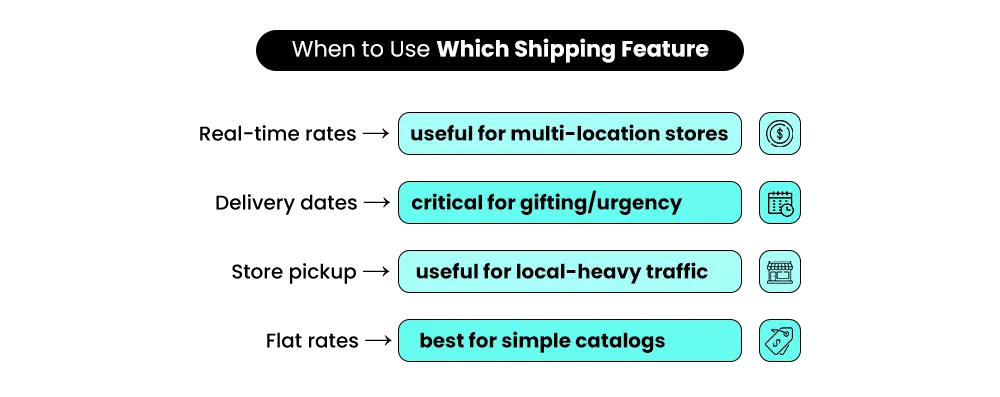
Don’t chase features—choose the app that removes confusion fastest. Merchants usually ask: What is the best shipping app for Shopify? But the better question is: – what part of the decision is unclear?
- For complex shipping rates → Advanced Shipping Rules
- When your shipping rules start overlapping → Intuitive Shipping
- Handling pickup and delivery together → Zapiet
- Starting out with basic delivery or pickup → Shopify native
- A balanced setup without heavy configuration → Stellar Delivery Date & Pickup
The Best Shopify Apps for your store depend on what you’re trying to fix, not just which features look useful.
Many stores try fixing shipping by adding more tools, but the real issue often starts earlier in how decisions are shaped across the store – Why Shopify Stores Fail After Launch: 16 Reasons Your Store Isn’t Getting Sales
Quick Reality Check — Which App Fixes What Kind of Problem?
| If Your Problem Sounds Like This | You Should Look At | Why | What to Watch Out For |
| “Shipping prices feel random.” | Shipping Rules, Intuitive Shipping | Brings control to how shipping is calculated | Can become difficult to manage without clear logic |
| “Customers keep asking when their order will arrive.” | Stellar Delivery Date & Pickup, Estimated Delivery Date (EDD) | Makes delivery timelines visible earlier in the journey | Doesn’t handle pricing or delivery capacity |
| “We offer pickup, but it’s confusing.” | Zapiet, ShipZip | Structures how delivery and pickup options are shown | Needs careful setup to avoid too many options |
| “Delivery operations feel unmanageable.” | EasyRoutes | Improves how deliveries are planned and executed | Doesn’t improve the checkout experience |
| “I just need something simple to start.” | Shopify Local Delivery + Pickup | Quick to enable without extra Shopify apps | Limited flexibility as your store grows |
Choosing based on features alone is where most merchants go wrong. When multiple options seem useful, the instinct is to add more Shopify apps. But most issues come from a single unclear decision at checkout—not a lack of tools.
📌 Key Video
Why Adding More Shipping Apps Can Make Things Worse
Adding more Shopify apps can create fragmentation instead of clarity.
What feels like improving your shipping setup often leads to overlapping logic, where different tools influence the same checkout decision in ways that are hard to track. Conflicting rules are one of the first issues that show up.
Different apps may apply their own logic, which can result in shipping rates or options that don’t behave as expected. Alongside this, each added layer can slow down how shipping options load, making the checkout feel less responsive. Inconsistent information is another common issue. Customers may see one delivery timeline earlier and a different one at checkout, which creates hesitation at the point of decision.
Have you ever tested your own checkout like a customer would?
Most issues are invisible until customers start dropping off. What feels like fixing gaps often ends up creating new ones.
The Hidden Cost of Getting Shipping Wrong
These issues rarely appear as technical problems, but they directly influence how customers decide at checkout.
- Unexpected shipping costs increase drop-offs at the final step.
- Unclear delivery expectations reduce trust and create hesitation.
- Orders require manual fixes when systems don’t align behind the scenes.
This is where Shopify shipping automation and structured logic matter more than adding tools.
How to Choose the Right Shipping Setup Based on Your Store Stage
The mistake isn’t choosing the wrong app—it’s choosing the right app at the wrong stage.
If You’re Just Starting
At this stage, clarity matters more than control. Customers should understand shipping costs and delivery timelines without needing to compare options. Instead of jumping into multiple tools, starting with the Best Shopify Apps for basic delivery clarity helps you keep the checkout simple and predictable.
If You’re Getting Orders but Facing Drop-offs
When customers reach checkout but don’t complete the purchase, the issue is usually uncertainty. They’re unsure about delivery timing or feel the pricing is unclear. Combining delivery visibility with structured shipping logic helps remove that hesitation and improves completion rates.
If You’re Scaling
As order volume grows, small inconsistencies start affecting both operations and customer experience. Manual fixes increase, and shipping logic becomes harder to manage. This is where the best Shopify Apps for automation and control help maintain accuracy without slowing down your workflow.
How Do You Know Your Shipping Setup Is Actually Working?
You don’t measure this through settings. You see it in how customers move through checkout.
- Customers move past shipping without hesitation – If most customers move to payment without pausing, pricing and delivery expectations are clear.
- Delivery questions start reducing over time – When customers stop asking about timelines or options, your store is answering these during the buying journey.
- Orders go through without needing correction – If you’re not fixing delivery details after orders, what customers see matches what you can fulfill.
- Returning customers don’t re-evaluate shipping – When repeat buyers don’t check delivery details again, your setup feels predictable.
These are not separate signals—they reflect the same thing. Your shipping setup is working when customers can decide without needing to think about it.
What Does a ‘Clear’ Shipping Experience Actually Look Like?
A clear shipping experience doesn’t make customers stop and think. It helps them move forward without needing to evaluate their options. When a customer reaches checkout, do they instantly understand what they’ll pay and when they’ll receive the order? Or do they pause to figure it out?
Even when using advanced Shopify shipping solutions, clarity depends on:
- Clear pricing – Shipping costs are easy to understand and don’t change unexpectedly at checkout. Customers know what they’re paying for before they reach the final step.
- Specific delivery expectations – Instead of vague timelines, customers see when they can expect their order. This reduces hesitation and removes the need for follow-up questions.
- Simple options – Customers aren’t forced to choose between too many delivery or pickup options. The right choices are visible without creating confusion.
When these are clear, customers don’t evaluate—they proceed. And when they don’t need to pause at checkout, the entire buying process feels faster and more predictable. Clarity removes hesitation. Hesitation reduces conversions.
Where Most Merchants Get Stuck (And Why They Start Looking for Help)
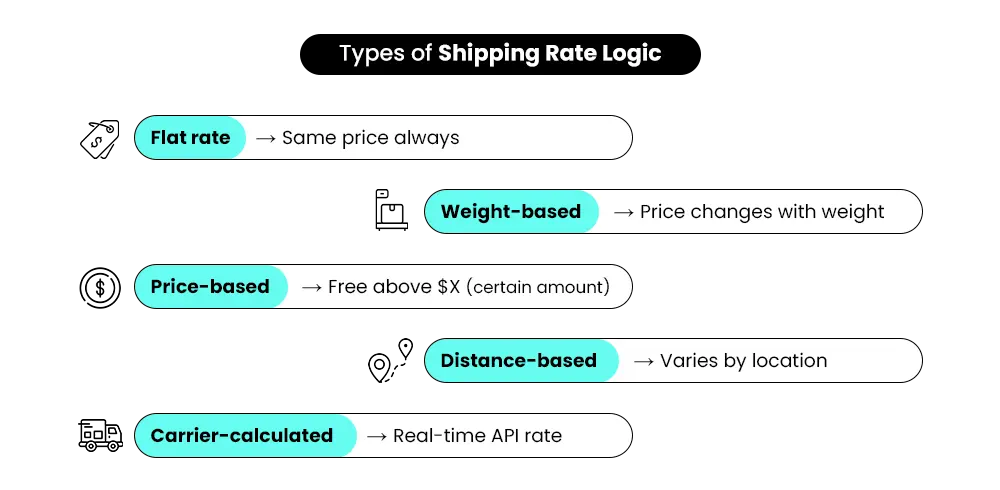
At some point, shipping stops feeling straightforward. You add one app for pricing, another for delivery dates, and maybe one more for pickup. Each solves a part of the problem—but together, they don’t always create a clear checkout.
- Multiple Shopify apps overlap and start conflicting – Different Shopify apps apply their own logic, and small mismatches begin to show up in pricing or delivery options.
- Shipping rules don’t behave as expected – Conditions overlap, making it harder to predict what customers will actually see at checkout.
- Checkout experience breaks silently – Nothing appears broken, but customers hesitate or drop off without a clear reason.
Individually, these issues seem manageable. Together, they start affecting how customers make decisions at checkout.
This is usually where the shift happens. Not because more tools are needed, but because the setup itself needs to be rethought. Shopify experts like Mastroke step in at this stage to simplify how pricing, delivery, and checkout decisions work together—so the experience feels consistent, not patched.
Conclusion: Don’t Just Add Apps—Design the Moment Customers Decide
Shipping is not just a setup—it’s the final decision trigger.
By the time customers reach checkout, they are deciding. Even small confusion here can affect whether the order is completed. Adding more Shopify apps doesn’t always fix this. What improves conversions is how clearly pricing, delivery, and options come together.
If your setup feels patched, it usually comes from fixes that worked in isolation but now overlap. This is where getting the setup right becomes critical. And when those issues start affecting how your store behaves overall, it often requires stepping back and reworking the structures.
Something Shopify partners like Mastroke approach through focused Shopify setup and redesign, not just surface-level changes. Before adding another app, look at what your checkout is forcing customers to figure out—and fix that first.
Build your dream Shopify store today
Bring your vision to life with Mastroke, an official Shopify Partner. We design and develop high-converting, scalable Shopify stores with clean structure and future-ready features—built to grow with your business.
Shipping FAQs That Actually Fix Checkout Confusion
Not all shipping problems are technical—most are clarity gaps. These FAQs unpack what really affects pricing, delivery expectations, and customer drop-offs at checkout.
1. Which Shopify app is best for custom shipping rates?
It really depends on how complex your setup is. For simple needs, basic Shopify shipping apps can work fine. But if you want more control over pricing logic, tools like Advanced Shipping Rules or Intuitive Shipping are often a better fit. They help you set conditions that actually match how your products ship. Over time, that flexibility makes a big difference.
2. Why do customers drop off at the shipping step?
Most drop-offs happen because something feels unclear or unexpected. It could be a higher-than-expected cost, vague delivery timelines, or too many confusing options. At this stage, customers are already close to buying, so even small friction creates hesitation. If they don’t feel confident, they leave instead of figuring it out. Clarity matters more than most people think here.
3. Can I set different shipping rates for different products on Shopify?
Yes, but it’s not as straightforward as most people expect. Shopify’s default setup works well for general rules, but once you try to get specific—like charging differently for certain products—it starts to feel restrictive. That’s why many store owners turn to shipping rule apps. These tools let you create more detailed conditions without having to hack your way around the system. It just makes the whole setup more practical and manageable.
4. Can one app handle delivery dates and store pickup together?
Yes, and it actually makes things much easier when one app handles both. Instead of stitching together multiple tools, you get a single flow where customers can choose delivery dates, time slots, or pickup options without confusion. Apps like Zapiet or ShipZip are built for this kind of setup. From the customer’s side, it feels smoother and more organized. From your side, it reduces the hassle of managing too many moving parts.
5. What’s the difference between delivery date apps and shipping rate apps?
A simple way to look at it is—one focuses on cost, the other on timing. Shipping rate apps decide how much the customer pays, while delivery date apps show when they’ll get their order. Both solve different problems, but you really need both to create a complete experience. If pricing is clear but timing isn’t, customers hesitate. And if timing is clear but pricing feels off, that creates doubt too. It’s the combination that builds trust.
6. Do I really need a shipping app, or can Shopify handle this on its own?
Shopify is good enough if your shipping setup is basic and doesn’t change much. But as soon as you start adding more conditions or want better control, you’ll notice its limitations. That’s usually the point where a shipping app becomes necessary. It’s not about adding complexity—it’s about removing friction from both your setup and the customer experience. Most stores outgrow the default options sooner than they expect.
7. Has Shopify changed how shipping rates work recently?
Shopify has definitely made some improvements over time, especially for simpler use cases. But when it comes to more advanced setups—like custom rules or combining multiple conditions—apps are still doing most of the work. The built-in features are a good starting point, but they don’t cover everything yet. So for growing stores, relying on apps is still pretty common.
8. Can I customize the checkout shipping experience on Shopify now?
There’s been some progress, but customization is still fairly limited, especially on standard plans. Most of the control still comes from apps—whether it’s how shipping options are displayed or how delivery details are shown. Without that, the checkout can feel a bit rigid and generic. And since this is the final step before purchase, even small improvements here can make a noticeable difference in conversions.