
Running ads should bring customers to your store. But many Shopify businesses launch campaigns, see traffic coming in, and still get very few sales.
In many cases, the real problem is Google Ads Audience Targeting. When ads are shown to people who are not interested in your products, clicks increase, but conversions stay low.
This is a common issue with Shopify Ads and Google Ads for Shopify. Many marketers try to fix the problem by changing landing pages, rewriting ad copy, or adjusting pricing. However, if the audience is wrong, even a great ad or offer will not lead to sales.
Think of it like inviting people to a product demo for something they do not need. They may look around or click through the page, but they are unlikely to buy. That is why strong PPC audience targeting is essential for successful campaigns.
In this guide, we will explain how to know if Google Ads targeting is wrong, the key warning signs to watch for, and how to improve your targeting so your ads reach people who are more likely to become customers.
Why is Google Ads Audience Targeting Important for Shopify Stores?
Google Ads audience targeting determines who sees your ads and when they see them.
Instead of showing ads to everyone online, Google uses signals like search intent, interests, demographics, location, and browsing behavior to match your ads with people who are more likely to be interested in your products.
This is what makes Google Ads for Shopify such a powerful tool when it is used correctly. For Shopify businesses running Shopify Ads or Shopify Google Ads campaigns, targeting is one of the most important factors that affects performance.
The success of a campaign depends heavily on how accurately you define and reach the audience most likely to buy from your store. When PPC audience targeting is not set up properly, several problems start to appear. You may see a lot of clicks but very few purchases.
Your ad spend increases while revenue stays the same. In many cases, your campaigns start attracting visitors who are curious but not serious buyers.
Poor targeting can lead to several issues, including:
- Wasted ad spend on audiences that have no purchase intent
- Irrelevant clicks from users outside your ideal customer profile
- Low conversion rates, even with high traffic
- Poor return on ad spend (ROAS)
This is why successful campaigns rely on choosing the right Google Ads audience segments and combining them with the right Google Ads targeting methods.
When the targeting is aligned with the right customers, your ads reach people who already have interest or intent, making it much easier to turn clicks into sales.
Click here to read: 10 Modern Shopify Design Principles Every Brand Should Follow
What Happens When Your Ads Reach the Wrong Audience?
Even well-designed campaigns can fail if the targeting is wrong. When Google Ads Audience Targeting is not aligned with the right customers, your ads may attract people who are curious but not actually interested in buying.
This is one of the most common reasons Shopify brands see traffic increase while sales remain low.
Many businesses assume the problem is their product, website design, or pricing. In reality, the issue often lies in Shopify ad targeting.
If the audience is not properly defined, the campaign starts bringing in visitors who were never likely to convert in the first place.
Research shows that a large portion of digital ad spend is wasted on irrelevant audiences. In fact, studies estimate that over 20% of global digital ad spending is lost due to poor targeting and inefficient campaigns. This happens when ads reach people outside the ideal customer segment.
When Shopify ads wrong audience targeting occurs, several clear warning signs begin to appear.
1. High traffic but no purchases
You may see a steady flow of visitors from your ads, but the number of actual buyers remains very low. These visitors might browse your products or explore your pages, but they rarely take the final step to purchase.
2. Visitors leave the website quickly
If users click your ad and leave within a few seconds, it often means the ad reached people who were not looking for your product. This mismatch between the ad and the audience can lead to high bounce rates.
3. Low return on ad spend (ROAS)
Poor targeting often leads to increasing ad costs with very little return. Even though the campaign generates clicks, the revenue does not justify the advertising spend.
4. Sales teams are receiving unqualified leads
In some cases, ads generate inquiries or signups from people who are not serious buyers. Sales teams then spend time filtering through leads that do not match the ideal customer profile.
5. High cost per acquisition (CPA)
When the audience is not well defined, it takes more clicks and more budget to generate a single sale. As a result, your cost per acquisition rises, and the campaign becomes less profitable.
These problems are rarely caused by the ad itself. Most of the time, they are signs that your Google Ads targeting methods are reaching the wrong audience.
When the right audience segments are used, ads attract people who already have interest or intent, which significantly improves conversions and campaign performance.
Build Your Shopify Store From Scratch With Mastroke
Launch faster with Mastroke, an official Shopify Partner. We build structured stores with conversion-first design, clean setup, and features built to scale!!
7 Signs Your Google Ads Audience Targeting Is Wrong
If your campaigns are getting traffic but not producing results, the issue may not be the ad itself. It could be your Google Ads Audience Targeting. When ads reach the wrong people, the campaign may look active on the surface, but the actual business results remain weak.
Studies suggest that the average Google Ads conversion rate across industries is around 3–5%. If your campaigns are far below this range, it is often a signal that the audience being targeted is not the right one.
Here are some common signs that your targeting may need attention.
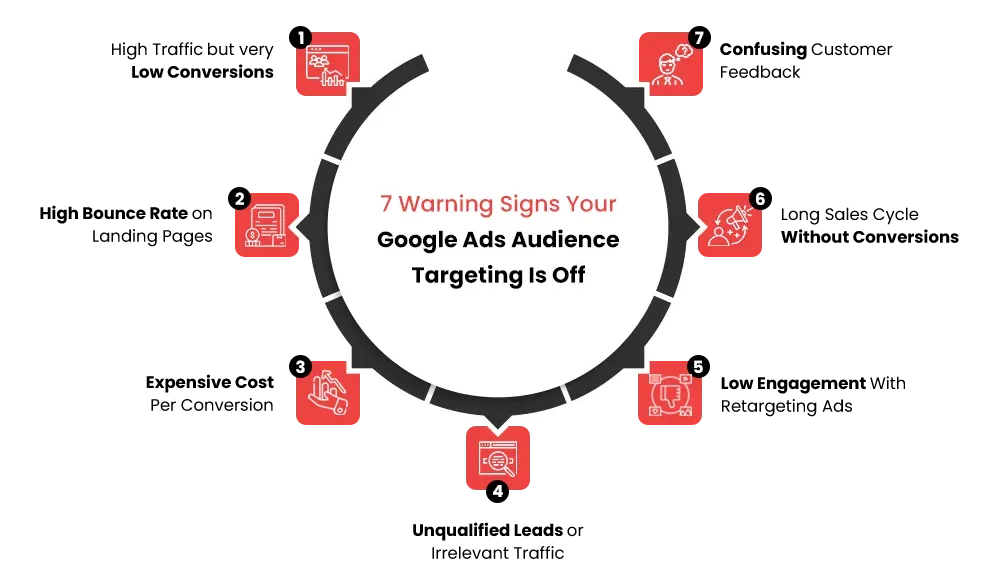
1. High Traffic but Very Low Conversions
One of the clearest signs of poor Google Ads Audience Targeting is when your ads generate many clicks but almost no purchases.
This often happens when Google Ads keyword targeting attracts people who are searching for information rather than looking to buy.
For example, imagine a Shopify store selling premium ergonomic office chairs. If the ads are triggered by keywords like “how to fix back pain at work,” the campaign may attract visitors looking for advice instead of people ready to purchase a chair.
Monitoring keyword intent can help you identify wrong traffic in Google Ads campaigns.
2. High Bounce Rate on Landing Pages
Another warning sign is when users click your ad but leave the website almost immediately.
This usually indicates that the ad message and the visitor’s intent do not match. Even if the landing page is well designed and loads quickly, a mismatch between the ad and the audience can cause people to leave within seconds.
For example, if someone clicks an ad expecting a discount product but lands on a premium-priced item, they may exit the page right away. Checking engagement metrics can help identify wrong traffic in Google Ads.
3. Expensive Cost Per Conversion
When ad spend keeps increasing, but conversions remain low, it is often a sign of weak targeting.
Poor PPC audience targeting can cause ads to reach people who are unlikely to purchase, which means the campaign requires more clicks to generate a single sale. This increases your cost per acquisition.
For instance, a Shopify clothing brand running ads to a broad interest group like “fashion lovers” may receive many clicks. However, if the brand actually sells sustainable vegan clothing, the broader audience may not be the right fit.
Using the right Google Ads targeting tools can help refine audiences and reduce wasted spending.
4. Unqualified Leads or Irrelevant Traffic
Sometimes ads generate inquiries, signups, or messages from people who are not ideal customers.
For example, a store selling bulk office supplies might receive inquiries from individual buyers looking for single products. The traffic exists, but it does not match the intended customer.
This often happens when Google Ads audience segments are too broad or poorly defined, leading to Shopify ads wrong audience targeting.
5. Low Engagement With Retargeting Ads
Retargeting ads are designed to bring back visitors who have already interacted with your store. Because these users have shown interest, retargeting campaigns usually perform better than cold traffic ads.
However, if even retargeting ads are not converting, it may indicate that the original audience was not a good fit.
For example, if many visitors land on your store through broad informational keywords and leave without buying, your retargeting ads may keep showing to users who were never serious buyers in the first place.
6. Long Sales Cycle Without Conversions
If your campaigns generate interest but sales conversations drag on without results, targeting could be the problem.
This often happens when ads reach people who find the product interesting but do not urgently need it.
For example, a Shopify store selling advanced analytics software may attract small businesses that are simply exploring options rather than actively searching for a solution.
A well-defined Google Ads audience targeting strategy helps focus on people who already feel the problem and are more ready to buy.
7. Confusing Customer Feedback
Another subtle signal appears when customer inquiries and feedback seem inconsistent.
You may notice that different users expect completely different features or product benefits. This usually means the campaign is attracting multiple unrelated audiences.
For instance, a Shopify ad targeting broad “fitness enthusiasts” might attract professional athletes, beginners, and casual gym-goers at the same time. Each group has different expectations, which creates mixed feedback and unclear demand.
This type of pattern often appears when Shopify ad targeting is too broad and not aligned with a specific buyer persona. Recognizing these signs early can help you adjust your targeting before large amounts of ad budget are wasted.
Once you identify these patterns, the next step is to analyze your campaign data and determine whether your Google Ads audience targeting needs refinement.
Not sure if your Shopify store is actually ready for ads? Watch this video to check the key signs before you spend a single dollar.
How to Check if Your Google Ads Targeting is Wrong?
If your ads are getting clicks but not generating real business results, it is important to review how your campaigns are targeting users.
Checking your campaign data can quickly reveal whether your Google Ads Audience Targeting is bringing the right visitors or attracting the wrong traffic.
Research shows that the average Google Ads conversion rate across industries is around 4%, which means most campaigns should convert at least a small percentage of visitors. If your campaigns are far below that level, it may indicate a targeting problem.
Here are some practical ways to evaluate whether your targeting needs improvement.
1. Analyze Google Ads Audience Segments
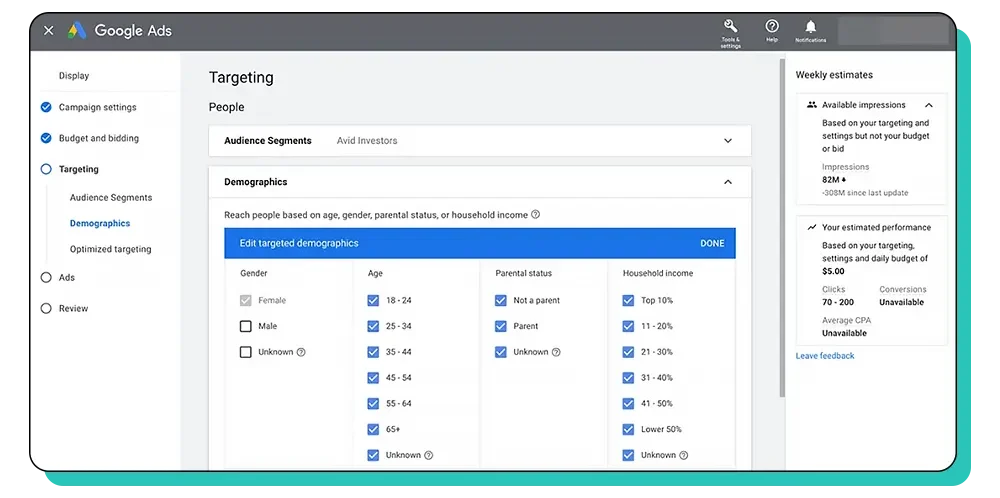
Start by reviewing the audience groups your ads are targeting. Google Ads provides detailed insights into demographics, interests, and in-market audiences.
Use Google Ads targeting tools to check which audience groups actually convert.
Look for patterns such as:
- Age groups that generate the most purchases
- Interest segments that engage with your ads
- In-market audiences that show strong buying behavior
A Shopify store selling luxury skincare products may discover that most purchases come from women aged 30–45 who are in beauty and skincare interest segments.
If the campaign is also targeting younger users who rarely convert, that audience segment may need to be excluded. Reviewing Google Ads audience segments helps you see which audiences bring value and which ones simply generate clicks.
2. Review Search Terms and Keyword Intent
Another important step is reviewing the actual search terms that triggered your ads.
Sometimes, Google Ads keyword targeting attracts users searching for information rather than products.
Check your search terms report and look for:
- Informational queries instead of purchase intent
- Keywords unrelated to your product
- Broad search phrases that bring low-quality traffic
A Shopify store selling premium coffee machines may discover that its ads appear for searches like “how to make coffee at home.” These users may only be looking for tips rather than buying equipment.
Filtering these keywords and refining Google Ads keyword targeting can significantly improve traffic quality. Before diving deeper into website behavior, it is also important to evaluate how visitors interact with your site after clicking your ads.
3. Evaluate Traffic Quality in Google Analytics
Google Analytics can reveal whether your ad traffic is actually interested in your store.
Key metrics to review include:
- Bounce rate
- Time on page
- Pages per session
- Conversion rate
Example: If visitors coming from your ads stay on the site for only a few seconds and view just one page, it may indicate that the ad attracted the wrong audience.
These engagement signals help marketers understand how to identify wrong traffic in Google Ads campaigns.
4. Analyze Conversion Data by Audience
Another useful method is analyzing conversion performance across different audience categories.
Compare results across:
- Device type (mobile vs desktop)
- Age groups
- Locations
- Interest categories
A Shopify fitness brand may discover that most conversions come from mobile users in urban areas aged 25–40. If ads are also heavily targeting older demographics who rarely convert, that audience can be reduced or removed.
Reviewing these patterns helps refine your Google Ads audience targeting strategy and focus your budget on high-performing segments.
5. Review Conversion Tracking Setup
Before making major targeting decisions, make sure your conversion tracking is working correctly. Incorrect tracking can make it appear as though targeting is failing when the issue is actually with data collection.
Check that:
- Purchases or lead submissions are properly tracked
- Conversion tags are installed on the correct pages
- Google Analytics and Google Ads accounts are linked
- Key events, such as add-to-cart or checkout, are recorded
Example: If your Shopify store receives sales but they are not recorded in Google Ads, the system may incorrectly optimize campaigns for the wrong audience because it cannot identify who is actually converting.
How to Fix Wrong Google Ads Audience Targeting?
Once you identify that your campaigns are reaching the wrong people, the next step is to adjust your Google Ads Audience Targeting.
Small changes in audience selection, keywords, and segmentation can significantly improve campaign performance and reduce wasted ad spend.
Below are practical steps you can take to fix targeting issues and attract the right customers.
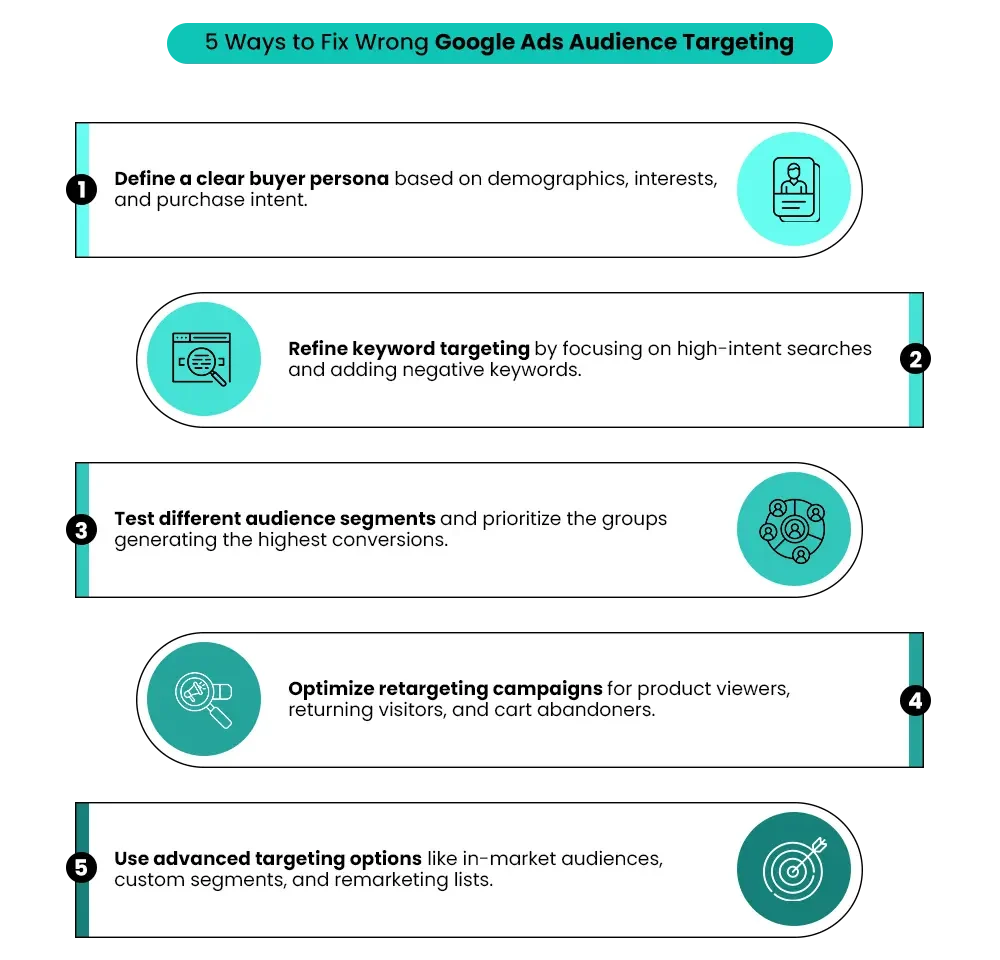
1. Define a Clear Buyer Persona
Effective PPC audience targeting starts with understanding exactly who your ideal customer is. Instead of targeting everyone who might be interested, define the specific audience most likely to buy.
Identify details such as:
- Demographics such as age, gender, and location
- Purchase intent and buying behavior
- Interests related to your product
- Problems your product solves
Example: A Shopify store selling premium yoga mats may initially target a broad group like “fitness enthusiasts.” However, after analyzing customers, the brand may realize that most buyers are women aged 25–40 who regularly practice yoga and follow wellness content online.
Refining your buyer persona helps ensure that your ads reach people who are more likely to convert.
2. Refine Keyword Targeting
Keyword targeting directly influences who sees your ads in search campaigns. If your keyword list is too broad, your ads may appear for irrelevant searches.
Improve Google Ads keyword targeting by:
- Removing keywords that attract low-quality traffic
- Adding negative keywords to block irrelevant searches
- Focusing on high-intent keywords that indicate buying interest
A Shopify store selling ergonomic office chairs should focus on keywords like:
- “buy ergonomic office chair.”
- “best office chair for back pain”
Instead of broad searches such as “office chair ideas” or “how to sit comfortably.”
After refining your keywords, the next step is to experiment with different audience groups to find the segments that convert best.
3. Test New Audience Segments
One of the most effective ways to improve targeting is to test different audience groups.
Using Google Ads targeting tools, you can experiment with various Google Ads audience segments and analyze which ones produce the best results.
Practical steps include:
- Running A/B tests with multiple audience groups
- Comparing conversion rates across segments
- Pausing underperforming audiences
- Increasing budget for high-performing segments
A Shopify skincare brand might test ads targeting:
- Beauty enthusiasts
- Organic skincare buyers
- Anti-aging product shoppers
If the anti-aging audience generates the highest conversions, the campaign can focus more budget on that segment.
4. Optimize Retargeting Campaigns
Retargeting ads help bring back users who have already interacted with your store. Since these visitors have shown interest, they are often more likely to convert.
Instead of showing the same ads to everyone, segment your retargeting campaigns based on user behavior.
Examples include:
- Users who viewed specific products
- Visitors who added items to the cart but did not complete checkout
- Returning visitors who browsed multiple pages
If a visitor looked at a specific product but left without buying, a retargeting ad can highlight that product again or offer a limited-time discount. Well-structured retargeting ads can significantly improve conversion rates.
5. Use Smarter Google Ads Targeting Methods
Google Ads offers multiple targeting options that help refine your campaigns and reach people with stronger purchase intent.
Some useful Google Ads targeting methods include:
- In-market audiences who are actively researching products
- Custom segments based on search behavior and interests
- Remarketing lists built from your website visitors
- Similar audiences that resemble your existing customers
A Shopify electronics store selling gaming accessories can target users who are actively researching gaming equipment rather than targeting general tech enthusiasts.
Combining these targeting methods with a strong Google Ads Audience Targeting strategy helps ensure your ads reach people who are more likely to become customers.
If your Shopify ads are getting clicks but not sales, you might be targeting the wrong audience—watch this video to find out why.
Best Google Ads Audience Targeting Strategy for Shopify Stores
Running successful Shopify Google Ads campaigns requires more than just choosing a few keywords and launching ads. The real impact comes from using a structured Google Ads audience targeting strategy that combines data, behavior insights, and continuous testing.
When businesses use the right targeting approach, Google Ads for Shopify can attract users who already have purchase intent, which increases conversions and improves return on ad spend.
Below are some best practices to build a stronger targeting strategy for Shopify stores.
1. Combine Keyword Targeting With Audience Segments
Many advertisers rely only on keywords, but combining keyword targeting with audience data makes campaigns more precise.
Instead of targeting broad searches alone, add audience filters so your ads reach people who are more likely to buy.
For example, A Shopify store selling high-end running shoes can target the keyword “best running shoes” while also focusing on users interested in marathon training or fitness.
This approach ensures the ad appears to people searching for the product and who are also interested in running. Using both search intent and audience insights makes your Google Ads audience targeting strategy much more effective.
2. Use First-Party Customer Data
Your existing customers are one of the best sources of targeting data.
Analyzing customer information can help identify patterns such as:
- Age groups that buy the most
- Locations where sales are strongest
- Products that attract repeat buyers
For example, a Shopify skincare brand may discover that most purchases come from customers aged 30–45 in urban areas. That insight can help refine targeting and focus ads on similar audiences.
Using first-party data allows campaigns to focus on audiences that already show buying behavior.
3. Build Lookalike or Similar Audiences
Once you understand your best customers, you can expand your reach by targeting users who share similar characteristics.
Google allows advertisers to create similar audiences based on:
- website visitors
- existing customers
- remarketing lists
Example: If a Shopify store selling handmade jewelry notices that most buyers follow fashion influencers and lifestyle blogs, Google can help find similar users with comparable interests.
This approach helps reach new potential customers who are more likely to convert.
4. Leverage Remarketing Lists
Remarketing is one of the most effective strategies for Shopify Google Ads campaigns. Remarketing lists allow you to show ads specifically to users who have already interacted with your store.
You can create segments such as:
- visitors who viewed product pages
- users who added items to the cart but did not complete checkout
- returning visitors who browsed multiple products
For example, a shopper who viewed a pair of sneakers but did not purchase might see an ad later highlighting the same product or offering a limited discount.
This strategy helps re-engage potential buyers and increase conversion rates.
5. Continuously Test and Optimize Campaigns
Audience behavior changes over time, which means targeting should never remain static.
Regular testing helps improve campaign performance and identify the most valuable audience segments.
Important optimization practices include:
- testing different audience groups
- adjusting budgets based on performance
- refining keyword targeting
- analyzing conversion data regularly
For example, a Shopify fashion store might test ads targeting different age groups and discover that customers aged 25–34 generate the highest conversions.
Over time, continuous testing allows your Google Ads audience targeting strategy to become more accurate and profitable.
Also Read: Before You Hire a Shopify Agency in 2026: Questions Every Merchant Must Ask
When to Work With a Shopify Store Agency?
Running ads successfully is not just about launching campaigns. Effective Shopify ad targeting requires a solid understanding of data, user behavior, and campaign optimization.
Many businesses struggle because managing ads involves several technical and strategic elements at the same time.
Successful campaigns usually require expertise in:
- analytics to understand where traffic and conversions are coming from
- audience segmentation to reach the most relevant customer groups
- Campaign optimization to improve ad performance and reduce wasted spend
- conversion tracking to measure what actually leads to sales
Without the right expertise, businesses may spend significant budgets on ads that generate traffic but fail to convert into customers.
This is where working with a Shopify Store Agency can help. Agencies bring experience in building and optimizing campaigns for ecommerce stores. They can identify targeting issues early, refine strategies, and ensure ads reach the right audience.
Build your dream Shopify store today
Bring your vision to life with Mastroke, an official Shopify Partner. We design and develop high-converting, scalable Shopify stores with clean structure and future-ready features—built to grow with your business.
Conclusion
Running ads does not automatically guarantee sales. Many Shopify stores invest in advertising and see traffic increase, but conversions remain low.
In many cases, the real issue is Google Ads audience targeting. If your ads reach people who are not interested or ready to buy, even strong campaigns will struggle to generate results.
Watching key performance signals can help detect this early. Metrics like high bounce rates, low conversion rates, poor audience segments, and irrelevant traffic often indicate that your ads are attracting the wrong users.
Once the issue is identified, refining your Google Ads targeting strategy can make a major difference.
By focusing on the right audience segments, improving keyword intent, and optimizing campaigns based on data, Shopify businesses can attract better traffic and improve ROI.
About Mastroke
If your Shopify Ads or Shopify Google Ads campaigns are driving traffic but not conversions, it may be time to bring in experienced specialists.
Mastroke is a Shopify agency that supports brands across the entire ecommerce journey. From Shopify store development and design to marketing, SEO, and Google Ads management, Mastroke provides the expertise needed to grow a successful online store.
Our team focuses on data-driven strategies, refining audience targeting, and optimizing campaigns so your ads reach customers who are more likely to buy.
Book an audit with Mastroke and discover how to turn your ad traffic into real sales.
Frequently Asked Questions
1. How do I know if my Google Ads targeting is wrong?
You can identify wrong targeting by analyzing campaign data. Signs include high traffic but low conversions, high bounce rates, expensive cost per acquisition, and irrelevant search terms triggering your ads.
2. What is Google Ads audience targeting?
Google Ads audience targeting allows advertisers to show ads to specific groups based on demographics, interests, search behavior, and purchase intent.
3. Why are my Shopify ads getting clicks but no sales?
This usually happens due to poor audience targeting. Your ads may reach users who are curious but not ready to buy.
4. How can I improve Google Ads targeting for my Shopify store?
Refine keywords, use audience segments, leverage remarketing lists, and analyze customer data to reach high-intent users.
5. What are the best audience types to target in Google Ads?
Effective audiences include in-market audiences, custom segments, remarketing lists, and similar audiences based on existing customers.