📌 Key Takeaways
This section highlights the most important insights:
- Planning your Shopify Plus store launch strategy
- Migrating products, customers, and order data
- Setting up store content and SEO essentials
- Designing a high-converting, mobile-first experience
- Choosing the right apps and integrations
- Testing checkout, performance, and workflows
- Launching smoothly and optimizing post-launch
Launching a Shopify Plus store in 2026? Don’t hit “publish” just yet. A smooth, reliable, and conversion-ready store from day one can make all the difference.
For enterprise brands, launching on Shopify Plus isn’t just about catalogues uploading products and choosing a theme. A store launch involves multiple moving parts: migrating product catalogs, syncing customer data, integrating ERP systems, configuring international markets, and ensuring the checkout experience works flawlessly.
Even small mistakes during a store launch can create big problems later—broken redirects, incorrect tax settings, slow page speed, or disconnected apps. For high-growth brands handling thousands of orders, these issues can affect revenue, operations, and customer experience.
That’s why having a structured plan for your store launch is critical.
This guide walks you through the full journey—from strategy and setup to launch day and post-launch growth. Whether you’re migrating from Magento, WooCommerce, or another enterprise platform, this checklist will help you prepare for a successful Plus store launch in 2026.
Before You Launch Your Shopify Plus Store: The Only Checklist You’ll Need
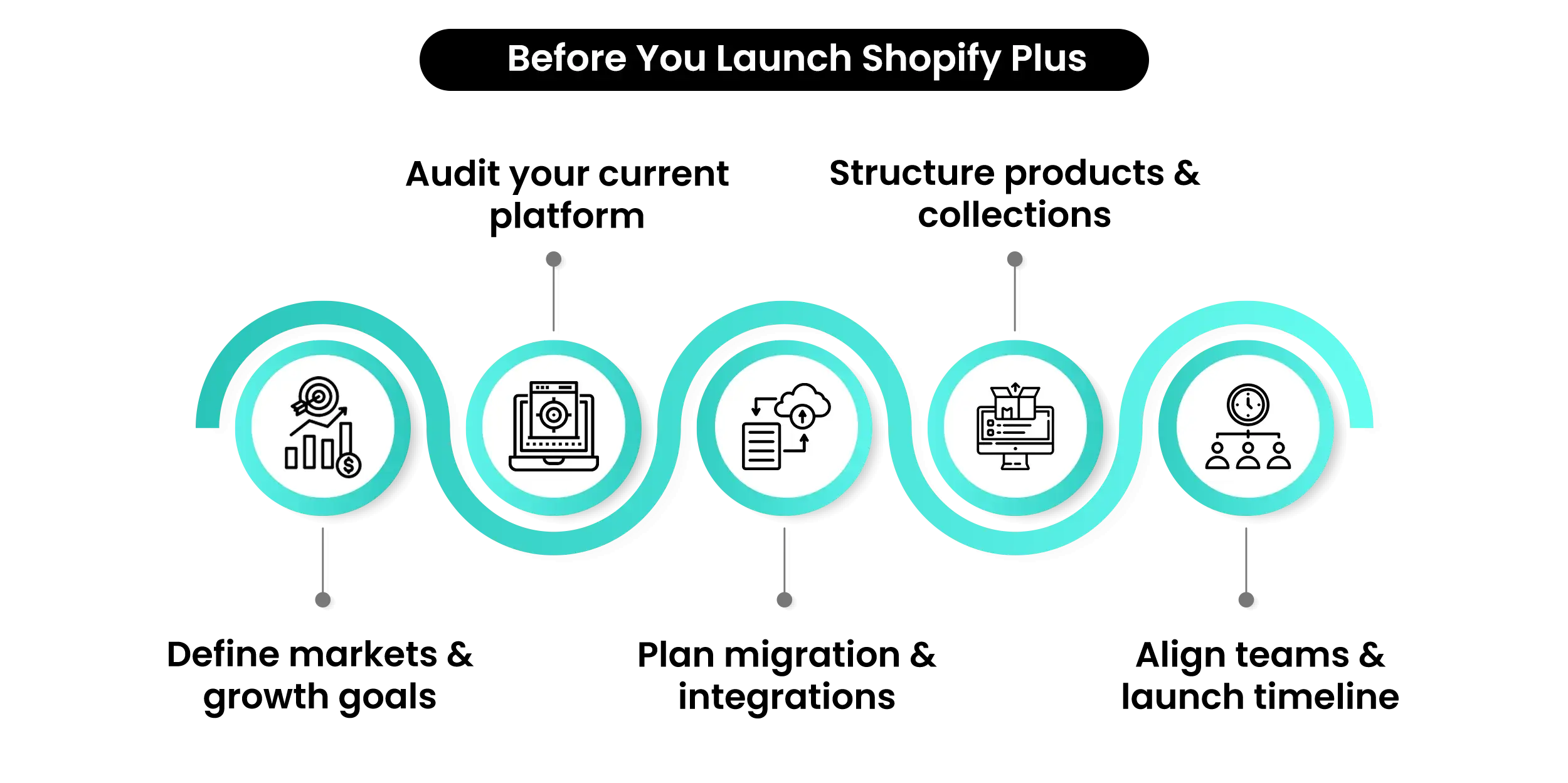
Launching an enterprise ecommerce store requires more than technical setup—it requires strategy. Before starting your store launch, brands need to align their business goals, operational workflows, and technology stack.
Start with a Clear Ecommerce Game Plan
A successful store launch begins with a clear business strategy. Identify your target audience, pricing model, product catalog structure, and growth goals. Enterprise Shopify Plus launches typically involve cross-functional teams, including developers who handle integrations, designers responsible for user experience, marketing teams managing launch campaigns, and operations teams overseeing inventory and fulfillment workflows.
Ask key questions like:
- Are you primarily B2C, B2B, or hybrid?
- Which markets will you sell in initially?
- What integrations are required for operations?
This planning phase ensures your Shopify Plus store launch aligns with long-term growth goals.
Plan Your E-commerce Architecture
Enterprise brands often need complex architecture during a Shopify Plus store launch, including integrations with:
- ERP systems
- CRM platforms
- Marketing automation tools
- Inventory management software
Planning these integrations early helps avoid operational disruptions after your Shopify Plus launch checklist. A Shopify Plus launch checklist typically follows a structured process. Breaking the launch into clear stages helps teams manage complexity and ensure nothing critical is overlooked.
Build the Right Team
Most enterprise brands rely on multiple stakeholders for a Shopify Plus launch checklist, including:
- Developers
- Designers
- Marketing teams
- Operations teams
Clearly defined responsibilities keep your Shopify Plus launch checklist timeline on track.
Planning Your Shopify Plus Store Launch Strategy
A structured roadmap reduces launch risk and ensures nothing gets missed.
| Launch Stage | Key Focus |
| Strategy | Define business goals and tech stack |
| Migration | Move product, customer, and order data |
| Store Setup | Configure payments, shipping, and taxes |
| Design & UX | Optimize customer experience |
| Testing | Validate checkout, payments, and workflows |
| Launch | Switch domain and activate store |
Following this framework helps brands execute a smooth Shopify Plus website launch without major surprises.
Migrating Data for Your Shopify Plus Website Launch
Launching an enterprise ecommerce store requires more than technical setup—it requires strategy. Before starting your store launch, brands need to align their business goals, operational workflows, and technology stack. Automation also plays a key role in streamlining operations at scale.
For deeper insights, you can also read our blog “10 Shopify Flow Automations Every Plus Merchant Should Set Up” to learn how automation can simplify workflows and improve efficiency for enterprise Shopify stores.
Data migration should follow a structured order to ensure data integrity.
Migration Tools for Shopify Plus
Enterprise migrations often involve thousands of products, customer records, and historical orders. Using reliable migration tools helps automate the transfer process and reduce the risk of data loss or formatting issues.
Many businesses rely on specialized tools such as Matrixify, LitExtension, or Cart2Cart to move large datasets from platforms like Magento, WooCommerce, or BigCommerce to Shopify Plus.
These tools allow teams to migrate products, customers, orders, images, and metadata efficiently while maintaining data structure and accuracy. For enterprise stores, using the right migration tool significantly reduces manual effort and ensures a smoother Shopify Plus website launch.
For more insights on optimizing your store’s search visibility after migration, you can also read our blog “Top 10 AI SEO Tools for Shopify Stores in 2026.”
Build Your Shopify Store From Scratch With Mastroke
Launch faster with Mastroke, an official Shopify Partner. We build structured stores with conversion-first design, clean setup, and features built to scale!!
Product Migration
Products should be migrated first during your . This includes:
- Product titles and descriptions
- Images and media files
- Variants and SKUs
- Inventory quantities
Clean product data improves SEO and customer experience after the Shopify Plus store launch.
Customer Migration
Next, migrate customer data, including contact details, addresses, and purchase history. Migrating accurate customer information ensures continuity when launching your Shopify Plus store.
SEO Redirect Migration
When migrating from another ecommerce platform, maintaining SEO rankings is critical. Setting up 301 redirects from old URLs to the new Shopify URLs ensures that both search engines and customers are automatically directed to the correct pages. This helps preserve existing search visibility and prevents disruptions to organic traffic.
Failing to manage redirects properly can lead to broken links, lost traffic, and a decline in search rankings.
Order History Migration
Migrating historical orders provides valuable analytics and ensures customer service teams have access to past transactions.
| Data Type | Migration Purpose |
| Products | Populate the catalog and collections |
| Customers | Preserve user accounts and history |
| Orders | Maintain analytics and reporting |
| Gift Cards | Ensure existing balances remain valid |
A structured migration process prevents data loss during your Shopify Plus store launch.
Setting Up Content for Your Shopify Plus Store Launch
Once your data is migrated, the next step is building the content that customers interact with. Well-structured collections also help search engines understand your product catalog, improving discoverability and navigation for both customers and search engines.
📌 Key Video
Create Essential Store Pages
Every Shopify Plus store launch requires several core pages to build trust and guide customers.
Essential pages include:
- Homepage
- About page
- Contact page
- FAQ section
- Shipping policy
- Refund policy
Clear policies and transparent information strengthen credibility after the Shopify Plus store deployment.
Organize Products and Collections
Collections make it easier for customers to navigate your store. Organizing products correctly during the Shopify Plus store deployment improves product discovery and SEO.
Optimize SEO Content
SEO is critical for driving organic traffic after the Shopify Plus store deployment. Optimize key elements such as:
meta titles and descriptions
- Image alt text
- URL structures
- Schema markup
A strong SEO foundation ensures your Shopify Plus store deployment doesn’t lose search rankings during migration.
Designing a High-Performing Shopify Plus Store
Design is not just about aesthetics—it directly impacts conversion rates and overall customer experience on Shopify Plus.
Mobile-First Experience
More than half of ecommerce traffic comes from mobile devices. Optimizing mobile usability is essential during a Shopify Plus store launch.
A mobile-first design ensures faster navigation, smoother checkout, and improved engagement for customers shopping on smartphones and tablets.
Product Page Optimization
Product pages should include:
- Clear product descriptions
- High-quality images
- Customer reviews
- Delivery estimates
A well-designed product page improves conversions after the Shopify Plus store launch. Clear information and visual clarity help customers make faster purchasing decisions.
Navigation and Search
Enterprise stores often have large product catalogs. Advanced navigation and search functionality help customers find products quickly during your Shopify Plus store setup.
Features like predictive search, smart filters, and categorized menus improve product discovery and reduce friction in the shopping journey.
Enterprise UX Features
Large ecommerce brands often implement advanced UX features to enhance the shopping experience. These may include personalized product recommendations, dynamic content, quick-view product options, and AI-powered search.
Such enterprise-level UX improvements help increase engagement, average order value, and overall customer satisfaction.
Apps and Integrations for a Successful Shopify Plus Store Launch
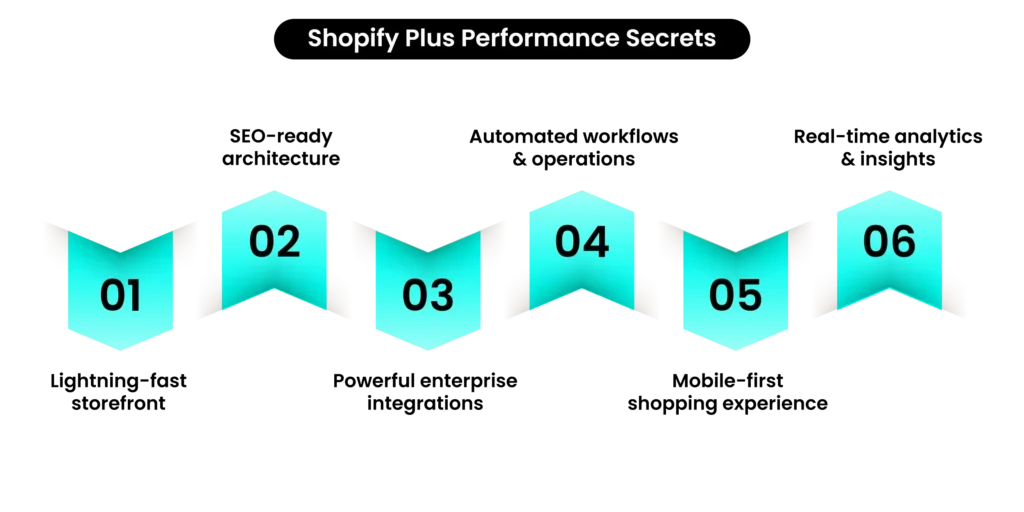
Shopify Plus provides powerful automation and integration capabilities that simplify operations after your Shopify Plus store launch. External integrations can connect your Shopify Plus store setup to critical systems like ERP platforms, marketing tools, and analytics dashboards.
Common enterprise integrations include tools such as NetSuite, Salesforce, Klaviyo, and advanced analytics platforms that help brands manage operations and customer insights efficiently.
Native tools available for enterprise brands include:
- Automation workflows
- Scheduled product launches
- Customizable checkout features
External integrations can connect your Shopify Plus store setup to critical systems like ERP platforms, marketing tools, and analytics dashboards.
These integrations streamline operations and enable scalable growth after your Shopify Plus store setup.
Setting Up Global Commerce and B2B Capabilities
Many enterprise brands choose Shopify Plus because of its global capabilities. One of the biggest advantages of Shopify Plus is its ability to support both global ecommerce expansion and wholesale commerce from a single platform.
International Selling
International commerce features allow brands to sell in multiple currencies and regions after their Shopify Plus store setup.
Localization options include:
- Currency conversion
- Translated storefronts
- Regional tax settings
Shopify B2B Capabilities
Shopify Plus also supports wholesale and B2B commerce. Brands can create company accounts, price lists, and bulk ordering features during their Shopify Plus store setup.
Businesses can set up company profiles to manage multiple buyers under a single organization account, making it easier to handle corporate purchasing workflows.
The platform also supports net payment terms, allowing B2B customers to place orders and pay later based on agreed payment schedules.
Brands can configure wholesale pricing through dedicated price lists, ensuring different pricing structures for retail and wholesale buyers.
In addition, bulk ordering capabilities allow business customers to purchase large quantities efficiently, improving the overall B2B purchasing experience.
These features allow businesses to serve both retail and wholesale customers from the same platform while maintaining a seamless and scalable ecommerce infrastructure.
Testing Your Shopify Plus Store Before Launch
Testing is one of the most important steps in a Shopify Plus store launch. Before going live, every Shopify Plus store launch should undergo extensive testing to ensure all customer journeys and operational workflows function correctly.
This includes testing checkout flows, payment gateways, site speed, and integrations to ensure the store performs reliably under real customer conditions.
Performance Testing
Test store performance under different conditions, including:
- High traffic simulations
- Page load speed
- App and integration performance
- Mobile responsiveness
Testing ensures the store remains stable and fast during and after the Shopify Plus store launch.
Checkout Testing
Test multiple checkout scenarios, including:
- Discount codes
- Guest checkout
- Logged-in users
- Different payment methods
Testing prevents checkout failures after the Shopify Plus store launch.
Order Workflow Testing
Place test orders to confirm that order confirmations, inventory updates, and fulfillment workflows function correctly.
Thorough testing ensures a smooth Shopify Plus store launch experience for both customers and internal teams.
Launch Day Checklist
Launch day marks the final step of your Shopify Plus store launch preparation. Key launch tasks include:
- Switching your primary domain
- Updating DNS settings
- Submitting your sitemap to Google
- Removing storefront password protection
Once these steps are complete, your Shopify Plus store launch officially goes live.
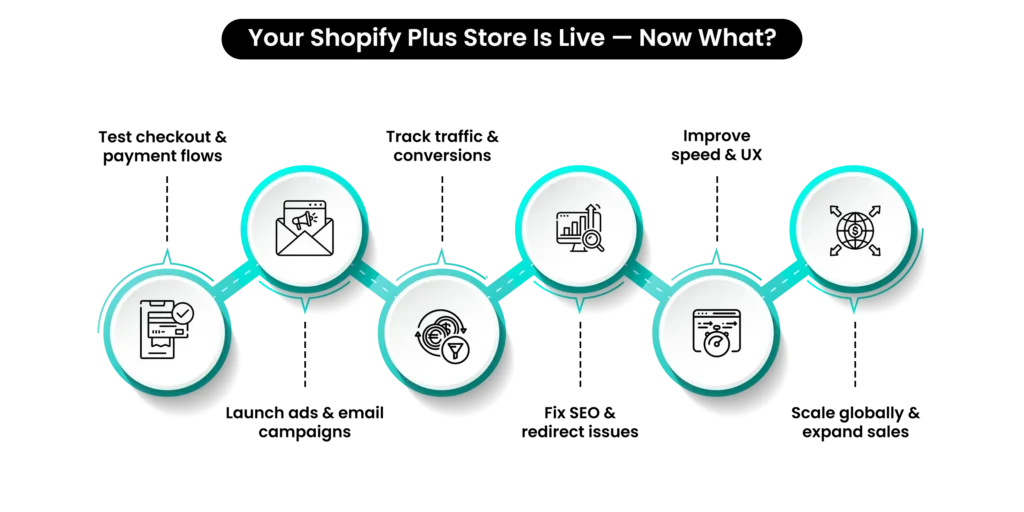
Shopify Plus Launch Mastery: The Enterprise Growth Checklist
Launching the store is only the beginning. After your Shopify Plus store launch, ongoing monitoring and optimization are essential.
Monitor Performance
Track key metrics such as:
- Site speed
- Conversion rate
- Customer acquisition cost
- Average order value
Monitoring these metrics helps identify opportunities for improvement after the Shopify Plus store launch.
Fix Post-Launch Issues
Many brands also run A/B tests on product pages, checkout flows, and promotional banners to improve conversion rates after their Shopify Plus store launch. After going live, check for:
- Broken links
- Missing redirects
- Indexing issues
Resolving these quickly protects SEO and ensures a smooth customer experience following your Shopify Plus store launch.
Continue Optimization
Successful brands continuously improve their ecommerce experience after a Shopify Plus store launch through:
- Conversion rate optimization
- Marketing automation
- Product experimentation
Performance and Speed Optimization
Many brands also review storefront performance, page speed, and technical stability after going live on Shopify Plus. After deployment, monitor:
- Large image or media files
- Heavy third-party scripts
- Slow-loading apps
Optimizing these elements helps maintain fast page speeds, protect SEO performance, and ensure a smooth shopping experience as the store scales.
Conclusion
Launching an enterprise ecommerce store requires careful preparation. From strategy and data migration to testing and optimization, every stage of the Shopify Plus store launch plays a critical role in long-term success.
By following this structured checklist, brands can confidently navigate the complexities of a Shopify Plus store launch and build a scalable e-commerce platform ready for growth.
Whether you’re migrating from another platform or launching a new enterprise brand, a well-planned Shopify Plus store launch ensures a smooth transition, strong performance, and the foundation needed to scale globally.
If you’re planning a Shopify Plus launch, the experts at Mastroke can help you make it seamless. From migration and store architecture to performance optimization and launch support, Mastroke’s Shopify specialists ensure your enterprise store is built for speed, stability, and scalable growth.
Connect with Mastroke to turn your Shopify Plus store launch into a powerful growth engine.
Build Your Shopify Store From Scratch With Mastroke
Launch faster with Mastroke, an official Shopify Partner. We build structured stores with conversion-first design, clean setup, and features built to scale!!
What does launching a Shopify Plus store involve?
Launching a Shopify Plus store involves planning, designing, migrating data, testing functionality, and publishing an enterprise ecommerce website ready for customers.
How long does it take to build a Shopify Plus store?
Building a Shopify Plus store typically takes 4 to 12 weeks, depending on the size of the product catalog, integration requirements, and level of design customization.
What should be tested before going live with a Shopify Plus store?
Before going live, businesses should test checkout flows, payment gateways, shipping rates, taxes, mobile responsiveness, and order processing workflows to ensure a smooth customer experience.
Can you migrate from Magento or WooCommerce to Shopify Plus?
Yes. Many brands migrate from platforms like Magento, WooCommerce, or BigCommerce while preserving product data, customer information, and SEO rankings.
Is Shopify Plus suitable for enterprise brands?
Yes. Shopify Plus is built for high-growth and enterprise brands, offering features such as automation workflows, global commerce capabilities, B2B functionality, and advanced integrations.
What are the biggest challenges when launching an enterprise Shopify store?
Common challenges include managing large product catalogs, ensuring accurate data migration, integrating third-party systems, and maintaining SEO rankings during platform transitions.
📌 Key Video