Shopify makes it easy to launch an online store. And that part is true. New stores go live on the platform every day. With ready-made themes, built-in tools, and hundreds of apps, Shopify store setup can feel surprisingly simple.
So it’s natural for first-time merchants to assume that a strong product and a well-designed store should lead to sales. But once the store goes live, the experience often turns out very different. Visitors browse but leave quickly, and conversions remain low. You wonder whether the product is the problem. Or if something was missed during setup?
This is where many Shopify store setup mistakes begin to reveal themselves. And these Shopify beginner mistakes go back to early setup decisions—store structure, theme settings, navigation layout, and the apps installed to run the store.
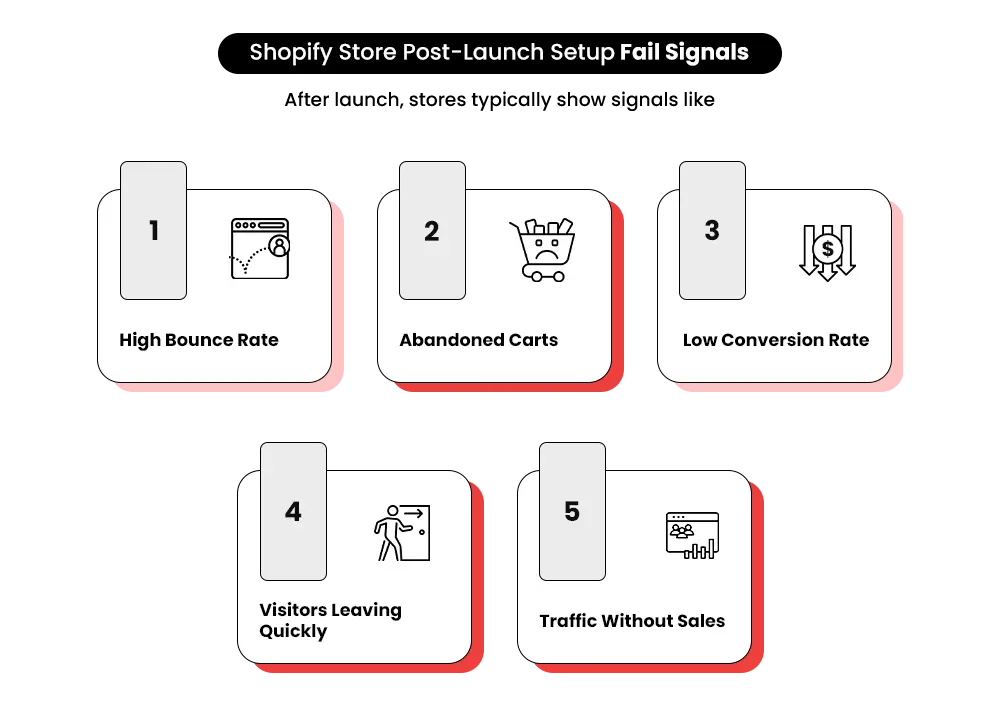
Many Shopify setup mistakes go unnoticed during the build phase and only appear later through high bounce rates, abandoned carts, and low conversions.
In this post, we’ll walk you through the seven common Shopify store setup mistakes first-time merchants often make, why they impact Shopify store performance, and how they can be avoided before they start slowing down growth.
The “Launch Trap” First-Time Shopify Merchants Fall Into
When first-time merchants set up a Shopify store, the focus usually goes toward the parts that are easiest to see. It usually means ticking away tasks on a Shopify store setup checklist.
This simplified checklist is often why many stores launch with hidden Shopify website setup errors.
At first glance, Shopify store setup can look like a simple checklist:
- Choose and install a Shopify theme
- Upload product images and descriptions
- Add apps for reviews, pop-ups, or email capture
- Configure Shopify payment gateway setup, payments and shipping
- Start running ads to bring visitors
At this point, customers can browse products and place orders. But this is where many Shopify store setup mistakes begin to form.
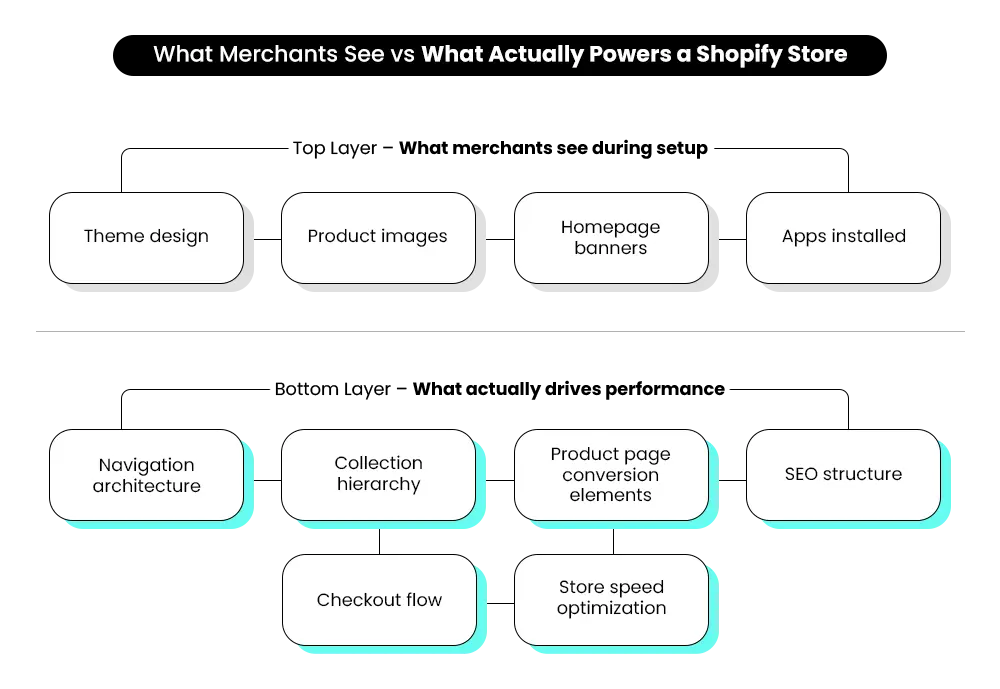
What many merchants consider “setup” usually covers only the visible parts of the store, while the structure that supports conversions receives little attention.
A well-prepared Shopify store usually includes foundations like:
- Store architecture — clear collections, pages, and navigation that guide customers.
- Conversion flow — product pages and trust signals that lead visitors toward checkout.
- Technical SEO — organized URLs, collections, and metadata for search discovery.
- Speed optimization — avoiding heavy themes and unnecessary apps that later create Shopify site speed issues as the store grows.
- Checkout flow — removing friction that causes cart abandonment.
- Data tracking — analytics configured to understand customer behavior.
When these foundations are missing, the store may appear complete but behave differently once customers interact with it.
This is the launch trap. The store goes live, but as traffic starts coming in, underlying Shopify store setup mistakes begin to surface through higher bounce rates, abandoned carts, and inconsistent sales.
Gaps like these are often noticed early by Shopify development partners such as Mastroke, who see how small setup decisions can quietly affect store performance long after launch.
7 Shopify Store Setup Mistakes First-Time Merchants Usually Make
Most Shopify stores don’t break because of one big mistake. Instead, a series of small setup decisions slowly creates friction across the store.
The real question is — which of those setup decisions are working against your store without you realizing it?
Here are 7 Shopify store setup mistakes first-time merchants unknowingly build into their stores.
1. Picking a Theme Without Testing Its Limits
Many first-time merchants choose a Shopify theme the same way they choose a template — by how impressive the demo store looks. Clean layouts, modern typography, and attractive product pages make the decision feel easy.
The problem is that demo stores rarely reflect real conditions. Once merchants add larger catalogues, more apps, and detailed product information, limitations begin to appear.
Sections stop adapting well across devices. Apps introduce styling conflicts that disrupt the layout. Simple layout changes suddenly require custom code or Shopify developer support.
This is one of the early Shopify store setup mistakes that often surfaces only after the store is already live, when changing the theme becomes far more disruptive and time-consuming.
How to Avoid It
Before selecting a theme, test how flexible its sections are, review customization limits, check mobile responsiveness with proper Shopify mobile optimization, and confirm it works well with the apps you plan to use.
2. Poor Product Organization and Navigation
Many first-time merchants upload products without first planning the catalogue structure. Products are uploaded one by one, collections are added, and navigation grows organically instead of being planned.
Over time, the store begins to feel scattered. Similar products end up in different collections, menus become crowded, and important categories are buried several clicks deep. Customers land on a product page but struggle to discover related items or explore products. And if they cannot quickly understand where to go next, they simply leave.
This often results from Shopify UX mistakes and weak Shopify store layout mistakes during the early setup phase.
Research shows that almost 50% of customers exit when they cannot locate products quickly. Even strong products struggle to sell when customers cannot easily find them.
Many built from scratch stores experience this as Shopify store navigation mistakes, where menus and collections fail to guide shoppers naturally through the catalogue.
How to Avoid It
Instead of organizing products as you upload them, plan the structure first. Decide which collections make sense, how categories should appear in the menu, and how customers will naturally move from one product to another.
3. Adding Apps Without Planning
Shopify’s app store makes it tempting to install apps for almost everything. Need reviews? There’s an app. Want pop-ups, bundles, upsells, analytics, loyalty programs? Another app promises to solve it in minutes.
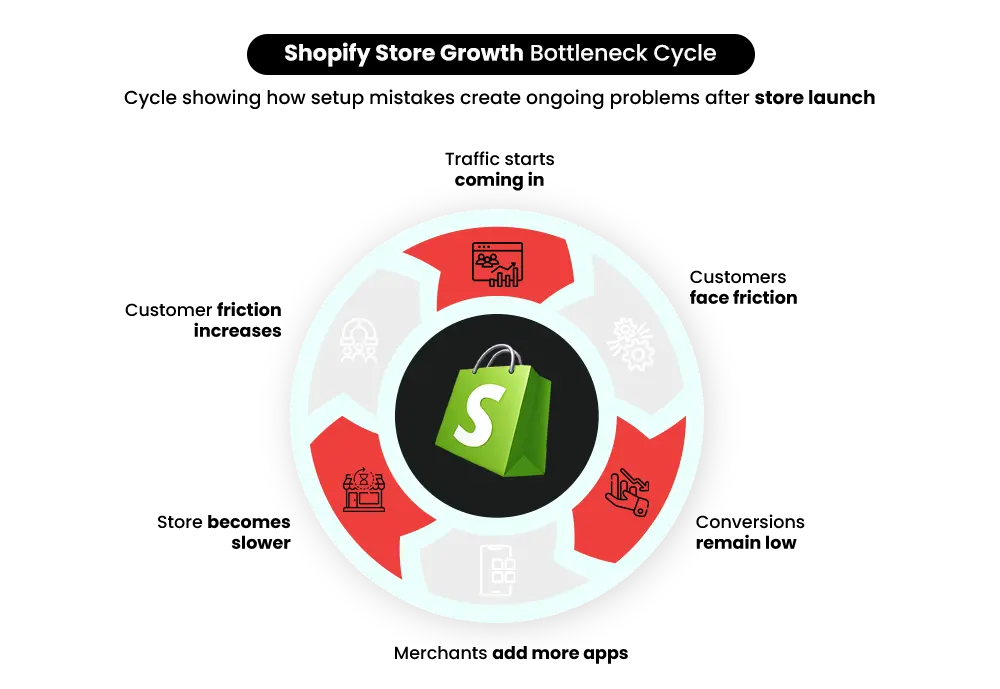
It’s easy to install one after another, thinking each app will add value, without evaluating which ones are actually necessary. This is how many stores run into the too many Shopify apps problem, where multiple apps add scripts that slow pages and create Shopify app conflicts.
This is one of those Shopify store setup mistakes that rarely shows up immediately. Even a one-second delay in page load time can reduce conversions by up to 7%.
How to Avoid It
Don’t treat apps as quick add-ons during setup. Instead, decide how you want key parts of the store — product pages, cart behavior, and marketing tools — to work first. Then install only the apps that support that plan.
4. Weak Product Page Structure
Product pages often go live with only the basics in place — a few images, a short description, the price, and an “Add to Cart” button. The page technically works, but it does very little to guide a customer toward actually buying.
When shoppers land on the page, they begin looking for signals that reassure them about the purchase. Has anyone else bought this product? If I need to return it, is there a refund policy?
If those answers are missing or difficult to find, hesitation grows quickly. Instead of taking the risk to buy, they leave to compare the same product on another store that feels clearer and more credible.
This is one of the Shopify CRO mistakes that affects conversions hugely and often appears when Shopify product page optimization is overlooked.
How to Avoid It
Think of the product page as answering a shopper’s doubts. Highlight benefits, place reviews and ecommerce trust signals near the purchase area, clarify shipping and refund policies, and keep the call-to-action easy to spot.
5. Ignoring SEO During Store Setup
During store setup, attention usually goes to design, products, and apps. SEO often gets pushed aside with the assumption that it can be handled later. But search engines start indexing your store as soon as it goes live.
If basic SEO elements are missing — unclear URLs, generic page titles, thin product descriptions, weak internal linking or Shopify metadata mistakes— search engines struggle to understand how your store is structured. Important product and collection pages may never gain visibility.
These issues often appear as Shopify SEO setup gaps, or deeper Shopify technical SEO mistakes. Traffic remains low, product pages fail to appear in search results, and growth becomes heavily dependent on paid ads.
Over time, such gaps can also lead to Shopify indexing issues where product or collection pages fail to appear consistently in search results.
How to Avoid It
Set up basic SEO during the build stage. Organize collections clearly, write descriptive titles and product descriptions, and link related pages so search engines understand your store from the start.
6. Skipping Testing Across Devices
Stores are often reviewed only on the device they were built on.
While customers browse on phones while commuting, open multiple tabs on tablets, or return to the cart later on a different device.
In those real situations, small issues start appearing. Product images crop incorrectly, and dropdown menus overlap important buttons.
A customer might reach the final step of checkout on mobile and simply give up because the form feels frustrating to fill out.
This is one of those Shopify store setup mistakes that merchants rarely notice themselves, because the store behaves differently only when real customers start interacting with it.
How to Avoid It
Do Shopify mobile optimization. Test the store on multiple devices and browsers. Try real purchase scenarios — browsing collections, adding several products, and completing checkout — to catch problems previews won’t reveal.
7. Inconsistent Content and Branding
Content in a store often gets added gradually. A banner is created one day, and product descriptions are written at different times. Over time, the store starts showing small inconsistencies.
Some product pages contain detailed descriptions, while others barely explain the product. Fonts and image styles vary across banners. Certain pages sound formal while others feel casual.
Individually, these differences may seem minor. But when customers move across the store, the experience begins to feel uneven. One page looks carefully built, while the next feels incomplete.
This is another Shopify store setup mistake and one of the subtle Shopify store design mistakes that affects how trustworthy the store appears. Even when the products are good, inconsistent content can make the store feel less reliable.
How to Avoid It
As you build the store, keep content formatting and tone consistent. Use similar structures for product descriptions, maintain the same visual style for banners, and ensure branding feels uniform.
The tricky part is that most of these issues stay hidden during the setup process. Everything may appear to work as expected until real visitors begin browsing, adding products to their cart, and moving through checkout.
What Shopify’s Dashboard Doesn’t Show During Store Setup
Is your Shopify dashboard really showing everything needed to launch a store that works?
The interface may look complete, but several important setup details sit beyond what the dashboard clearly reveals.
- Multi-Step Setup for Simple Features – Even shipping, taxes, or r Shopify payment gateway setup aren’t handled in one place. The settings are scattered across different menus. It’s easy to assume everything is configured, only to discover later that a small but critical option was never enabled.
- Theme Restrictions – Themes look flexible at first, but the dashboard never tells you what the theme cannot do. That realization usually comes when you try to add a section that simply doesn’t exist in the theme. These limitations often surface later as Shopify theme customization mistakes.
- Hidden Dependencies Between Pages – A small design change like adjusting a header, footer, or layout block can unexpectedly affect other pages or how certain apps behave.
- Setup Sequence – Some setup tasks quietly depend on others. Collections influence navigation, and payment settings shape checkout behavior, but the order isn’t obvious while building.
None of the setup elements are obvious while you’re building a store from scratch. But once customers begin browsing, adding products to their cart, and moving toward checkout, these details start influencing Shopify store performance.
Also Read – Shopify Pricing: How much does it cost to build a Shopify website?
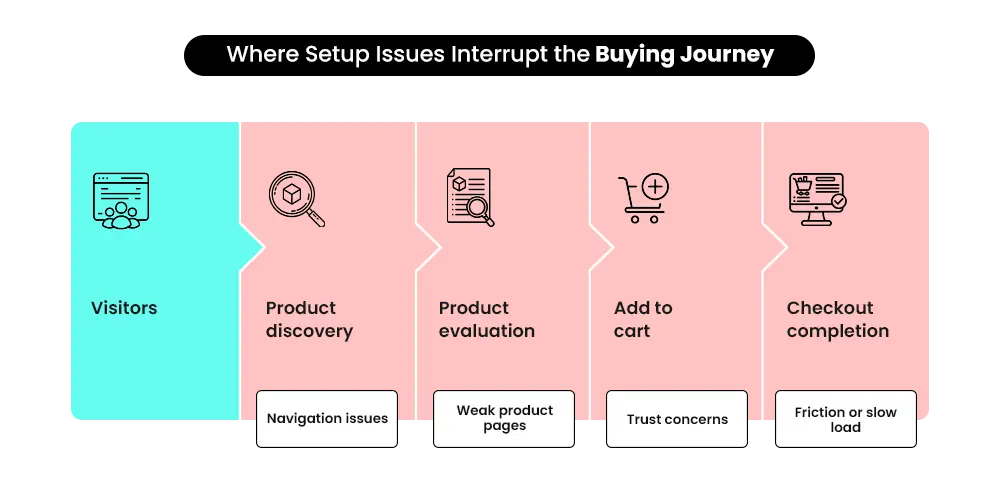
Why These Mistakes Can’t Just Be Fixed Later ?
It’s common to assume that small setup issues can be corrected later. In reality, many Shopify store setup mistakes become harder to fix once the store is live.
The reason is simple: store components quickly become interconnected. Changing one element often affects others.
- Store structure problems – When collections, navigation, and internal links are poorly organized, correcting them later can break product paths, menus, and search indexing across the store.
- App conflicts – Apps often control the same areas of the storefront. Removing or replacing one can unexpectedly disrupt features tied to product pages, carts, or checkout.
- SEO neglect – If search engines index poorly structured pages early, correcting URLs and content later can take months before rankings recover. These issues usually originate from missing Shopify SEO setup or unresolved Shopify technical SEO mistakes.
By the time these issues become visible, fixing them often means rebuilding parts of the store rather than making simple adjustments. The longer these issues remain unnoticed, the more expensive they become to fix.
| Mistake | Fix Later Cost | Hidden Impacts |
| Theme/UX | 2–4 weeks redesign | Breaks navigation, app conflicts |
| Performance | Extra $500–$2000 in optimizations | Lost conversions, SEO impact |
| Apps | Re-integration headaches | Checkout bugs, downtime |
| SEO/CRO | Months of lost traffic | Higher ad spend, lower revenue |
| Payment/Shipping | Refunds, compliance fines | Customer trust erosion |
The Invisible Safety Net Experts Provide
So what actually changes when experienced Shopify teams step into the setup process?
The difference often lies in what gets noticed before the store goes live. While DIY setups prioritize launching quickly following the usual Shopify store setup guide, experts evaluate how the store will behave once customers start browsing.
Experienced Shopify store setup experts usually look for signals that aren’t immediately visible in the dashboard.
- Architecture foresight — thinking ahead about how collections, navigation, apps, and custom features will interact as the catalogue grows.
- Invisible bottleneck detection — identifying potential conflicts, speed slowdowns, or missing Shopify performance optimization before the store goes live.
- Conversion-first design — structuring product and collection pages to reduce hesitation and guide visitors toward purchase using stronger Shopify checkout optimization
- Performance longevity — building the store in a way that allows it to grow without frequent redesigns or technical fixes.
This is the perspective Shopify growth partners like Mastroke often bring to the process. While working on a Shopify store setup, the attention stays on how the store will behave once traffic arrives not just how it looks on launch day. And as businesses evolve, the same perspective often guides improvements made through a Shopify store redesign when stores expand or customer expectations change.
Also Read – 5 Clear Signs It’s Time to Hire a Shopify Agency
Is Your Store a Ticking Time Bomb?
A Shopify store can appear ready the moment products go live and checkout works. Yet small setup decisions often reveal their impact only after customers start browsing.
A conflicting app, an unclear product path, or a checkout step that creates hesitation can interrupt the buying journey. These issues rarely look serious during setup but can slowly chip away at conversions once traffic begins arriving.
Many of these problems originate from unnoticed Shopify store setup mistakes. This is often why merchants choose to get their setup reviewed by early Shopify store setup agencies. Agencies like Mastroke focus on identifying these issues early.
Build Your Shopify Store From Scratch With Mastroke
Launch faster with Mastroke, an official Shopify Partner. We build structured stores with conversion-first design, clean setup, and features built to scale!!
Conclusion: Setting Up a Shopify Store Isn’t Just Clicking Buttons
What appears simple in the dashboard often hides decisions that determine whether a store performs well once customers start buying. The setup stage is where navigation, apps, content, and checkout begin to connect.
Miss one of these connections and the impact rarely appears immediately. It often surfaces later through confused visitors, inconsistent sales, or friction at checkout.
Launching a store only means it is live. Building one that converts requires following best practices for Shopify store setup and avoiding common Shopify store setup mistakes.
And Shopify development partners are experts at applying these best practices and avoiding common Shopify beginner mistakes.
Still unsure how to be successful on Shopify? A Shopify setup expert can help you identify setup errors and fix these gaps early.
FAQs
Q1:Can Shopify’s default theme setup handle every type of store?
A: Default themes provide a strong starting point, but every store has unique needs that default themes might not support.
Q2: Is making a Shopify store free?
A: Shopify itself is not completely free, but it does offer a free trial that allows merchants to explore the platform before choosing a plan. While setting up a store during the trial is possible, launching a live store usually requires a subscription plan.
Q3: Is installing more Shopify apps always better for a new store?
A: Not necessarily. While apps can add useful functionality, installing too many without evaluating their purpose or compatibility can slow down the store.
Q4: When should I bring in a Shopify expert?
A: The sooner, the better. Waiting until issues appear often means higher costs and lost sales. Expert guidance at setup ensures hidden problems are caught before they impact customers or revenue.
Q5: How to launch a Shopify store after setup?
A: After completing setup, review payments, shipping settings, taxes, and test checkout. Once everything works correctly, remove the password page and make the store live to launch your Shopify store.
Q6. Does Shopify take a percentage of sales?
A: Shopify charges transaction fees depending on the payment gateway used. Using Shopify Payments usually reduces these fees.