
A sudden slowdown in your store can quietly kill conversions overnight. Many merchants start looking into Shopify speed optimization only after they notice their Shopify store is loading slowly without warning. One day, everything feels fast, and the next day, customers begin dropping off.
The impact adds up quickly. Slow pages increase bounce rates, reduce conversions, and chip away at revenue. Search visibility can also decline because site speed directly affects Shopify SEO optimization and user experience.
Here is the key shift most brands miss. Modern Shopify speed optimization is not just about compressing images or deleting apps. Real slowdowns usually come from deeper system stability issues like script conflicts, heavy app logic, and checkout bottlenecks.
In this guide, you will learn the hidden causes behind sudden slowdowns, how to diagnose them properly, and the exact checklist to fix your store before performance starts costing serious sales.
Why Did My Shopify Store Suddenly Become Slow?
Sudden slowdowns usually do not happen randomly. In most cases, they are triggered by recent changes or hidden bottlenecks building up behind the scenes.
Modern Shopify speed issues often come from apps, scripts, and store complexity rather than just images or hosting. Shopify stores constantly evolve. New features, promotions, and integrations can quietly add load to your site. When multiple systems fire at the same time, performance can drop almost overnight.
Google data shows that when page load time increases from 1 second to 3 seconds, bounce probability rises by 32 percent.
That is why a quick diagnosis is essential for proper Shopify optimization.

1. New app installations
Apps frequently inject scripts across your storefront. Adding or updating an app can increase requests and slow key interactions, especially when multiple apps target the cart or product page.
2. Theme updates or custom code changes
Small theme edits can introduce heavy JavaScript, duplicate libraries, or unoptimized animations that impact load and interactivity.
3. Heavy promotions or traffic spikes
Large campaigns often expose hidden weaknesses. Stacked discounts, upsells, and loyalty logic can overload your store during peak traffic.
4. Third-party script conflicts
Tracking tools and marketing pixels sometimes compete for priority. This can delay rendering and create noticeable Shopify speed issues.
5. Increased product or catalog size
As your store grows, collection pages, filtering, and search operations become heavier, which can gradually slow performance.
Symptoms Diagnostic Table
| Symptom | Likely Cause | Check First |
| Mobile feels laggy | Heavy scripts or animations | Recent apps |
| Cart updates slowly | API or app conflicts | Upsell and discount apps |
| Checkout freezes | Script conflicts | Payment customizations |
| Discounts lag | Promo overload | Auto-discount setup |
| Slow after the recent change | Theme or code edit | Latest updates |
| Slow during sales | Traffic bottleneck | Promo stack |
Spotting the right symptom early makes Shopify optimization much faster and more effective.
The Hidden System Failures That Slow Shopify Stores
Speed in 2026 is no longer just about lighter images or fewer apps. Real performance depends on how stable your store architecture is when everything runs at once.
Many Shopify page speed optimization guides still focus on surface fixes, but the biggest slowdowns usually happen deeper in the system.
Modern stores run multiple apps, scripts, promotions, and cross-border rules simultaneously. When these layers conflict or overload, your Shopify store’s loading speed becomes almost inevitable, even if your speed score looks fine.
Google reports that 53 percent of mobile users leave a site that takes more than 3 seconds to load, which makes stability-focused Shopify speed optimization essential for revenue protection.
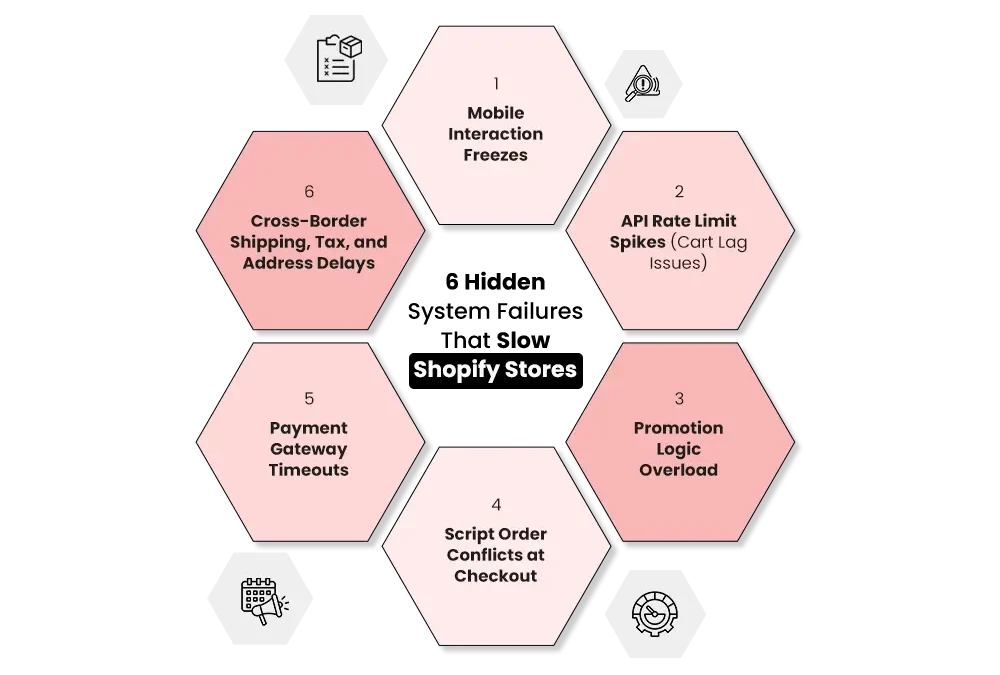
1. Mobile Interaction Freezes
Mobile devices have limited processing power compared to desktops. When too many scripts try to execute during scroll or tap events, the browser queue gets blocked. This creates visible lag even if the page technically “loads.”
Why does it happen?
- Multiple scripts firing on tap or scroll
- Heavy above-the-fold sections competing for priority
- Excessive event listeners added by apps
- Unoptimized theme animations stress the mobile GPU
Symptoms
- Taps not registering immediately
- Navigation menus feel sticky or delayed
- Variant selectors lag
- The ” Add to Cart ” button becomes briefly unresponsive
Why does this hurt performance?
Mobile traffic often makes up the majority of ecommerce visits. When interaction feels delayed, users assume the store is broken and exit quickly, which directly impacts conversions.
Fix preview: Prioritize mobile-first Shopify site speed optimization. Reduce above-the-fold weight, limit interaction-based scripts, and audit event listeners added by apps.
2. API Rate Limit Spikes (Cart Lag Issues)
Your cart is constantly communicating with Shopify through APIs. Upsells, discounts, cart drawers, and tracking tools all send requests. When too many apps hit the cart API at once, Shopify begins throttling responses.
Root causes
- Too many apps are calling the cart API simultaneously
- Real-time discount recalculations on every cart change
- Loyalty, bundling, and upsell tools firing together
- Background tracking requests are stacking up
Symptoms
- Cart updates take several seconds
- Cart drawer opens empty, then refreshes
- Quantity changes feel delayed
- Slow redirect to checkout
Why does this hurt performance
Cart friction appears at the highest purchase intent moment. Even small delays here can significantly reduce Shopify conversion optimization performance because users are already ready to buy.
3. Promotion Logic Overload
Promotions look simple on the surface, but are computationally heavy behind the scenes. When multiple discount rules stack, Shopify must repeatedly recalculate cart totals, eligibility rules, and pricing logic.
Common problems
- BOGO conflicts with bundle apps
- Tiered discounts load slowly
- Auto-discounts misfire or flicker
- High variant products slow promo evaluation
What’s happening technically?
Multiple promo engines often rewrite cart attributes simultaneously. This creates repeated recalculation loops that slow the cart and checkout experience.
Business impact
Even minor delays during discount calculation can reduce completed purchases. Deloitte research shows that a 0.1-second speed improvement can increase retail conversions by up to 8 percent, which highlights how sensitive shoppers are at this stage.
4. Script Order Conflicts at Checkout
Checkout is where the most scripts compete for control. Payment buttons, shipping logic, tax tools, and tracking pixels all try to load in a specific order. When that order breaks, performance issues appear instantly.
Causes
- Multiple apps editing the same cart attributes
- Duplicate events firing from different tools
- Sequential script loading instead of parallel
- Theme logic competing with app logic
Symptoms
- Checkout freezes for 1 to 2 seconds
- Express payment buttons are missing or slow
- Prices or discounts flicker during load
- Form fields feel laggy after typing
Why does this hurt performance?
Checkout friction directly reduces completed orders. Problems here are especially expensive because the customer has already committed to buying.
Proper Shopify speed optimization requires auditing script priority and removing unnecessary overlaps to truly optimize Shopify performance.
5. Payment Gateway Timeouts
Payment is the most sensitive step in the funnel. During traffic spikes, gateway response time plus internal script load can create delays that look like failures to the customer.
What creates the delay?
- High traffic is hitting the gateway simultaneously
- Extra redirects before payment loads
- Third-party scripts are delaying payment rendering
- Conflicts blocking express checkout buttons
Merchant-visible signs
- Sudden spike in payment failures
- Shop Pay or Apple Pay loads slowly
- Long pause after clicking Pay Now
- Increased abandonment at the payment step
Baymard Institute research shows that 18 percent of shoppers abandon checkout due to a long or complicated process. Slow payment rendering is a major contributor.
6. Cross-Border Shipping, Tax, and Address Delays
Global selling adds powerful growth opportunities but also introduces heavy real-time calculations. Shopify Markets, tax engines, and shipping apps often run simultaneously during checkout.
What creates the slowdown?
- Multiple apps modifying country or market logic
- Real-time tax calculations under load
- Shipping apps overriding native rates
- Geolocation scripts triggering extra validation
Symptoms
- Shipping rates take too long to appear
- Address validation fails or spins
- Taxes load slowly
- Checkout stalls after country selection
Why is this important for scaling brands?
International shoppers are highly sensitive to friction. When shipping or taxes do not load quickly, many users immediately abandon. Strong Shopify site speed optimization becomes essential as stores expand globally.
Fixing these deeper layers is what separates basic tuning from true Shopify speed optimization. Surface tweaks help, but architectural stability is what keeps stores fast when real traffic hits.
Quick Technical Causes of a Slow Shopify Store
Hidden system conflicts often cause major slowdowns, but surface-level technical problems can still drag performance down.
Many stores dealing with Shopify speed issues have a mix of both. Fixing these quick technical gaps is an important step when you optimize Shopify speed.
1. Too Many Shopify Apps
Apps are powerful, but every single app adds scripts to your storefront. Over time, your Shopify setup can become crowded with background processes competing for browser resources.
Even apps you uninstall may leave leftover code inside theme files. This “ghost code” continues loading and quietly slows your store.
Why is this crucial?
- More apps mean more JavaScript to process
- Global scripts can block page interactivity
- App conflicts increase the risk of instability
Regular app audits are essential if you want to optimize Shopify speed without breaking functionality. Many high-performing stores review their app stack every quarter.
2. Heavy Images and Media Files
Visual content drives conversions, but unoptimized media remains one of the most common causes of slow pages. Large assets increase load time and hurt Core Web Vitals.
Common culprits
- Oversized product images
- Heavy or uncompressed hero banners
- Self-hosted product videos
- Too many images are loading above the fold
Best practices
- Use WebP or properly compressed JPEG files
- Enable lazy loading for below-the-fold images
- Serve responsive image sizes for mobile
- Host videos externally on YouTube or Vimeo
Google recommends keeping Largest Contentful Paint under 2.5 seconds, making media optimization a key part of Shopify page speed optimization.
3. Slow or Bloated Theme
Your theme controls how efficiently your storefront renders. Poorly built themes often include unnecessary code and heavy visual effects that slow down the entire experience.
Typical performance killers
- Poorly coded or outdated themes
- Excess animations and sliders
- Too many enabled theme features
- Legacy theme versions are not aligned with Shopify updates
A lightweight, performance-focused theme provides a strong foundation for long-term Shopify optimization. Many fast-growing brands periodically review their theme health as part of routine maintenance.
4. Too Many Fonts and Sections
Design flexibility can quietly add weight to your pages. Multiple font files and duplicated sections increase requests and slow rendering, especially on mobile.
What usually causes bloat
- Multiple font families and weights
- Custom fonts loaded sitewide
- Separate sections built for mobile and desktop
- Heavy homepage layouts with too many blocks
Streamlining typography and relying on responsive design instead of duplicate sections helps maintain a clean Shopify site speed optimization.
5. Redirect Chains and Broken Links
Redirects are useful during migrations and URL changes, but too many chained redirects force browsers to make extra hops before reaching the final page.
Performance impact
- Longer time before the page starts rendering
- Slower perceived load speed
- Wasted crawl budget for search engines
- Poorer user experience on mobile
Redirect hygiene plays a direct role in Shopify SEO optimization and Shopify search engine optimization. Keeping URLs clean and minimizing redirect chains helps both users and search engines reach your content faster.
Addressing these technical gaps alongside deeper fixes creates a much stronger foundation for consistent Shopify speed optimization.
What You Can and Cannot Control in Shopify Speed Optimization?
One of the biggest mistakes merchants make is trying to fix things that are outside their control. Smart Shopify speed optimization focuses on the areas you can actually influence while understanding the platform limits.
Knowing the difference helps you prioritize the right fixes and avoid wasting time during performance tuning.
What You Cannot control?
Some parts of your store’s performance are managed entirely by Shopify or by external factors. These are important to understand, but not something you can directly change.
1. Shopify core infrastructure
Shopify handles hosting, server scaling, and core platform code. You cannot modify Shopify’s backend architecture. The good news is that Shopify’s infrastructure is already highly optimized for global commerce.
2. Customer’s internet speed
Your store may feel slow to users with poor network connections, especially on mobile data. While you cannot control the visitor’s connection quality, you can reduce page weight to minimize the impact.
3. Third-party server performance
Many apps rely on their own servers. If an app provider experiences latency, it can affect your storefront. You can choose better apps, but you cannot control how their servers perform in real time.
4. Shopify CDN locations
Shopify automatically distributes your assets through its global CDN. You cannot manually select CDN nodes or routing paths. However, keeping assets optimized ensures the CDN works efficiently.
What You CAN Optimize?
This is where real performance gains happen. A strong Shopify speed optimization service focuses heavily on these controllable layers.
1. Theme performance
Your theme has a major impact on speed and interactivity. You can:
- Use lightweight, well-coded themes
- Remove unnecessary animations
- Disable unused theme features
- Keep the theme updated
Clean theme architecture makes it easier to optimize Shopify performance long term.
2. App stack
Apps are one of the biggest levers you control.
- Audit and remove unused apps
- Replace heavy apps with lighter alternatives
- Avoid overlapping functionality
- Monitor apps that modify the cart or checkout
A lean app stack reduces script conflicts and improves stability.
3. Image optimization
Media weight directly affects load time. You can:
- Compress images before upload
- Use WebP where possible
- Implement lazy loading
- Serve responsive image sizes
This remains a foundational part of any effort to optimize Shopify speed.
4. Custom code cleanup
Over time, stores accumulate unused scripts and legacy code.
- Remove leftover app code
- Minify CSS and JavaScript
- Load scripts asynchronously where possible
- Review custom sections regularly
Code hygiene prevents hidden slowdowns from building up.
Content structure
How you organize content is also an important factor.
- Limit products per collection page
- Avoid overly heavy homepages
- Use pagination instead of infinite scroll
- Reduce above-the-fold clutter
A clean structure improves both user experience and crawl efficiency.
60-Minute Shopify Speed Optimization Audit (Action Plan)
If your Shopify store has started slowing down, you do not always need a full rebuild to find the problem.
A focused, one-hour audit can uncover most performance risks before they turn into revenue leaks. High-growth brands run this type of Shopify speed optimization check regularly, especially before major campaigns.
Use the steps below to quickly diagnose weak points across mobile, cart, checkout, and cross-border flows.
Step 1 — Mobile Stability Test (10 Minutes)
Mobile is usually the first place where performance issues appear. Testing on a desktop alone will miss many real-world problems.
What to do
- Test your store on real mobile data (3G or 4G, not just Wi-Fi)
- Navigate menus, variant selectors, and add-to-cart
- Watch for tap delays or stuttering
- Temporarily disable heavy homepage sections or scripts and compare
Goal: Uncover mobile bottlenecks that hurt interactivity. If the store feels even slightly laggy on mobile, your Shopify speed optimization needs attention.
Step 2 — API and Cart Reliability Check (10 Minutes)
Your cart is one of the most sensitive performance zones. Small delays here can quickly hurt conversions.
What to do
- Rapidly add and remove items from the cart
- Test quantity updates multiple times in a row
- Open and close the cart drawer repeatedly
- Review API logs inside Shopify if available
- Temporarily disable non-essential apps and retest
Consistent lag here usually signals API pressure or app conflicts that require deeper Shopify site speed optimization.
Step 3 — Promotion Conflict Test (10 Minutes)
Promotions often look fine on the surface but create heavy logic behind the scenes. This step helps expose discount-related slowdowns.
What to do
- Test common promotions like BOGO, bundles, and tiered discounts
- Add multiple qualifying products to the cart
- Watch how quickly discounts apply
- Compare performance with promo apps temporarily disabled
If the store becomes noticeably faster with promo tools off, your Shopify speed optimization should focus on discount logic cleanup.
Step 4 — Checkout and Script Order Test (15 Minutes)
Checkout is where the highest revenue risk lives. Even small freezes can reduce completed orders.
What to do
- Test Shop Pay, Apple Pay, PayPal, and standard checkout
- Fill out checkout fields slowly and quickly
- Watch for pauses after typing
- Validate that discounts and shipping update smoothly
- Compare behavior with non-critical scripts disabled
Problems here usually indicate script order conflicts that require deeper Shopify site speed optimization work.
Step 5 — Cross-Border Stress Test (15 Minutes)
Stores selling internationally often miss this step. Cross-border logic adds significant real-time processing.
What to do
- Simulate checkout from multiple regions (US, UK, AU, CA, SG)
- Change shipping countries several times
- Validate shipping rate load speed
- Check how quickly taxes are calculated
- Test address autocomplete behavior
International friction is a common hidden issue in Shopify speed optimization, especially for stores using Shopify Markets.
Running this 60-minute audit gives you a clear, practical view of where your Shopify site speed optimization is breaking down. Once you know which layer is struggling, you can prioritize fixes that actually move revenue, not just improve surface metrics.
Build Your Shopify Store From Scratch With Mastroke
Launch faster with Mastroke, an official Shopify Partner. We build structured stores with conversion-first design, clean setup, and features built to scale!!
What is Considered a Good Shopify Speed in 2026?
In 2026, “fast” is no longer judged by a single score. Real performance depends on how quickly your store loads, responds, and completes the checkout flow under real user conditions.
Strong Shopify page speed optimization focuses on the full customer journey, not just homepage metrics.
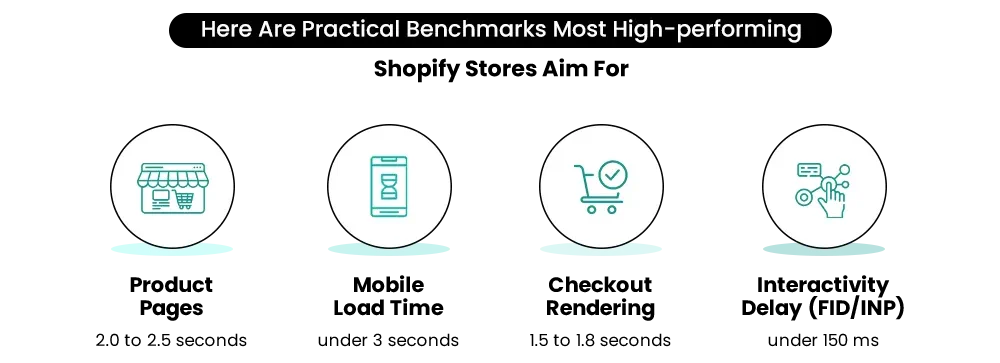
If your store consistently meets these ranges, it is considered competitively fast in today’s ecommerce environment.
Why Shopify Speed Score Does Not Equal Real Performance?
Many merchants rely heavily on Shopify’s Speed Score, but it only tells part of the story. The score mainly reflects front-end weight under controlled testing conditions. Real shoppers behave very differently.
Speed Score limitations
- Measured in lab conditions, not real traffic
- Does not fully capture cart and checkout behavior
- May miss script conflicts and API delays
- Often ignores cross-border complexity
- Cannot reflect peak traffic stress
A store can have a decent Speed Score and still feel slow to users if cart logic, promotions, or checkout scripts are struggling.
What Actually Matters More?
For modern Shopify page speed optimization, focus on real user experience signals:
- How fast add-to-cart responds
- How smoothly does checkout loads
- How quickly are shipping and taxes calculate
- How responsive mobile interactions feel
Speed Score is useful as a directional metric, but stability and real interaction speed are what truly protect conversions and revenue.
In short, the fastest Shopify stores in 2026 are not just lightweight. They are stable, responsive, and consistent from first click to payment confirmation.
Why Stability Matters More Than Raw Speed?
Speed still matters. But in modern ecommerce, stability is what protects revenue. Many stores look fast in testing tools yet struggle when real shoppers interact with carts, discounts, and checkout.
True Shopify optimization today is about making sure your store performs consistently under pressure.
1. Speed Used to Be About Assets
A few years ago, most performance work focused on front-end weight.
Back then, improving speed usually meant:
- Compressing images
- Reducing theme size
- Removing unused files
- Minimizing JavaScript bundles
This approach worked when Shopify stores were simpler. Fewer apps, fewer dynamic elements, and lighter promotion logic meant asset weight was the main bottleneck.
2. Today It’s About Architecture
Modern Shopify stores are far more complex. Multiple systems now run at the same time during a single shopping session.
Key complexity drivers include:
- Expanding app ecosystem
- Advanced promotion engines
- Cross-border tax and shipping logic
- Personalization and tracking scripts
- Upsell, loyalty, and bundling tools
All these layers compete for resources. When they fire together, even a visually lightweight store can slow down.
That is why advanced Shopify optimization now focuses on how systems interact, not just how much the page weighs.
3. Stability Means Higher Revenue
The most expensive performance problems are rarely visual. They happen during interaction, when buyers are closest to purchasing.
Common failure scenarios include:
- Cart lag during add-to-cart
- Checkout freezes after form input
- Payment buttons are loading late
- Shipping rates are spinning too long
- Discount calculations are delaying the totals
These issues directly hurt Shopify conversion optimization because they appear at high-intent moments.
A store that loads fast but breaks during interaction is fragile. A stable store maintains speed from first click to payment confirmation.
When to Consider Professional Shopify Speed Optimization Services?
Many merchants can handle basic improvements in-house. But as stores grow, performance challenges become more technical and interconnected.
This is where a specialized Shopify speed optimization service can deliver faster and more reliable results.
You may benefit from expert help if you notice these signs:
1. Your Speed Score keeps dropping
Despite image compression and basic fixes, performance continues to decline. This usually indicates deeper script or architecture issues.
2. Checkout problems appear during traffic spikes
If your store works fine on normal days but struggles during campaigns, hidden bottlenecks are likely present.
3. Your business depends on multiple apps
Complex app stacks increase the risk of conflicts. A Shopify store agency can help streamline and stabilize your setup.
4. You are selling internationally
Cross-border logic adds significant complexity. Shipping, tax, and market rules often require advanced Shopify optimization to stay fast.
5. Your in-house team feels stuck
If your team has tried the usual fixes but performance still fluctuates, it may be time for a deeper technical review.
A dedicated Shopify marketing agency or performance-focused partner can audit your full stack, identify hidden conflicts, and implement long-term fixes.
The right Shopify speed optimization service does more than boost scores. It protects conversions, improves user experience, and keeps your store resilient as it scales.
Build your dream Shopify store today
Bring your vision to life with Mastroke, an official Shopify Partner. We design and develop high-converting, scalable Shopify stores with clean structure and future-ready features—built to grow with your business.
Fix the Root, Not Just the Symptoms
Sudden slowdowns usually come from hidden conflicts between apps, scripts, promotions, and cross-border logic. Quick fixes like compressing images may help briefly, but they rarely solve the real issue.
Shopify speed optimization has clearly shifted from cosmetic tweaks to system-level stability. The fastest stores today are not just lightweight.
They are structurally sound and remain responsive even under heavy traffic. Running proactive audits before peak seasons helps catch small bottlenecks before they turn into revenue leaks.
If you need expert support, Mastroke is a trusted Shopify store agency specializing in Shopify development, Shopify marketing, and full-stack Shopify performance improvements
If your Shopify store is loading slowly and you want expert help to optimize Shopify speed, Mastroke’s team can audit, fix, and scale your store for peak performance.
Book a free audit with us now!
Frequently Asked Questions
1: Why is my Shopify store loading slowly all of a sudden?
Sudden slowdowns usually happen after recent changes such as installing new apps, updating your theme, adding heavy media, or running major promotions. Too many scripts or unoptimized assets can quickly increase load time and hurt performance.
2: How can I quickly check my Shopify store’s speed?
You can measure performance using tools like Google PageSpeed Insights, GTmetrix, and Shopify’s built-in Speed Report. These tools analyze Core Web Vitals, loading time, and blocking scripts so you can identify bottlenecks fast.
3: Do too many apps slow down Shopify stores?
Yes. Every app injects additional scripts that must load when a visitor opens your store. More apps mean more code execution, which increases load time and can create conflicts. Even uninstalled apps may leave leftover code if not cleaned properly.
4: What is the biggest cause of slow Shopify page speed?
Oversized images, excessive third-party apps, and bloated themes are among the most common causes. Large media files and unnecessary scripts force browsers to process more data, which delays page rendering, especially on mobile.
5: Will improving Shopify speed help SEO and conversions?
Absolutely. Faster sites improve user experience, reduce bounce rates, and help search rankings. Even a one-second delay can reduce conversions significantly, which directly impacts revenue.