Most Shopify stores follow mobile first design, but still favour mouse over thumb.
Layouts are planned on large screens where navigation is easy to review, and product pages are checked with precise cursor clicks. At this stage, the store appears complete and works smoothly during desktop testing. But once mobile visitors arrive, the experience changes.
Shoppers scroll, explore a few products, interact briefly, and leave without moving deeper into the store. Nothing breaks, yet the interaction often ends before actions like browsing multiple products or adding items to the cart begin. This pattern leads many merchants to ask: Why are mobile visitors browsing but not purchasing? Why does mobile traffic look strong while conversions remain low?
In many cases, the answer lies in how comfortably the store works on a phone. Mobile users navigate with their thumbs, not a mouse. Their reach is limited, making some areas easier to interact with than others. This reachable space is known as the Thumb Zone.
Responsive layouts adapt to smaller screens, but they don’t always deliver a comfortable mobile shopping experience. This is where mobile-first design becomes important. Instead of adapting desktop layouts later, it builds the interface around how people actually browse on their phones.
According to Statista, more than 70% of global ecommerce traffic comes from mobile devices, making Shopify store mobile optimization essential. This article shows where the thumb zone affects interaction, why it often goes unnoticed, and how a better mobile-first design can make everyday shopping actions easier.
What Is the Thumb Zone (And Why It Matters for Shopify Stores)
The thumb zone refers to the area of a smartphone screen that a user’s thumb can comfortably reach while holding the device with one hand.
Most mobile browsing does not happen in a perfectly focused setting. Customers often scroll through products while commuting, waiting in line, or casually exploring stores during short breaks. Mobile shopping behaviour mirrors modern media consumption—users quickly skip anything that slows them down.
Because of this behaviour, phones are usually held with one hand, and the thumb becomes the primary way users interact with the screen.
Google research shows that more than 50% of users are less likely to engage with a brand if the mobile experience feels inconvenient. Understanding this pattern is an important part of mobile UX design principles and a core idea behind mobile-first design.
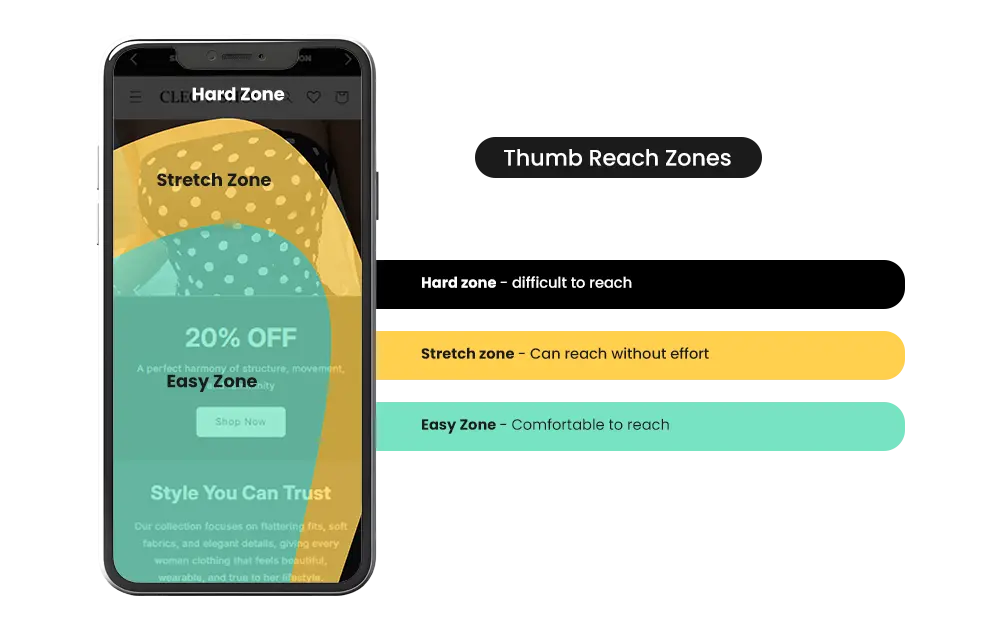
Mobile screens naturally divide into three interaction zones:
- Easy Zone – areas the thumb can reach comfortably
- Stretch Zone – areas that require a slight thumb stretch
- Hard Zone – areas that usually require repositioning of the hand
UX research often visualizes the thumb zone as a heat map across the screen, highlighting which parts of the interface are easiest and hardest to reach. Many Shopify themes unintentionally place important store actions inside the hard zone.
Because of this, many mobile UX design principles focus on keeping important actions within easy thumb reach, which directly influences mobile navigation patterns in e-commerce interfaces. Many Shopify themes unintentionally place important store actions inside the hard zone.
For merchants setting up a store, these decisions often go unnoticed because the layout appears perfectly functional during desktop testing. The challenge only becomes visible once real shoppers begin interacting with the store on their phones.
This is why mobile UX reviews have become an important part of Shopify store mobile optimization. Agencies such as Mastroke often work with merchants to evaluate how easily customers can navigate, browse products, and move toward checkout on mobile devices.
When actions like opening the menu, applying filters, or accessing the cart require customers to adjust their grip, browsing momentum can slow down. Improving the reachability of these interactions is often one of the first steps toward building a mobile-first store design and supporting thumb-friendly design and a smoother mobile shopping experience.
Also Read – 7 Common Shopify Store Setup Mistakes First-time Owners Make (And How to Avoid Them)
Build Your Shopify Store From Scratch With Mastroke
Launch faster with Mastroke, an official Shopify Partner. We build structured stores with conversion-first design, clean setup, and features built to scale!!
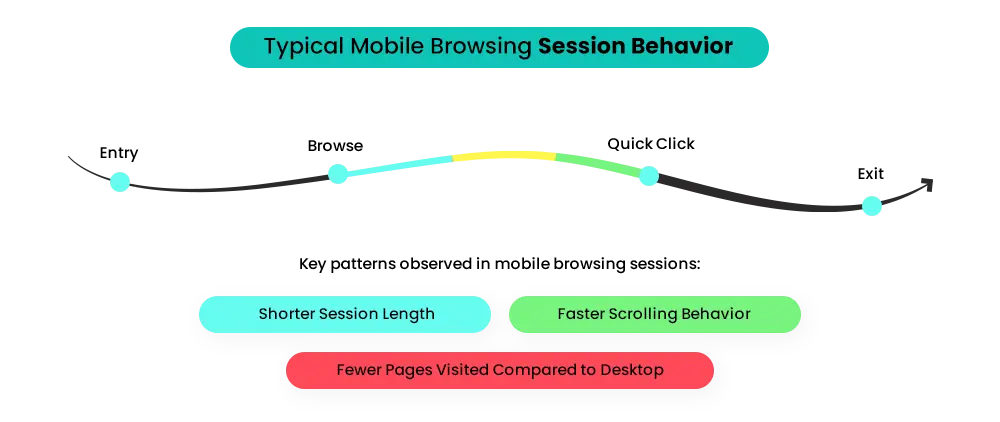
Mobile Shopping Is Thumb-Driven — Not Click-Driven
Designing for mobile is not simply about shrinking a desktop website to fit a smaller screen. The way people browse on their phones is fundamentally different from how they navigate on a computer.
Desktop shoppers:
- Navigate with a cursor
- Click with precision
- Explore menus easily
Mobile shoppers rely on:
- Scrolling
- Quick taps
- One-hand navigation
- Short browsing sessions
Because most interactions happen through the thumb, the overall mobile shopping experience depends heavily on how easily key actions can be reached during browsing.
This is why mobile-first design focuses on how people actually interact with interfaces rather than simply adapting desktop layouts. Many merchants eventually begin noticing shifts in their store analytics and begin asking:
- Why do mobile visitors explore fewer products than desktop users?
- Why does browsing activity look strong, but purchases remain lower on mobile?
Usually, the issue is not pricing or product quality. It’s interaction comfort.
Mobile shoppers rarely adjust their grip just to reach something on the screen. When menus, filters, or cart actions sit outside natural thumb reach:
- Browsing slows down
- Interaction decreases
- Product discovery drops
Small friction points like these influence mobile browsing behaviour and often become overlooked mobile conversion optimization challenges. Noticing these patterns is the first step toward improving mobile UX for e-commerce and designing store interfaces that feel natural to navigate on a phone.
Signs Your Store Might Be Fighting the Thumb Zone
Thumb-zone issues don’t appear as obvious design mistakes.
Instead, they usually surface through store analytics and customer behaviour. When interaction points sit outside natural thumb reach, the friction becomes visible in how shoppers move through the store.
Merchants eventually start noticing signals such as:
- Strong mobile traffic but weaker mobile conversions
- Product pages are receiving attention, but limited add-to-cart activity
- Visitors open the navigation repeatedly before finding categories
- Filters are being used less frequently
- Customers browsing collections but viewing only a few products
These patterns signal mobile UX friction on e-commerce, where the store technically works, but small interaction barriers slow down browsing. From a merchant’s perspective, the questions usually look like this:
- Why are visitors exploring products but hesitating to interact?
- Why do shoppers open menus multiple times before navigating deeper?
- Why do mobile users leave product pages faster than expected?
Nothing is technically broken, but the experience demands more effort than shoppers expect. When important actions sit outside comfortable thumb reach:
- Browsing slows
- Product discovery becomes harder
- Interaction drops across the mobile purchase journey
Many merchants initially interpret these signals as marketing or pricing issues. In reality, they link back to mobile conversion optimization challenges inside the store interface.
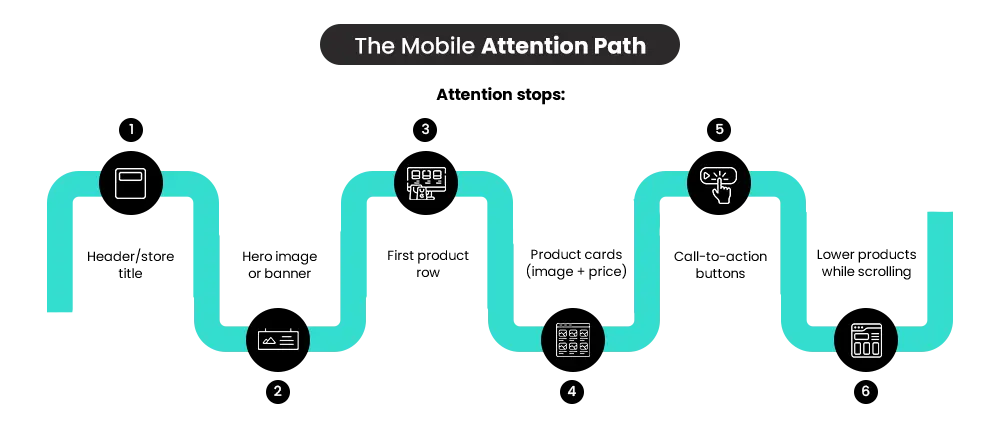
Mobile shoppers also explore stores differently from desktop users. Their behavior reflects broader mobile browsing behavior in e-commerce, where customers prefer quick scanning and low-effort interaction while moving through product lists.
A single awkward tap might not stop a shopper. But when several small obstacles appear across the interface, they accumulate into what designers describe as mobile UX friction in e-commerce.
Try This on Your Own Store: A One-Hand Mobile Check
A simple way to understand the thumb zone is to test it yourself. Hold your phone the way you normally browse — with one hand. Now try reaching different parts of the screen using only your thumb. You’ll probably notice how the screen naturally divides into three reach areas:
- A lower section that your thumb reaches comfortably while holding the phone.
- A middle section that requires a slight stretch to interact with.
- An upper section that may force you to adjust your grip before tapping.
Now try completing these actions without adjusting your grip:
- Open the menu
- Browse a collection
- Use filters
- Open a product page
- Add an item to cart
- Move toward checkout
As you test the experience, notice where your thumb naturally rests and where it has to stretch. If browsing actions feel slightly awkward to reach, your customers may be experiencing the same friction.
Nothing may look broken on the screen. But if shopping feels less comfortable than it should, it can affect the mobile shopping experience and influence how customers interact with the store.
Many stores unintentionally place important actions — like menus, filters, or cart icons — inside these harder-to-reach areas, which creates subtle mobile UX friction in ecommerce.
When customers have to adjust their grip just to interact with a store, browsing becomes slightly less convenient and can interrupt the natural mobile purchase journey. Overall, if you had to adjust your grip while testing, then it may be time to rethink your mobile-first store design.
How to Optimize Your Shopify Store for Mobile: Design for the Thumb Zone
Mobile optimization is not only about responsive layouts. It also involves ensuring that important store interactions sit within comfortable thumb reach. Small placement decisions can influence how easily customers:
- Explore collections
- Interact with products
- Move toward checkout
These details shape the overall mobile shopping experience, especially for shoppers browsing with one hand. In practice, identifying these interaction barriers requires reviewing how real users navigate a store on their phones.
Mobile UX audits conducted by Shopify specialists such as Mastroke often reveal subtle layout decisions—like button placement or navigation reach—that directly influence browsing and checkout behaviour. Refining these interactions is a major step in Shopify store mobile optimization and effective mobile-first design.
Below are several store areas merchants should review when improving their mobile-first store design. For many stores, these improvements connect back to how the store was originally set up — a topic worth looking into more – The Ultimate Guide to Shopify Store Setup and Optimization (Start from Scratch)
1. Don’t Place Navigation Where Thumbs Struggle to Reach
The issue
Many Shopify themes place the menu icon in the top corner of the screen. For one-handed users, this position sits outside comfortable thumb reach. This placement can create small usability gaps in mobile navigation design, especially when stores follow desktop-style mobile navigation patterns instead of layouts built for one-hand browsing.
What happens
When navigation becomes harder to reach, customers may:
- Stretch their thumb repeatedly to open the menu
- Reposition their hand before tapping
- Explore fewer categories or collections
These interruptions influence mobile browsing behaviour in e-commerce, where shoppers usually expect quick and effortless exploration.
Business impact
When navigation requires extra effort:
- Fewer collections are explored
- Product discovery becomes limited
- Browsing sessions become shorter
Over time, these small obstacles contribute to mobile UX friction in e-commerce.
Better mobile patterns
Navigation feels more natural when menu access sits closer to the thumb’s resting area. Lower menu triggers or reachable scrolling navigation highly improves mobile navigation design and creates smoother mobile navigation patterns.
2. Make the Add-to-Cart Button Easy to Reach
The issue
On many product pages, the purchase action appears high on the screen or disappears while scrolling through details. This placement weakens mobile product page design, where key actions should remain accessible during browsing.
What happens
When the purchase action isn’t easy to reach, shoppers may:
- Read product details without interacting
- Scroll past the buying action while exploring images or descriptions
- Delay tapping the purchase button
These moments introduce hesitation into the mobile purchase journey, especially during fast browsing sessions.
Business impact
When purchase actions require extra effort:
- Add-to-cart activity drops
- Product interest does not convert into interaction
- Purchase intent weakens during product exploration
These patterns often appear as mobile conversion optimization challenges rather than product or pricing problems.
Better mobile patterns
Product pages perform better when the purchase action remains within easy reach while shoppers explore details. Keeping the action accessible reinforces a strong mobile product page design and captures buying intent before attention shifts elsewhere.
3. Place Filters Where Shoppers Can Reach Them Easily
The issue
Filtering tools sit at the top of collection pages or hide behind small icons. This arrangement weakens the mobile UI layout, where filters are meant to help shoppers quickly narrow large product lists.
What happens
When filters sit outside comfortable thumb reach, shoppers generally:
- Scroll through long product lists instead of refining results
- Overlook filtering options entirely
- Leave collections when browsing feels overwhelming
These interaction trends influence mobile browsing behaviour, particularly when customers try to locate specific products quickly.
Business impact
When filters are harder to access:
- Product discovery slows down
- Browsing becomes less focused
- Shoppers explore fewer products within collections
These issues usually show up as mobile UX issues in e-commerce rather than catalog or merchandising problems.
Better mobile patterns
Filtering becomes easier when controls appear within the browsing area instead of remaining fixed at the top. This improves mobile UI layout and supports more effective mobile interface optimization.
4. Keep Cart Access Visible and Easy to Reach
The issue
The path toward checkout begins with a small cart icon placed at the top of the screen. In mobile design for one-handed use, this placement can leave cart access outside natural thumb reach during browsing.
What happens
When cart access sits far from the thumb’s resting position, shoppers may:
- Postpone opening the cart after adding items
- Continue browsing without reviewing selections
- Delay moving toward checkout
These small interruptions can slow the rhythm of the mobile purchase journey.
Business impact
When reviewing the cart requires extra effort:
- Cart checks happen less frequently
- Purchase momentum weakens
- Checkout progression slows
These patterns often appear as mobile checkout UX challenges rather than product or pricing concerns.
Better mobile patterns
Checkout flow improves when cart access remains visible during browsing. Keeping the cart reachable supports stronger mobile checkout UX and a smoother mobile purchase journey.
Thumb-Friendly vs Hard-to-Reach Store Design
| Store Element | Hard-to-Reach Placement | Thumb-Friendly Placement |
| Menu Icon | Top corners | Lower navigation or reachable menu |
| Add to Cart | Above product description | Sticky button near thumb zone |
| Filters | Top bar | Bottom-accessible filters |
| Cart Access | Small top icon | Persistent cart visibility |
| Product actions | Dense layouts | Clear tap areas |
Small layout shifts decide whether customers keep browsing or stop exploring altogether.
Why Many Growing Stores Eventually Revisit Their Mobile Design
As stores begin receiving consistent traffic, merchants eventually start noticing patterns that were not obvious during the initial launch. Mobile visitors browse products and explore collections, yet interaction does not always move further toward checkout.
Analytics usually begins revealing signals such as:
- Strong mobile traffic but weaker purchase activity.
- Product pages receiving attention without add-to-cart interaction.
- Shoppers browsing collections but leaving before checkout.
These signals rarely point to pricing or product issues. Instead, they indicate gaps in mobile UX optimization or how key interactions are arranged across the interface.
For merchants focusing on Shopify store mobile optimization, this stage marks the shift from measuring performance to understanding behavior. It’s also when a more practical question comes up: Is the store built the way mobile shoppers actually use it?
That question is usually where the idea of revisiting parts of the mobile-first store design begins. Many of these interaction gaps don’t feel serious on their own — but across hundreds of sessions, they eventually reduce how often browsing turns into buying.
And this is the stage where experienced Shopify experts like Mastroke step in — reviewing navigation reach, product page interaction, and checkout flow to redesign how the store works on mobile and create a smoother mobile shopping experience for customers.
Is Your Store Comfortable to Shop With One Thumb?
Open your store on your phone and try navigating it the way most customers do — with one hand. Now move through a few common shopping actions:
- Open the menu
- Browse a collection
- Use filters
- Open a product page
- Add an item to cart
- Move toward checkout
As you test the experience, notice where your thumb naturally rests and where it has to stretch.
- Can you reach the menu easily?
- Does the Add-to-Cart button stay within reach?
- Do filters feel effortless to access while browsing?
If several actions require adjusting your grip, it answers a question merchants eventually ask: why is mobile-first design important?
And if this quick test made you think about how to optimize your Shopify store for mobile, that’s when merchants begin looking at how their store was originally set up. This is where Shopify partners like Mastroke help merchants set up Shopify stores around mobile-first store design, ensuring the entire mobile shopping experience feels natural from the moment the store launches.
It’s also worth understanding how Shopify development agencies approach these challenges differently – DIY vs Shopify Development Agency: How Your Setup Choice Affects Store Performance
Launch faster with Mastroke, an official Shopify Partner. We build structured stores with conversion-first design, clean setup, and features built to scale!!
[/cta_box]
Conclusion: Mobile Stores Should Feel Effortless to Navigate
Mobile shoppers don’t think about store design. They simply move through it, one tap at a time.
A menu that feels slightly out of reach, a purchase button that disappears during scrolling, or filters that require extra effort may seem like small details. Yet these small moments shape how the mobile shopping experience unfolds. That is where mobile-first design begins to matter. It’s not just a visual choice, but a practical decision about how customers interact with a store.
For merchants working on Shopify store mobile optimization, the real opportunity lies in those everyday interactions — the taps, scrolls, and decisions that happen within seconds. When navigation, product pages, and checkout actions feel natural to reach, the path from browsing to buying becomes far easier for customers to follow.
Build your dream Shopify store today
Bring your vision to life with Mastroke, an official Shopify Partner. We design and develop high-converting, scalable Shopify stores with clean structure and future-ready features—built to grow with your business.
FAQs
Q1. Why do Shopify stores get mobile traffic but low conversions?
A: This happens when the mobile shopping experience feels inconvenient. If navigation or Add-to-Cart actions sit outside comfortable thumb reach, customers may browse products but hesitate to complete purchases. Improving Shopify store mobile optimization can help reduce this gap.
Q2. What is the thumb zone in mobile design?
A: The thumb zone is the area of a smartphone screen that a user can comfortably reach with their thumb while holding the device with one hand. Designing around this reach area is a core principle of mobile-first design.
Q3. How can I optimize my Shopify store for mobile users?
A: A stronger mobile first store design usually focuses on thumb-friendly navigation, visible purchase actions during scrolling, and a simpler path to checkout. These changes make the mobile shopping experience easier for customers.
Q4. Why do mobile shoppers view products but not add items to the cart?
A: Often, the purchase action is difficult to reach or disappears while customers scroll. Improving mobile product page design and refining interactions through mobile UX optimization can help customers act when purchase intent appears.
Q5. Is responsive design enough for a mobile-friendly Shopify store?
A: Not always. Responsive layouts fit smaller screens, but a mobile-first design focuses on how customers actually interact with the store. Designing around thumb reach can create a smoother mobile shopping experience.
Q6. What is mobile-first design in Shopify?
A: Mobile-first design in Shopify means building the store around how customers use it on their phones. Instead of adjusting a desktop layout later, the focus is on making navigation, product actions, and checkout easy to reach and use from the start.