
You should consider a Shopify store redesign when you notice the following signals:
- Falling conversion rates
- Poor mobile experience
- Slow load speeds
- Outdated design
- Theme limitations
- High bounce rate
However, not every issue needs a full rebuild. Sometimes smart optimization is enough.
Introduction: Is Your Shopify Store Quietly Losing Sales?
A Shopify store that felt modern just 2–3 years ago can quickly start to look outdated. The problem is, most store owners do not notice the impact right away.
- Poor UX quietly reduces conversions.
- Slow pages, cluttered layouts, or hard-to-use mobile screens can push shoppers toward competitors.
- An outdated design also weakens trust.
If your store looks old, visitors may question your brand before they even explore your products. There is also an SEO risk. Search engines favor fast, mobile-friendly, well-structured Shopify website design. If your store is lagging, your rankings and organic traffic can slowly decline.
However, not every issue requires a full Shopify store redesign. In many cases, focused optimization and CRO improvements can solve the problem.
In this guide, we will share 10 clear signals that show when a redesign is truly necessary and when optimization is enough.
Shopify Optimization vs Shopify Redesign
Before committing to a full Shopify store redesign, it is important to understand whether your store needs optimization or a structural rebuild. Many performance issues can be fixed faster and more safely through targeted improvements.
Optimization focuses on improving what already exists. It is usually faster, lower risk, and ideal when your store foundation is still strong.
Redesign is more strategic and structural. It becomes necessary when your current Shopify website design, theme, or UX architecture is limiting growth.
Here is how the two approaches differ:
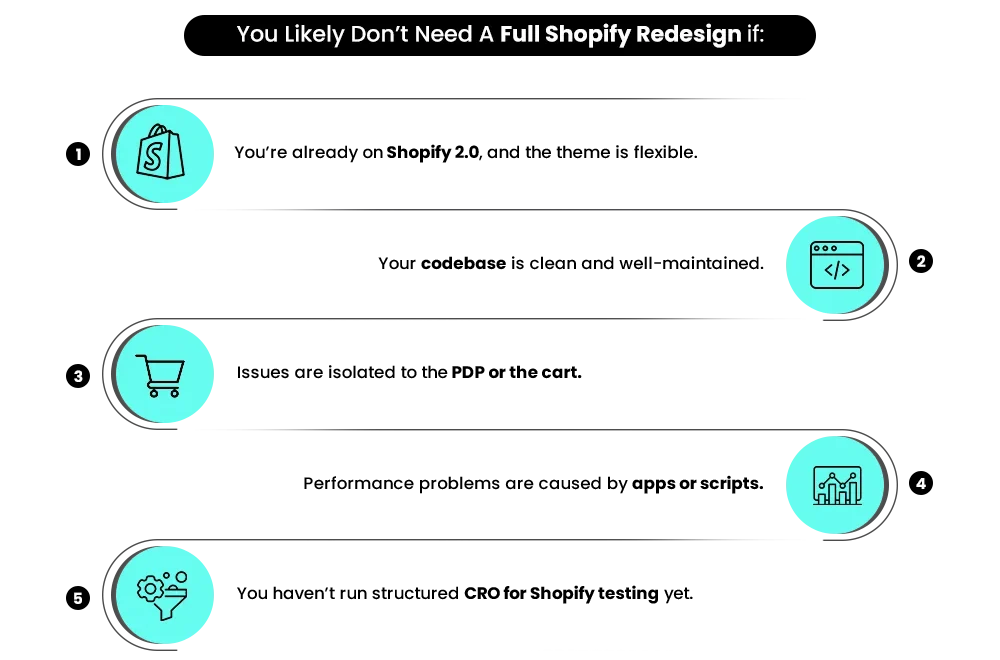
| If the Issue Looks Like This | You Likely Need Optimization | You Likely Need a Redesign |
| Page-level problems | Issues isolated to PDP, cart, or specific templates | Problems appear across most key pages |
| Theme flexibility | The theme is modern and adjustable | The theme is rigid or outdated> |
| Brand positioning | Brand visuals are mostly aligned | The brand has clearly outgrown its current design |
| Performance drops | Speed declined after adding apps or scripts | Store remains slow despite the cleanup |
| UX friction | Fixable with layout and CRO tweaks | Navigation and UX feel structurally broken |
| Mobile experience | Improves with responsive fixes | Mobile layout breaks across devices |
| Scalability | Store handles the current catalog well | Structure struggles with growth or expansion |
Let’s look at the 10 clear signals that tell you when a redesign is truly the right move.
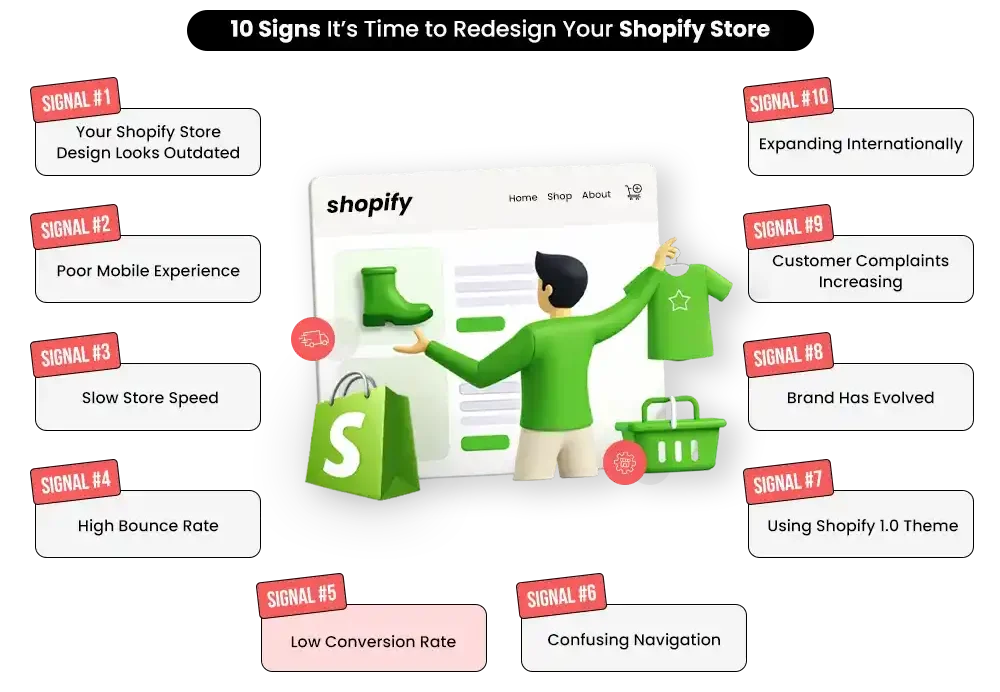
Signal #1: Your Store Looks Outdated
First impressions happen fast. Studies show users form an opinion about a website in about 0.05 seconds. That means your Shopify website design is judged almost instantly.
If your store looks old or cluttered, visitors may leave before they even view a product. An outdated look does not just hurt aesthetics. It directly affects trust, engagement, and conversions.
Visual Red Flags to Watch
Your store design for Shopify may need attention if you notice:
- Heavy gradients or old-style color schemes
- Cluttered layouts that feel busy
- Poor use of whitespace
- Inconsistent branding across pages
- Too many flashy animations or banners
- Design that does not match your target audience
Research also shows that 75 percent of users judge a company’s credibility based on its website design (Stanford Web Credibility Research).
So if your store feels dated, shoppers may question your brand before exploring your products.
A modern Shopify UX redesign is not about chasing trends. It is about building trust quickly and guiding users smoothly toward purchase.
Build Your Shopify Store From Scratch With Mastroke
Launch faster with Mastroke, an official Shopify Partner. We build structured stores with conversion-first design, clean setup, and features built to scale!!
When Optimization Is Enough
You may not need a full Shopify store redesign if:
- Your layout is still structurally sound
- Branding only needs color or font updates
- Mobile experience works well
- Navigation is clear and scalable
When Full Redesign Is Necessary
A complete Shopify redesign is usually the better move when:
- Your theme feels visually behind competitors
- The layout structure is cluttered or hard to fix
- Brand positioning has changed significantly
- Mobile experience is fundamentally weak
- Your theme limits modern UX improvements
- Users show low trust or high bounce on key pages
If your current Shopify website design is creating friction at the first impression stage, patchwork fixes usually do not work. A strategic redesign helps realign your store with customer expectations and future growth.
Signal #2: Poor Mobile Experience
Mobile is now the primary way people shop online. Recent data shows that around 59 percent of global website traffic comes from mobile devices (Statista). If your Shopify website design struggles on mobile, you are likely losing a large share of potential customers.
Google also uses mobile-first indexing, which means it mainly evaluates your mobile experience when deciding rankings. So weak mobile UX hurts both conversions and SEO visibility.
Common Mobile Issues to Watch
Your store may need attention if you notice:
- Tiny or hard-to-tap CTAs
- Overloaded product pages on small screens
- Misaligned images or cut-off text
- Clunky, multi-step checkout
- Missing mobile payment options
- Menus that are difficult to use
- Theme not built mobile-first
Even small usability problems can push mobile shoppers to exit quickly rather than switch devices.
When Shopify UX Redesign Is Enough
Optimization usually works well when your theme is relatively modern and mobile issues are limited in scope.
If improving tap targets, simplifying layouts, and refining the checkout flow leads to better engagement, a focused Shopify UX redesign is typically sufficient.
Many stores recover strong mobile performance without rebuilding the entire site.
When the Theme Architecture Forces a Rebuild
A full Shopify store redesign becomes the smarter move when mobile problems are deeply rooted in the theme.
If layouts keep breaking across devices, fixes require heavy custom workarounds, or product pages feel cramped no matter what you adjust, the limitation is structural.
In these situations, rebuilding on a clean, mobile-first Shopify website design creates a more scalable foundation.
Signal #3: Slow Page Load Speeds
Speed is not just a technical metric. It directly affects revenue. A slow Shopify store growth frustrates users, increases bounce rate, and hurts search visibility.
One Google study found that as page load time goes from 1 second to 3 seconds, the probability of bounce increases by 32 percent. Small delays create big losses. For most ecommerce stores, the ideal benchmark is under 3 seconds, especially on mobile.
Why Speed Matters?
Slow load speeds impact:
- Conversion rate, as shoppers lose patience
- Bounce rate, as visitors leave early
- SEO rankings, since page speed is a ranking factor
If your store feels sluggish, it is often a sign that your current setup needs Shopify store optimization or, in some cases, a deeper Shopify redesign.
Common Causes of Slow Shopify Stores
Most speed problems come from:
- Too many installed apps
- Heavy third-party scripts
- Unoptimized images and videos
- Legacy or messy code
- Bloated or outdated themes
Many stores keep adding apps to add features. Over time, this creates performance drag that is hard to ignore.
When Optimization Is Enough
Stick with optimization if:
- Speed issues appeared after adding apps
- Your theme is relatively lightweight
- Core pages can be improved with a cleanup
- Performance improves after initial fixes
- You are not hitting structural limits
Before jumping into a rebuild, it is smart to focus on Shopify store optimization first.
Start with steps like:
- Implementing lazy loading for images
- Compressing and properly sizing media
- Cleaning unused apps and scripts
- Minifying CSS and JavaScript
- Reviewing theme performance
In many cases, these improvements alone can deliver noticeable speed gains.
Redesign trigger: If your store remains slow even after proper optimization and cleanup, your theme architecture may be the real bottleneck, and a Shopify store redesign may be required.
Signal #4: High Bounce Rate or Low Engagement
If visitors land on your Shopify store and leave quickly, something in the experience is not meeting expectations. A high bounce rate usually points to friction in design, messaging, or usability.
As a rough guide, ecommerce stores typically see:
- 20–45% as healthy engagement
- 45–55% as average
- 55%+ as a warning zone
- 70%+ is a strong red flag
Before jumping into a Shopify store redesign, you need to understand why users are leaving.
Common Causes
High bounce often comes from:
- Messaging mismatch between ads and landing pages
- Poor visual hierarchy
- Confusing navigation
- Weak or unclear CTAs
Important: Bounce rate is a signal to investigate, not an automatic trigger for redesign.
What to Analyze
Look deeper into:
- Traffic segmentation (paid vs organic vs social)
- Mobile vs desktop behavior
- Scroll depth and time on page
- Top entry pages
- CTA click-through rates
When Optimization Is Enough
Start with CRO for Shopify if problems are limited and fixable. If improving CTA placement, page speed, or messaging begins to reduce bounce, your store likely needs optimization, not a full rebuild.
In many cases, targeted Shopify UX redesign and testing can deliver solid gains.
When Full Redesign Is Necessary
A full Shopify redesign becomes more likely when bounce remains high across key pages, and user friction persists despite repeated fixes.
If navigation feels broken, mobile engagement stays weak, and CRO tests show little improvement, the limitation is usually structural.
Signal #5: Low Conversion Rates (Below 2–3%)
If your traffic is steady but sales are dropping, your store is leaking revenue. The average ecommerce conversion rate is around 2 to 3 percent, so consistently falling below this range is a red flag.
Warning Signs
Watch for:
- High cart abandonment
- Checkout friction
- Too many form fields
- No guest checkout option
- Missing trust elements like reviews or security badges
The goal of a Shopify store redesign is not to make things prettier. It is to remove the friction that stops customers from completing purchases.
When Optimization Is Enough
Start with CRO for Shopify if:
- Issues are isolated to checkout or PDP
- Trust elements are missing
- Form fields can be simplified
- Cart flow needs refinement
- Conversion improves after small tests
A focused Shopify UX redesign often delivers quick wins here.
When Full Redesign Is Necessary
Consider a full Shopify redesign when:
- Conversion remains low across the funnel
- The checkout flow is structurally clunky
- Theme limits UX improvements
- Mobile checkout performs poorly
- Multiple CRO tests show minimal lift
In these cases, the problem is deeper than surface fixes.
Also read: Design, Speed, or Marketing — What Should Come First in Your Shopify Store Growth Plan for 2026?
Signal #6: Navigation Is Confusing
Navigation is your store’s revenue path. If shoppers cannot quickly find what they are looking for, they rarely stay long enough to purchase.
Common Navigation Issues
- Overcrowded menus
- No smart or predictive search
- Broken links
- Hidden key pages
- Poor category structure
- Weak filtering options
Modern ecommerce shoppers expect fast discovery. When your store design for Shopify makes browsing feel like work, drop-offs increase quickly.
Today’s high-performing Shopify website design typically includes a clear hierarchy, strong search functionality, and intuitive product grouping that mirrors how customers actually shop.
When Optimization Is Enough
You can often fix navigation with optimization if:
- The menu just needs restructuring
- Search works but needs tuning
- Filters can be improved
- Categories need cleanup
- Internal linking is weak
These are usually solvable within your existing Shopify website design.
When Full Redesign Is Necessary
A Shopify redesign is smarter when:
- Navigation breaks across the site
- The theme cannot support mega menus or filters
- Category structure is fundamentally flawed
- Users struggle across multiple journeys
- Search experience is deeply limited
Structural navigation problems often require deeper UX changes.
Signal #7: You’re Still Using a Shopify 1.0 Theme
Shopify Online Store 2.0 introduced major flexibility improvements, including sections everywhere, native metafields, faster performance, and cleaner templates. However, many stores built before mid-2021 are still running on older architecture.
Limitations of Shopify 1.0
- Homepage-only section editing
- Rigid templates
- App compatibility issues
- Heavy developer dependency
There is no automatic upgrade path, which is why many growing brands eventually face a Shopify 2.0 upgrade decision.
Important: Moving to Shopify 2.0 does not always require a full redesign, but it often reveals deeper UX or structural gaps.
When Optimization Is Enough
You may avoid a full Shopify redesign if:
- Your theme can be cleanly migrated
- Design still feels modern
- UX structure is solid
- Performance is acceptable
- Only backend flexibility is missing
A skilled Shopify development agency can sometimes upgrade without a visual rebuild.
When Full Redesign Is Necessary
A full Shopify redesign makes more sense when:
- The theme is visually outdated
- The layout is rigid
- Migration requires heavy rework
- UX needs modernization
- Performance is lagging
In many cases, moving to Shopify 2.0 becomes the right moment to rebuild properly.
Signal #8: Your Brand Has Evolved
Brands naturally grow and reposition over time. The problem arises when your storefront still reflects an earlier version of your business.
Common Triggers Are
- New positioning
- Expanded product lines
- Premium pricing shift
- Different target audience
- Full or partial rebrand
When your storefront does not match your brand maturity, trust drops quickly.
When Optimization Is Enough
Minor updates may be enough if the changes are mostly visual.
If your product range is similar, the layout still supports your catalog, and the main need is brand polish, a focused Shopify UX redesign can usually realign the experience without a full rebuild.
When Full Redesign Is Necessary
A full Shopify store redesign is more appropriate when the structure is holding you back.
If the theme limits layout flexibility, the visual hierarchy feels dated, your catalog has grown significantly, or your brand has moved upmarket, incremental fixes typically turn into patchwork rather than real progress.
Click here to read: 5 Clear Signs It’s Time to Hire a Shopify Agency
Signal #9: Frequent Customer Complaints
If customers keep reporting issues with your store, take it seriously. Repeated complaints usually point to friction in the buying journey that is already costing you sales.
Common Problem Areas
Pay close attention if customers mention:
- Checkout issues
- Broken links or error pages
- Mobile bugs or layout problems
- Payment gateway limitations
- Slow load times
- Outdated or confusing policies
These are not just support tickets. They are signals that something in your Shopify UX is breaking the buying flow.
Customer complaints are conversion data. They show you exactly where shoppers are getting stuck or losing trust.
Optimization usually works when the problems are contained and responsive to fixes.
If issues are limited to certain pages, the theme is still flexible, mobile works with minor tweaks, and complaints drop after cleanup, you likely do not need a full rebuild.
A full Shopify redesign becomes more likely when problems are widespread and persistent.
If UX gains have plateaued, the theme feels rigid or outdated, mobile bugs keep returning, and the checkout flow feels fundamentally clunky, the limitation is usually structural.
Signal #10: Expanding Internationally
Scaling into new markets is exciting, but it also exposes limitations in your current setup. Many stores discover that their existing Shopify website design was built only for one region.
Watch for signs like:
- Single currency display
- No translation support
- Missing local payment methods
- No region-specific shipping information
- Unclear taxes or duties at checkout
When global shoppers cannot easily understand pricing, payments, or delivery, they are far more likely to abandon the purchase.
You can usually move forward with optimization if your store’s foundation already supports global features.
If Shopify Markets or apps handle currency and language smoothly, layouts stay intact across regions, and expansion is still limited to a few markets, configuration and UX tuning are often enough.
A full Shopify redesign becomes necessary when the store was built only for one region and begins to break under global demands.
If currency or language changes disrupt layouts, checkout cannot support local payment methods, navigation does not scale well, or the theme lacks flexibility for international growth, the limitation is structural.
How Often Should You Redesign Your Shopify Store?
There’s no fixed timeline. High-performing brands treat their Shopify stores as evolving assets.
1. Minor Updates — Yearly
Make small improvements each year to keep your store fresh and functional—update banners, refine product pages, improve mobile spacing, clean unused apps, and run CRO tests.
2. UX Refresh — Every 2–3 Years
Customer expectations change fast. A periodic UX refresh helps modernize layouts, improve mobile experience, enhance navigation, and align with current best practices.
3. Full Redesign — When Needed
Consider a full redesign if:
- Your brand positioning has changed
- Performance stalls despite optimization
- You’re scaling internationally
- Your theme or tech stack limits growth
Base redesign decisions on data, not just looks. If performance is strong, optimize. If structural limits block growth, a strategic redesign is the smarter move.
How to Redesign Without Losing SEO Rankings?
A Shopify store redesign service can improve SEO, but only if it is handled carefully. Poorly managed rebuilds often lead to traffic drops because URLs change, content gets removed, or technical signals break.
To protect your rankings during a Shopify redesign, focus on the fundamentals:
- Preserve URL structure where possible: If URLs must change, implement proper 301 redirects from old pages to new ones.
- Audit your top-performing pages first: Identify which product, collection, and blog pages drive the most traffic and protect them during the rebuild.
- Maintain or improve on-page SEO: Keep optimized titles, meta descriptions, headings, and internal links intact or better than before.
- Improve site speed and mobile UX: A faster, mobile-friendly Shopify website design often supports ranking gains post-launch.
- Update and resubmit your sitemap: This helps search engines crawl your new structure faster.
- Monitor closely after launch: Track rankings, crawl errors, and traffic in Google Search Console and Analytics.
When handled strategically, a Shopify store redesign does not have to hurt SEO. In many cases, it creates the foundation for stronger long-term growth.
What Results to Expect After a Strategic Shopify Redesign?
A successful Shopify store redesign should deliver measurable improvements, not just a fresh look. Most stores begin to see an impact on user behavior, conversions, and technical performance within the first few months.
Here is what brands typically experience:
- Improved conversion rates as friction is removed from key buying steps
- Lower bounce rates due to clearer messaging and better UX flow
- Stronger mobile performance with cleaner, mobile-first layouts
- Faster page load speeds after technical cleanup and theme improvements
- Higher customer trust from a more modern and consistent brand experience
- Better scalability for new products, campaigns, and international growth
Keep in mind that results depend on how strategic the redesign is. The biggest win is not just short-term uplift. It is building a Shopify website design that can support growth for the next phase of your business.
Conclusion:
A Shopify store redesign is not about chasing trends or making your site look different for the sake of it. The real goal is to remove friction, strengthen trust, and build a store that supports your next stage of growth.
When done right, a strategic Shopify store redesign service helps you:
- Remove friction across the buyer journey
- Align your store with your brand’s current positioning
- Unlock new conversion and revenue opportunities
The key is knowing whether your store truly needs a rebuild or simply smarter optimization. That clarity is what prevents wasted time, lost SEO equity, and unnecessary development costs.
Book a Shopify Store Audit with Mastroke today, and let’s identify whether your next step is optimization or a strategic redesign.
Build your dream Shopify store today
Bring your vision to life with Mastroke, an official Shopify Partner. We design and develop high-converting, scalable Shopify stores with clean structure and future-ready features—built to grow with your business.
Frequently Asked Questions (FAQs)
1. How do I know if my Shopify store needs a redesign?
Look for declining conversions, high bounce rate, slow load speed, outdated design, or theme limitations.
2. What is the difference between Shopify optimization and Shopify redesign?
Optimization improves the existing structure; redesign rebuilds the layout, theme, and UX architecture.
3. How often should I redesign my Shopify store?
Minor updates yearly; full redesign every 2–3 years or when performance stagnates.
4. Does upgrading to Shopify 2.0 require a full redesign?
Not always. Migration can sometimes happen without a structural rebuild.
5. Can a Shopify development agency help improve conversions?
Yes. A professional Shopify development agency combines UX design, CRO, technical optimization, and SEO for measurable growth.