📌 Key Takeaways
What this blog breaks down:
- Stores don’t fail technically, they fail when the buying journey doesn’t support decisions.
- Customers interact with the store but hesitate before completing the purchase.
- Weak structure in product pages, navigation, and checkout creates hesitation.
- Missing trust signals, unclear pricing, and poor mobile experience reduce confidence.
- Overuse of apps, slow speed, and poor discovery break the shopping experience.
- Fixing this requires aligning the full store experience, not isolated fixes.
When a store launches on Shopify, everything appears to function as expected. Products are visible, collections are organized, and checkout runs smoothly. From a technical standpoint, the store seems fully operational.
Merchants follow what looks like a complete Shopify store launch checklist, believing the technical setup alone will ensure a successful start. But operational doesn’t always mean aligned with the way customers actually shop. Merchants only begin noticing problems once traffic starts interacting with the store. Visitors browse product pages, explore collections, and sometimes reach checkout — yet purchases remain inconsistent.
This is when merchants begin asking a frustrating question: Why do Shopify stores fail to generate consistent sales even though the store appears to be working?
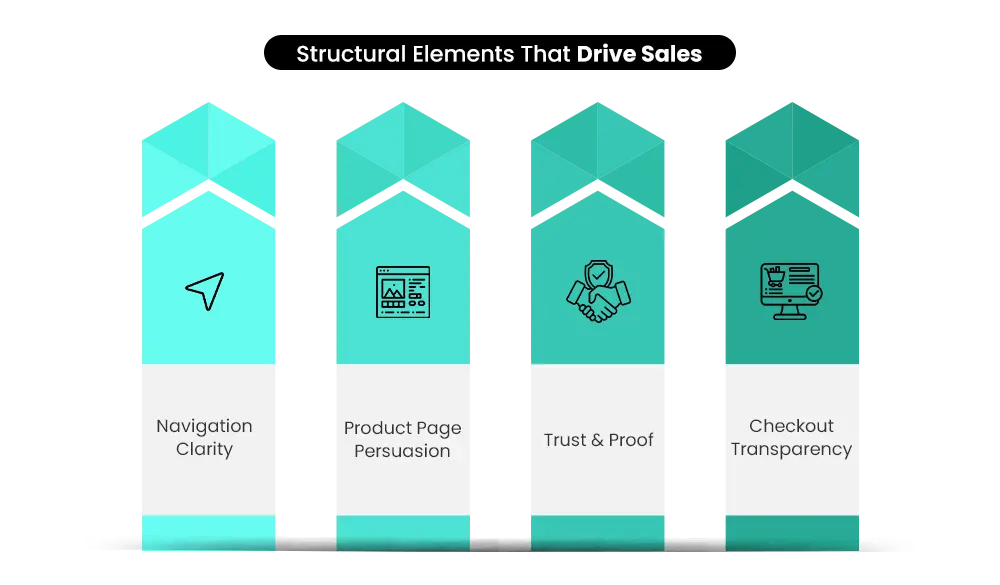
The issue isn’t technical errors but subtle configuration decisions made during setup. When product presentation, navigation clarity, trust signals, and checkout transparency are not aligned, the result can be a Shopify store not converting, even when customers seem interested.
In this article, we’ll look at the structural decisions that quietly influence store performance — from product pages and navigation to checkout flow — and why these details often explain why Shopify stores fail after launch.
Why Shopify Stores Fail After Launch (Quick Answer)
Launching a Shopify store is mostly a technical task. Getting customers to buy is a behavioural one.
After launch, sales often stall when certain parts of the store begin working against the buying decision. How the product is introduced, how easily visitors move through the catalogue, or how much confidence the store creates.
These are only a few examples. A Shopify store’s performance is shaped by many interconnected factors. When several of them misalign, the store may attract attention but struggle to turn that interest into actual purchases.
Why Shopify Store Failures Are Hard to Recognize
Most merchants expect failure to look obvious. When a store struggles, they usually imagine clear technical problems — broken checkout pages, website errors, or systems preventing customers from completing purchases.
But Shopify store issues don’t appear that way.
Instead, many stores experience what could be described as silent failure. Visitors arrive, browse products, and sometimes even reach checkout. From the outside, the store appears to be working. Yet sales remain inconsistent. Over time, merchants begin noticing patterns that are difficult to explain:
- Visitors browse multiple pages but leave without buying
- Customers reach checkout but hesitate before completing the purchase
- Marketing campaigns bring traffic, but revenue barely moves
Nothing appears broken — yet customers still walk away.
This is what makes the problem difficult to diagnose. The store functions normally, but something within the buying journey quietly interrupts the decision to purchase. Situations like this, an e-commerce store getting traffic but no sales, are where visitors interact with the store, but purchases do not follow.
For many merchants, this leads to a familiar concern: the Shopify store is not converting, even though visitors seem interested.
Studies estimate that nearly 70% of online shopping carts are abandoned before checkout is completed, showing how easily hesitation can disrupt online purchases.
Because these issues develop gradually, they often become clearer only when the store experience is reviewed more closely.
Shopify development agencies such as Mastroke, examining store performance frequently notice how small setup decisions — particularly in navigation, product pages, and checkout flow — begin building the buying journey.
Understanding these patterns is often the first step in explaining why Shopify stores fail even when the store appears technically functional.
Also Read – DIY vs Shopify Development Agency: How Your Setup Choice Affects Store Performance
Build Your Shopify Store From Scratch With Mastroke
Launch faster with Mastroke, an official Shopify Partner. We build structured stores with conversion-first design, clean setup, and features built to scale!!
Signs Your Shopify Store Has a Conversion Problem
Prior to identifying the deeper causes behind weak sales, merchants usually begin noticing certain behavioural patterns in their store analytics.
These signals usually don’t point to a single problem, but they often indicate that something in the buying journey is creating hesitation.
In many situations, these patterns are early indicators of broader ecommerce conversion problems, where visitors browse but fail to complete purchases.
Some of the most common signs include:
- Visitors spend time on product pages but still don’t purchase. Customers appear interested in the product, yet something prevents them from completing the decision.
- Customers frequently return to the same product page without buying. Repeated visits usually mean the product caught their attention, but something about the information, pricing, or presentation still leaves doubts. Merchants facing this pattern often assume that their Shopify store not making sales is a marketing issue, when the hesitation actually begins on the product page.
- People are browsing several products but never settling on one. Customers explore the store but struggle to feel confident about choosing a product.
- Questions about shipping, returns, or policies appear frequently. When visitors repeatedly look for answers about delivery times or refund policies, it usually indicates missing reassurance in the buying journey. Over time, this type of uncertainty can make merchants feel their Shopify store is not getting sales, even though customers are actively exploring the store.
When these patterns appear repeatedly, the issue isn’t just traffic alone. To understand what is interrupting the buying decision, it helps to examine how customers actually move through the store experience.
How to Diagnose Problems in Your Shopify Store ?
Before assuming the issue is marketing or competition, it helps to look at how customers are interacting with your store.
Several early indicators can reveal whether structural issues may be affecting conversions and leading to broader ecommerce conversion problems. Common warning signs include:
- Traffic without sales – Customers arrive on product pages but leave without purchasing. In fact, average ecommerce conversion rates hover around just 2–3%, meaning most visitors leave without buying.
- High cart abandonment – Shopify checkout problems disrupt purchase completion. Customers add products but abandon the checkout process
- Short product page visits – Shoppers leave before scrolling through the full page.
- Visitors browsing multiple pages without buying – Customers scanning, but your Shopify store is not making sales? This often suggests hesitation or a lack of buying confidence.
When these signals appear, the issue usually isn’t traffic alone. More often, something in the store experience — navigation, product pages, trust signals, or checkout flow — is creating friction for customers.
Taken together, these signals usually indicate which areas of the store require Shopify conversion optimization.
The Most Common Reasons Shopify Stores Fail
- Weak product pages
- Slow site speed
- Generic store design
- Lack of trust signals
- Poor mobile experience
- Checkout friction
- Overuse of Shopify apps
- Weak product discovery
📌 Key Video
Reasons You’re Not Making Sales On Shopify
When sales stall, merchants usually start investigating external factors such as:
- Advertising performance
- Product pricing
- Competition in the market
But many stores struggle due to structural issues within the store itself. These kinds of e-commerce store mistakes arise after launch as they’re usually overlooked during setup.
The real reasons why Shopify stores fail after launch often lie inside the store experience rather than marketing performance. Below are some of the most common reasons Shopify stores quietly lose sales after going live.
1. Your Shopify Product Page Isn’t Converting
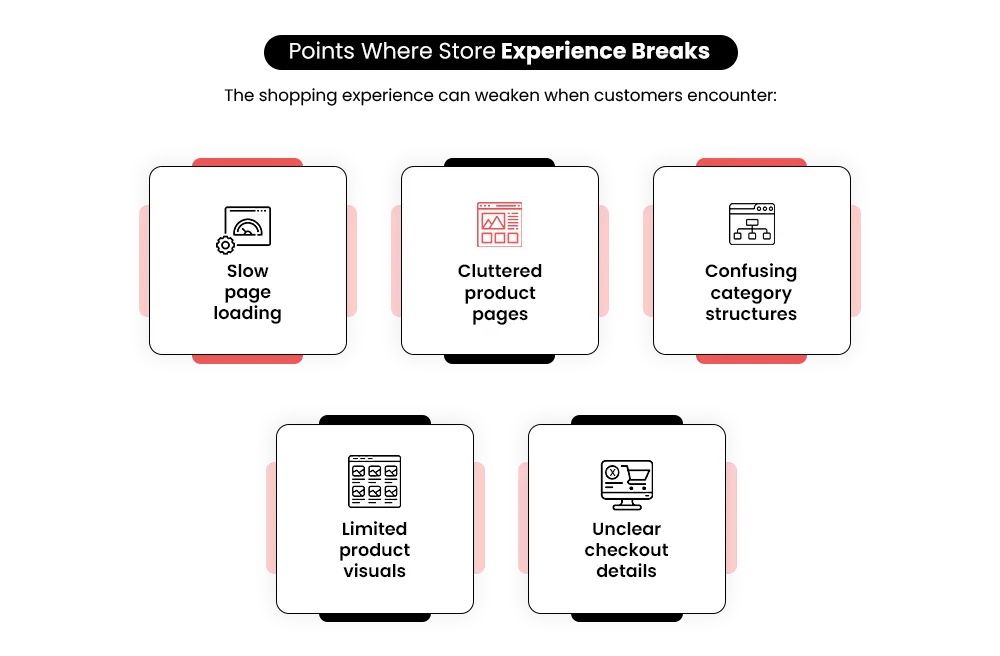
Product pages often contain the right information — just not in the order customers need. Visitors typically scan a page quickly, looking for reassurance before committing to a purchase. When value explanation, trust signals, or guarantees appear too late on the page, hesitation begins early. This is one of the most common reasons a Shopify store is not converting, even when traffic reaches product pages.
Fix: Product pages tend to perform better when value, proof, and reassurance appear early in the layout. Effective Shopify product page optimization places reviews, guarantees, or benefits near the top to build visitor confidence early.
2. Your Shopify Store Looks Generic
One of the common Shopify design mistakes new stores make is relying heavily on default themes and template layouts. While these designs function well technically, they often make stores look similar to thousands of others. When a brand lacks a clear identity or differentiation, customers may hesitate before buying.
Fix: Stores often convert better when branding feels distinct and consistent across pages. Clear messaging and visual identity help customers understand what makes the store different.
3. Your Product May Have Weak Market Demand
Sometimes the store structure is not the problem — the product itself may struggle to generate demand. If customers browse but don’t purchase, it may indicate that the product does not solve a clear problem or faces heavy competition. In these situations, merchants may feel their Shopify store is not getting sales, when the real challenge is limited demand for the product itself.
Fix: Demand usually becomes clearer through competitor research, audience feedback, or smaller product tests. These signals can reveal whether customers genuinely want the product.
4. Your Collection Pages Don’t Help Customers Decide
Collections often become large product grids without guidance. When customers encounter dozens of similar options with no clear direction, decision fatigue quickly appears. Instead of choosing a product, visitors may simply leave the page. Weak collection structure is a common Shopify collection page optimization issue.
Fix: Collections tend to perform better when they highlight key products or guide visitors toward popular options. Clear sorting and filtering can also make decision-making easier.
5. Your Shopify Navigation Confuses Customers
Navigation determines how easily customers explore a store. If menus contain too many categories or overlapping product groups, visitors may struggle to locate what they want. Confusing navigation often interrupts the buying journey early, leading merchants to feel their Shopify store is not converting even when products are relevant.
Fix: Navigation structures work best when categories are simple and organized around how customers search for products. Clear menu logic often improves product discovery.
6. Your Shopify Store Is Slow
Even small delays in page loading can affect buying decisions, leading to Shopify site speed issues. When a store takes too long to display product images or load new pages, visitors often lose patience and leave before exploring further. Speed issues frequently occur when stores rely on heavy themes, large image files, or too many scripts running in the background.
Fix: Conducting Shopify speed optimization helps. Remove unnecessary apps, scripts, and reduce large media files. Faster loading times make browsing feel smoother for visitors.
7. Too Many Shopify Apps Are Breaking the Experience
Shopify apps help extend functionality, but too many of them also create Shopify app overload problems. Installing too many can create unexpected complications. Multiple pop-ups, overlapping discount tools, or conflicting scripts may interrupt the shopping experience. Instead of helping conversions, excessive apps can make the store feel cluttered and confusing for customers.
Fix: A simpler app setup often creates a cleaner shopping experience. Removing overlapping tools usually improves both store speed and usability.
8. Customers Can’t Easily Find Products in Your Store
As product catalogues grow, organizing items becomes increasingly important. Without consistent tagging, filtering, or category logic, visitors may struggle to locate specific products. When discovery becomes difficult, customers often leave the store rather than continue searching.
Fix: Product exploration becomes easier when the catalogue follows a clear internal structure. Implementing Shopify catalogue organization elements, such as logical collections and meaningful filters, helps visitors narrow their choices without scanning the entire store.
9. Customers Don’t Trust Your Checkout
Even when customers reach checkout, uncertainty can stop them from completing a purchase. Missing policies, unclear shipping costs, or limited payment options may cause hesitation at the final stage. In many cases, this is where a Shopify store not converting becomes most visible.
Fix: Checkout experiences usually improve when policies, payment options, and shipping details feel transparent. Visible reassurance elements often help customers feel comfortable completing the order.
10. Your Product Images Don’t Build Buying Confidence
Online shoppers rely heavily on visuals when evaluating products. If product images appear generic, low-quality, or limited to only one angle, customers may hesitate to buy. Strong visuals are an important part of Shopify product page conversion optimization, because customers often rely on images to judge quality and usability.
Fix: Confidence increases when product images show the item clearly from multiple angles and real-life contexts. Visual clarity helps customers understand what they’re buying before committing.
11. Your Shopify Store Isn’t Mobile Optimized
Most e-commerce traffic now comes from mobile devices, yet many stores are still designed primarily with desktop layouts in mind. When product pages feel cramped, buttons are difficult to tap, or browsing requires excessive scrolling, customers may leave before completing a purchase. This often explains situations where a Shopify store is not getting sales despite steady mobile traffic.
Fix: Mobile browsing becomes easier when layouts prioritize readability, clear tap areas, and quick navigation. Shopify mobile optimization helps reduce friction during product exploration by creating a smoother mobile experience.
12. Your Shopify Store Has No Reviews or Social Proof
Many customers look for proof that others have already purchased the product. When stores lack reviews, testimonials, or visible buyer feedback, uncertainty naturally increases. Absence of reassurance weakens social proof for the Shopify store, making visitors less confident about completing the purchase.
Fix: Visible customer feedback often reassures new visitors during the decision stage. Reviews, ratings, and buyer experiences can provide the confidence needed to move forward.
13. Your Shopify Store Relies Only on Paid Ads
Advertising can bring traffic quickly, but relying only on paid campaigns creates instability. When ads stop performing well, or budgets change, sales can drop suddenly. In these situations, merchants often feel their Shopify store is not making sales, even though the issue lies in limited traffic sources.
Fix: Traffic sources that extend beyond advertising tend to create more stability over time. Organic search, email marketing, and content can help reduce Shopify organic traffic issues and create more consistent sales.
14. Your Store Doesn’t Bring Customers Back
Many stores focus heavily on acquiring new customers but overlook retention. Without follow-up communication or incentives to return, previous buyers may never visit again. Over time, this limits growth and leads merchants to believe their store’s conversion problem is due to traffic, when the real issue is weak retention.
Fix: Customer relationships strengthen when buyers continue hearing from the brand after their purchase. Using Shopify repeat customer strategies, such as email sequences, loyalty programs, and remarketing, helps bring customers back to the store.
15. You Expect Shopify Sales Too Quickly
Some merchants expect strong sales immediately after launching their store. However, e-commerce growth usually develops gradually as stores refine their structure, messaging, and marketing channels. When expectations are unrealistic, it may seem that a Shopify store is not selling, even though the store simply needs optimization over time.
Fix: Sustainable growth usually emerges through gradual improvements in the store experience. Continuous adjustments based on customer behaviour often lead to stronger results over time.
16. Your Shopify Store Doesn’t Guide Customers Toward Purchase
Some stores function more like product catalogues than guided shopping experiences. Visitors can browse pages freely, but there is no clear path leading them toward a purchase decision. Without direction, customers may explore the store but never reach checkout — one of the patterns that helps explain why Shopify stores fail to convert visitors consistently.
Fix: So, how to increase Shopify sales? Customers are more likely to buy when the store clearly guides them from discovery to checkout. Clear navigation paths and product progression can help customers move toward purchase with less hesitation.
Also Read – 7 Common Shopify Store Setup Mistakes First-time Owners Make (And How to Avoid Them)
When Structural Issues Start Costing Real Revenue
Many store issues seem insignificant when traffic levels are still low. But as traffic grows, their impact becomes more noticeable.
What begins as occasional hesitation during browsing or checkout can gradually translate into lost revenue. When visitors repeatedly encounter uncertainty during the buying journey, conversion rates begin to decline.
With time, these structural issues affect customer experience and overall store performance.
| Store Issue | What Happens | Real Business Impact |
| Weak product pages | Customers hesitate before purchasing | Lower conversion rate |
| Slow store speed | Visitors leave before browsing fully | Lost traffic |
| Poor navigation | Products become harder to find | Missed sales |
| Checkout friction | Customers abandon their cart | Direct revenue loss |
Even a small 1–2% drop in conversion rate can translate into significant revenue loss as traffic scales. This is one of the major reasons why Shopify stores fail to reach their full potential after launch.
Which is why many merchants eventually begin asking a deeper question: What’s actually causing these stores to underperform?
A Realistic Plan to Fix the Problems Behind Why Shopify Stores Fail
Instead of trying to fix everything at once, successful merchants usually begin by understanding where the buying journey starts losing momentum. Structural issues usually don’t appear in isolation, which is why store performance often improves when the experience is evaluated as a whole.
Many merchants approach this process using a structured Shopify store audit checklist, reviewing the store experience step by step to identify where customers begin hesitating.
A structured review typically focuses on a few key areas that shape how visitors move through the store.
- Step 1 — Look closely at the store’s structure: Navigation paths, collection layouts, and product page organization often reveal where browsing becomes confusing or slow.
- Step 2 — Examine the purchase journey: The way visitors move from product discovery to checkout can expose subtle moments where hesitation appears. Many merchants review this flow using a Shopify store optimization checklist, identifying pages where customers drop off before completing the purchase.
- Step 3 — Reduce unnecessary technical complexity: Over time, many stores accumulate layers of apps and scripts that quietly affect performance and user experience. Simplifying these elements often helps address Shopify app overload problems that interrupt browsing or slow down the store.
- Step 4 — Strengthen signals that build buyer confidence: Clear policies, visible reviews, and transparent purchase details contribute to Shopify store customer experience optimization, guiding them to feel more comfortable completing an order.
Looking at these areas together often reveals patterns that are easy to miss when problems are examined individually. Shopify experts reviewing store performance regularly notice how small decisions across navigation, product pages, and checkout begin influencing each other over time.
It’s the kind of pattern Shopify partners like Mastroke pay attention to early on — addressing these structural details during the setup stage so they don’t quietly affect conversions later.
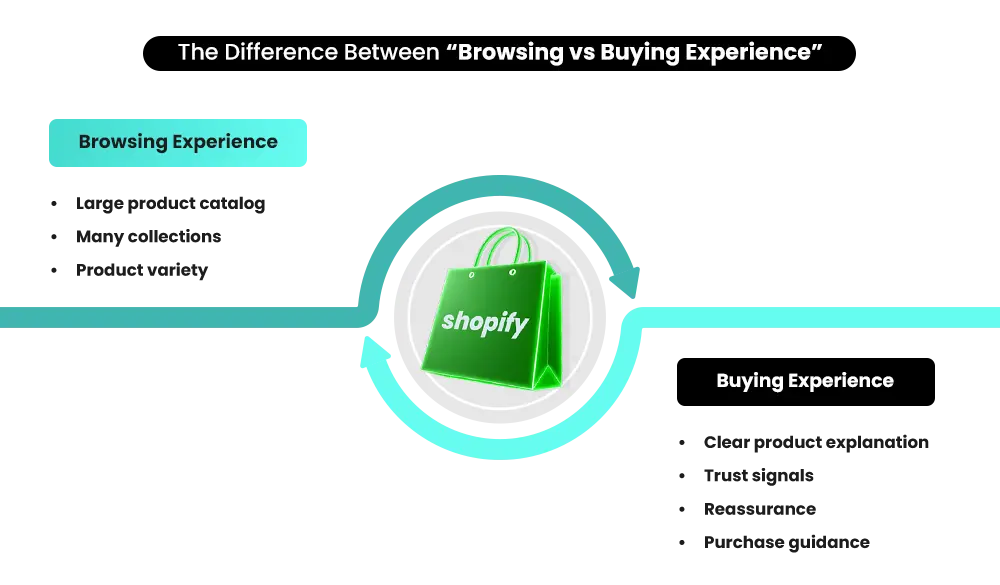
Before Your Shopify Store Starts Losing Sales
Many Shopify stores don’t fail dramatically. Instead, they quietly underperform for long periods of time. Traffic may continue arriving, visitors browse products, and the store appears active — yet sales never grow at the pace merchants expect.
When this happens, the first reaction is often to increase ad budgets, install more apps, or redesign parts of the store. While those changes may help in some cases, they don’t always address the underlying issue.
Often, the real problem lies within the store structure itself.
Small points of friction in navigation, product pages, or checkout flow can gradually reduce the store’s ability to convert visitors into buyers.
Gradually, these subtle interruptions accumulate and begin affecting revenue. That’s why many merchants begin looking for practical Shopify store optimization tips to improve store performance. A Shopify store audit from specialists like Mastroke can reveal hidden issues affecting:
- conversion flow
- navigation clarity
- store structure
- buyer confidence
Sometimes these issues can be resolved with small adjustments. But in other cases, these findings might lead to greater structural improvements — which is where Mastroke’s Shopify store redesign approach can help.
When identified in time, such setup issues can often be fixed without a full redesign. That’s why identifying these problems early can prevent months of lost traffic and wasted marketing spend — and help address the critical reasons why Shopify stores fail to generate consistent sales.
Also Read – Before You Hire a Shopify Agency in 2026: Questions Every Merchant Must Ask
Conclusion — The Real Reason Why Shopify Stores Fail
Launching a Shopify store is relatively straightforward. Building one that consistently converts visitors into customers is far more complex.
Many stores appear complete after launch. Products are visible, pages load correctly, and the checkout works. Yet the real test begins once customers start interacting with the store.
Only after customers land on the store do the real reasons why Shopify stores fail to generate consistent sales become visible. The difference usually lies in how intentionally the store experience was designed. Stores that perform well tend to guide product discovery clearly, reduce friction during browsing, and build buyer confidence before customers reach checkout.
When these elements are missing, merchants often feel their Shopify store is not selling despite steady traffic. In many cases, the issue isn’t demand, but the way customers move through the buying journey — from product pages to checkout.
A Shopify store may look finished once it goes live. But long-term performance often depends on how carefully the structure behind that experience was built.
Build your dream Shopify store today
Bring your vision to life with Mastroke, an official Shopify Partner. We design and develop high-converting, scalable Shopify stores with clean structure and future-ready features—built to grow with your business.
FAQs
Q1. Why do Shopify stores fail after launch?
Many Shopify stores fail after launch because of structural issues inside the store experience. Problems such as weak product pages, confusing navigation, or checkout friction can discourage customers from completing purchases. These issues often remain unnoticed until real traffic starts interacting with the store.
Q2. What is the most common reason Shopify stores fail?
One of the most common reasons why Shopify stores fail is a weak conversion structure. When the store doesn’t guide visitors clearly from product discovery to checkout, customers may browse products but hesitate to complete the purchase, leaving the Shopify store not converting even when interest in the product exists.
Q3. How can I tell if my Shopify store has conversion problems?
Certain behavioural signals often indicate conversion problems. These include traffic without sales, high cart abandonment, visitors leaving product pages quickly, or customers browsing multiple products without buying – situations where merchants feel their Shopify store is not making sales despite steady visitor activity.
Q4. Can Shopify apps hurt store performance?
Yes, installing too many apps can affect store performance. Extra scripts, pop-ups, or overlapping tools may slow the store or interrupt the browsing experience, which can reduce conversions.
Q5. How often should Shopify stores be optimized?
Most Shopify stores benefit from periodic reviews every few months. As product catalogs grow and customer behaviour evolves, regular optimization helps maintain a smooth shopping experience and support ongoing Shopify conversion optimization.
Q6. How can I fix a Shopify store that isn’t selling?
Improving a Shopify store not selling usually starts with evaluating the buying journey. Reviewing product pages, navigation clarity, trust signals, and checkout transparency often reveals where customers begin hesitating before purchase.