Why do over 5 million merchants trust Shopify to build and scale their stores? The answer lies in its simplicity, flexibility, and power to help businesses grow fast without needing to code or hire a full tech team. If you’re thinking about launching your online store, Shopify store setup is one of the most beginner-friendly ways to get started.
Did you know that some of the world’s most famous brands—like Netflix’s online shop, Red Bull, and Heinz Co., run on Shopify? What began in 2006 as a simple platform for selling snowboards has evolved into an all-in-one, cloud-based eCommerce builder powering over $700 billion in total sales. Whether you’re a solopreneur selling handmade products or a growing retailer looking to expand globally, Shopify offers scalable tools to manage everything from inventory to marketing—all in one dashboard.
You might be wondering, “Is Shopify good for beginners starting an online store?” Absolutely. This step-by-step guide will walk you through how to start a Shopify store from scratch, optimize it for sales, and turn your business idea into a revenue-generating reality.
Why Understanding the Ecommerce Landscape is Crucial for Shopify Merchants?
Before you start setting up a Shopify store, it’s essential to take a closer look at whether Shopify is the right platform for your business. Doing this helps you make informed decisions and ensures long-term success for your online store.
Why Choose Shopify for Your Online Store?
Shopify holds a 10.32% share of the global eCommerce market, making it one of the most trusted platforms for building and scaling online stores. Its intuitive Shopify admin dashboard simplifies store setup, management, and optimization for all experience levels.
Here’s why Shopify stands out for your online business:
- User-friendly interface: Easy-to-navigate dashboard for smooth store management.
- Multiple sales channels: Sell across marketplaces, social media, and websites effortlessly.
- Customization options: Access free and premium themes, apps, and templates.
- Shopify App Store: Choose from thousands of tools to automate marketing, inventory, and customer service.
- Built-in security: Protect your customers with SSL encryption and fraud prevention.
- 24/7 support: Get help anytime from Shopify’s expert team.
- Shopify Payments: Accept payments instantly without extra gateway fees.
Build Your Shopify Store From Scratch With Mastroke
Launch faster with Mastroke, an official Shopify Partner. We build structured stores with conversion-first design, clean setup, and features built to scale!!
Starting an Online Store in 2025
The eCommerce industry is evolving rapidly, making 2025 the perfect time to start a Shopify store and tap into global opportunities. With a quick and seamless Shopify store setup, anyone—from solopreneurs to small business owners—can launch and scale an online business with ease.
Here’s why starting an online store now makes sense:
- Low startup costs: Begin selling online with minimal investment.
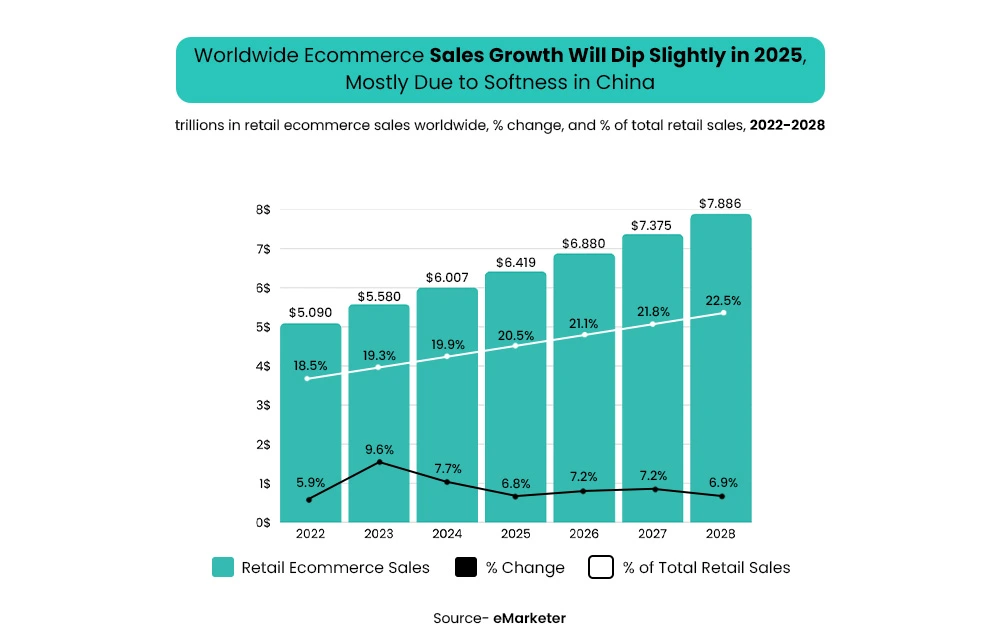
- Expanding market: Global eCommerce sales are projected to hit $6.8 trillion by 2026.
- Smart technology: Shopify manages hosting, checkout, and updates for you.
- Flexible business models: Try dropshipping, print-on-demand, or digital products.
- Work from anywhere: Manage your store from any device, anywhere in the world.
Starting your Shopify store today sets the foundation for long-term digital growth and financial independence.
– Also Read: 7+ Shopify Design Mistakes Store Owners Make (and How Experts Fix Them)
Setting Up Your Shopify Store: A Step-by-Step Checklist
Let’s start the step-by-step checklist for your Shopify store setup:
Step 1: Choose the Right Shopify Plan and Domain
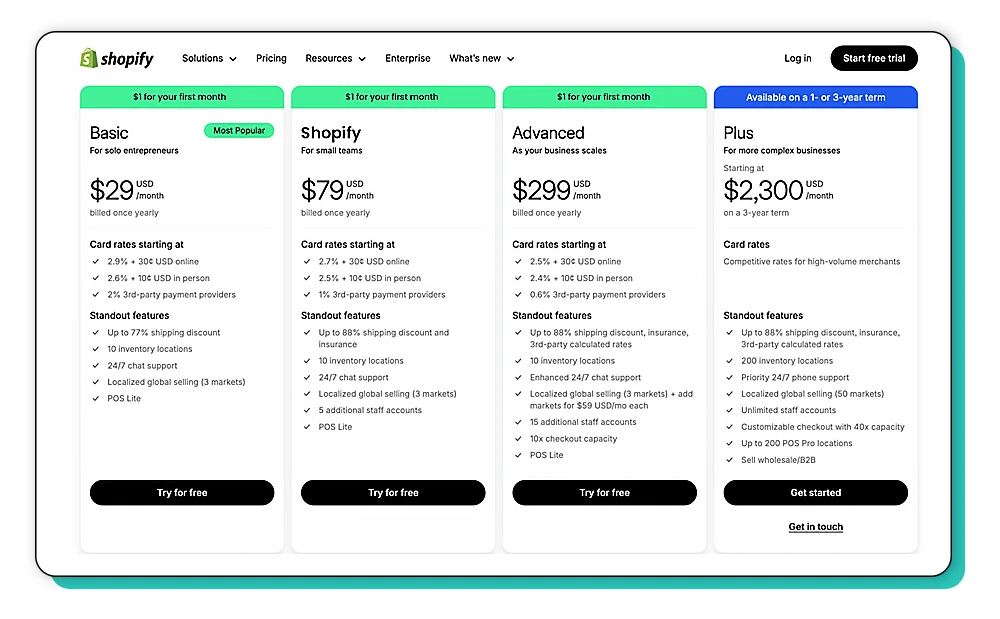
When figuring out which Shopify plan is best for a new store, start by looking at your goals and budget. Here’s a quick Shopify plan comparison:
- Basic Shopify – Perfect for beginners. Lower cost, essential features like an online store, unlimited products, and discount codes.
- Shopify – Mid-tier. Adds better reporting, lower transaction fees, and more staff accounts—ideal if you expect steady growth.
- Advanced Shopify – High-level analytics, custom reporting, and the lowest fees—best for scaling big operations.
As part of your Shopify store optimization checklist, secure a domain that’s easy to remember, matches your brand name, and works globally. Connecting your domain in Shopify is simple; you can buy directly from Shopify or use one you already own.
For branding, keep your store name, logo, and colors consistent across all channels. To boost reach, think about GEO optimization—set up regional currencies, language, and shipping zones to target key markets.
If you’re learning how to set up a Shopify store from scratch, most new merchants start with Basic Shopify and upgrade as sales grow. It’s all about scaling at the right pace without overspending early.
Step 2: Set Up Your Shopify Storefront
If you’re wondering how to design your Shopify homepage for more conversions, start inside the Shopify Admin, your control center for everything store-related. Here, you can manage products, customize themes, track sales, and view analytics right from the dashboard.
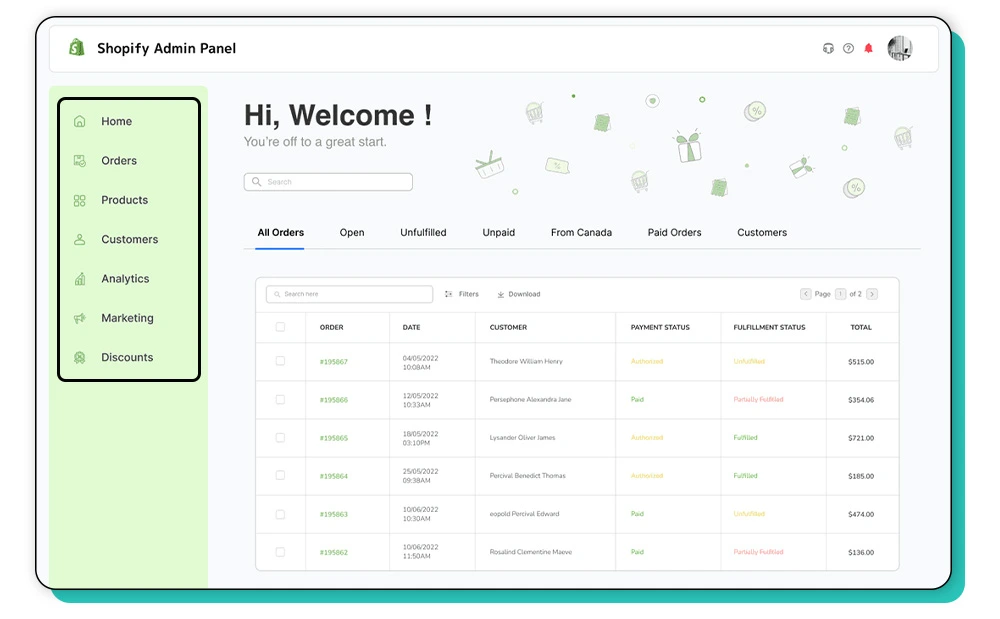
The navigation is clean and beginner-friendly, so take time to explore menus like “Online Store,” “Products,” and “Settings” to understand how each impacts your Shopify store setup.
When building your storefront, always think mobile-first. Most customers shop on their phones, so choose a responsive theme and keep layouts simple:
- Highlight your best-selling or featured products near the top.
- Use high-quality visuals with plenty of white space.
- Add clear CTAs like “Shop Now” or “Add to Cart.”
- Keep menus short and navigation intuitive.
If design isn’t your strength, you can always hire someone to set up a Shopify store or explore professional Shopify store setup services. The right homepage design shapes your shoppers’ first impression and drives those crucial clicks that turn visitors into loyal customers.
Step 3: Add and Optimize Your Products
Ready to add your first products? In Shopify, you’ll use the “add a product” button in the product section of your Admin.
Start by organizing items into product categories and collections—like “New Arrivals” or “Summer Essentials“—to make browsing simple for your customers. You can also use variants for products that come in different sizes or colors, keeping your product pages neat.
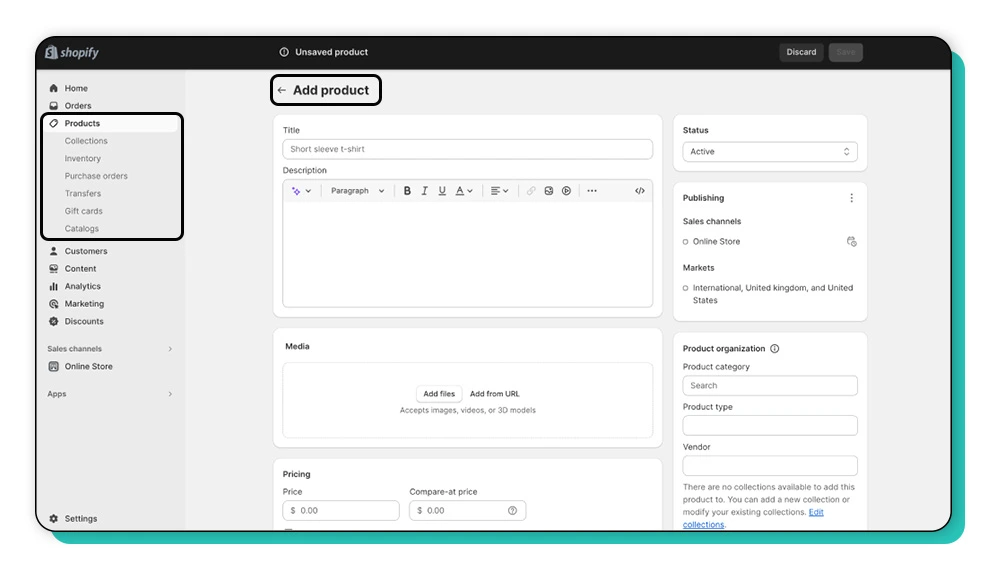
For Shopify store optimization, focus on strong SEO practices. Here’s how to write an SEO-friendly product description:
- Use keyword research: Find out what shoppers search for and include those phrases naturally in your product titles and descriptions.
- Add high-quality photos and videos: Clean, clear media builds trust and increases conversion.
- Leverage schema data: Shopify automatically adds some schema, but you can enhance it with apps to help your product pages appear in rich results (like price, stock, reviews).
- Try AI-generated copy tools for ideas, but always edit for clarity and branding.
So, if you’re asking, “How do I write SEO-optimized product descriptions for Shopify?”—think like your customer, use clear headings and bullet points, and highlight the benefits, not just features.
Step 4: Optimize Shopify Store Speed & Performance
A fast, responsive store is essential for keeping visitors engaged and increasing sales. During your Shopify store setup, optimizing Shopify site speed should be a top priority—it directly impacts your customer experience and search rankings.
If you’ve ever asked, “How do I fix slow loading speed on my Shopify store?” here’s what you need to know:
- Use caching: Shopify automatically caches pages, but you can further boost performance by minimizing large scripts and optimizing your theme.
- Compress images: Use lightweight image formats and apps like TinyIMG or Crush.pics to reduce file size without losing quality.
- Ensure mobile responsiveness: Most customers browse and buy on mobile, so test your store layout, buttons, and visuals on multiple devices.
- Leverage AI SEO tools: They can automatically detect technical issues, optimize assets, and suggest improvements for faster load times.
A faster site not only boosts conversions but also helps your products to sell better, as customers trust and stay longer on smooth-performing stores.
Step 5: AI SEO Optimization for Shopify Stores
Once you’re done launching your online store, the next step is fine-tuning visibility through AI SEO for Shopify store optimization. AI-driven tools simplify and automate SEO tasks, helping you attract the right customers and boost conversions effortlessly.
If you’re wondering, “How can I use AI SEO tools to grow my Shopify store?” here’s how:
- Optimize metadata automatically: Tools like SurferSEO and Frase.io analyze competitor pages and suggest SEO-rich titles, descriptions, and keyword placements.
- Understand keyword intent: AI helps identify search intent behind queries, ensuring your product pages and blogs align with what buyers are actually searching for.
- Leverage voice search optimization for Shopify: With more users asking AI assistants to find products, natural language and question-based content improve your store’s discoverability.
- Use content generation tools like Jasper: Create compelling product descriptions and blog content that both humans and AI search engines love.
Partnering with a Shopify Optimization Service ensures all these tools work together—helping your store climb search rankings faster and drive consistent organic traffic.
– Also Read: How to Choose the Right Shopify Store Setup Agency for Your Brand?
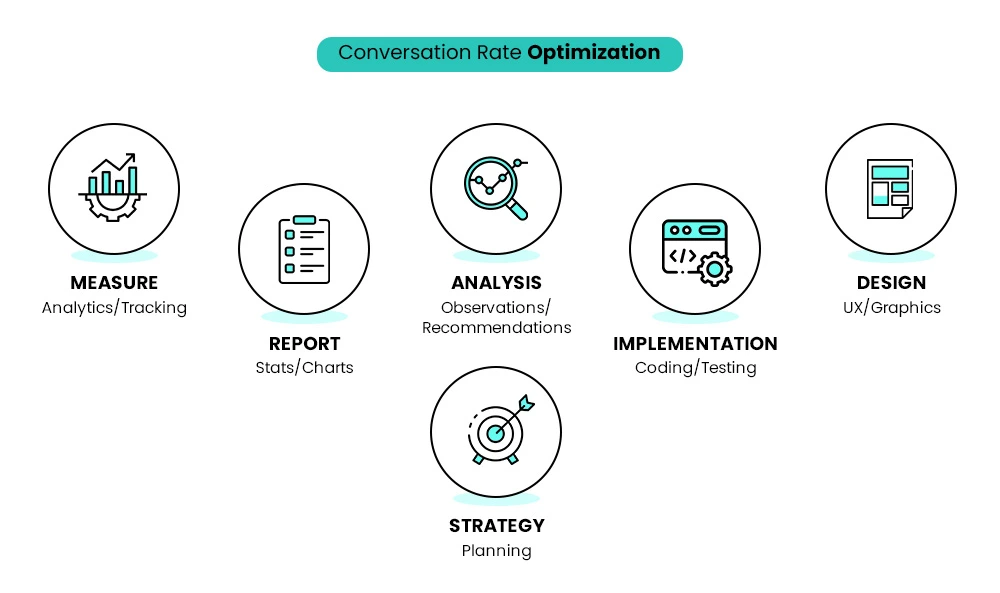
Step 6: Conversion Optimization (CRO + UX)
Once your Shopify store setup is complete, your next priority should be turning visitors into paying customers. That’s where conversion optimization (CRO + UX) comes in.
If you’re wondering, “What are the best Shopify CRO strategies for beginners?” Here’s a clear breakdown.
- Add social proof: Customer reviews, star ratings, and real testimonials build trust and reduce buyer hesitation.
- Use clear CTAs: Strong, action-driven buttons like “Buy Now” or “Add to Cart” guide users toward completing a purchase.
- Simplify the checkout process: A clean, distraction-free checkout page minimizes drop-offs and improves the buying experience.
- Split test key elements: Use A/B testing to experiment with product images, CTA colors, layouts, or pricing.
- Personalize through AI: AI tools can dynamically adjust recommendations and offers based on user behavior.
Well-designed high converting Shopify product pages combined with a frictionless checkout can significantly boost your revenue. By refining user experience step by step, you can turn casual visitors into loyal customers and scale your store efficiently.
Step 7: Marketing Setup (Email, Ads & Social Integration)
Once your Shopify store setup is ready, it’s time to attract traffic and build a loyal customer base through smart marketing. If you’re asking, “How do I market my Shopify store for free?”—the good news is, there are plenty of effective strategies.
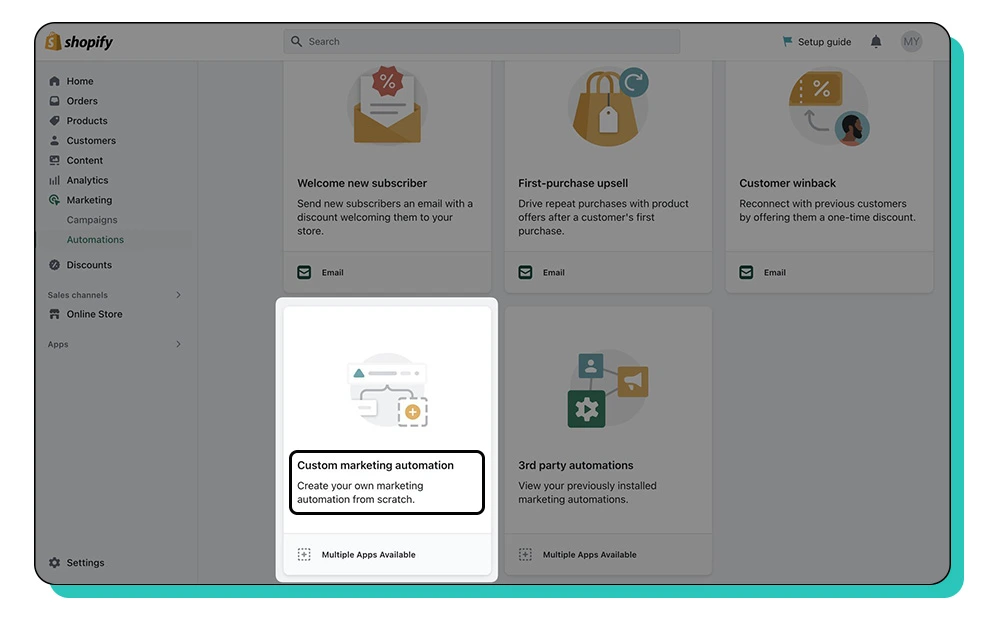
- Integrate social channels: Connect your store with Facebook, Instagram, and Google Ads to reach your target audience where they already spend time.
- Leverage email marketing: Create automated workflows to welcome new subscribers, retarget abandoned carts, and re-engage existing customers.
- Run retargeting campaigns: Remind interested shoppers about products they viewed but didn’t purchase.
- Optimize Shopify for mobile: Ensure all campaigns and landing pages work seamlessly on mobile devices for maximum conversions.
- Use AI SEO strategies: Pair your marketing with SEO to rank higher and build organic visibility on search engines and AI-powered platforms.
- Tap into social media: Share consistent content, user-generated posts, and product updates to grow your following without heavy ad spend.
With the right marketing setup, you can drive traffic, boost conversions, and build brand loyalty—all while staying cost-efficient.
Step 8: Launch Checklist for New Shopify Stores
Before you go live, a solid pre-launch review can save you from costly mistakes. If you’re asking, “What should I check before launching my Shopify store?”—this 15-point launch checklist has you covered.
Whether you’re handling your Shopify store setup yourself or working with a Shopify setup expert, double-check each step to ensure a smooth start.
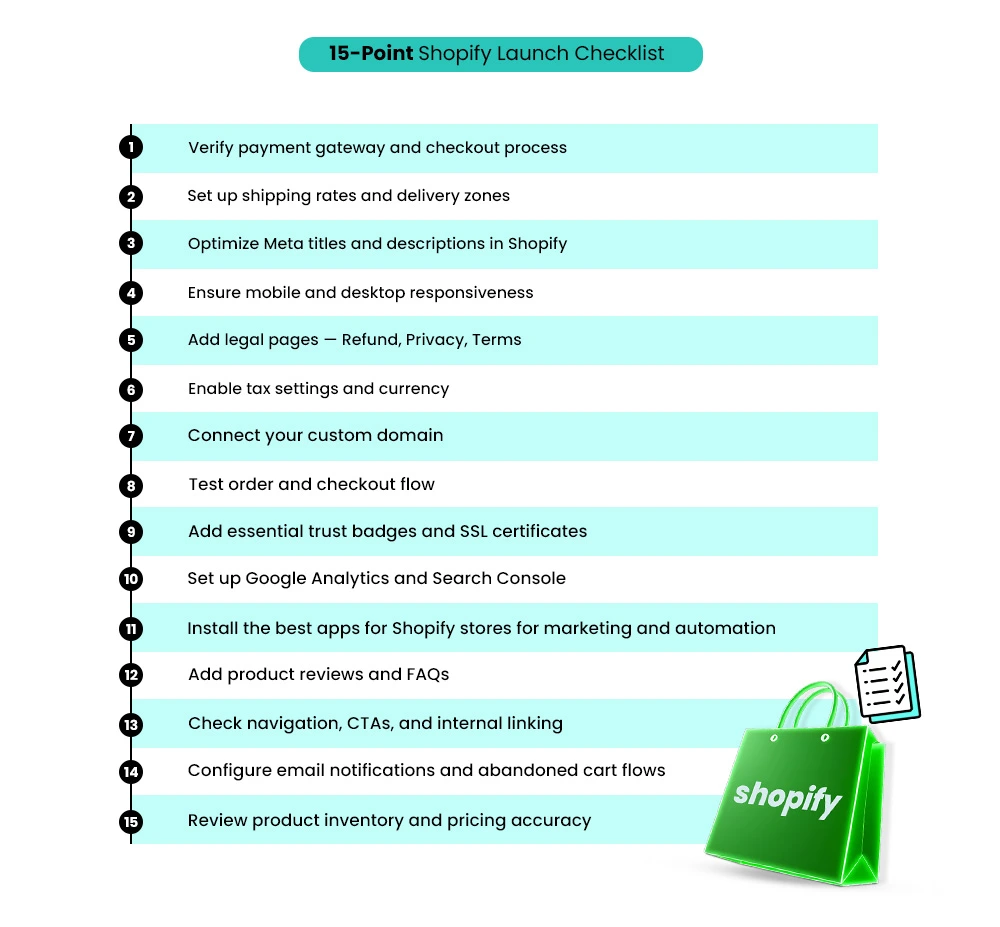
✅ 15-Point Shopify Launch Checklist:
- Verify payment gateway and checkout process.
- Set up shipping rates and delivery zones.
- Optimize Meta titles and descriptions in Shopify.
- Ensure mobile and desktop responsiveness.
- Add legal pages — Refund, Privacy, Terms.
- Enable tax settings and currency.
- Connect your custom domain.
- Test order and checkout flow.
- Add essential trust badges and SSL certificates.
- Set up Google Analytics and Search Console.
- Install the best apps for Shopify stores for marketing and automation.
- Add product reviews and FAQs.
- Check navigation, CTAs, and internal linking.
- Configure email notifications and abandoned cart flows.
- Review product inventory and pricing accuracy.
This Shopify beginner guide ensures your store is optimized, compliant, and ready for visitors on day one. A strong launch builds trust and sets the tone for growth.
Step 9: Post-Launch Optimization
Once your store is live, the real work begins—continuous post-launch optimization. If you’re wondering, “How do I improve my Shopify store after launch?”, the answer lies in tracking, analyzing, and adapting. Even the best Shopify store setup can underperform without proper monitoring.
1. Track and analyze performance using smart tools:
- Use Google Search Console to monitor indexing, keyword rankings, and page performance.
- Integrate GA4 to understand user behavior and conversion paths.
- Leverage AI Analytics tools to identify trends, audience segments, and sales opportunities.
2. Apply GEO strategies for growth:
- Create tailored content for top markets like the US, UK, and Canada.
- Localize product descriptions, pricing, and promotions.
- Adjust your campaigns based on time zones, cultural trends, and buying behavior.
3. Optimize regularly:
- Refresh product pages with updated keywords and visuals.
- Improve load speed and checkout flow.
- Test new marketing channels and retargeting strategies.
Working with a Shopify setup expert can make this process more efficient. Consistent post-launch optimization turns a good store into a high-performing, scalable business.
Step 10: Scaling Your Shopify Store
Once your store is stable, it’s time to focus on scaling your Shopify store. Growth isn’t just about adding more products — it’s about building smarter systems. A solid Shopify store setup lays the foundation, but scaling requires strategy, automation, and personalization.
1. Boost revenue through smart upselling and subscriptions:
- Add upsell and cross-sell recommendations on product and cart pages.
- Introduce subscription models for recurring purchases to ensure steady revenue.
2. Leverage automation:
- Automate email flows, abandoned cart recovery, and inventory updates.
- Use AI tools to personalize offers and predict buying patterns.
3. Expand your reach with omnichannel strategies:
- Sell across multiple platforms like Amazon, Instagram, and TikTok.
- Keep your inventory, pricing, and promotions consistent everywhere.
4. Use AI-driven insights:
- Predictive analytics can help you identify top-performing products and future trends.
- AI recommendations enhance customer experience and average order value.
5. Follow a scaling framework:
- Regularly revisit your Shopify store optimization checklist to keep your store efficient and competitive.
- Use AI SEO for Shopify store growth to boost visibility and reach new audiences.
Scaling smartly turns a growing business into a sustainable brand.
Common Mistakes to Avoid When Starting a Shopify Store
Learning from the mistakes of others can save you time, money, and unnecessary frustration during your Shopify store setup. Many new entrepreneurs fall into the same traps, slowing down growth and hurting long-term success. Here are five common Shopify mistakes to avoid when launching your store:
1. Building Without Validating
Many beginners spend months perfecting their store before confirming if the product actually solves a real problem. Skipping validation can cost you both time and money. Start with small tests — such as surveys, pre-orders, or launching on a single channel — to validate demand before fully building. When you prove there’s genuine interest, your investment becomes strategic, not speculative.
2. Neglecting Mobile Optimization
More than 45% of all ecommerce traffic comes from mobile devices, and poor mobile experiences can crush conversion rates. A desktop-only focus can lead to slow pages, hard-to-navigate menus, and lost sales. Choose a responsive Shopify theme, optimize your images, and test every page on multiple mobile devices to ensure a smooth, frictionless checkout experience.
3. Unclear Shipping Policies
Hidden costs and unclear shipping timelines are leading causes of abandoned carts. Shoppers expect transparent and predictable shipping information. Always display shipping costs, delivery estimates, and return policies upfront. Offering free shipping or flat-rate options can also boost trust and encourage higher order values. Clear policies mean fewer surprises—and happier customers.
4. Ignoring Legal Requirements
Many new store owners overlook essential legal steps like business registration, tax compliance, and privacy policies. This can lead to future penalties or shutdowns. Before launching, research the legal requirements in your region, set up clear terms and conditions, and ensure your policies align with consumer protection laws. Protecting your business early prevents bigger issues later.
5. Expecting Overnight Success
Shopify makes launching easy—but building a profitable business takes time. Expecting instant sales can lead to disappointment and burnout. Real growth comes from consistent marketing, product refinement, and listening to your customers. Stay patient, optimize regularly, and build trust over time. Sustainable success compounds—it doesn’t happen overnight.
Pro Tip: Mistakes are part of the journey. What matters is learning quickly, adapting smartly, and building your Shopify store on a strong foundation.
– Also Read: How to Optimize Your Shopify Store for Better UX and Retention?
Conclusion
Launching your online store doesn’t have to feel overwhelming. With the right Shopify store setup, clear strategy, and a focus on long-term growth, you can build a strong foundation from day one. Shopify gives beginners and growing businesses the tools they need to launch fast, customize easily, and scale confidently.
From picking your niche to optimizing speed, integrating AI SEO, improving CRO, and marketing your products effectively—every step plays a role in your success. This Shopify beginner guide is designed to help you avoid common pitfalls, stay organized, and keep your store running smoothly.
Remember, Shopify store optimization isn’t a one-time task; it’s an ongoing process. The most successful stores continually refine their strategy, listen to their customers, and leverage new tools to stay ahead.
Whether you’re starting small or dreaming big, your journey begins with one step—launching your online Shopify store the smart way.
Build your dream Shopify store today
Bring your vision to life with Mastroke, an official Shopify Partner. We design and develop high-converting, scalable Shopify stores with clean structure and future-ready features—built to grow with your business.
FAQs-
1. How do I start a Shopify store from scratch with no experience?
You can start by signing up on Shopify, choosing a theme, adding your products, and customizing your store settings. Shopify’s setup wizard makes the process beginner-friendly.
2. What’s the best Shopify plan for new ecommerce businesses?
For most new merchants, the Basic Shopify plan is ideal. It offers essential tools for store setup, payments, and SEO at an affordable monthly cost.
3. How can I optimize my Shopify store for SEO and AI-powered search engines?
Focus on AI SEO strategies—use structured data, natural language content, and voice-search-friendly keywords. Tools like SurferSEO and Jasper help automate optimization.
4. What are the key steps before launching my Shopify store?
Test payment gateways, add legal policies, set up analytics, compress images for speed, and double-check your meta tags and alt texts for SEO readiness.
5. How do I make my Shopify store rank higher in Google and ChatGPT results?
Use AI SEO tools to identify intent-based keywords, create high-quality product descriptions, and strengthen topical authority through blogs and FAQs.
6. Can I migrate from Wix or WooCommerce to Shopify without losing SEO?
Yes. You can migrate using tools like Cart2Cart or Shopify’s import option. Ensure URL redirection, product schema, and meta data transfer for minimal SEO loss.