
The holiday rush is finally over, but the data left behind tells a story. Did your store slow down during peak traffic? Were customers dropping off at the final checkout step?
Holiday 2025 likely exposed hidden cracks in your website. Using a Shopify store audit checklist 2026 helps you find these conversion leaks before you spend another dollar on ads.
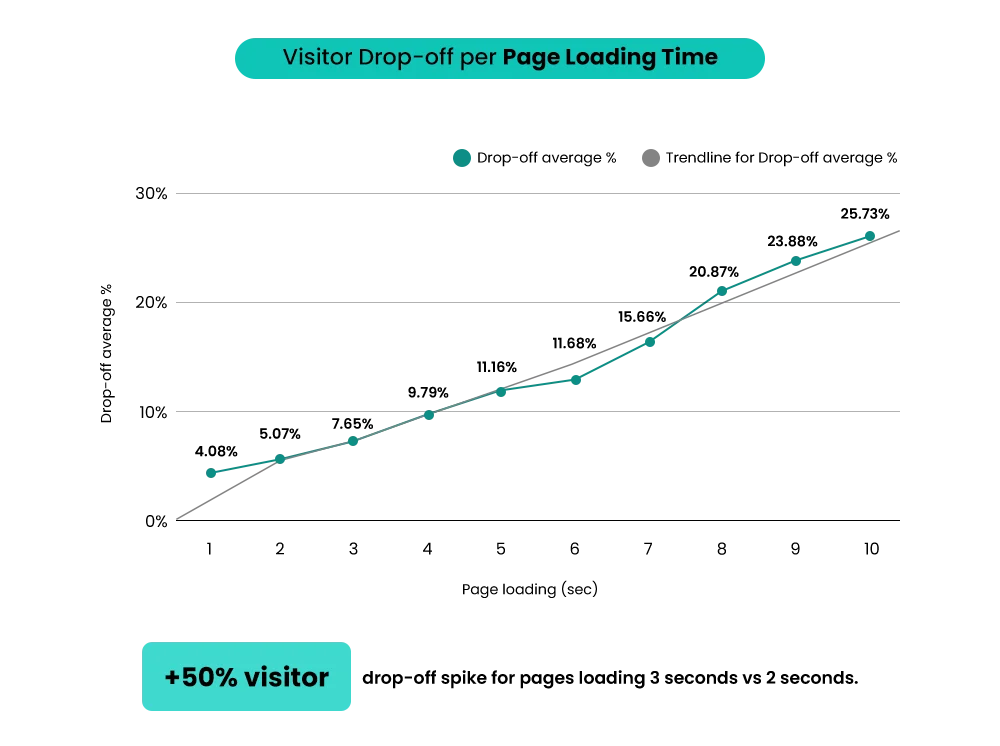
Scaling a store with technical issues is like pouring water into a leaky bucket. You might get more traffic, but your profit disappears through the holes. Research shows that just a one-second delay in page load time can drop your conversions by 7%.
In 2026, the game has changed. AI-driven search and new user experience signals now decide who shows up on page one. A quick audit beats a random marketing campaign because it fixes the foundation first.
This checklist is perfect for early-stage brands hitting a growth plateau. It is also vital for established merchants planning international expansion or major ad spend. Let’s make sure your store is healthy enough to handle the growth you have planned for this year.
Shopify Speed & Performance Audit Checklist
A slow store is a silent profit killer. In fact, Google research shows that even a 0.1-second delay in page load can drop your conversion rates by 8.4%. As you run your store audit checklist for Q1 2026, use these steps to ensure your site stays fast and competitive.
A). Core Web Vitals (2026 Benchmarks)
Google now uses Core Web Vitals (INP) to measure how “snappy” your site feels. Unlike the old metrics, INP tracks every click and tap during a user’s entire visit.
- The Big Three: Aim for an LCP (loading) under 2.5s, CLS (stability) under 0.1, and INP (responsiveness) under 200ms.
- Homepage vs. PDP: Your homepage often carries heavy branding, but your Product Detail Pages (PDPs) drive sales. Audit both to ensure high-intent buyers don’t bounce.
- The Mobile Gap: Most Shopify traffic is mobile. If your desktop site is fast but mobile feels “laggy,” you are losing the majority of your audience.
Build Your Shopify Store From Scratch With Mastroke
Launch faster with Mastroke, an official Shopify Partner. We build structured stores with conversion-first design, clean setup, and features built to scale!!
B). App Bloat & Script Cleanup
Every app you add to Shopify brings extra weight. This section of your Shopify performance audit checklist targets hidden “ghost” code.
- Zombie Scripts: When you delete an app, its code often stays in your theme.liquid file. These scripts still try to load, causing major Shopify speed issues.
- The “One-App” Rule: Do you have three different apps for upsells, rewards, and pop-ups? Look for all-in-one tools to reduce the number of external requests.
- Liquid Overload: Check your theme files for excessive “if/else” logic that slows down the server before the page even starts to draw.
C). Image & Media Optimization
Visuals sell products, but unoptimized files are the most common Shopify slow store fixes.
- Modern Formats: Stop using PNGs for everything. Switch to WebP or AVIF to cut file sizes by up to 50% without losing quality.
- Native Video: Avoid embedding YouTube or Vimeo players if possible. Use Shopify’s native video player to keep the code light and the playback smooth.
- Consistency is Key: Ensure all product images use the same aspect ratio to prevent the page from “jumping” (CLS) while it loads.
– Also Read- The Ultimate Guide to Shopify Store Setup and Optimization (Start from Scratch)
UX Audit – Can Shoppers Buy Easily in 2026?
User experience is the heart of your Shopify store audit checklist 2026. Even with perfect marketing, a confusing site will kill your sales. Shoppers in 2026 have zero patience for friction. If they can’t find what they need in seconds, they will leave.
A). Homepage & First-Impression Checks
First impressions are almost entirely design-led. According to recent research, it takes only 0.05 seconds for a user to form an opinion about your website.
- The Above-the-Fold Test: Your value proposition must be crystal clear before a user scrolls. What do you sell? Why should they care?
- CTA Clarity: Your primary button should pop. Use high-contrast colors so it stands out against the background.
- Visual Hierarchy: Remove clutter that distracts from the main goal. A busy homepage leads to high bounce rates in Google Search Console.
B). Navigation & Product Discovery
If customers can’t find it, they can’t buy it. This is a common area for conversion blockers shopify stores face.
- Logical Menus: Keep your main menu simple. Group products into intuitive categories that make sense to a first-time visitor.
- Filter Usability: Collection filters should be fast and easy to use. Ensure users can sort by price, size, or color without the page refreshing every time.
- Search Accuracy: Use the Shopify Search & Discovery app to power your search bar. It should handle typos and suggest popular products instantly.
C). Mobile-First UX Checks
Most of your traffic comes from phones, making a Shopify mobile audit essential for Q1.
- The Thumb Zone: Place important buttons where they are easy to reach with one hand. Keep your “Buy” buttons in the bottom half of the screen.
- Sticky Elements: A sticky “Add to Cart” button keeps the purchase option visible even as users scroll long product pages.
- Tap Targets: Make sure buttons aren’t too close together. This prevents “fat-finger” errors that frustrate shoppers and increase load times for their journey.
– Also Read- How to Optimize Your Shopify Store for Better UX and Retention?
CRO Audit – Where Are You Losing Sales?
A high-traffic store is only successful if those visitors actually buy. A shopify CRO audit helps you find the specific “leaks” in your sales funnel. As you follow your Shopify store audit checklist, focus on these three critical areas to turn more browsers into buyers.
A). Product Page (PDP) Breakdown
Your product pages are the final pitch for your brand. If the information is messy, shoppers will hesitate.
- Visual Impact: Use high-resolution images that show the product from every angle. Clear, benefit-driven descriptions should answer a customer’s questions before they even ask.
- Trust Signals: Place reviews and security badges near your “Add to Cart” button. Seeing that others are happy helps remove last-minute doubt.
- Smart Upsells: Use “frequently bought together” logic to suggest relevant items. This increases your order value without feeling pushy or annoying.
B). Cart & Add-to-Cart Experience
The jump from the product page to the cart is where many sales disappear. Small, Quick Shopify Fixes here can lead to a massive lift in revenue.
- Sticky Behavior: A sticky “Add to Cart” button ensures the call-to-action is always visible as users scroll.
- Drawer Clarity: Your cart drawer should be clean and distraction-free. Avoid showing too many ads or unrelated offers that might pull the shopper away from the checkout.
- Friction Check: Ensure the “View Cart” or “Checkout” buttons are the most prominent elements on the screen.
C). Checkout Flow Review
The checkout is the most sensitive part of your store. In 2026, Shopify checkout optimization is easier than ever with one-page layouts. According to the Baymard Institute, the average documented online shopping cart abandonment rate is about 70%.
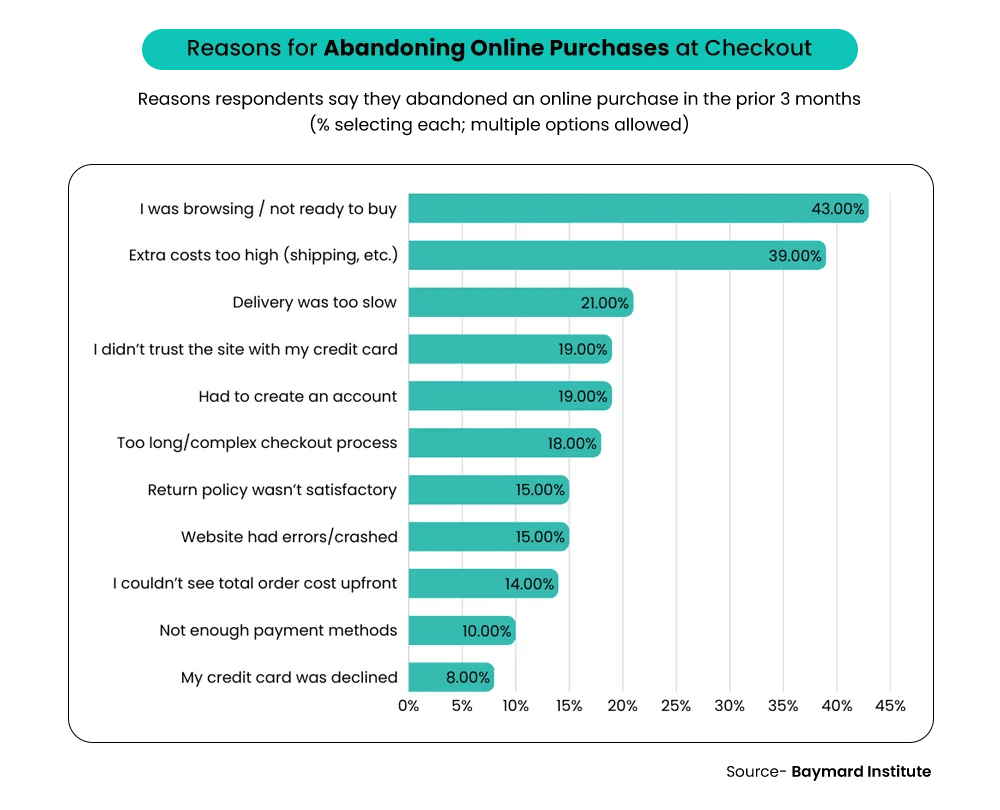
- Guest Checkout: Never force a user to create an account to buy. This is one of the biggest Shopify conversion issues and causes immediate drop-offs.
- Accelerated Payments: Enable Shop Pay, Apple Pay, and Google Pay. These “one-tap” options make buying effortless, especially on mobile devices.
- Simplify Fields: Audit your checkout step by step to remove any unnecessary form fields. Only ask for the information you absolutely need to ship the order.
– Also Read- Looking for a Shopify Marketing Agency? Here’s Your Checklist for 2026
Shopify SEO Audit – Can Customers & AI Find You?
In 2026, SEO is no longer just about basic keywords. Search engines and AI tools now look for “entities” and deep context to answer user questions. As you run your Shopify store audit checklist 2026, your goal is to make your site readable for both humans and machines.
A). On-Page SEO Essentials
Your on-page elements act as the storefront sign for your digital business. High-quality meta titles and meta descriptions are your first chance to win a click.
- Hierarchy Matters: Use a clear heading structure (H1, H2, H3) so search bots can skim your content easily.
- Image Context: AI-driven search relies heavily on image alt text to understand your products. Write descriptive tags that explain exactly what is in the photo.
- The CTR Factor: A well-crafted title tag does more than help you rank. According to industry data, pages with rich results achieve a 20–40% higher click-through rate than standard text listings.
B). Content & Indexing Health
A Shopify SEO audit must look for “content decay” and technical clutter that confuses search engines.
- Duplicate Content: Shopify often creates multiple URLs for the same product. Ensure your canonical tags are pointing to the main version to avoid self-competition.
- Thin Pages: Every page should provide value. If a collection page has no text or only one product, it may be hidden from search results.
- Closing the Gaps: Look for “content gaps” where your blog could answer common customer questions. This helps you win Zero-click search spots where Google provides the answer directly on the results page.
C). Technical SEO & AI Readiness
How to audit Shopify SEO for the future? You must focus on structured data. This helps AI models like ChatGPT and Google’s AI Overviews “cite” your store as a source.
- Schema Markup: This is the most vital part of a Shopify store SEO checklist. It tells search engines your price, stock status, and star ratings in a language they speak fluently.
- The Entity Approach: Use Entity-based SEO to link your brand to specific categories, locations, and social profiles.
- Cleanup: Regularly check for broken links and 404 errors. Too many dead ends tell search engines that your store is neglected, which can tank your rankings.
– Also Read- How to Choose the Right Shopify Store Setup Agency for Your Brand?
App & Automation Review – What’s Helping vs Hurting
A critical part of your Shopify store audit checklist is a deep dive into your apps and automated flows. Over time, many stores collect “ghost apps” that sit quietly in the background. These tools often drain your site speed and create a messy user experience.
A). App Necessity & Overlap Check
Performing a Shopify app audit helps you find redundant tools that do the same thing. You might have one app for reviews and another for loyalty, yet both offer overlapping features. This overlap creates “code bloat,” which slows down your page loading.
During your Shopify app cleanup, check which apps are performance-heavy. Some tools inject large scripts that delay your site from feeling snappy. If an app isn’t directly helping you make sales, it might be time to delete it. Removing these unnecessary scripts immediately makes your store feel faster for shoppers.
B). Automation Health
Next, move on to a Shopify automation review to ensure your backend is actually working. Start with your email and post-purchase flows to see if they still match your 2026 branding. Check your inventory alerts to make sure you never sell a product that is out of stock.
Smart automation relies on accurate customer tagging and segmentation. You should tag your high-value shoppers automatically so you can send them special offers later. This keeps your marketing targeted and your operations clean. Fixing these flows now prevents “growth chaos” as your order volume increases later this year.
Analytics & Data Accuracy Checklist
In 2026, data is the compass for your brand. A broken Shopify store audit checklist 2026 often starts with “ghost data” that leads to bad decisions. If your numbers don’t match, you aren’t just losing clarity—you’re losing money.
A). Tracking Setup Verification
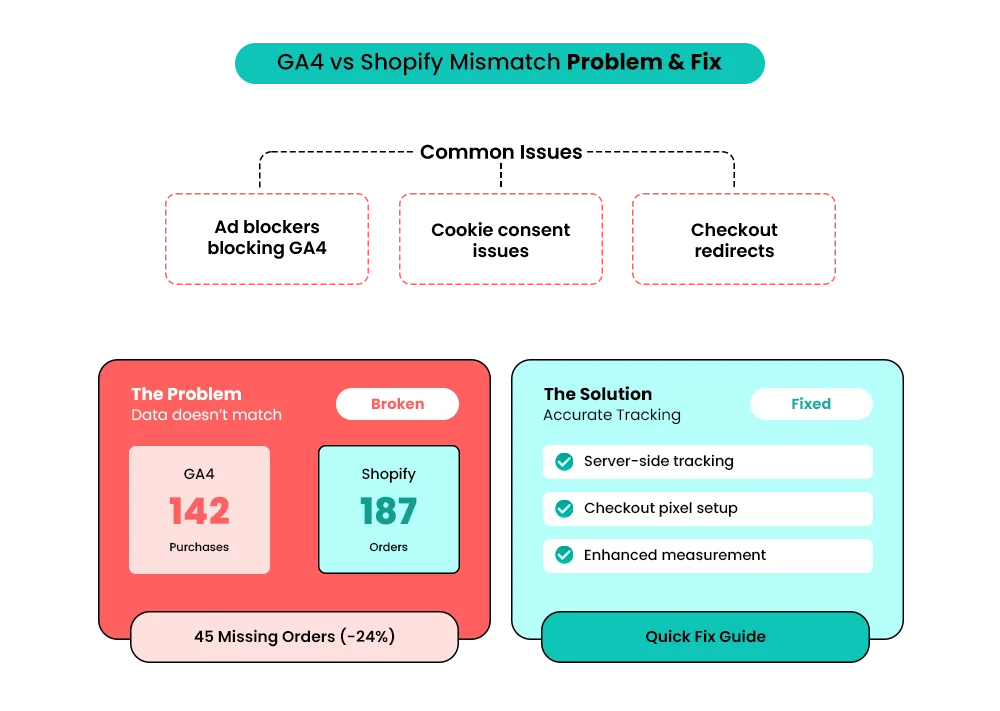
Start your Shopify analytics audit by checking your Shopify GA4 setup. Your tracking must be active on every page, especially the checkout. Ensure your conversion events, like “purchase” and “add to cart,” fire correctly in the GA4 Debug View.
A common headache is revenue parity between Shopify and Google. Your GA4 revenue should ideally stay within 10% of your Shopify admin. Mismatches often happen due to timezone differences or missing tax and shipping data. Check that your currency settings match on both platforms to avoid exchange rate errors.
B). Funnel & Revenue Visibility
A deep Shopify funnel analysis reveals exactly where shoppers lose interest. Track the percentage of users moving from a product page to the cart. If there is a massive drop-off before the checkout, you likely have a friction problem.
Watch for a “traffic vs. revenue mismatch” where high visits don’t equal sales. This often happens if your ads bring in the wrong audience. It can also mean your mobile site is too slow to convert. Cleaning up these gaps ensures every dollar you spend on ads actually works for you.
Mobile Store Audit – Where Most Sales Happen
By 2026, most of your customers will be shopping from their phones. If your mobile site feels clunky, your sales will suffer. A solid Shopify store audit checklist must prioritize the mobile experience above all else.
Start by testing your mobile load speed on a standard data connection. Large images often look great on a desktop but crawl on a phone. Even a two-second delay can kill your mobile conversion Shopify rates. Next, look for Shopify mobile UX issues like tiny buttons or annoying pop-ups.
Ensure your navigation menu is easy to open with one thumb. Check your mobile checkout usability by placing a test order yourself. Are the form fields easy to tap? Does the “Buy Now” button stay visible without scrolling?
Small friction points, like hidden shipping costs, feel much worse on a small screen. Fixing these tiny gaps turns frustrated scrollers into happy buyers. If your mobile store is fast and easy, your revenue will reflect that effort.
Conclusion
Scaling your brand in 2026 requires a rock-solid foundation. Using this Shopify store audit checklist ensures your site is ready for heavy traffic. Many brands rush to buy more ads while their store still has leaks. Fixing these basic issues protects your hard-earned ad spend from being wasted.
Real growth rarely comes from adding more expensive tools to your dashboard. Instead, success comes from cleaning up your existing navigation and checkout flows. A lean, fast store naturally improves your ROAS because more visitors actually finish their purchase.
A clean store also boosts your customer lifetime value by making repeat buying easy. When your foundation is strong, every marketing dollar you spend goes much further. You can finally scale your business without the fear of your systems breaking. Start your Q1 audit today with our Shopify store experts to build a profitable and scalable year.
Build your dream Shopify store today
Bring your vision to life with Mastroke, an official Shopify Partner. We design and develop high-converting, scalable Shopify stores with clean structure and future-ready features—built to grow with your business.
FAQs-
1. What is a Shopify store audit checklist?
A Shopify store audit checklist is a structured review of your store’s UX, speed, SEO, CRO, apps, and technical setup to identify issues affecting performance and conversions.
2. How often should I audit my Shopify store?
You should audit your Shopify store at least once every quarter, with a full audit recommended in Q1 before scaling traffic, launching ads, or running major campaigns.
3. What should I check first in a Shopify store audit?
Start with store speed, mobile experience, checkout flow, and product page UX, as these areas directly impact conversions and paid traffic performance.
4. Can I audit my Shopify store myself, or do I need an expert?
You can run a basic audit yourself using a checklist, but expert audits uncover deeper issues, such as CRO gaps, app conflicts, and tracking inaccuracies.
5. Why is a Shopify audit important before running ads?
Running ads without an audit can waste your budget. A Shopify audit ensures landing pages, checkout, speed, and tracking are optimized to convert paid traffic.
6. What tools are useful for a Shopify store audit?
Common tools include Shopify Analytics, GA4, Google Search Console, PageSpeed Insights, and heatmap tools to identify UX, speed, and conversion issues.